Backup & Restore

justinlee

New member
Local time
11:54 PM
Messages
25
Just bought a 1TB external hard drive for use to back up files and system. Now, i understand Windows 7 backup will not back up Program Files and System files even if they are selected. Am i correct in saying that when i go to 'Let me choose' in the backup if a folder is greyed out it means that Windows will not backup that particular folder it up even if it is selected??
 

My Computer

Computer Manufacturer/Model Number
Sony Vaio
OS
Windows 7 Home Premium x64
CPU
Intel Core Duo P7450 @ 2.13GHz
Motherboard
Chipset type: Intel PM45, Data Bus Speed: 1066MHz
Memory
4GB
Graphics Card(s)
NVIDIA GeForce 9600M GT (HDMI, VGA)
Hard Drives
1TB Internal, 1TB External
Back up and restore is for your personal documents
System Image will back up the entire drive
System Restore backs up the entire OS.
 

My Computer

Computer type
PC/Desktop
Computer Manufacturer/Model Number
Dell XPS 420
OS
Windows 10, Home Clean Install
CPU
Intel Core2 processsor Q8200(2.33Ghz 1333FSB) Quad Core Tech
Motherboard
Dell
Memory
6 gb
Graphics Card(s)
ATI Radeon 256MB HD3650
Sound Card
Intergrated 7.1 Channel Audio
Monitor(s) Displays
Dell SP2009W 20"
Hard Drives
640 GB Serial ATA Hard drive
Cooling
Fan
Keyboard
Dell USB Keyboard
Mouse
Dell Premium Optical USB
Internet Speed
DSL 2.85
So that means i am right in thinking the greyed out folders cannot be backed up even if checked. Instead that will be done by creating a System Image?
 

My Computer

Computer Manufacturer/Model Number
Sony Vaio
OS
Windows 7 Home Premium x64
CPU
Intel Core Duo P7450 @ 2.13GHz
Motherboard
Chipset type: Intel PM45, Data Bus Speed: 1066MHz
Memory
4GB
Graphics Card(s)
NVIDIA GeForce 9600M GT (HDMI, VGA)
Hard Drives
1TB Internal, 1TB External

My Computer

Computer type
PC/Desktop
Computer Manufacturer/Model Number
Dell XPS 420
OS
Windows 10, Home Clean Install
CPU
Intel Core2 processsor Q8200(2.33Ghz 1333FSB) Quad Core Tech
Motherboard
Dell
Memory
6 gb
Graphics Card(s)
ATI Radeon 256MB HD3650
Sound Card
Intergrated 7.1 Channel Audio
Monitor(s) Displays
Dell SP2009W 20"
Hard Drives
640 GB Serial ATA Hard drive
Cooling
Fan
Keyboard
Dell USB Keyboard
Mouse
Dell Premium Optical USB
Internet Speed
DSL 2.85
Doesn't mention anything about the greyed out boxes. I assume they indicate that they cannot be backed up by checking them? I.e. Program files, system files etc??
 

My Computer

Computer Manufacturer/Model Number
Sony Vaio
OS
Windows 7 Home Premium x64
CPU
Intel Core Duo P7450 @ 2.13GHz
Motherboard
Chipset type: Intel PM45, Data Bus Speed: 1066MHz
Memory
4GB
Graphics Card(s)
NVIDIA GeForce 9600M GT (HDMI, VGA)
Hard Drives
1TB Internal, 1TB External
Whatever is greyed out does not qualify.
 

My Computer

Computer Manufacturer/Model Number
HP, Dell, Gateway, Toshiba - 4 laptops and 2 desktops
OS
Vista, Windows7, Mint Mate, Zorin, Windows 8
CPU
from 1.6GHz Duo to i7
Monitor(s) Displays
2x HP w2207
Hard Drives
5x HDD, 7x SSD, 12x Externals
Keyboard
with trackball - no mices
Mouse
Trackball mice
Internet Speed
DSL 6000
Thank you.
 

My Computer

Computer Manufacturer/Model Number
Sony Vaio
OS
Windows 7 Home Premium x64
CPU
Intel Core Duo P7450 @ 2.13GHz
Motherboard
Chipset type: Intel PM45, Data Bus Speed: 1066MHz
Memory
4GB
Graphics Card(s)
NVIDIA GeForce 9600M GT (HDMI, VGA)
Hard Drives
1TB Internal, 1TB External
When you are doing a Backup (Files/folders) after "Let me choose" what specifically is grayed out?
Just give a list of some of the grayed out boxes you are referring to.
 

My Computer

Computer type
PC/Desktop
Computer Manufacturer/Model Number
Own build
OS
Windows 7x64 Home Premium SP1
CPU
Intel i7 2600k
Motherboard
ASUS P8Z68 Deluxe
Memory
G.Skill Ripjaws (DDR3-1600) 2x4GB
Graphics Card(s)
Nvidia GeForce GTS 450; Intel HD Graphics 3000(GT2+)
Monitor(s) Displays
Dell Ultrasharp IPS panel U2311H, Samsung SyncMaster P2350
Screen Resolution
1920x1080
Hard Drives
Samsung 850 Pro SSD 256GB, Samsung SSD 840 120GB, Seagates 1TB Barracuda ST31000528AS x2
PSU
Seasonic M12II 520W
Case
Lian Li Lancool PC-K60
Cooling
Case: 1x120mm, 3x140mm CPU: Hyper 212+
Keyboard
Logitech MK520 (wireless)
Mouse
Logitech MK520
Internet Speed
6-7 Mbps
Antivirus
Norton Security Premium, Malwarebytes on 2 (MSE on 3rd PC)
Browser
FireFox
Other Info
Audio: Logitech Z523 2.1
Program files, recycle bin, HP folder, system volume information, system.sav etc etc...
 

My Computer

Computer Manufacturer/Model Number
Sony Vaio
OS
Windows 7 Home Premium x64
CPU
Intel Core Duo P7450 @ 2.13GHz
Motherboard
Chipset type: Intel PM45, Data Bus Speed: 1066MHz
Memory
4GB
Graphics Card(s)
NVIDIA GeForce 9600M GT (HDMI, VGA)
Hard Drives
1TB Internal, 1TB External
I have a couple of software development, compiler folders under c:\ which I include in my file/folder backup set but never considered it appropriate to even try and backup system stuff (except via imaging).

But these options aren't grayed out for me - now I'm puzzled why they aren't.
 

My Computer

Computer type
PC/Desktop
Computer Manufacturer/Model Number
Own build
OS
Windows 7x64 Home Premium SP1
CPU
Intel i7 2600k
Motherboard
ASUS P8Z68 Deluxe
Memory
G.Skill Ripjaws (DDR3-1600) 2x4GB
Graphics Card(s)
Nvidia GeForce GTS 450; Intel HD Graphics 3000(GT2+)
Monitor(s) Displays
Dell Ultrasharp IPS panel U2311H, Samsung SyncMaster P2350
Screen Resolution
1920x1080
Hard Drives
Samsung 850 Pro SSD 256GB, Samsung SSD 840 120GB, Seagates 1TB Barracuda ST31000528AS x2
PSU
Seasonic M12II 520W
Case
Lian Li Lancool PC-K60
Cooling
Case: 1x120mm, 3x140mm CPU: Hyper 212+
Keyboard
Logitech MK520 (wireless)
Mouse
Logitech MK520
Internet Speed
6-7 Mbps
Antivirus
Norton Security Premium, Malwarebytes on 2 (MSE on 3rd PC)
Browser
FireFox
Other Info
Audio: Logitech Z523 2.1
That's strange.
 

My Computer

Computer Manufacturer/Model Number
Sony Vaio
OS
Windows 7 Home Premium x64
CPU
Intel Core Duo P7450 @ 2.13GHz
Motherboard
Chipset type: Intel PM45, Data Bus Speed: 1066MHz
Memory
4GB
Graphics Card(s)
NVIDIA GeForce 9600M GT (HDMI, VGA)
Hard Drives
1TB Internal, 1TB External
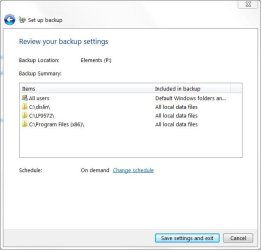
Here is an example of a test backup I was able to select.
All Users is normally what's backed up by default.

c:\dislin is a graphics library
c:\LF9572 is a directory with compiler, linker, libraries ....
Note
c:\Program Files (x86)\ is what it says

Except note for the last three it states: Included in Backup - "All local data files"
After a bit of exploring the definition of "All local data files" is not that clear to me.

By the way I never actually include c:\Program Files (x86)\ !!
 

Attachments

  • backupeg1.JPG
    backupeg1.JPG
    34.2 KB · Views: 8

My Computer

Computer type
PC/Desktop
Computer Manufacturer/Model Number
Own build
OS
Windows 7x64 Home Premium SP1
CPU
Intel i7 2600k
Motherboard
ASUS P8Z68 Deluxe
Memory
G.Skill Ripjaws (DDR3-1600) 2x4GB
Graphics Card(s)
Nvidia GeForce GTS 450; Intel HD Graphics 3000(GT2+)
Monitor(s) Displays
Dell Ultrasharp IPS panel U2311H, Samsung SyncMaster P2350
Screen Resolution
1920x1080
Hard Drives
Samsung 850 Pro SSD 256GB, Samsung SSD 840 120GB, Seagates 1TB Barracuda ST31000528AS x2
PSU
Seasonic M12II 520W
Case
Lian Li Lancool PC-K60
Cooling
Case: 1x120mm, 3x140mm CPU: Hyper 212+
Keyboard
Logitech MK520 (wireless)
Mouse
Logitech MK520
Internet Speed
6-7 Mbps
Antivirus
Norton Security Premium, Malwarebytes on 2 (MSE on 3rd PC)
Browser
FireFox
Other Info
Audio: Logitech Z523 2.1
Here is what MS have to say"

"You can choose to back up individual folders, libraries, or drives.
Notes


  • All files in known system folders (folders that contain files that Windows needs to run), and known program files (files that define themselves as part of a program in the registry when the program is installed) will not be backed up even if they are in a selected folder.

  • If a folder or drive is not selected, the contents of that folder or drive are not backed up."


This explains my confusion. You can include .exe in your backup set except when they are recorded in the registry. Of course images includes everything.
 

My Computer

Computer type
PC/Desktop
Computer Manufacturer/Model Number
Own build
OS
Windows 7x64 Home Premium SP1
CPU
Intel i7 2600k
Motherboard
ASUS P8Z68 Deluxe
Memory
G.Skill Ripjaws (DDR3-1600) 2x4GB
Graphics Card(s)
Nvidia GeForce GTS 450; Intel HD Graphics 3000(GT2+)
Monitor(s) Displays
Dell Ultrasharp IPS panel U2311H, Samsung SyncMaster P2350
Screen Resolution
1920x1080
Hard Drives
Samsung 850 Pro SSD 256GB, Samsung SSD 840 120GB, Seagates 1TB Barracuda ST31000528AS x2
PSU
Seasonic M12II 520W
Case
Lian Li Lancool PC-K60
Cooling
Case: 1x120mm, 3x140mm CPU: Hyper 212+
Keyboard
Logitech MK520 (wireless)
Mouse
Logitech MK520
Internet Speed
6-7 Mbps
Antivirus
Norton Security Premium, Malwarebytes on 2 (MSE on 3rd PC)
Browser
FireFox
Other Info
Audio: Logitech Z523 2.1
It's simple. Windows Backup will not back up the operating system, itself. This includes the system files and folders, as they are an integral part of the operating system. As has been pointed out, if you need to backup these files and folders, you'll have to create a system image.
 

My Computer

Computer Manufacturer/Model Number
Custom Build
OS
Windows 7 Pro/32 Academic. Build 7600
CPU
Intel 2.3 Duo core
Motherboard
EliteGroup G31T-M
Memory
4 GB DDR
Graphics Card(s)
Nvidia GeForce 9500 GT
Sound Card
Built in
Monitor(s) Displays
Viewsonic 15" 4:3
Screen Resolution
1280 x 1024
Hard Drives
WD Caviar Black 750 GB
WD 250 GB External
PSU
Antec 450w
Keyboard
Standard windows
Mouse
Logitech USB
Internet Speed
Bellsouth DSL 6.0
It's simple. Windows Backup will not back up the operating system, itself. This includes the system files and folders, as they are an integral part of the operating system. As has been pointed out, if you need to backup these files and folders, you'll have to create a system image.
I know that! and a fair bit about imaging and the difference between the .zip backup.
Read the thread more carefully and my response.

The OP was commenting on folders being grayed out when I didn't have them grayed out. Many of these folders have non registry and non operating system components.
My point was that anything with a registry entry will not be backed up and some of the components in my compiler folder were not backed up with "backup" because they have a registry entry.

Edit: Look at the screenshot in post #12
see folder c:\Program Files (x86) ..... accepted
It appears I need to repeat things -- I'm not suggesting you actually do "backup" (zip style) allowable elements of this folder.
 
Last edited:

My Computer

Computer type
PC/Desktop
Computer Manufacturer/Model Number
Own build
OS
Windows 7x64 Home Premium SP1
CPU
Intel i7 2600k
Motherboard
ASUS P8Z68 Deluxe
Memory
G.Skill Ripjaws (DDR3-1600) 2x4GB
Graphics Card(s)
Nvidia GeForce GTS 450; Intel HD Graphics 3000(GT2+)
Monitor(s) Displays
Dell Ultrasharp IPS panel U2311H, Samsung SyncMaster P2350
Screen Resolution
1920x1080
Hard Drives
Samsung 850 Pro SSD 256GB, Samsung SSD 840 120GB, Seagates 1TB Barracuda ST31000528AS x2
PSU
Seasonic M12II 520W
Case
Lian Li Lancool PC-K60
Cooling
Case: 1x120mm, 3x140mm CPU: Hyper 212+
Keyboard
Logitech MK520 (wireless)
Mouse
Logitech MK520
Internet Speed
6-7 Mbps
Antivirus
Norton Security Premium, Malwarebytes on 2 (MSE on 3rd PC)
Browser
FireFox
Other Info
Audio: Logitech Z523 2.1
Hello

I have a sort of similar prob with my lappy it takes forever to select backup to an external HDD and the only option I am left with is a system image.
This happens even when I try Kaspersky Pure to back up as well. Now I don't mind that - BUT each time I do connect an external I end up with disk errors of various drive#'s.
It is getting so frustrating as I have tried 3 brands and each with the same "expensive" result. No such prob with the desktop so am wondering if the errors maybe caused by the mobo or some other internal stuf that I must admit I know not that much about.
 

My Computer

Computer type
PC/Desktop
Computer Manufacturer/Model Number
Own build (new) Desk1 / Asus ROG Win 7 / Desk2 1st build
OS
Desk1 7 Home Prem / Desk2 10 Pro / Main lap Asus ROG 10 Pro 2 laptop Toshiba 7 Pro Asus P2520 7 & 10
CPU
Desk1 i5 3750K / Laptop i7 GTX 860M / Desk2 i5 2500
Motherboard
Desk1 Asus P877-V / Desk2 Gigabyte H67 UD3H / Laptop ?
Memory
Desk1 8GB (1866) / Desk2 16GB (1333) / Laptop 8Gb DDR3
Graphics Card(s)
Desk 1& 2NVidia GTX 650 & Laptops on board Intel
Sound Card
Desk 1 & 2 -XONAR DG Realtek High Def audio Laptop
Monitor(s) Displays
Desk 1 Benq HD 2450 / Desk2 Philips 24" / Laptop 17.5"
Screen Resolution
1920x1080 D1 & D2 & Laptop 1
Hard Drives
Desk1 Samsung 120GB 830 SSD
Asus ROG 256GB 850 Pro SSD
Desk2 Samsung 840 256 SSD
Toshiba 120GB EVO
PSU
Desk 1 Corsair HX 1050/ Laptop ? / Desk 2 Corsair HX 650
Case
Desk 1 Cooler HAF XM ? Toshiba laptop / Desk2 Coolermaster
Cooling
Fans on all Desk1 -2 Desk2 - all Coolermasters 5 Laptop ?
Keyboard
Desk 1 MS Sidewinder X6 Desk 2 MS Sidewinder X 4
Mouse
Desk 1&2 - Gigabyte MS 900 gamer - laptop - Logitec wireless
Internet Speed
ADSL2+
Other Info
One other Desktop (tester) and spare Toshba laptop both with SSD's
Running Kaspersky 2016 ISS on all machines config'd identically
Logitec audio stereo systems on each machine (x3)
Canon MG5250MFC
Router/modem TP-Link running WPA2SK
It's simple. Windows Backup will not back up the operating system, itself. This includes the system files and folders, as they are an integral part of the operating system. As has been pointed out, if you need to backup these files and folders, you'll have to create a system image.
I know that! and a fair bit about imaging and the difference between the .zip backup.
Read the thread more carefully and my response.

The OP was commenting on folders being grayed out when I didn't have them grayed out. Many of these folders have non registry and non operating system components.
My point was that anything with a registry entry will not be backed up and some of the components in my compiler folder were not backed up with "backup" because they have a registry entry.

Edit: Look at the screenshot in post #12
see folder c:\Program Files (x86) ..... accepted
It appears I need to repeat things -- I'm not suggesting you actually do "backup" (zip style) allowable elements of this folder.
Sorry, mjf, my response wasn't to you, it was to the OP
 

My Computer

Computer Manufacturer/Model Number
Custom Build
OS
Windows 7 Pro/32 Academic. Build 7600
CPU
Intel 2.3 Duo core
Motherboard
EliteGroup G31T-M
Memory
4 GB DDR
Graphics Card(s)
Nvidia GeForce 9500 GT
Sound Card
Built in
Monitor(s) Displays
Viewsonic 15" 4:3
Screen Resolution
1280 x 1024
Hard Drives
WD Caviar Black 750 GB
WD 250 GB External
PSU
Antec 450w
Keyboard
Standard windows
Mouse
Logitech USB
Internet Speed
Bellsouth DSL 6.0
Apologies

Look I'm sorry that I have caused so much confusion - I am not as savvy as you fellows and thought that a back up was a back up as in the whole shooting match!

I have a system image thats all and now I can see that it probably isn't going to be much good either.

I did a HDD test with HD Tune and it told me that the C: and the external were all good - only to find now I have ntfs errors (flies are corrupted) after that scan and this morning on start up.

Now someone else is asking what the hell am I doing with or running on the machine and the answer is simply the average joe blow stuff. I haven't touched the reg, run Kaspersky Pure, MBAM, just do auto updates for Windows, Kaspersky and have Defender turned off in case it is conflicting with the K and MBAM. I only use an extra usb hub for the external HDD's, printer, wireless mouse, the occasional usb stick for doc files etc, and an audio system (Logitec). I only get named brand plug in stuff and even if that means paying a bit more for items.

I feel deep down that I have a lemon on my hands in that there must be a fault with some other component and am going to contact Toshiba in Sydney as the dealer I bought this from (a Toshiba trained tech site) has been as about as much help as an ashtray on a motorbike. This is the second Toshiba I have had from the same dealer and both have had major faults. The first had a HDD that died and cost me $450 to replace! but at least that time it was a identifiable problem! Not like the current machine which seems to have a mind of it's own.

This one which is ten months old having problems since June that were corrected to a point by a factory default, but it seems every time I put something on the bloody thing as mentioned above - even something essential like the ISS it starts spitting out these errors. So am going to do another factory default tonight and see if it clears the corrupted files as two chkdsk's have not.

Ah well it's just as well I bought two years extra warranty I suppose - even so that flaming dealer charged me an extra $39 more than one ca get it direct from Toshiba!

Still enough ranting and I am so sorry for the confusion, and thank all for the time and patience, only it has become rather depressing to lurch from one problem to another and still have something that I am now really quite unsure to use - or touch.

J
 

My Computer

Computer type
PC/Desktop
Computer Manufacturer/Model Number
Own build (new) Desk1 / Asus ROG Win 7 / Desk2 1st build
OS
Desk1 7 Home Prem / Desk2 10 Pro / Main lap Asus ROG 10 Pro 2 laptop Toshiba 7 Pro Asus P2520 7 & 10
CPU
Desk1 i5 3750K / Laptop i7 GTX 860M / Desk2 i5 2500
Motherboard
Desk1 Asus P877-V / Desk2 Gigabyte H67 UD3H / Laptop ?
Memory
Desk1 8GB (1866) / Desk2 16GB (1333) / Laptop 8Gb DDR3
Graphics Card(s)
Desk 1& 2NVidia GTX 650 & Laptops on board Intel
Sound Card
Desk 1 & 2 -XONAR DG Realtek High Def audio Laptop
Monitor(s) Displays
Desk 1 Benq HD 2450 / Desk2 Philips 24" / Laptop 17.5"
Screen Resolution
1920x1080 D1 & D2 & Laptop 1
Hard Drives
Desk1 Samsung 120GB 830 SSD
Asus ROG 256GB 850 Pro SSD
Desk2 Samsung 840 256 SSD
Toshiba 120GB EVO
PSU
Desk 1 Corsair HX 1050/ Laptop ? / Desk 2 Corsair HX 650
Case
Desk 1 Cooler HAF XM ? Toshiba laptop / Desk2 Coolermaster
Cooling
Fans on all Desk1 -2 Desk2 - all Coolermasters 5 Laptop ?
Keyboard
Desk 1 MS Sidewinder X6 Desk 2 MS Sidewinder X 4
Mouse
Desk 1&2 - Gigabyte MS 900 gamer - laptop - Logitec wireless
Internet Speed
ADSL2+
Other Info
One other Desktop (tester) and spare Toshba laptop both with SSD's
Running Kaspersky 2016 ISS on all machines config'd identically
Logitec audio stereo systems on each machine (x3)
Canon MG5250MFC
Router/modem TP-Link running WPA2SK
Back
Top