
Backup & Restore

prospero

the ancient geek
Member
VIP
Local time
10:15 PM
Messages
114
Location
Primrose Hill, London, UK
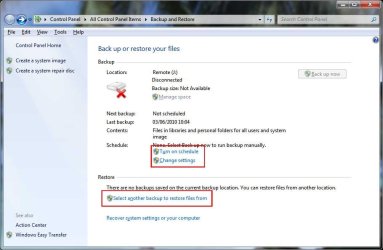
I've just created an image of the system and also a repair disk. The Backup & Restore window points to an incorrect drive (one of the card readers) but I can't change the source as the links won't respond. I attach a screenshot.
 

Attachments

  • Backup.jpg
    Backup.jpg
    51.1 KB · Views: 32

My Computer

Computer type
PC/Desktop
Computer Manufacturer/Model Number
Dell Inspiron 580
OS
Windows 7 Professional 64-bit SP1
CPU
Intel Quad Core i5 750 2.67Ghz 8Mb
Motherboard
Dell 033FF6 A00
Memory
6Gb DDR3 Dual Channel
Graphics Card(s)
1Gb ATI Radeon HD 5450
Sound Card
Integrated 7.1
Monitor(s) Displays
Dell 23" ST 2310 HDMI; Samsung 21" HDMI
Screen Resolution
1920 x 1080; 1920 x 1080
Hard Drives
1TB WD Serial ATA 7200RPM
Iomega 500Gb Remote
PSU
300w
Case
Dell
Cooling
1 x Case; 1 x Processor; 1 x Video Card
Keyboard
Microsoft Comfort Curve 3000
Mouse
Microsoft Wireless Touch (Intellipoint)
Internet Speed
down 200Mb; up 12Mb (Virgin Media SuperHub 2)
Antivirus
MSE
Browser
IE11, Google Chrome
Other Info
HP Photosmart Premium 309g-m
Compaq Presario Laptop CQ70 with 7 Pro 32-bit.
Huawei MediaPad 32GB
Several Raspberry Pi's B2,B3 and Zero
Several varieties of Arduinos
Open Backup and Restore by clicking the Start button , clicking Control Panel, clicking System and Maintenance, and then clicking Backup and Restore.
Click Change settings. Administrator permission required If you're prompted for an administrator password or confirmation, type the password or provide confirmation. Point it to the correct drive and run/rerun backup.

You may wish t read this tutorial also
http://www.sevenforums.com/tutorials/628-backup-user-system-files-delete-backups.html?ltr=B
 

My Computer

Computer Manufacturer/Model Number
DELL XPS Studio 435T
OS
Vista 64 Ultimate, Windows 7 64 Ultimate, Ubuntu 9.10
CPU
i7 975 3.3 GHz Extreme (Factory OC'd to 3.6 GHz)
Motherboard
DELL provided
Memory
18 Gb Tri-Channel 1066
Graphics Card(s)
ATI 5970 2048 Mb
Sound Card
X-Fi Extreme Gamer
Monitor(s) Displays
Vizio 37" HD-TV
Screen Resolution
1920 x 1080
Hard Drives
1.5 Tb HDD
1.5 Tb HDD
2.0 Tb Network Drive
512 Gb Crucial SSD
PSU
DELL Provided 475 watts
Case
DELL
Cooling
3 fans
Keyboard
Logitech Performance K350 Wireless
Mouse
Logitech Performance MX Wireless
Internet Speed
3 Mb up 750 Kb down
Other Info
Bamboo Fun Tablet, Belkin N+ Wireless router, Pioneer Dolby System Wireless Headphones, Bose 5.1 Dolby Surround Sound System, LifeCam VX 3000 Webcam, Blu-Ray/Hi Def DVD +RW combo and Blu-ray +RW,l 15 in 1 media card reader, Logitech Rumblepad 2, Hauppauge 2250 DTV Tuner with MS Media Center Remote

Laptop:Alienware M17x, Q9100 CPU, 8Gb RAM, 1920x1200 WUXGA LCD driven by 4870's in CrossFireX, Bl
Open Backup and Restore by clicking the Start button , clicking Control Panel, clicking System and Maintenance, and then clicking Backup and Restore.
Click Change settings. Administrator permission required If you're prompted for an administrator password or confirmation, type the password or provide confirmation. Point it to the correct drive and run/rerun backup.

You may wish t read this tutorial also
http://www.sevenforums.com/tutorials/628-backup-user-system-files-delete-backups.html?ltr=B

Thanks fishnbanjo, (or may I call you "fish"?), my problem is that the change settings link doesn't work.
 

My Computer

Computer type
PC/Desktop
Computer Manufacturer/Model Number
Dell Inspiron 580
OS
Windows 7 Professional 64-bit SP1
CPU
Intel Quad Core i5 750 2.67Ghz 8Mb
Motherboard
Dell 033FF6 A00
Memory
6Gb DDR3 Dual Channel
Graphics Card(s)
1Gb ATI Radeon HD 5450
Sound Card
Integrated 7.1
Monitor(s) Displays
Dell 23" ST 2310 HDMI; Samsung 21" HDMI
Screen Resolution
1920 x 1080; 1920 x 1080
Hard Drives
1TB WD Serial ATA 7200RPM
Iomega 500Gb Remote
PSU
300w
Case
Dell
Cooling
1 x Case; 1 x Processor; 1 x Video Card
Keyboard
Microsoft Comfort Curve 3000
Mouse
Microsoft Wireless Touch (Intellipoint)
Internet Speed
down 200Mb; up 12Mb (Virgin Media SuperHub 2)
Antivirus
MSE
Browser
IE11, Google Chrome
Other Info
HP Photosmart Premium 309g-m
Compaq Presario Laptop CQ70 with 7 Pro 32-bit.
Huawei MediaPad 32GB
Several Raspberry Pi's B2,B3 and Zero
Several varieties of Arduinos
well looking at google, it seems that this backup feature is not performant at all.
I, like many others, am unable to backup without an error.
MSoft talk about an reparse point issue, but nobody explain what it is and how to avoid it.

Back to Nero Backitup...
 

My Computer

Computer Manufacturer/Model Number
Home made
OS
Win7 pro 64
CPU
Core i5-750
Motherboard
GA-P55M-UD4
Memory
4GB Patriot DDR3
Graphics Card(s)
ATI RADEON HD5450
Hard Drives
SSD Crucial CT250BX100SSD1 ATA
Internet Speed
DSL
Antivirus
Avast free
Back
Top