Backup seems stuck

herbc

New member
Member
VIP
Local time
7:17 PM
Messages
255
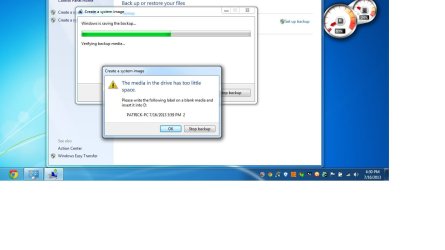
Hi folks, anybody know what the problem could be regarding the following screenshot, it hasn't even used up one dvd and it asks for another. It won't progress past verifying media backup.
 

Attachments

  • Untitled.jpg
    Untitled.jpg
    59.9 KB · Views: 11

My Computer

Computer type
Laptop
Computer Manufacturer/Model Number
asus U56E
OS
win 7 64 Home edition
CPU
2430 i5 intel
Motherboard
?Asus
Memory
6
Graphics Card(s)
imtegrated
Sound Card
Microsoft
Hard Drives
WDC WD6400BPVT-80HXZT3 ATA Device
Antivirus
Kaspersky trial AV 2014
Browser
chrome
Since no one seems to know what the problem could be with my above issue can someone tell me if a backup and system image is the same thing?

Thanks
 

My Computer

Computer type
Laptop
Computer Manufacturer/Model Number
asus U56E
OS
win 7 64 Home edition
CPU
2430 i5 intel
Motherboard
?Asus
Memory
6
Graphics Card(s)
imtegrated
Sound Card
Microsoft
Hard Drives
WDC WD6400BPVT-80HXZT3 ATA Device
Antivirus
Kaspersky trial AV 2014
Browser
chrome
Since no one seems to know what the problem could be with my above issue can someone tell me if a backup and system image is the same thing?

Thanks
Don't feel bad. I'd like to know too.
 

My Computer

Computer type
PC/Desktop
Computer Manufacturer/Model Number
Home Built
OS
Windows `10 Professional 64bit
CPU
Intel i5 [email protected]
Motherboard
MSI P67A-GD55 (MS7681)
Memory
Corsair Vengeance DDR3 1600 16G
Graphics Card(s)
NVIDIA GeForce GT520 1GHz
Sound Card
Realtek High Definition Audio
Monitor(s) Displays
Haans G 241
Screen Resolution
1600X1024
Hard Drives
Crucial MX100 256GB SSD
PSU
OCZ ModXStream Modular High Performance 500 Watt
Case
Rosewill Challenger-U3
Cooling
Just Fans
Keyboard
Kensington K64338B
Mouse
Microsoft wheel mouse 1.1A
Internet Speed
240.0 Mbps
Antivirus
ESET Internet Security
Browser
Firefox
Other Info
SuperAntiSpyware-Pro
Malwarebytes (Premium)
Kerish Doctor
A "backup" and system image are not the same thing. A "backup" can include:
1) A system image (basically a snapshot of your full system) plus
2) A file/folder backup (basically your personal folders)

With Windows 7 backup I strongly recommend the "let me choose" option and uncheck create a system image box. Make system images using the separate "Create a system image" when you desire.
http://www.sevenforums.com/tutorials/663-backup-complete-computer-create-image-backup.html

Also DVDs are a bad backup media option. Get an external USB HDD.
 

My Computer

Computer type
PC/Desktop
Computer Manufacturer/Model Number
Own build
OS
Windows 7x64 Home Premium SP1
CPU
Intel i7 2600k
Motherboard
ASUS P8Z68 Deluxe
Memory
G.Skill Ripjaws (DDR3-1600) 2x4GB
Graphics Card(s)
Nvidia GeForce GTS 450; Intel HD Graphics 3000(GT2+)
Monitor(s) Displays
Dell Ultrasharp IPS panel U2311H, Samsung SyncMaster P2350
Screen Resolution
1920x1080
Hard Drives
Samsung 850 Pro SSD 256GB, Samsung SSD 840 120GB, Seagates 1TB Barracuda ST31000528AS x2
PSU
Seasonic M12II 520W
Case
Lian Li Lancool PC-K60
Cooling
Case: 1x120mm, 3x140mm CPU: Hyper 212+
Keyboard
Logitech MK520 (wireless)
Mouse
Logitech MK520
Internet Speed
6-7 Mbps
Antivirus
Norton Security Premium, Malwarebytes on 2 (MSE on 3rd PC)
Browser
FireFox
Other Info
Audio: Logitech Z523 2.1
Need help with this screenshot

Hi folks, i posted about this issue days ago in the backup and restore forum but for some reason that forum has very little help and i have not, and i noticed many others have not received help after many days of waiting.

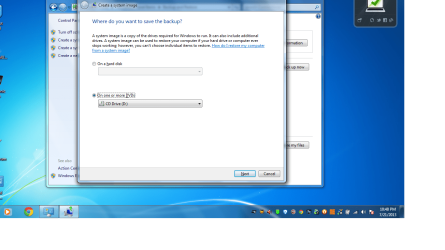
I am trying to make a system image but as you can see in the below screenshots it is not allowing me to do it on my hard drive. When i have tried with the disk option it freezes after it starts and keeps saying i need another dvd.

Thanks for any assistance, when i check the hard disk box the (next box) at the bottom of the page fades out and does not let me select it.

 

Attachments

  • Untitled.png
    Untitled.png
    124.7 KB · Views: 7
Last edited by a moderator:

My Computer

Computer type
Laptop
Computer Manufacturer/Model Number
asus U56E
OS
win 7 64 Home edition
CPU
2430 i5 intel
Motherboard
?Asus
Memory
6
Graphics Card(s)
imtegrated
Sound Card
Microsoft
Hard Drives
WDC WD6400BPVT-80HXZT3 ATA Device
Antivirus
Kaspersky trial AV 2014
Browser
chrome
Hello Herb. You would need another HDD that does not have the w7 install on it.
 

My Computer

Computer type
PC/Desktop
Computer Manufacturer/Model Number
Home Built Desktop By DataTech
OS
Windows 7 Ultimate X64 SP1
CPU
Intel i5-2550K, Differing ~4.4-4.8GHz No built in GPU
Motherboard
ASUS P8Z68-V PRO/GEN3
Memory
16GB G.Skill Sniper 1866MHz @ 2133MHz 2x8GB
Graphics Card(s)
ASUS GTX650TIB-DC2OC-2GD5, (650TI Boost)
Sound Card
Onboard Realtek 5-1
Monitor(s) Displays
Samsung P2570HD
Screen Resolution
1920x1080
Hard Drives
Samsung 840 Pro 256GB SSD for OS, 500GB Seagate Constellation (Enterprise drive) for Data
PSU
Corsair HX650W
Case
Inwin Dragon Rider
Cooling
Hyper 212 EVO w/two Noctua fans, push-pull, @1300 RPM
Keyboard
E-Z Eyes, bright yellow keys with large characters
Mouse
steelseries SENSEI Laser Pro Gaming
Internet Speed
48-51Mbs Mbs down, 11 Mbs up Xfinity Cable
Antivirus
Norton Internet Security 2013
Browser
IE 10, Opera, Pale Moon if needed
Other Info
4 case fans, LG BluRay-RE, ASUS DVD-RW, Mr. Fusion power supply, 1.21 gigawatts.
Hi Britton, i'm assuming an HDD is short for external hard drive ?
 

My Computer

Computer type
Laptop
Computer Manufacturer/Model Number
asus U56E
OS
win 7 64 Home edition
CPU
2430 i5 intel
Motherboard
?Asus
Memory
6
Graphics Card(s)
imtegrated
Sound Card
Microsoft
Hard Drives
WDC WD6400BPVT-80HXZT3 ATA Device
Antivirus
Kaspersky trial AV 2014
Browser
chrome

My Computer

Computer type
PC/Desktop
Computer Manufacturer/Model Number
Built them myself, Science Experiments !
OS
Win7 Enterprise, Win7 x86 (Ult 7600), Win7 x64 Ult 7600, TechNet RTM on AMD x64 (2.8Ghz)
CPU
AMD fx8350 4ghz, AMD-32 2400mhz, AMD-64 3200mhz, AMDx64 2.8G
Motherboard
SIS 755, ECS-K8M890M-M (Ult 7600), GigaByte & others
Memory
2gb, 4gb on the Ult 7600, 4gb on Technet RTM, 32gb on FX8350
Graphics Card(s)
Draw my own Graphics, several nVidia cards
Sound Card
on motherboard
Monitor(s) Displays
19" flat scr, 28" I-Inc widescr,22" Emprex Widescr, 23" Acer
Screen Resolution
1280 x 1024, 1440 x 900, 1920 x 1080
Hard Drives
6 pata Ide HD's & 2 Sata HD's
added 80gb external on Ult 7600 computer,
numerous extra 1tb, 2TB, 3Tb SATA HD's
A collection of ext HD Docks w/ HDs
PSU
430w, 550w, 600w, 700, 800, etc
Case
All Generic Full Towers
Cooling
Open Air & a few fans, some w/ colored LEDs
Keyboard
Compaq & Dell recycled from GoodWill
Mouse
Made in China Optical Wired Mouse
Internet Speed
Fast Cable InterNet
Antivirus
AVG Free on 24 different Desktops, NO Problems!
Browser
IE 8 is preferred, but use FireFox sometimes
Other Info
Linksys Routers, switches, & Hubs
Too Many USB Flash Drives to count, Biggest is 64GB !
Eight computers in my home network.
Sixteen computers at my business network.
Linked via TeamViewer !
Lots of old used spare computer parts everywhere!
Sorry, HDD= Hard Disk Drive. I meant the one in your machine. :)
 

My Computer

Computer type
PC/Desktop
Computer Manufacturer/Model Number
Home Built Desktop By DataTech
OS
Windows 7 Ultimate X64 SP1
CPU
Intel i5-2550K, Differing ~4.4-4.8GHz No built in GPU
Motherboard
ASUS P8Z68-V PRO/GEN3
Memory
16GB G.Skill Sniper 1866MHz @ 2133MHz 2x8GB
Graphics Card(s)
ASUS GTX650TIB-DC2OC-2GD5, (650TI Boost)
Sound Card
Onboard Realtek 5-1
Monitor(s) Displays
Samsung P2570HD
Screen Resolution
1920x1080
Hard Drives
Samsung 840 Pro 256GB SSD for OS, 500GB Seagate Constellation (Enterprise drive) for Data
PSU
Corsair HX650W
Case
Inwin Dragon Rider
Cooling
Hyper 212 EVO w/two Noctua fans, push-pull, @1300 RPM
Keyboard
E-Z Eyes, bright yellow keys with large characters
Mouse
steelseries SENSEI Laser Pro Gaming
Internet Speed
48-51Mbs Mbs down, 11 Mbs up Xfinity Cable
Antivirus
Norton Internet Security 2013
Browser
IE 10, Opera, Pale Moon if needed
Other Info
4 case fans, LG BluRay-RE, ASUS DVD-RW, Mr. Fusion power supply, 1.21 gigawatts.
Ok, thanks a lot guys, i get it now. My main purpose is not to save anything important because i don't have anything important on this laptop, my main interest is solely to avoid needing to re install anytime i get a nasty infection.

Thats what i always end up doing because it's easy and i never have anything to save.

Would relying on restore points be a better way to get my laptop back to where it wasn't infected?
 

My Computer

Computer type
Laptop
Computer Manufacturer/Model Number
asus U56E
OS
win 7 64 Home edition
CPU
2430 i5 intel
Motherboard
?Asus
Memory
6
Graphics Card(s)
imtegrated
Sound Card
Microsoft
Hard Drives
WDC WD6400BPVT-80HXZT3 ATA Device
Antivirus
Kaspersky trial AV 2014
Browser
chrome

My Computer

Computer type
PC/Desktop
Computer Manufacturer/Model Number
Home Built Desktop By DataTech
OS
Windows 7 Ultimate X64 SP1
CPU
Intel i5-2550K, Differing ~4.4-4.8GHz No built in GPU
Motherboard
ASUS P8Z68-V PRO/GEN3
Memory
16GB G.Skill Sniper 1866MHz @ 2133MHz 2x8GB
Graphics Card(s)
ASUS GTX650TIB-DC2OC-2GD5, (650TI Boost)
Sound Card
Onboard Realtek 5-1
Monitor(s) Displays
Samsung P2570HD
Screen Resolution
1920x1080
Hard Drives
Samsung 840 Pro 256GB SSD for OS, 500GB Seagate Constellation (Enterprise drive) for Data
PSU
Corsair HX650W
Case
Inwin Dragon Rider
Cooling
Hyper 212 EVO w/two Noctua fans, push-pull, @1300 RPM
Keyboard
E-Z Eyes, bright yellow keys with large characters
Mouse
steelseries SENSEI Laser Pro Gaming
Internet Speed
48-51Mbs Mbs down, 11 Mbs up Xfinity Cable
Antivirus
Norton Internet Security 2013
Browser
IE 10, Opera, Pale Moon if needed
Other Info
4 case fans, LG BluRay-RE, ASUS DVD-RW, Mr. Fusion power supply, 1.21 gigawatts.
Again, I suggest you just forget DVDs and use a relatively cheap external USB Hard Drive. It's faster and definitely more reliable. An equally important advantage is that you can store multiple system images spanning a period of time. So if you are worried about some virus infection or other software issue you can go back far enough before the issue occurred.
 

My Computer

Computer type
PC/Desktop
Computer Manufacturer/Model Number
Own build
OS
Windows 7x64 Home Premium SP1
CPU
Intel i7 2600k
Motherboard
ASUS P8Z68 Deluxe
Memory
G.Skill Ripjaws (DDR3-1600) 2x4GB
Graphics Card(s)
Nvidia GeForce GTS 450; Intel HD Graphics 3000(GT2+)
Monitor(s) Displays
Dell Ultrasharp IPS panel U2311H, Samsung SyncMaster P2350
Screen Resolution
1920x1080
Hard Drives
Samsung 850 Pro SSD 256GB, Samsung SSD 840 120GB, Seagates 1TB Barracuda ST31000528AS x2
PSU
Seasonic M12II 520W
Case
Lian Li Lancool PC-K60
Cooling
Case: 1x120mm, 3x140mm CPU: Hyper 212+
Keyboard
Logitech MK520 (wireless)
Mouse
Logitech MK520
Internet Speed
6-7 Mbps
Antivirus
Norton Security Premium, Malwarebytes on 2 (MSE on 3rd PC)
Browser
FireFox
Other Info
Audio: Logitech Z523 2.1
Last edited:

My Computer

Computer type
PC/Desktop
Computer Manufacturer/Model Number
Home Built
OS
Windows `10 Professional 64bit
CPU
Intel i5 [email protected]
Motherboard
MSI P67A-GD55 (MS7681)
Memory
Corsair Vengeance DDR3 1600 16G
Graphics Card(s)
NVIDIA GeForce GT520 1GHz
Sound Card
Realtek High Definition Audio
Monitor(s) Displays
Haans G 241
Screen Resolution
1600X1024
Hard Drives
Crucial MX100 256GB SSD
PSU
OCZ ModXStream Modular High Performance 500 Watt
Case
Rosewill Challenger-U3
Cooling
Just Fans
Keyboard
Kensington K64338B
Mouse
Microsoft wheel mouse 1.1A
Internet Speed
240.0 Mbps
Antivirus
ESET Internet Security
Browser
Firefox
Other Info
SuperAntiSpyware-Pro
Malwarebytes (Premium)
Kerish Doctor
Back
Top