Hi. I have a system with 2 identical drive. I have windows on one drive C: and backing up on second one D:
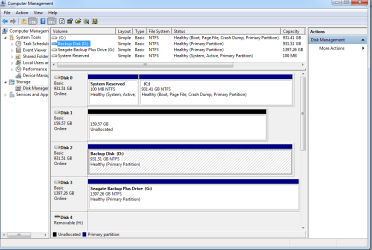
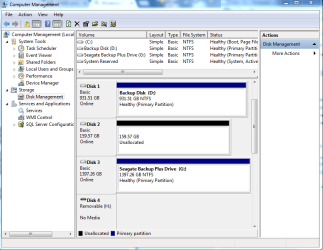
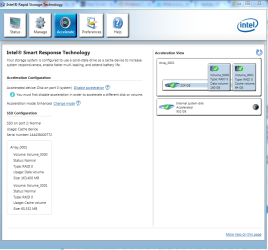
Previously they were configured raid 1, but now I am just using C: as non-raid and accelarated using SSD and Intel Smart Response Technology where 64GB out of was used as cached volume. Please note SSD total size is 256GB. So there is left over space of 159GB showed up as separate volume in Disk Management.
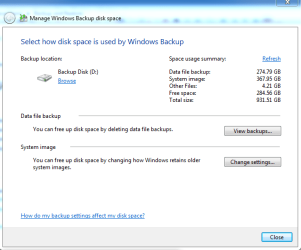
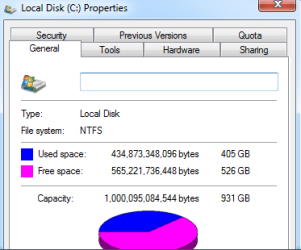
So I quick formatted D: drive to use as backup drive. After backup is complete, it shows backup size as 642.68 GB on D drive. My whole C: uses only 405GB. It is taking up so much more space than it should and I don't know why. Both C and D has 4096 as allocation unit size. I think backup might be including SSD size on the system image. Please note there is no backup history that might take up space. This is first time backup on this disk.
SSD is for caching only. It should not be included in the system image backup. Also I am afraid it will cause problem when I have to use this system image to restore and somehow restore application might not know what to do with this additional cache data in system image.
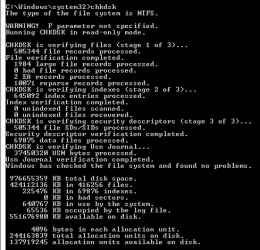
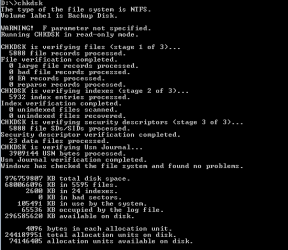
I have included some screenshots.
If Windows Backup won't work with SSD Caching setup like i have, what should I use to backup system image?
Previously they were configured raid 1, but now I am just using C: as non-raid and accelarated using SSD and Intel Smart Response Technology where 64GB out of was used as cached volume. Please note SSD total size is 256GB. So there is left over space of 159GB showed up as separate volume in Disk Management.
So I quick formatted D: drive to use as backup drive. After backup is complete, it shows backup size as 642.68 GB on D drive. My whole C: uses only 405GB. It is taking up so much more space than it should and I don't know why. Both C and D has 4096 as allocation unit size. I think backup might be including SSD size on the system image. Please note there is no backup history that might take up space. This is first time backup on this disk.
SSD is for caching only. It should not be included in the system image backup. Also I am afraid it will cause problem when I have to use this system image to restore and somehow restore application might not know what to do with this additional cache data in system image.
I have included some screenshots.
If Windows Backup won't work with SSD Caching setup like i have, what should I use to backup system image?
Attachments
My Computer
At a glance
64 bit
- Computer type
- PC/Desktop
- OS
- 64 bit