Backup: System Images

Tripper

New member
Local time
1:22 AM
Messages
4
I am trying to setup Windows 7 to backup to a 1TB external (Western Digital) drive, but I get the notification, "The selected backup location does not support the creation of system images." What is necessary in order to backup my system image along with my data? Thanks much!
 

My Computer

OS
Windows 7 Ultimate
CPU
AMD Phenom X4 9600 4MB 95W Socket AM2
Motherboard
ASUS M4N78 Pro GeForce 8300 Socket AM2+
Memory
Wintec Ampx 4096MB PC6400 DDR2 800MHz (4x2048)
Hard Drives
Seagate 1TB
PSU
OCZ ModXStream Pro 500W
Case
Cooler Master Elite 335 Black ATX RoHS Case
I am trying to setup Windows 7 to backup to a 1TB external (Western Digital) drive, but I get the notification, "The selected backup location does not support the creation of system images." What is necessary in order to backup my system image along with my data? Thanks much!

Hi and welcome

What is the WD formated in ? NTFS?

Is it partitioned as a whole 1tb partition, or smaller?

Are the partitions Logical, or dynamic?

Ken J+
 

My Computer

Computer Manufacturer/Model Number
HP Pavillion dv-7 1005 Tx
OS
Win 8 Release candidate 8400
CPU
[email protected]
Memory
4 gigs
Graphics Card(s)
Nvidia 9600M
Sound Card
HD built-in
Monitor(s) Displays
17" Wxga
Screen Resolution
1440x900
Cooling
none
Internet Speed
45Mb down 5Mb up
I've gotten that message myself before.

It seems windows wants a physical drive.
 

My Computer

Computer Manufacturer/Model Number
Cheap $399.00 E-Machine
OS
Windows 7 Pro & Vista Home Premium
CPU
Athlon 64 3800+ (Orleans) 2.40GHz
Motherboard
Winfast
Memory
2GB DDR2 RAM DIMM
Graphics Card(s)
NVIDIA GeForce 8500 GT 512 MB memory HDMI out
Sound Card
creative X-Fi Exteme 7..1 channel
Monitor(s) Displays
Acer V223W 22" widescreen DVI
Screen Resolution
1680x1050
Hard Drives
WDC WD5 500GB
WDC WD25 250GB
PSU
OCZ 550 watt
Case
Gateway
Cooling
2 fans
Keyboard
Dell
Mouse
Sony Vaio
Internet Speed
18MB/s down - .72MB /s up
Hi and welcome

What is the WD formated in ? NTFS?

Is it partitioned as a whole 1tb partition, or smaller?

Are the partitions Logical, or dynamic?

Ken J+

Thanks, Ken - The drive is brand new--just out of the box, one big partition, FAT32.

- Kris
 

My Computer

OS
Windows 7 Ultimate
CPU
AMD Phenom X4 9600 4MB 95W Socket AM2
Motherboard
ASUS M4N78 Pro GeForce 8300 Socket AM2+
Memory
Wintec Ampx 4096MB PC6400 DDR2 800MHz (4x2048)
Hard Drives
Seagate 1TB
PSU
OCZ ModXStream Pro 500W
Case
Cooler Master Elite 335 Black ATX RoHS Case
I am trying to setup Windows 7 to backup to a 1TB external (Western Digital) drive, but I get the notification, "The selected backup location does not support the creation of system images." What is necessary in order to backup my system image along with my data? Thanks much!

I know this isn't the answer you are looking for Trip, but do yourself a favor & get away from using Windows backup altogether... :sarc:
I along with others here "Swear" by Acronis True Image Home 2010 for all my imaging backups.
Not only is it extremely easy to use, but uses much less space (at default its 1/2 the original size) for your backups & does "perfect" 1:1 image backups of exactly what's on your HD's & or partitions!
It will also easily let you use any external drive or even a online Server... :geek:
I've used Acronis now for 7 years & it works flawlessly...
Nice to know in case of a disaster that I can have my OS up & running again in 3 minutes flat from one of my backup images! :p
 

My Computer

Computer Manufacturer/Model Number
ABS Tech Ultimate X9
OS
Windows® 7 Ultimate x64 SP1
CPU
Intel Core 2 Duo E8400 (E0) @ 4.0GHz
Motherboard
ASUS P5Q Pro Turbo / 1780 FSB
Memory
G.SKILL-F2-8500CL5D-4GBPK (2x2Gbs) (5-5-5-15) @ 1067Mhz
Graphics Card(s)
EVGA GTX 470 SC (845/1690/2000) 160Gbs
Sound Card
VIA HD Audio / Boston Acoustics
Monitor(s) Displays
Acer X222W HD 22" LCD 2500:1 / 5ms
Screen Resolution
1680x1050
Hard Drives
Seagate Barracuda SATAII 2 x 320GB
Seagate Barracuda SATAII 1Tb
Intel® Rapid Storage Technology v10.1.0.1008
AHCI-NCQ Enabled
PSU
Silent Pro GOLD 80 PLUS 800w /95% efficiency / SLI-Crossfire
Case
ABS Stealth Black-Custom
Cooling
CoolerMaster V6GT 6 Heatpipe 200w CPU Cooler
Keyboard
Logitech G15 Gaming Keyboard (Old Style Blue!)
Mouse
Logitech MX518 Gaming Mouse
Internet Speed
1Mbs-up/ 6Mbs-down
I know this isn't the answer you are looking for Trip, but do yourself a favor & get away from using Windows backup altogether... :sarc:
I along with others here "Swear" by Acronis True Image Home 2010 for all my imaging backups... :p

MUff1N - Thanks much for the tip--I'll check into it (seriously). But I'm also still interested in a native Windows 7 solution, if it exists.
 

My Computer

OS
Windows 7 Ultimate
CPU
AMD Phenom X4 9600 4MB 95W Socket AM2
Motherboard
ASUS M4N78 Pro GeForce 8300 Socket AM2+
Memory
Wintec Ampx 4096MB PC6400 DDR2 800MHz (4x2048)
Hard Drives
Seagate 1TB
PSU
OCZ ModXStream Pro 500W
Case
Cooler Master Elite 335 Black ATX RoHS Case
Hi Tripper,

I am with Muffin on this. A 3rd party solution is much better.

The main issues with Windows Backup are:

It doesn't let you select a source - you are forced to image the system and boot partitions ( tho you can add others).

It doesn't let you browse to an image of choice - you can get in serious trouble if the image location , or name has changed. There are cases of the image being clearly visible in Explorer and Windows Backup just refuses to see it.

It doesn't let you select the target - it tries to put the image back where it came from.

That is extarordinarily limited - all 3rd party apps. I know of do all those things - and most have extra niceties - like adjustable speed, compression, ability to make an image from the boot disc., exclude options, make bootable backup partition/ dvd/usb, etc. etc.

Even the free versions are better than Windows Backup.

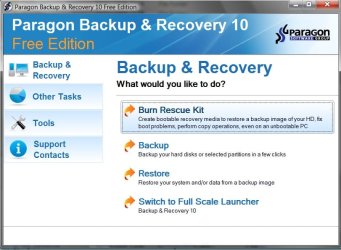
The most complete is Paragon B&R10 Free :

Free Backup Software: Paragon Backup & Recovery 10 Free Edition - Overview

B&RFREE-1-2009-11-18_002146.jpg

How to Create an Image with Paragon

How to Restore Data with Paragon


Another good choice ( fewer functions than Paragon, but very small and fast):

Macrium Reflect FREE Edition - Information and download

How to create a disk image with Macrium Reflect

How to create the Macrium Linux rescue CD

How to recover your PC using the Linux rescue CD
 

My Computers

System One System Two

  • Computer type
    PC/Desktop
    OS
    7 X64
    CPU
    i5 8400
    Motherboard
    gigabyte b365m ds3h
    Memory
    2x8gb 3200mhz
    Hard Drives
    various
    PSU
    pure power 11 400w cm
    Case
    Coolermaster
    Cooling
    cryorig m9i
  • Computer type
    PC/Desktop
    OS
    7x64
    CPU
    g5400
    Motherboard
    ga b365m ds3h
    Memory
    8gb ddr4 2400
    PSU
    xfx pro 450w
The problem is the Fat32. You have to reformat the drive to NTFS. Have fun - for 1TB it will take a while (like 10 hours).
 

My Computer

Computer Manufacturer/Model Number
HP, Dell, Gateway, Toshiba - 4 laptops and 2 desktops
OS
Vista, Windows7, Mint Mate, Zorin, Windows 8
CPU
from 1.6GHz Duo to i7
Monitor(s) Displays
2x HP w2207
Hard Drives
5x HDD, 7x SSD, 12x Externals
Keyboard
with trackball - no mices
Mouse
Trackball mice
Internet Speed
DSL 6000
Hi Tripper,

I am with Muffin on this. A 3rd party solution is much better.

The main issues with Windows Backup are:

It doesn't let you select a source - you are forced to image the system and boot partitions ( tho you can add others).

It doesn't let you browse to an image of choice - you can get in serious trouble if the image location , or name has changed. There are cases of the image being clearly visible in Explorer and Windows Backup just refuses to see it.

It doesn't let you select the target - it tries to put the image back where it came from.

That is extarordinarily limited - all 3rd party apps. I know of do all those things - and most have extra niceties - like adjustable speed, compression, ability to make an image from the boot disc., exclude options, make bootable backup partition/ dvd/usb, etc. etc.

Even the free versions are better than Windows Backup.

The most complete is Paragon B&R10 Free :

Free Backup Software: Paragon Backup & Recovery 10 Free Edition - Overview

View attachment 37417

How to Create an Image with Paragon

How to Restore Data with Paragon


Another good choice ( fewer functions than Paragon, but very small and fast):

Macrium Reflect FREE Edition - Information and download

How to create a disk image with Macrium Reflect

How to create the Macrium Linux rescue CD

How to recover your PC using the Linux rescue CD

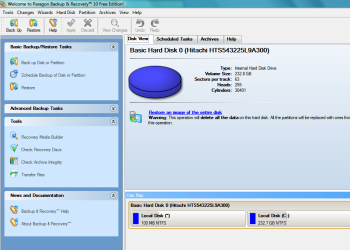
I downloaded and installed Paragon and my program looks nothing like your screen shot.

The pic of your screen looks much easier to use and understand. I think the interface I have is too confusing.
 

Attachments

  • paragon.PNG
    paragon.PNG
    39.2 KB · Views: 61
Last edited:

My Computer

Computer Manufacturer/Model Number
HP G60 120US Laptop
OS
7 home premium 64 bit
CPU
AMD Turion X2 64 bit 2 ghz
Motherboard
Whatever HP puts inside
Memory
3 gig
Graphics Card(s)
NVIDIA GeForce 8200M G
Sound Card
Conexent High Definition SmartAudio 221
Monitor(s) Displays
One attached to the laptop
Screen Resolution
1366X768
Hard Drives
Hitachi HTS543225L9A300 ATA 232 gb
Keyboard
attached
Mouse
touch pad attached
You need to format the drive NTFS, or create a partition formatted NTFS.

For example, on my computers I format a primary partition to store the image, then copy it to a backup in case of HDD failure.

When I need the HDD reimaged for any reason, I boot from the installer's Repair console, choose "Recover using an Image backup" and it will find the primary partition which it views as a drive, or the image stored in the root of the external.

So far I have reimaged instead of reinstalled a half dozen times, including just one partition, flawlessly in 15 minutes.
 
Sold! I guess I was a bit too optimistic about Windows 7, but you all have convinced me otherwise. I looked at Paragon, and it looks very well done. I'm sure some of the others are, too. Thanks, everyone! :D
 

My Computer

OS
Windows 7 Ultimate
CPU
AMD Phenom X4 9600 4MB 95W Socket AM2
Motherboard
ASUS M4N78 Pro GeForce 8300 Socket AM2+
Memory
Wintec Ampx 4096MB PC6400 DDR2 800MHz (4x2048)
Hard Drives
Seagate 1TB
PSU
OCZ ModXStream Pro 500W
Case
Cooler Master Elite 335 Black ATX RoHS Case
I made the interface for it.

Here - unzip this,

View attachment Express Launch.zip

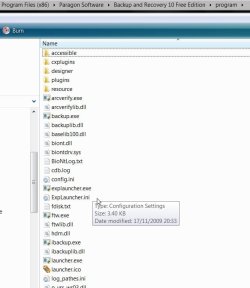
put the 2 files ( not the folder) inside the program folder

"C:\Program Files (x86)\Paragon Software\Backup and Recovery 10 Free Edition\program".

If you are on 32 bit - it will be

"C:\Program Files\Paragon Software\Backup and Recovery 10 Free Edition\program".

Inside the program folder , it will look like this:

BR-2-2009-11-18_012107.jpg

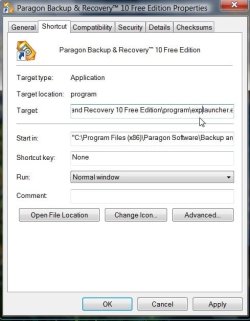
Then just rt click the Paragon shortcut you already have on your desktop and add the three letters exp, as you see here:

B&R_EXP_SHRTCUT2009-11-18_011107.jpg

Then click Apply, click OK.

Or you can make a separate shortcut, if you like.
 

My Computers

System One System Two

  • Computer type
    PC/Desktop
    OS
    7 X64
    CPU
    i5 8400
    Motherboard
    gigabyte b365m ds3h
    Memory
    2x8gb 3200mhz
    Hard Drives
    various
    PSU
    pure power 11 400w cm
    Case
    Coolermaster
    Cooling
    cryorig m9i
  • Computer type
    PC/Desktop
    OS
    7x64
    CPU
    g5400
    Motherboard
    ga b365m ds3h
    Memory
    8gb ddr4 2400
    PSU
    xfx pro 450w
As others have said, the true problem is that the file system on the external drive is FAT32. This file system cannot handle a file over 4GB in size...so all of these backups apps are going to fail unless you can configure the backup to output multiple 2GB files or something.

If you just want an image, the built-in Windows 7 "system image" does a very good job. I've used it numerous times and it's always worked just as it should. It doesn't have advanced functionality like keeping multiple backups or doing incremental backups...but depending upon your needs...these functions may be unnecessary.

For example, I just load Windows, the core drivers and then activate. I then take an image. That's the only image that I need. I like to always start out clean and I don't really want a dozen plus apps put back on..some of which I might not actually be using anymore. So for me, the Windows "System Image" fits the bill perfectly and I don't need to incur the expense of the paid commercial applications.

And if you do a quick format, it should not take 10 hours to format a 1TB drive.
 

My Computer

Computer Manufacturer/Model Number
Self-Built in July 2009
OS
Windows 7 Ultimate x64
CPU
Intel Q9550 2.83Ghz OC'd to 3.40Ghz
Motherboard
Gigabyte GA-EP45-UD3R rev. 1.1, F12 BIOS
Memory
8GB G.Skill PI DDR2-800, 4-4-4-12 timings
Graphics Card(s)
EVGA 1280MB Nvidia GeForce GTX570
Sound Card
Realtek ALC899A 8 channel onboard audio
Monitor(s) Displays
23" Acer x233H
Screen Resolution
1920x1080
Hard Drives
Intel X25-M 80GB Gen 2 SSD
Western Digital 1TB Caviar Black, 32MB cache. WD1001FALS
PSU
Corsair 620HX modular
Case
Antec P182
Cooling
stock
Keyboard
ABS M1 Mechanical
Mouse
Logitech G9 Laser Mouse
Internet Speed
15/2 cable modem
Other Info
Windows and Linux enthusiast. Logitech G35 Headset.
Nothing really wrong with Windows Backup. You can adjust a setting so it only keeps one image of your system and its incremental backups are standard with other apps. As for the drive, it should have come with NTFS, I'm fairly sure mine did.
 

My Computer

Computer Manufacturer/Model Number
Sony Vaio Z46GDU
OS
Windows 7 Ultimate x86-64
CPU
[email protected] 1066MHz FSB
Motherboard
Sony branded
Memory
6GB DDR3 1066MHz
Graphics Card(s)
9300M GS 256MB Dedicated (Speed) + Intel4500MHD (Stamina)
Sound Card
Realtek HD Audio
Monitor(s) Displays
13.1' WXGA
Screen Resolution
1600x900
Hard Drives
320GB 7200RPM w/ 16MB cache
Internet Speed
1MB/s
You can't make an image of D - then restore to G :(

You can't make an image of just a non system partition - or any combination thereof:(

You can't move the image, rename it, and then still browse to it and use it:(

You can't make an image of the drive using the boot disc - essential if you can't boot in.:(

You can't change the speed or compression.:(

You can't attach another drive and restore the image to that.:( You don't get exclude options,:( or the option to image using built in snapshot drivers , if VSS is playing up - the list is endless.:(

It is no use to me. Luckily, there are FREE ones that are so much better.:D
 

My Computers

System One System Two

  • Computer type
    PC/Desktop
    OS
    7 X64
    CPU
    i5 8400
    Motherboard
    gigabyte b365m ds3h
    Memory
    2x8gb 3200mhz
    Hard Drives
    various
    PSU
    pure power 11 400w cm
    Case
    Coolermaster
    Cooling
    cryorig m9i
  • Computer type
    PC/Desktop
    OS
    7x64
    CPU
    g5400
    Motherboard
    ga b365m ds3h
    Memory
    8gb ddr4 2400
    PSU
    xfx pro 450w
You can't make an image of D - then restore to G :(

You can't make an image of just a non system partition - or any combination thereof:(

You can't move the image, rename it, and then still browse to it and use it:)

You can't make an image of the drive using the boot dic - essential if you can't boot in.:(

You can't change the speed or compression, you can't attach another drive and restore the image to that. You don't get exclude options, or the option to image using built in snapshot drivers , if VSS is playing up - the list is endless.:(

It is no use to me. Luckily, there are FREE ones that are so much better.:D

Its unnecessary to have another image, the critical one is your system. :D

The image will be used when its necessary and you can browse to it when you work your way through a few UAC prompts. :D

Why would you want an image when you can't boot? That would be a time for restore. :D

The speed is fine for a 7200RPM external drive connected via USB - and VSS normally works until something breaks it. :D
 

My Computer

Computer Manufacturer/Model Number
Sony Vaio Z46GDU
OS
Windows 7 Ultimate x86-64
CPU
[email protected] 1066MHz FSB
Motherboard
Sony branded
Memory
6GB DDR3 1066MHz
Graphics Card(s)
9300M GS 256MB Dedicated (Speed) + Intel4500MHD (Stamina)
Sound Card
Realtek HD Audio
Monitor(s) Displays
13.1' WXGA
Screen Resolution
1600x900
Hard Drives
320GB 7200RPM w/ 16MB cache
Internet Speed
1MB/s
I have a lot of partitions - several o/s - not all are ntfs - like many enthusiasts - of course we need more than just an image of the system partition and we need the ability to restore them elsewhere.

Being able to make an image when you can't boot can be a lifesaver - extraordinary you should ask. Have you been on the beer? .LOL
 

My Computers

System One System Two

  • Computer type
    PC/Desktop
    OS
    7 X64
    CPU
    i5 8400
    Motherboard
    gigabyte b365m ds3h
    Memory
    2x8gb 3200mhz
    Hard Drives
    various
    PSU
    pure power 11 400w cm
    Case
    Coolermaster
    Cooling
    cryorig m9i
  • Computer type
    PC/Desktop
    OS
    7x64
    CPU
    g5400
    Motherboard
    ga b365m ds3h
    Memory
    8gb ddr4 2400
    PSU
    xfx pro 450w
Yes, SIW2....all of us have different needs and that makes some applications more practical for some than others.

While I too am an enthusiast...I usually handle my multiple operating systems
1). On physically different hardware
2). Virtual machines

For me, on my sole Windows 7 machine, I just need to be able to back up my 80GB SSD (C drive) to my 1TB storage drive (D) right after install. It's almost barely not worth even making the image.
 

My Computer

Computer Manufacturer/Model Number
Self-Built in July 2009
OS
Windows 7 Ultimate x64
CPU
Intel Q9550 2.83Ghz OC'd to 3.40Ghz
Motherboard
Gigabyte GA-EP45-UD3R rev. 1.1, F12 BIOS
Memory
8GB G.Skill PI DDR2-800, 4-4-4-12 timings
Graphics Card(s)
EVGA 1280MB Nvidia GeForce GTX570
Sound Card
Realtek ALC899A 8 channel onboard audio
Monitor(s) Displays
23" Acer x233H
Screen Resolution
1920x1080
Hard Drives
Intel X25-M 80GB Gen 2 SSD
Western Digital 1TB Caviar Black, 32MB cache. WD1001FALS
PSU
Corsair 620HX modular
Case
Antec P182
Cooling
stock
Keyboard
ABS M1 Mechanical
Mouse
Logitech G9 Laser Mouse
Internet Speed
15/2 cable modem
Other Info
Windows and Linux enthusiast. Logitech G35 Headset.
I see 2 schools of thought - and both are perfectly valid:

1. The "keep it simple" school - and I am of that kind. Keep everything seperate. I run 3 systems on 1 box. One is the Vista base, a second one is a Win7 in a virtual partition and I now install another Win7 on an SSD that I switch with the BIOS boot sequence (no double booting). I use Norton Ghost (partly because I did not know better 2 years ago). I only make full images, no incrementals, because those I can delete selectively without disturbing the tree. For the wife I set up the Maxtor One Touch Manager. All she needs to do is to connect the disk and touch the button. Nothing is easier.
I also have 6 external disks for my 4 systems (2 here in Florida and 2 back home in Germany). That also helps to keep things uncluttered.
2. Then there are the system setups that require a more complex approach. Systems with 2, 3, or 4 multiboot operating systems and constrained external disk space (or just 1 disk). People who have those complex setups also tend to shove things around quite frequently. For them compression, icrementals, restoration from A to B, etc are important prequisites. It results in a much tighter setup but also requires a lot more planning and thought.

Bottom line, one can argue for either side depending on the individual requirements. Fortunately all those options are out there and we can pick what suits us the best.
 

My Computer

Computer Manufacturer/Model Number
HP, Dell, Gateway, Toshiba - 4 laptops and 2 desktops
OS
Vista, Windows7, Mint Mate, Zorin, Windows 8
CPU
from 1.6GHz Duo to i7
Monitor(s) Displays
2x HP w2207
Hard Drives
5x HDD, 7x SSD, 12x Externals
Keyboard
with trackball - no mices
Mouse
Trackball mice
Internet Speed
DSL 6000
I know it irks my friend SIW2 that I relentlessly urge newbies to "use Win7 Backup Imaging to create an image (stored externally) used to reimage your HDD flawlessly in 15 minutes, so you never have to reinstall."

I only do this to take advantage of Win7 bringing backup imaging to the masses for the first time, which is why it needs repeating since most ordinary users filter out "backup imaging" like it is Martian.

Only because it is built in, simple and rudimentary is it easily understandable for the first time to newbies, and most are thrilled that they never have to reinstall an OS again if they take it up.

Later they can advance to Acronis, Paragon HD Mgr, etc. But now, even to suggest free Macrium gets mostly ignored unless we are doing open heart surgery on botched multi-boots.
 
Back
Top