
Backup takes 800GB? Manage Windows Backup Disk Space

webmanoffesto

New member
Member
Local time
1:31 PM
Messages
14
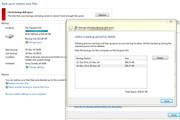
How do I control how much disk space my Windows Backup takes up? I have a 1TB external disk for backups and other files. My computer's HDD only has about 250GB capacity. I don't know why my backups file got so bloated. What should I do?

I see that I can delete the older backup file: 22-Oct to 11-Nov. But read the text.
""Deleting previous backups will free up space on your backup location."
So far so good.

Then it continues, "All files backed up during the selected period will be deleted."

I'm pretty sure the text is just badly written. I guess that means the backup-files (on the backup drive) will be deleted. They couldn't mean that the original files (on my data drive) will be deleted. That sure is a scary possibility though. How do you understand this?

System: Windows 7 Enterprise

ScreenCap below
 
Last edited:

My Computer My Computer

OS
Windows 7 Enterprise
Yes, it is perhaps, badly written, but true. All files in the backup period from 22-Oct. to 11-Nov. will be deleted. Not to worry, though, because those same files are backed up in a later backup period from 11-Nov. to ? It is safe to delete older backup periods.
 

My Computer My Computer

Computer Manufacturer/Model Number
Custom Build
OS
Windows 7 Pro/32 Academic. Build 7600
CPU
Intel 2.3 Duo core
Motherboard
EliteGroup G31T-M
Memory
4 GB DDR
Graphics Card(s)
Nvidia GeForce 9500 GT
Sound Card
Built in
Monitor(s) Displays
Viewsonic 15" 4:3
Screen Resolution
1280 x 1024
Hard Drives
WD Caviar Black 750 GB
WD 250 GB External
PSU
Antec 450w
Keyboard
Standard windows
Mouse
Logitech USB
Internet Speed
Bellsouth DSL 6.0
Thank you for the excellent response. I have deleted the older backup.

Another question. On my external drive (for backups) I have files which I cannot open
1. Name-PC-Home
2. WindowsImageBackup

Is Name-PC-Home the Windows Backup (files and system image)?

I think WindowsImageBackup is what I created last month with CloneZilla. I'm not sure. I'd like to delete it if it's now superfluous.
 

My Computer My Computer

OS
Windows 7 Enterprise

My Computer My Computer

Computer Manufacturer/Model Number
Custom Build
OS
Windows 7 Pro/32 Academic. Build 7600
CPU
Intel 2.3 Duo core
Motherboard
EliteGroup G31T-M
Memory
4 GB DDR
Graphics Card(s)
Nvidia GeForce 9500 GT
Sound Card
Built in
Monitor(s) Displays
Viewsonic 15" 4:3
Screen Resolution
1280 x 1024
Hard Drives
WD Caviar Black 750 GB
WD 250 GB External
PSU
Antec 450w
Keyboard
Standard windows
Mouse
Logitech USB
Internet Speed
Bellsouth DSL 6.0
So "WindowsImageBackup" is the backup file?
What do you think "Name-PC-Home" could be?
 

My Computer My Computer

OS
Windows 7 Enterprise
So "WindowsImageBackup" is the backup file?
What do you think "Name-PC-Home" could be?
No, "WindowsImageBackup" is your system's image. Basically, it's a carbon copy (snapshot) of your entire C:\ drive. There should be 2 other files on your backup drive, a MediaID.bin file and the other one is your data backup. It could be named anything.
Here's an excellent tutorial on Windows 7 backup and restore.
How To Use Backup and Restore in Windows 7 - How-To Geek
 

My Computer My Computer

Computer Manufacturer/Model Number
Custom Build
OS
Windows 7 Pro/32 Academic. Build 7600
CPU
Intel 2.3 Duo core
Motherboard
EliteGroup G31T-M
Memory
4 GB DDR
Graphics Card(s)
Nvidia GeForce 9500 GT
Sound Card
Built in
Monitor(s) Displays
Viewsonic 15" 4:3
Screen Resolution
1280 x 1024
Hard Drives
WD Caviar Black 750 GB
WD 250 GB External
PSU
Antec 450w
Keyboard
Standard windows
Mouse
Logitech USB
Internet Speed
Bellsouth DSL 6.0
There are 2 backup processes one uses zip compressed files to backup your files and folders. The other uses vhd format files which are complete images of the partition (everything - OS, programs data...).
When you run "Backup Now" by default it will make the two types of backup.
I go into Change settings and untick the box that says make a system image as well. I make images only when I want to and use the "Create a System Image" on the left in the Backup and restore screen to make images when and on what partition.
 

My Computer My Computer

Computer type
PC/Desktop
Computer Manufacturer/Model Number
Own build
OS
Windows 7x64 Home Premium SP1
CPU
Intel i7 2600k
Motherboard
ASUS P8Z68 Deluxe
Memory
G.Skill Ripjaws (DDR3-1600) 2x4GB
Graphics Card(s)
Nvidia GeForce GTS 450; Intel HD Graphics 3000(GT2+)
Monitor(s) Displays
Dell Ultrasharp IPS panel U2311H, Samsung SyncMaster P2350
Screen Resolution
1920x1080
Hard Drives
Samsung 850 Pro SSD 256GB, Samsung SSD 840 120GB, Seagates 1TB Barracuda ST31000528AS x2
PSU
Seasonic M12II 520W
Case
Lian Li Lancool PC-K60
Cooling
Case: 1x120mm, 3x140mm CPU: Hyper 212+
Keyboard
Logitech MK520 (wireless)
Mouse
Logitech MK520
Internet Speed
6-7 Mbps
Antivirus
Norton Security Premium, Malwarebytes on 2 (MSE on 3rd PC)
Browser
FireFox
Other Info
Audio: Logitech Z523 2.1
Back
Top