
You are using an out of date browser. It may not display this or other websites correctly.
You should upgrade or use an alternative browser.
You should upgrade or use an alternative browser.
Backup to a network drive
- Thread starter cgeraldc
- Start date


seeingwhite
New member
- Local time
- 4:28 PM
- Messages
- 6
It won't work for me through the GUI, either. But it works well through the command line.
Good link here:
http://maximumpcguides.com/windows-vista/schedule-a-complete-pc-backup/
Good link here:
http://maximumpcguides.com/windows-vista/schedule-a-complete-pc-backup/
Last edited:
My Computer
- OS
- Win7 x64
Pathfinder51442
New member
ERROR With network backup
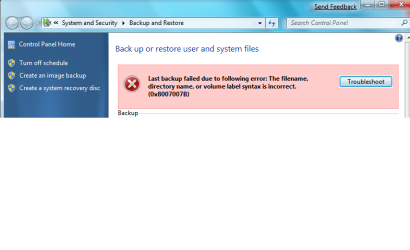
I am on a home network and cannot backup windows 7 to a network drive. This is asking me to put in network credentials. I have put in network credentials witch failed, I have put in my User account login and password. I have mapped the drive and it see's the free space and attemts to backup however it says it cannot do so because of the credentials.
Any ideas?
I am on a home network and cannot backup windows 7 to a network drive. This is asking me to put in network credentials. I have put in network credentials witch failed, I have put in my User account login and password. I have mapped the drive and it see's the free space and attemts to backup however it says it cannot do so because of the credentials.
Any ideas?
My Computer
- Computer Manufacturer/Model Number
- BAREBONES TIGER DIRECT
- OS
- Windows 7, Vista Ultimate, XP Pro, XP Tablet
- CPU
- AMD 5000+, celeron m, P4 1.8, P2
- Internet Speed
- Cable
seeingwhite
New member
- Local time
- 4:28 PM
- Messages
- 6
I am on a home network and cannot backup windows 7 to a network drive. This is asking me to put in network credentials. I have put in network credentials witch failed, I have put in my User account login and password. I have mapped the drive and it see's the free space and attemts to backup however it says it cannot do so because of the credentials.
Any ideas?
I have the same problem. It seems to be a bug with Windows 7 beta. It does work, however, from the command line interface. Check out the link I posted above. The WBAdmin command is the only way I can get it to work with Windows 7 Beta.
My Computer
- OS
- Win7 x64

Not the answer you were probably looking for but :
I'd recommend a commercial backup program such as Ghost or Acronis true image (my favourite). Backup software for data backup and disaster recovery in Windows and Linux - Acronis
Well worth the price -- you can also create bootable media so even if you totally hose up the hard drive(s) you can restore data / partitions etc etc.
Aronis takes care of multi-volumes if you backup to DVD's etc. No probs with network drives or external USB disks either.
You can backup / restore a typical home system in around 35 - 60 mins. Well worth it.
Much better than messing around with Windows backup.
You can also restore individual files even if you have made an "Image" (Partition / Disk) backup .
Testing any sort of OS using programs like acronis gives you backup and restore at any point so if you get hosed up trying to uninstall some anti-virus software for example which won't uininstall cleanly and messes up the registry you can just restore the whole system to the state it was before you installed the offending program for example.
cheers
jimbo
I'd recommend a commercial backup program such as Ghost or Acronis true image (my favourite). Backup software for data backup and disaster recovery in Windows and Linux - Acronis
Well worth the price -- you can also create bootable media so even if you totally hose up the hard drive(s) you can restore data / partitions etc etc.
Aronis takes care of multi-volumes if you backup to DVD's etc. No probs with network drives or external USB disks either.
You can backup / restore a typical home system in around 35 - 60 mins. Well worth it.
Much better than messing around with Windows backup.
You can also restore individual files even if you have made an "Image" (Partition / Disk) backup .
Testing any sort of OS using programs like acronis gives you backup and restore at any point so if you get hosed up trying to uninstall some anti-virus software for example which won't uininstall cleanly and messes up the registry you can just restore the whole system to the state it was before you installed the offending program for example.
cheers
jimbo
My Computer
- Computer type
- PC/Desktop
- Computer Manufacturer/Model Number
- Custom built, several laptops HP/ASUS
- OS
- Linux CENTOS 7 / various Windows OS'es and servers
- CPU
- Intel i7 Intel i5
- Memory
- 8GB, 16GB
- Graphics Card(s)
- On Motherboard
- Sound Card
- Realtek HD audio
- Monitor(s) Displays
- Apple Cinema display, Samsung LCD
- Screen Resolution
- 1920 X 1080
- Hard Drives
- 4 X 1TB SATA
- Mouse
- Toshiba wireless laser
- Internet Speed
- > 20MB up
seeingwhite
New member
- Local time
- 4:28 PM
- Messages
- 6
Not the answer you were probably looking for but :
I'd recommend a commercial backup program such as Ghost or Acronis true image (my favourite). Backup software for data backup and disaster recovery in Windows and Linux - Acronis
The downside is that the last time I tried and researched Acronis TI Home, it would not install on Windows 7 x64 for most users. Now I was able to install Acronis TI Echo Workstation and use it successfully, but the program costs $83 now directly from Acronis!! Plus one has to be carefull that any boot/system partitions and whatnot are also backed up otherwise Windows 7 restorations with Acronis will fail... I've read about it, and I've tried it. It only works when I backup hidden and seemingly (to many normal users) unimportant partitions. In contract, the "-allCritical" option used with wbadmin (Windows Backup) automatically ensures that all necessary data/partitions are backed up in the event that a system restoration is requested by the user.
You are correct, though, in that Acronis TI has vastly more functionality than Windows Backup. So if Acronis TI can get the problems sorted out with Windows 7, then it will be worth the investment for most users.
My Computer
- OS
- Win7 x64
Hi there
To get round the Hidden / Small Partition problem all you have to do is boot up Windows 7 from an install DVD and select REPAIR SYSTEM -- then all the boot stuff will go to the primary partition.
I actually did this deliberately -- I deleted a small partition and expanded my primary Windows partition to use the space. I then booted and when I got the Fail (NTLDR missing or some other error) I did the repair system --worked a treat.
Unless you re dual / triple / multi-booting then I prefer to have the OS in it's OWN partition (In any case I keep my data files on different partitions / disks).
If your Windows 7 DVD is build 7048 you can make it bootable by extracting the boot rec from Build 7000/7022 (or even VISTA)
and then use a program like Ultra ISO to create a bootable dvd.
Cheers
jimbo
To get round the Hidden / Small Partition problem all you have to do is boot up Windows 7 from an install DVD and select REPAIR SYSTEM -- then all the boot stuff will go to the primary partition.
I actually did this deliberately -- I deleted a small partition and expanded my primary Windows partition to use the space. I then booted and when I got the Fail (NTLDR missing or some other error) I did the repair system --worked a treat.
Unless you re dual / triple / multi-booting then I prefer to have the OS in it's OWN partition (In any case I keep my data files on different partitions / disks).
If your Windows 7 DVD is build 7048 you can make it bootable by extracting the boot rec from Build 7000/7022 (or even VISTA)
and then use a program like Ultra ISO to create a bootable dvd.
Cheers
jimbo
My Computer
- Computer type
- PC/Desktop
- Computer Manufacturer/Model Number
- Custom built, several laptops HP/ASUS
- OS
- Linux CENTOS 7 / various Windows OS'es and servers
- CPU
- Intel i7 Intel i5
- Memory
- 8GB, 16GB
- Graphics Card(s)
- On Motherboard
- Sound Card
- Realtek HD audio
- Monitor(s) Displays
- Apple Cinema display, Samsung LCD
- Screen Resolution
- 1920 X 1080
- Hard Drives
- 4 X 1TB SATA
- Mouse
- Toshiba wireless laser
- Internet Speed
- > 20MB up
seeingwhite
New member
- Local time
- 4:28 PM
- Messages
- 6
Hi there
To get round the Hidden / Small Partition problem all you have to do is boot up Windows 7 from an install DVD and select REPAIR SYSTEM -- then all the boot stuff will go to the primary partition.
I actually did this deliberately -- I deleted a small partition and expanded my primary Windows partition to use the space. I then booted and when I got the Fail (NTLDR missing or some other error) I did the repair system --worked a treat.
Good to know, thanks. I have done several system repairs with the install disk, but not to that extent. Good info.
My Computer
- OS
- Win7 x64

- Local time
- 4:28 PM
- Messages
- 995
Not the answer you were probably looking for but :
I'd recommend a commercial backup program such as Ghost or Acronis true image (my favourite). Backup software for data backup and disaster recovery in Windows and Linux - Acronis
Well worth the price -- you can also create bootable media so even if you totally hose up the hard drive(s) you can restore data / partitions etc etc.
....
cheers
jimbo
The only problem i have jim is that paying out $300 for ultimate with included backupware... hate to shell out another Ben Franklin for more same TYPE of software I would already have to do the funtion... Maybe MS should/could make this software optional, , cut the price even

My Computer
- Computer Manufacturer/Model Number
- CUSTOM
- OS
- XP/win7 x86 build 7127
- CPU
- Athlon64 X2 DUAL 4200+ 2.21ghz
- Motherboard
- ASUS K8 PRO SLI
- Memory
- 2GB Dual Chan DDR2 Corsair
- Graphics Card(s)
- Nvidia 6800GT
- Sound Card
- nvidia
- Monitor(s) Displays
- 19' LCD
- Screen Resolution
- 1280x1024
- Hard Drives
- WD 250, 2x500, 2x1TB IDE/USB
WD 250 SATA (system)
SEAGATE 120 Sata
- PSU
- coolermaster 450
- Case
- SUPERFLOWER
- Cooling
- 1 HDD bay fan, 5x80mm Case Fans, AEROGATE II Fan/Temp
- Keyboard
- MS wireless
- Mouse
- MS Wireless
- Internet Speed
- fassssssssst
Pathfinder51442
New member
The program I use on my other pc's is Avanquest perfect image. Cheaper and seems to work better than Acronis(I used acronis in a corporate environment) Wouldn't recomend using Norton anything.
My Computer
- Computer Manufacturer/Model Number
- BAREBONES TIGER DIRECT
- OS
- Windows 7, Vista Ultimate, XP Pro, XP Tablet
- CPU
- AMD 5000+, celeron m, P4 1.8, P2
- Internet Speed
- Cable
Hi everybody -- good to know there are cheaper alternatives -- however I think you've all got the point of the post that almost any commercial solution is better than the built in Windows system restore.
If you are purely Imaging the drive there may also be some stand alone open source Linux solutions as well but I haven't looked yet.
cheers
jimbo
If you are purely Imaging the drive there may also be some stand alone open source Linux solutions as well but I haven't looked yet.
cheers
jimbo
My Computer
- Computer type
- PC/Desktop
- Computer Manufacturer/Model Number
- Custom built, several laptops HP/ASUS
- OS
- Linux CENTOS 7 / various Windows OS'es and servers
- CPU
- Intel i7 Intel i5
- Memory
- 8GB, 16GB
- Graphics Card(s)
- On Motherboard
- Sound Card
- Realtek HD audio
- Monitor(s) Displays
- Apple Cinema display, Samsung LCD
- Screen Resolution
- 1920 X 1080
- Hard Drives
- 4 X 1TB SATA
- Mouse
- Toshiba wireless laser
- Internet Speed
- > 20MB up
Backup in Windows 7
I have been using XP on my file-server system for years because it has a good network backup in it. Apparently is not present in Vista or W7 because MS didn't own it.
I use backup to backup each of the My Documents for the computers on my network. I run the full backup once and then the incremental backup each night.
Now that I have moved my file-server to W7 I am left without a good network backup package without going to a commercial product. I can use Virtual Windows XP, since the backup function exists, but this seems a little kludgey.
I don't want hard drive images, I just want to backup my operational data. Am I missing something that will provide this function in W7?
I have been using XP on my file-server system for years because it has a good network backup in it. Apparently is not present in Vista or W7 because MS didn't own it.
I use backup to backup each of the My Documents for the computers on my network. I run the full backup once and then the incremental backup each night.
Now that I have moved my file-server to W7 I am left without a good network backup package without going to a commercial product. I can use Virtual Windows XP, since the backup function exists, but this seems a little kludgey.
I don't want hard drive images, I just want to backup my operational data. Am I missing something that will provide this function in W7?
My Computer
- OS
- Windows Vista Ultimate