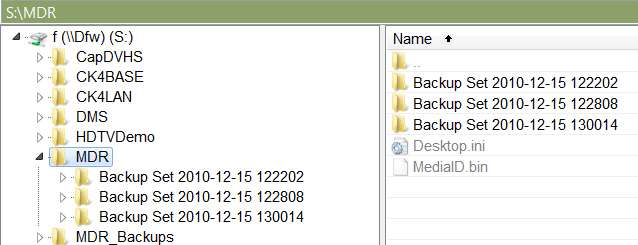
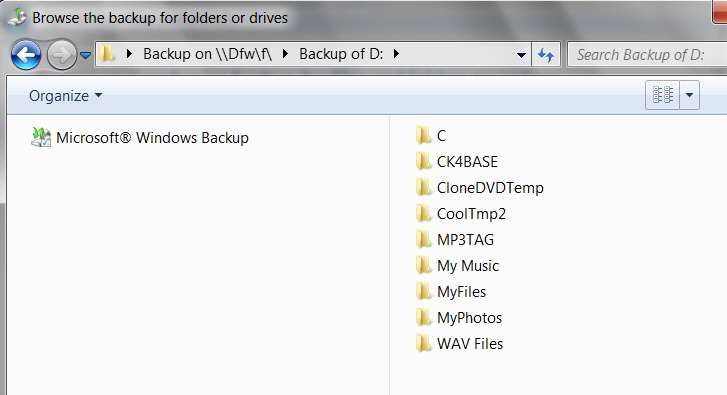
Ok, this is the first time I've tried to use Win7's Backup/Restore functionality. I normally use NovaBackup (to DAT tape) for my backup/restore functionality, but for convenience and speed during a hard drive swap I did today I decided to do a Win7 backup to disk (actually, to a network drive location) of the complete partitions I was transplanting.
I ran individual unique backups of each partition to be transplanted, placing the backup set in a unique folder on a large network drive. Each of the backups went fine, and the results look good.
After completing all the partition backups, I then removed the two old SCSI drives and installed one new SATA drive. I then re-partitioned the new drive as I wanted and got ready to do the RESTORE's for each partition.
For example, to restore my O partition, I navigated the RESTORE wizard to the following folder located on my network drive:
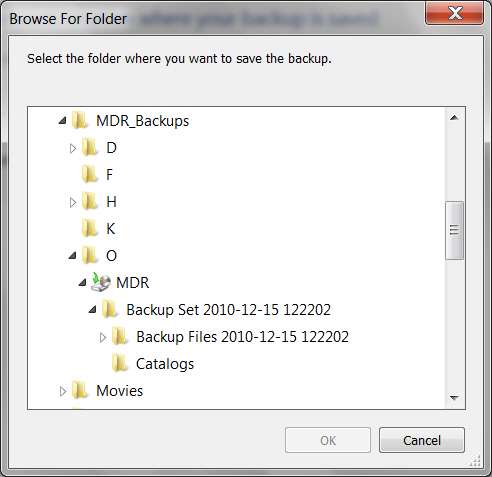
First, I point out that the dialog titling looks a bit weird... the English says "select the folder where you want to save the backup". This is kind of crazy, since I'm in the RESTORE function, and I would expect English to say something like "point to the backup set you want to restore" or similar.
Anyway, I don't actually know which of the folders or sub-folders I'm supposed to select from what's shown, in order to position properly for the RESTORE. No matter what I select, I get an error message when I push NEXT.
For example, I selected what seems to be the most reasonable folder (i.e. the one which has the backup set date and time in the picture above):
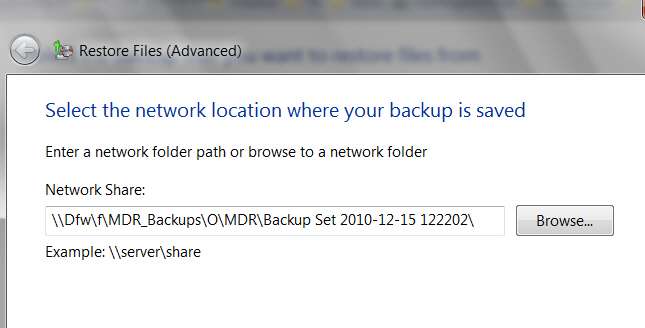
But when I then push the OK button, I get the following error message:
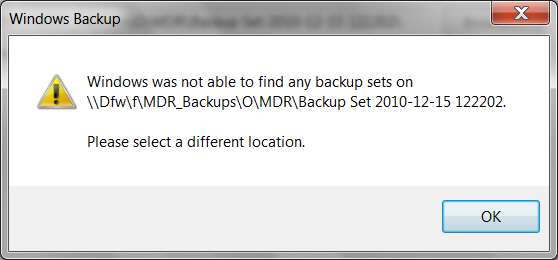
No matter what folder or sub-folder I select, I always get the same error message. RESTORE simply is apparently unhappy. I'm stumped.
Of course, even though I'm in a RESTORE function note that the error message above claims to be from "WINDOWS BACKUP"!!! Sure looks wrong to me. But if somehow the RESTORE wizard is actually invoking BACKUP, well... that might explain all of this craziness. Big bug in Win7 of course, but at least now explained.
My solution was to simply go down to the lowest level Files sub-folder where all the individual ZIP files are located, and then use WINRAR to manually un-zip them from their network location into the newly created partitions on my new drive. And of course this worked fine.
But... why is RESTORE failing?
Is the complaint really trying to tell me that my current output drive from the RESTORE (in my example, O) not a match for what was originally backed up??? Of course this is guaranteed to be true when swapping hardware, which is precisely why you would be using backup/restore... so it seems hard to believe this could be the complaint.
But if not that, then what's wrong with RESTORE that it is complaining at all? Obviously the backup set on the network drive was produced by BACKUP, with zero errors. So why isn't that backup set usable as input to RESTORE?
Anybody have some insights for me?
Again, I've worked around the problem already, using my manual un-zip method. But this is obviously ridiculous and RESTORE should clearly work.
I ran individual unique backups of each partition to be transplanted, placing the backup set in a unique folder on a large network drive. Each of the backups went fine, and the results look good.
After completing all the partition backups, I then removed the two old SCSI drives and installed one new SATA drive. I then re-partitioned the new drive as I wanted and got ready to do the RESTORE's for each partition.
For example, to restore my O partition, I navigated the RESTORE wizard to the following folder located on my network drive:
First, I point out that the dialog titling looks a bit weird... the English says "select the folder where you want to save the backup". This is kind of crazy, since I'm in the RESTORE function, and I would expect English to say something like "point to the backup set you want to restore" or similar.
Anyway, I don't actually know which of the folders or sub-folders I'm supposed to select from what's shown, in order to position properly for the RESTORE. No matter what I select, I get an error message when I push NEXT.
For example, I selected what seems to be the most reasonable folder (i.e. the one which has the backup set date and time in the picture above):
But when I then push the OK button, I get the following error message:
No matter what folder or sub-folder I select, I always get the same error message. RESTORE simply is apparently unhappy. I'm stumped.
Of course, even though I'm in a RESTORE function note that the error message above claims to be from "WINDOWS BACKUP"!!! Sure looks wrong to me. But if somehow the RESTORE wizard is actually invoking BACKUP, well... that might explain all of this craziness. Big bug in Win7 of course, but at least now explained.
My solution was to simply go down to the lowest level Files sub-folder where all the individual ZIP files are located, and then use WINRAR to manually un-zip them from their network location into the newly created partitions on my new drive. And of course this worked fine.
But... why is RESTORE failing?
Is the complaint really trying to tell me that my current output drive from the RESTORE (in my example, O) not a match for what was originally backed up??? Of course this is guaranteed to be true when swapping hardware, which is precisely why you would be using backup/restore... so it seems hard to believe this could be the complaint.
But if not that, then what's wrong with RESTORE that it is complaining at all? Obviously the backup set on the network drive was produced by BACKUP, with zero errors. So why isn't that backup set usable as input to RESTORE?
Anybody have some insights for me?
Again, I've worked around the problem already, using my manual un-zip method. But this is obviously ridiculous and RESTORE should clearly work.
My Computer
At a glance
Windows 7 Pro x64 (1), Win7 Pro X64 (2)i5-3350p 3.1Ghz/6MB-cache (1); E8400 3.0Ghz/6...8GB PC3-12800 DDR3 (1); 4GB PC3-10600 DDR3 (2)ATI HD7750 (1), (see TV cards); ATI R7 250 (2)
- Computer type
- PC/Desktop
- Computer Manufacturer/Model Number
- Home-built, two systems (1) and (2)
- OS
- Windows 7 Pro x64 (1), Win7 Pro X64 (2)
- CPU
- i5-3350p 3.1Ghz/6MB-cache (1); E8400 3.0Ghz/6MB-cache (2)
- Motherboard
- ASUS P8Z77-V Pro (1); ASUS P5Q3 (2)
- Memory
- 8GB PC3-12800 DDR3 (1); 4GB PC3-10600 DDR3 (2)
- Graphics Card(s)
- ATI HD7750 (1), (see TV cards); ATI R7 250 (2)
- Sound Card
- Realtek ALC892 HD Audio (1); Realtek ALC1200 HD Audio (2)
- Monitor(s) Displays
- Eizo HD2441W LCD, Eizo S2433W (1); Eizo 24" S2433W (2)
- Screen Resolution
- 1920x1200, 1920x1200 (1); 1920x1200 (2)
- Hard Drives
- (1) 1TB SATA-II (7200RPM), 2x2TB SATA-III (7200RPM), 250GB SATA-III (10000RPM) for OS; 2x2TB external USB 3.0
(2) 320GB SATA-II (7200RPM), 750GB SATA-II (7200RPM), 150GB SATA-II (10000RPM) for OS; 2TB external USB 3.0
- PSU
- Nesteq ECS-6001 600W (1); Nesteq ECS-5001 500W (2)
- Case
- Acousti-Case 360 (1) and (2)
- Cooling
- Noctua NH-U12P SE2 for CPU, 2x120mm case fans (1) and (2)
- Keyboard
- IBM PS/2 (1) and (2)
- Mouse
- Logitech MX Revolution wireless (1); Microsoft wired (2)
- Internet Speed
- 100mbps down / 10mbps up
- Antivirus
- Microsoft Security Essentials; Malwarebyte Anti-Malware Pro
- Browser
- Firefox
- Other Info
- Ceton InfiniTV 4-tuner cablecard-enabled TV card as well as Hauppauge HVR-2250 OTA/ATSC 2-tuner TV card in (1), running under Win7 WMC