Backup

Liz

New member
Local time
10:49 AM
Messages
21
Location
Leeds, UK
Not sure if this is the correct forum.

I cannot get Windows to finish a back up to a disc - it never gets further than 82%.

I am probably doing something wrong - but what.

Simple terms please.

Liz
 

My Computer

Computer Manufacturer/Model Number
Dell
OS
Windows 7 Home Premium
Hi Liz

If you are talking about system image and a backing up to a DVD, there are problems. Many members including myself were not able to make the image using the built in system image. When I tried twice, I got stuck at about 65% and I even had to pull the computer plug to stop the process. Not good, but I had no choice.

Instead you may want to use and try this free software. I have made my backup to DVD, using the softwared. In addition I have made a back up using the built in system image and have that on a separate drive.

Free Backup Software: Paragon Backup & Recovery Free Edition - Overview
 
Last edited:

My Computer

Computer type
PC/Desktop
Computer Manufacturer/Model Number
Dell XPS 420
OS
Windows 10, Home Clean Install
CPU
Intel Core2 processsor Q8200(2.33Ghz 1333FSB) Quad Core Tech
Motherboard
Dell
Memory
6 gb
Graphics Card(s)
ATI Radeon 256MB HD3650
Sound Card
Intergrated 7.1 Channel Audio
Monitor(s) Displays
Dell SP2009W 20"
Hard Drives
640 GB Serial ATA Hard drive
Cooling
Fan
Keyboard
Dell USB Keyboard
Mouse
Dell Premium Optical USB
Internet Speed
DSL 2.85

My Computer

Computer type
PC/Desktop
Computer Manufacturer/Model Number
Self Assembled
OS
Microsoft Windows 10 Pro Insider Preview 64-bit
CPU
Intel(R) Core(TM) i3-4130 CPU @ 3.40GHz
Motherboard
Gigabyte Technology Co., Ltd. B85M-D3H
Memory
Corsair Vengence 4GB x2 (8.00GB Dual-Channel DDR3 @ 798MHz)
Graphics Card(s)
2047MB GeForce GTS 450 (ZOTAC International)
Sound Card
Onboard (Realtek High Definition Audio)
Monitor(s) Displays
LG Flatron E2040T
Screen Resolution
1600x900
Hard Drives
Western Digital 1 TB
Seagate 500 GB
PSU
Corsair VS550
Case
Cooler Master K380
Cooling
Cooler Master Seidon 120V Plus
Keyboard
Logitech MK260r
Mouse
Logitech MK260r
Internet Speed
PMPL Broadband
Antivirus
Windows Defender + MBAM
Browser
Firefox
Other Info
Dell Studio 15" Laptop
Hi Liz

If you are talking about system image and a backing up to a DVD, there are problems. Many members including myself were not able to make the image using the built in system image. When I tried twice, I got stuck at about 65% and I even had to pull the computer plug to stop the process. Not good, but I had no choice.

Instead you may want to use and try this free software. I have made my backup to DVD, using the softwared. In addition I have made a back up using the built in system image and have that on a separate drive.

Free Backup Software: Paragon Backup & Recovery Free Edition - Overview


Thanks all

I am looking into the Paragon back up and will let you know how I get on.

Cheers

Liz
 

My Computer

Computer Manufacturer/Model Number
Dell
OS
Windows 7 Home Premium
Good Liz.

What I do is have a back up on DVD with Paragaon and another with system image (the MS backup). System image I leave on my HD and it is ready for any problem, except for a Hard Drive Crash. If something goes wrong with my OS, I get some corruption etc, I can easily reapair it.
 
Last edited:

My Computer

Computer type
PC/Desktop
Computer Manufacturer/Model Number
Dell XPS 420
OS
Windows 10, Home Clean Install
CPU
Intel Core2 processsor Q8200(2.33Ghz 1333FSB) Quad Core Tech
Motherboard
Dell
Memory
6 gb
Graphics Card(s)
ATI Radeon 256MB HD3650
Sound Card
Intergrated 7.1 Channel Audio
Monitor(s) Displays
Dell SP2009W 20"
Hard Drives
640 GB Serial ATA Hard drive
Cooling
Fan
Keyboard
Dell USB Keyboard
Mouse
Dell Premium Optical USB
Internet Speed
DSL 2.85
  • Like
Reactions: Liz
Thanks - I have noted what you have said - I have not tried anything yet.

i have since looked at it but not sure what to do - what do I back up - I am a complete novice concerning computers.


Liz
 
Last edited:

My Computer

Computer Manufacturer/Model Number
Dell
OS
Windows 7 Home Premium
You want to back up your entire hard drive.
 

My Computer

Computer type
PC/Desktop
Computer Manufacturer/Model Number
Dell XPS 420
OS
Windows 10, Home Clean Install
CPU
Intel Core2 processsor Q8200(2.33Ghz 1333FSB) Quad Core Tech
Motherboard
Dell
Memory
6 gb
Graphics Card(s)
ATI Radeon 256MB HD3650
Sound Card
Intergrated 7.1 Channel Audio
Monitor(s) Displays
Dell SP2009W 20"
Hard Drives
640 GB Serial ATA Hard drive
Cooling
Fan
Keyboard
Dell USB Keyboard
Mouse
Dell Premium Optical USB
Internet Speed
DSL 2.85
Many thanks

Liz
 

My Computer

Computer Manufacturer/Model Number
Dell
OS
Windows 7 Home Premium
Liz

Depending on how many changes you make to your computer, you may want to update the backups once a month or so. Then if you have a problem that cannot be fixed, you can merely use the back up to be good again.
 

My Computer

Computer type
PC/Desktop
Computer Manufacturer/Model Number
Dell XPS 420
OS
Windows 10, Home Clean Install
CPU
Intel Core2 processsor Q8200(2.33Ghz 1333FSB) Quad Core Tech
Motherboard
Dell
Memory
6 gb
Graphics Card(s)
ATI Radeon 256MB HD3650
Sound Card
Intergrated 7.1 Channel Audio
Monitor(s) Displays
Dell SP2009W 20"
Hard Drives
640 GB Serial ATA Hard drive
Cooling
Fan
Keyboard
Dell USB Keyboard
Mouse
Dell Premium Optical USB
Internet Speed
DSL 2.85
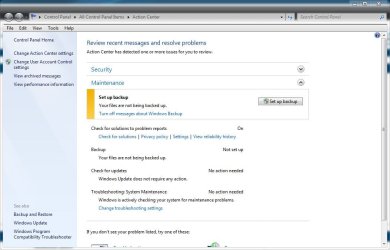
I got fed up with the Action Centre being flagged and telling me that my back up had not been completed (that was the last one that I tried) and I could not unflag it.

I did a windows back up and it went to 100% but just stayed there and when I came out of it it told me that I was not fully backed up - what is it with this thing. I shall try the Paragon next but feel a bit unsure. Why do Microsoft include the back up if its not going to work - or are some people (me) unlucky.


Liz
 

My Computer

Computer Manufacturer/Model Number
Dell
OS
Windows 7 Home Premium
If you are backing up to your Hard Drive, make sure that you have enough space for the back up. How much space do you have for your back up?
 

My Computer

Computer type
PC/Desktop
Computer Manufacturer/Model Number
Dell XPS 420
OS
Windows 10, Home Clean Install
CPU
Intel Core2 processsor Q8200(2.33Ghz 1333FSB) Quad Core Tech
Motherboard
Dell
Memory
6 gb
Graphics Card(s)
ATI Radeon 256MB HD3650
Sound Card
Intergrated 7.1 Channel Audio
Monitor(s) Displays
Dell SP2009W 20"
Hard Drives
640 GB Serial ATA Hard drive
Cooling
Fan
Keyboard
Dell USB Keyboard
Mouse
Dell Premium Optical USB
Internet Speed
DSL 2.85
The Microsoft product usually works for most people, but is not particularly intuitive and lacks the flexibility of other products such as Acronis, Paragon, and Macrium Reflect. Paragon and Macrium are free and Acronis is free for those who will restore to a Seagate or Western Digital hard drive.

None of the 3 are flawless, but all 3 are more intuitive and flexible than the Microsoft product.

I make images with all 3 because I have plenty of room to store the images. If I ever have a drive failure, I figure at least 1 of the 3 will be able to restore my system.

I just made and verified new images with Acronis, Macrium, and Paragon yesterday. Took only about 45 minutes to do all three.
 

My Computer

Computer type
PC/Desktop
Computer Manufacturer/Model Number
Ignatz Special; 4 speed manual gearbox; factory air conditioning; one of one
OS
Windows 7 Home Premium SP1, 64-bit
CPU
Intel Skylake i5-6600K, not overclocked
Motherboard
AsRock Z170M Extreme 4, micro ATX
Memory
8 GB HyperX DDR4-2666 (2 x 4 GB)
Graphics Card(s)
none; graphics are integrated on CPU
Sound Card
onboard: Realtek ALC1150; external: USB Behringer UF0-202
Monitor(s) Displays
Dell S2340M 23 inch IPS
Screen Resolution
1600 x 900
Hard Drives
System: Crucial MX100 series SSD, 128 GB;
Data: Samsung Spinpoint 103SJ, 1 TB;
Backup: WD Caviar Green WD30EZRX-00D8PB0, 3 TB
PSU
Rosewill SilentNight 500 watt fanless, semi-modular
Case
Antec Solo II
Cooling
Noctua NH-U12S; Noctua F12 intake, Noctua S12A exhaust
Keyboard
Microsoft 200 6JH-00001 USB
Mouse
Dell or Microsoft optical wired; USB
Antivirus
Microsoft Security Essentials and Malwarebytes Premium
Browser
Pale Moon
Other Info
All fans PWM; speeds at idle: CPU circa 500 rpm; intake circa 600 rpm; exhaust circa 600 rpm; CPU temps 27 idle and 47 C load in a warm room (27 C/81 F) when running Intel Extreme Tuning Utility stress test.
I got fed up with the Action Centre being flagged and telling me that my back up had not been completed (that was the last one that I tried) and I could not unflag it.

I did a windows back up and it went to 100% but just stayed there and when I came out of it it told me that I was not fully backed up - what is it with this thing. I shall try the Paragon next but feel a bit unsure. Why do Microsoft include the back up if its not going to work - or are some people (me) unlucky.


Liz

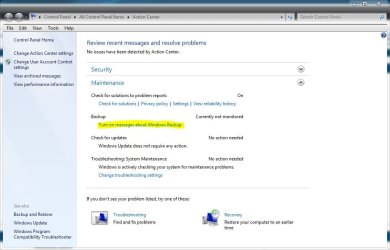
No you're not the only one. You can turn off notifications in the action center, Thats what I did so I wouldn't have to see them.
Or if you are using a third party app for backups, You can use this tutorial to set it back to default http://www.sevenforums.com/tutorial...files-reset-default-configuration.html?filter[2]=Backup Restore.
 

Attachments

  • backup.JPG
    backup.JPG
    65.7 KB · Views: 2
  • backup 2.JPG
    backup 2.JPG
    67.5 KB · Views: 3

My Computer

Computer type
PC/Desktop
Computer Manufacturer/Model Number
Self Built
OS
Win 10 Pro x64
CPU
Intel I5-2500K @3.3GHz
Motherboard
Asrock P67 Extreme4
Memory
16GB G.Skill Ripjaws X (4x4GB)
Graphics Card(s)
EVGA GeForce 750 Ti SC 2GB
Sound Card
ASUS Xonar DG 5.1 Channels 24-bit 96KHz PCI Interface Sound
Monitor(s) Displays
auria eq2367
Screen Resolution
1920 x 1080
Hard Drives
250GB Samsung 850 EVO SSD
1TB WD Blue
1TB Hitachi
PSU
SeaSonic X 650W 80 Plus Gold
Case
Corsair Obsidian 750D
Cooling
Corsair H60, Three 140mm case fans
Keyboard
Logitech Wireless Keyboard K520
Mouse
Logitech Wireless Mouse M310
Internet Speed
Wave Broadband ~ 100 dn 5 up
Antivirus
Windows Defender, Malwarebytes Premium
Browser
Edge, IE11, Chrome
Other Info
Laptop specs: HP g7-1365dx /
CPU: AMD A6-3420M APU with Radeon(tm) HD Graphics /
RAM: Crucial 8Gb (2x4Gb) /
SSD: Crucial M4-CT128M4SSD2 ATA Device/ FW 000F /
GFX: AMD Radeon HD 6520G /
OS: Windows 10 Pro x64
If you are backing up to your Hard Drive, make sure that you have enough space for the back up. How much space do you have for your back up?


I have 256GB space - and I backed up to a DVD.

Liz
 

My Computer

Computer Manufacturer/Model Number
Dell
OS
Windows 7 Home Premium
I got fed up with the Action Centre being flagged and telling me that my back up had not been completed (that was the last one that I tried) and I could not unflag it.

I did a windows back up and it went to 100% but just stayed there and when I came out of it it told me that I was not fully backed up - what is it with this thing. I shall try the Paragon next but feel a bit unsure. Why do Microsoft include the back up if its not going to work - or are some people (me) unlucky.

Liz

Liz

No you're not the only one. You can turn off notifications in the action center, Thats what I did so I wouldn't have to see them.
Or if you are using a third party app for backups, You can use this tutorial to set it back to default http://www.sevenforums.com/tutorial...files-reset-default-configuration.html?filter[2]=Backup Restore.

Many thanks I will look into it

Cheers

Liz
 

My Computer

Computer Manufacturer/Model Number
Dell
OS
Windows 7 Home Premium
Back
Top