
You are using an out of date browser. It may not display this or other websites correctly.
You should upgrade or use an alternative browser.
You should upgrade or use an alternative browser.
Backups on a Network?
- Thread starter Tarka Dal
- Start date


- Local time
- 10:22 PM
- Messages
- 7,146
maybe because you are running inferior imaging software?
what are you using?
the free macrium reflect allows you to backup/restore from a network location.
what are you using?
the free macrium reflect allows you to backup/restore from a network location.
My Computer
- Computer Manufacturer/Model Number
- mickey megabyte 1234
- OS
- ultimate 64 sp1
- CPU
- i5 2500K [email protected]
- Motherboard
- MSI P67A-GD53
- Memory
- 8 gigs GSkill Ripjaws 1600
- Graphics Card(s)
- amd hd6950
- Sound Card
- creative x-fi gamer
- Monitor(s) Displays
- samsung 24"
- Screen Resolution
- 1920x1080
- Hard Drives
- ocz vertex 2e 60 gig, samsung f3 1tb, buffalo 2tb ext
- PSU
- antec 550
- Case
- antec three hundred
- Cooling
- i'm a cooling fan
- Keyboard
- saitek eclipse ii
- Mouse
- logitech g3
- Internet Speed
- about 4 Mbps
- Other Info
- i love win7
- Local time
- 10:22 PM
- Messages
- 7,146
My Computer
- Computer Manufacturer/Model Number
- mickey megabyte 1234
- OS
- ultimate 64 sp1
- CPU
- i5 2500K [email protected]
- Motherboard
- MSI P67A-GD53
- Memory
- 8 gigs GSkill Ripjaws 1600
- Graphics Card(s)
- amd hd6950
- Sound Card
- creative x-fi gamer
- Monitor(s) Displays
- samsung 24"
- Screen Resolution
- 1920x1080
- Hard Drives
- ocz vertex 2e 60 gig, samsung f3 1tb, buffalo 2tb ext
- PSU
- antec 550
- Case
- antec three hundred
- Cooling
- i'm a cooling fan
- Keyboard
- saitek eclipse ii
- Mouse
- logitech g3
- Internet Speed
- about 4 Mbps
- Other Info
- i love win7
- Local time
- 10:22 PM
- Messages
- 7,146
hmm, i've had zero experience with that particular software.
try macrium and see - i think it's the third best thing since sliced bread.
try macrium and see - i think it's the third best thing since sliced bread.
My Computer
- Computer Manufacturer/Model Number
- mickey megabyte 1234
- OS
- ultimate 64 sp1
- CPU
- i5 2500K [email protected]
- Motherboard
- MSI P67A-GD53
- Memory
- 8 gigs GSkill Ripjaws 1600
- Graphics Card(s)
- amd hd6950
- Sound Card
- creative x-fi gamer
- Monitor(s) Displays
- samsung 24"
- Screen Resolution
- 1920x1080
- Hard Drives
- ocz vertex 2e 60 gig, samsung f3 1tb, buffalo 2tb ext
- PSU
- antec 550
- Case
- antec three hundred
- Cooling
- i'm a cooling fan
- Keyboard
- saitek eclipse ii
- Mouse
- logitech g3
- Internet Speed
- about 4 Mbps
- Other Info
- i love win7

First of all, how are you trying to connect to the network share?
I still haven't used Acronis or Macrium...
One of the tools I use is Ghost, which is run from a USB bootable PE. (Ours is built off BartPE)
Firstly in the process, the network card drivers need to be loaded.
Then a connection to the share needs to be established and mapped from the NET USE command:
net use i: \\server\share /user:domain\user
Then run ghost, or your imaging tool, and create image from disk to file on I:\
I still haven't used Acronis or Macrium...
One of the tools I use is Ghost, which is run from a USB bootable PE. (Ours is built off BartPE)
Firstly in the process, the network card drivers need to be loaded.
Then a connection to the share needs to be established and mapped from the NET USE command:
net use i: \\server\share /user:domain\user
Then run ghost, or your imaging tool, and create image from disk to file on I:\
My Computer
- OS
- Windows 7 Enterprise
- CPU
- Intel Pentium Dual E2200 @2.2GHz
- Motherboard
- Gigabyte II-G31
- Memory
- 4GB
- Graphics Card(s)
- Palit GForce 9500GT 1GB
- Sound Card
- onBoard
- Hard Drives
- WesternDigital: 250GB + 1TB + 1TB + 2TB
- PSU
- 450W
- Case
- CoolerMaster CM690
- Cooling
- Corsair H50
- Mouse
- Logitech MX518
- Local time
- 10:22 PM
- Messages
- 7,146
crikey - macrium reflect is far simpler than that.
you can use it with linux or pe boot disc/partition, with no command-line stuff necessary - just browse to the network location you want to backup to or restore from.
try them all and see which works best for you...
xarden, you're 'the imaging guy', yet you haven't tried these programs?
you can use it with linux or pe boot disc/partition, with no command-line stuff necessary - just browse to the network location you want to backup to or restore from.
try them all and see which works best for you...
xarden, you're 'the imaging guy', yet you haven't tried these programs?
My Computer
- Computer Manufacturer/Model Number
- mickey megabyte 1234
- OS
- ultimate 64 sp1
- CPU
- i5 2500K [email protected]
- Motherboard
- MSI P67A-GD53
- Memory
- 8 gigs GSkill Ripjaws 1600
- Graphics Card(s)
- amd hd6950
- Sound Card
- creative x-fi gamer
- Monitor(s) Displays
- samsung 24"
- Screen Resolution
- 1920x1080
- Hard Drives
- ocz vertex 2e 60 gig, samsung f3 1tb, buffalo 2tb ext
- PSU
- antec 550
- Case
- antec three hundred
- Cooling
- i'm a cooling fan
- Keyboard
- saitek eclipse ii
- Mouse
- logitech g3
- Internet Speed
- about 4 Mbps
- Other Info
- i love win7

the free macrium reflect allows you to backup/restore from a network location.
+1. Absolutely correct : backing up to, and restoring from, a network works flawlesly for me.
My Computer
- Computer type
- PC/Desktop
- Computer Manufacturer/Model Number
- Golden Mk. I.4
- OS
- Windows 10 Pro x64 ; Xubuntu x64
- CPU
- Intel i7 860 @ 2.80 GHz O/C'ed to 4.0GHz
- Motherboard
- Gigabyte P55A-UD3R Rev.1. Award BIOS F13
- Memory
- 16GB Corsair Vengance DDR3 @ 661 MHz Dual Channel (9-9-9-24)
- Graphics Card(s)
- EVGA NVidia GTX 560 1024MB
- Sound Card
- Realtek Integrated
- Monitor(s) Displays
- Dual Samsung SyncMaster 2494HS
- Screen Resolution
- 1920*1080 and 1920*1080
- Hard Drives
- 1*Samsung 840 EVO 120GB SSD;
1*OCZ Vertex 2 60GB SSD;
2*Samsung F3 SpinPoint 1TB in RAID0;
1*Samsung F1 SpinPoint 1TB;
2*Western Digital 1TB External USB 3.0
1*Western Digital 500GB External USB 3.0
1*Seagate 500GB External USB 2.0
- PSU
- Thermaltake ToughPower QFan 750W
- Case
- Thermaltake Element S VK60001W2Z
- Cooling
- Corsair H60 Water Cooling, 2*230mm and 2*80mm case fans
- Keyboard
- Logitech G110
- Mouse
- Logitech MX518
xarden, you're 'the imaging guy', yet you haven't tried these programs?
I know I should, so then I wont be so biased towards the tools I've inherited...
I'm expecting a bit of downtime after semester starts, so then I can look into other tools. And I will be looking into them.
In the meantime, what I've got works and it works very well for builds and deployments.
So that's what I'l be recommending
My Computer
- OS
- Windows 7 Enterprise
- CPU
- Intel Pentium Dual E2200 @2.2GHz
- Motherboard
- Gigabyte II-G31
- Memory
- 4GB
- Graphics Card(s)
- Palit GForce 9500GT 1GB
- Sound Card
- onBoard
- Hard Drives
- WesternDigital: 250GB + 1TB + 1TB + 2TB
- PSU
- 450W
- Case
- CoolerMaster CM690
- Cooling
- Corsair H50
- Mouse
- Logitech MX518
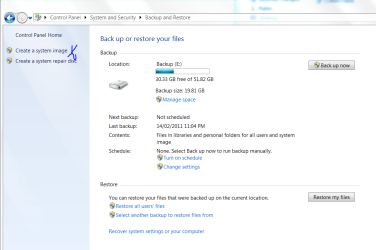
Cheers guys. But, I've found that you can save the image to a networked computer. It's there in the menu.
Capture.PNG
Yep this worked and there is no need for Macrium Reflect....
Capture.PNG
Yep this worked and there is no need for Macrium Reflect....
Attachments
Last edited:
My Computer
- OS
- Stools
- Local time
- 10:22 PM
- Messages
- 7,146
just as an extra to this thread:
windows backup will only work with a network if you use the professional, ultimate or enterprise editions.
windows backup will only work with a network if you use the professional, ultimate or enterprise editions.
My Computer
- Computer Manufacturer/Model Number
- mickey megabyte 1234
- OS
- ultimate 64 sp1
- CPU
- i5 2500K [email protected]
- Motherboard
- MSI P67A-GD53
- Memory
- 8 gigs GSkill Ripjaws 1600
- Graphics Card(s)
- amd hd6950
- Sound Card
- creative x-fi gamer
- Monitor(s) Displays
- samsung 24"
- Screen Resolution
- 1920x1080
- Hard Drives
- ocz vertex 2e 60 gig, samsung f3 1tb, buffalo 2tb ext
- PSU
- antec 550
- Case
- antec three hundred
- Cooling
- i'm a cooling fan
- Keyboard
- saitek eclipse ii
- Mouse
- logitech g3
- Internet Speed
- about 4 Mbps
- Other Info
- i love win7