Bad Browsers

alebcay

New member
Local time
5:59 PM
Messages
19
Hi all,

I have a problem on my computer regarding access to the internet. Internet Explorer 8, Google Chrome, etc. all cannot access the internet, except for Mozilla Firefox (versions 3 and 4b both working) and a Mozilla-based browser known as Epic Browser (see their site here). Is this something with my DNS or something more or less serious?


Please help,
--Alebcay
 

My Computer

Computer Manufacturer/Model Number
Lenovo
OS
Windows 7 x86
CPU
Intel Pentium Dual Core T4400 at 2.2 GHz
Screen Resolution
1024x768
Welcome to Seven Forums alebcay. Are you running a firewall that could be blocking them? Try this:

Start> Type CMD in serach box> Right click on cmd.exe in results above and click on Run As Administrator

When the cmd prompt opens, type

ipconfig /flushdns

Press enter

ipconfig /release

Press enter

ipconfig /renew

Press enter

See if that solves it. A Guy
 

My Computer

Computer type
PC/Desktop
OS
Windows 10 Home x64
CPU
INTEL Core i5-750 Quad-Core 3.37GHz
Motherboard
ASUS P7P55D
Memory
HyperX Fury Black Series 8GB (2 x 4GB) 1866Mhz
Graphics Card(s)
EVGA GeForce GTX 750 Superclocked 1GB 128-Bit GDDR5
Monitor(s) Displays
LG 32MA68HY 32" IPS
Screen Resolution
1920 x 1080
Hard Drives
Samsung 840 Evo 120GB, SEAGATE 500GB Barracuda® 7200.12, SATA 3 Gb/s, 7200 RPM, 16MB cache
PSU
ANTEC TruePower New TP-550, 80 PLUS, 550W
Case
ANTEC Three Hundred Illusion
Cooling
COOLER MASTER Hyper 212 Plus, 4 x 120mm 1 x 140mm Noctua's
Internet Speed
85 + Mbps
Antivirus
Avast
Browser
Vivaldi
The ipconfig /flushdns command worked, but an error came up on ipconfig /renew.

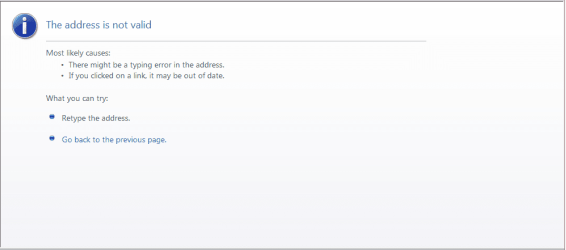
Also IE says that my address is not valid when I try to access a website.
 

Attachments

  • IE.PNG
    IE.PNG
    10.8 KB · Views: 16

My Computer

Computer Manufacturer/Model Number
Lenovo
OS
Windows 7 x86
CPU
Intel Pentium Dual Core T4400 at 2.2 GHz
Screen Resolution
1024x768
The ipconfig /flushdns command worked, but an error came up on ipconfig /renew.

Also IE says that my address is not valid when I try to access a website.

Did the release also work successfully? What was the error on renew? Try this, Start> On all programs list, click on Windows Update. Does WU open ok? A Guy
 

My Computer

Computer type
PC/Desktop
OS
Windows 10 Home x64
CPU
INTEL Core i5-750 Quad-Core 3.37GHz
Motherboard
ASUS P7P55D
Memory
HyperX Fury Black Series 8GB (2 x 4GB) 1866Mhz
Graphics Card(s)
EVGA GeForce GTX 750 Superclocked 1GB 128-Bit GDDR5
Monitor(s) Displays
LG 32MA68HY 32" IPS
Screen Resolution
1920 x 1080
Hard Drives
Samsung 840 Evo 120GB, SEAGATE 500GB Barracuda® 7200.12, SATA 3 Gb/s, 7200 RPM, 16MB cache
PSU
ANTEC TruePower New TP-550, 80 PLUS, 550W
Case
ANTEC Three Hundred Illusion
Cooling
COOLER MASTER Hyper 212 Plus, 4 x 120mm 1 x 140mm Noctua's
Internet Speed
85 + Mbps
Antivirus
Avast
Browser
Vivaldi
In cmd prompt, type ipconfig /all - then screen shot it here...

If you getting a 169.x.x.x IP address, then your computer isn't getting an ip address from a router. If you are gtting any other IP address, then ignore that last statement.

Still, have a look at this: Your IP Address Can Change
 

My Computer

Computer Manufacturer/Model Number
ATX Custom Build 2012
OS
Windows 7 Enterprise x64 SP1
CPU
Intel Core i3-2100 @ 3.10GHz
Motherboard
Intel DH67CL desktop ATX
Memory
10 GB DDR3
Graphics Card(s)
Asus EAH5450 series (Radeon)
Monitor(s) Displays
Samsung SyncMaster 226BW, Samsung Syncmaster P2450H
Screen Resolution
226BW: 1680 x 1050 & P2450H: 1920 x 1080
Hard Drives
Western Digital 320 GB sata (boot), Samsung 640 GB sata, Seagate 2 TB sata (data)
PSU
Cooler Master Extreme Power Plus 500W
Case
Thermaltake V3 Black Edition
Cooling
stock cooling with added intake fan
Keyboard
HP Wireless Elite Keyboard Wireless Keyboard
Mouse
Microsoft Touch
Internet Speed
Comcast Cable business class <=18Mb {averages 12Mb}
Other Info
Optical drives: LG SuperMulti Blue, HP DVD 1260T
Other: Kensington Bluetooth Receiver
Network: Buffalo Wireless N USB, DLink N router/DLink Ethernet Switch/DLink Xtreme N wireless bridge
Printer: HP Photosmart Plus, HP Officejet Pro 8600 Plus
PCs: HP dv6-3040us (7 x64 SP1), HP DM4-2165dx (7 x64 SP1), HP Pavilion zv6130us (7 x86), Apple Macbook Air (Lion)
************
Hi all,

As A Guy requested, Windows can look for updates, but an error occurs when it attempts to download.

As merkat106 requested, my IP is not 169.x.x.xx, you can take a look at my cmd.
 

Attachments

  • Command Prompt.PNG
    Command Prompt.PNG
    15.3 KB · Views: 26

My Computer

Computer Manufacturer/Model Number
Lenovo
OS
Windows 7 x86
CPU
Intel Pentium Dual Core T4400 at 2.2 GHz
Screen Resolution
1024x768
Solved!

Hi all,

Thank you for all your effort and all your consideration for my dilemma. Fortunately, I fixed the problem by resetting the Internet Settings.


Thanks,
Alebcay:D
 

My Computer

Computer Manufacturer/Model Number
Lenovo
OS
Windows 7 x86
CPU
Intel Pentium Dual Core T4400 at 2.2 GHz
Screen Resolution
1024x768
Thank you very much for taking the time to come back and give us the update. We are all happy you got your computer to work correctly.
 

My Computer

Computer type
Laptop
Computer Manufacturer/Model Number
Toshiba P775-S7100
OS
Windows 7 Professional SP1 64-bit
CPU
Intel Core i5-2450M @2.5 GHz
Memory
6 GB DDR3 1333MHz
Graphics Card(s)
Intel HD 3000
Monitor(s) Displays
Built-in 17.3" LED; 22" Insignia NS-L22Q-10A
Screen Resolution
1600x900; 1360x768
Hard Drives
750 GB Hitachi
1TB Seagate FreeAgent External
Internet Speed
Verizon DSL Speed(Down/Up): 3360 Kbps / 800 Kbps
Antivirus
MSE and MBAM Pro
Browser
IE10
Glad you got it working, and let us know how. We don't like to quit until the problem is fixed :D

A Guy
 

My Computer

Computer type
PC/Desktop
OS
Windows 10 Home x64
CPU
INTEL Core i5-750 Quad-Core 3.37GHz
Motherboard
ASUS P7P55D
Memory
HyperX Fury Black Series 8GB (2 x 4GB) 1866Mhz
Graphics Card(s)
EVGA GeForce GTX 750 Superclocked 1GB 128-Bit GDDR5
Monitor(s) Displays
LG 32MA68HY 32" IPS
Screen Resolution
1920 x 1080
Hard Drives
Samsung 840 Evo 120GB, SEAGATE 500GB Barracuda® 7200.12, SATA 3 Gb/s, 7200 RPM, 16MB cache
PSU
ANTEC TruePower New TP-550, 80 PLUS, 550W
Case
ANTEC Three Hundred Illusion
Cooling
COOLER MASTER Hyper 212 Plus, 4 x 120mm 1 x 140mm Noctua's
Internet Speed
85 + Mbps
Antivirus
Avast
Browser
Vivaldi
...I fixed the problem by resetting the Internet Settings....
I'm still confused about what you did. Did you reset IE8, reset the computer's IP settings using the command prompt window, or reset settings on your router?
 

My Computer

Computer type
PC/Desktop
Computer Manufacturer/Model Number
OQO 2+
OS
Windows 8 Pro w/MC 32-bit
CPU
Intel Atom 1.86 GHz
Motherboard
OQO 2+
Memory
2 GB
Graphics Card(s)
Intel GMA 500
Sound Card
IDT
Monitor(s) Displays
LCD
Screen Resolution
800 x 480 (portable) 1280 x 1024 (docked)
Hard Drives
64 GB SSD
PSU
9 Ah Battery (portable) or OQO Brick (docked)
Case
Shirt Pocket Sized
Cooling
Tiny Fan
Keyboard
Slide out (portable) DiNovo Edge (docked)
Mouse
Eraser head (portable) Logitech Bluetooth (docked)
Internet Speed
WWAN or 802.11G (portable) T1 (docked)
Browser
IE 10
Other Info
DVD-RW OQO Docking Station
On IE8, I clicked Tools>Internet Options. Then, I went to the Advanced Tab and clicked Reset, and that was all there was to it!
 

My Computer

Computer Manufacturer/Model Number
Lenovo
OS
Windows 7 x86
CPU
Intel Pentium Dual Core T4400 at 2.2 GHz
Screen Resolution
1024x768
Back
Top