Bad drive? Fun with Disk Management

justaguy

New member
Local time
12:42 AM
Messages
4
Location
Lake Michigan
OK, so.

I just realized I have an external drive that's not hooked up. Been sitting there for I don't know how long. I just completely lost track of how many drives I used to have hooked up. Supposed to be 9, only been showing 8 for a long time.

So I plug it in. 7 gives me the "hardware attached" sound, but nothing happens in Explorer. Shows up in Device Manager. Does show up in Disk Management, but won't let me do anything to it. Cannot initialize, can't go online with it, can't change the drive letter, just says "Disk 8, Unknown, Not Initialized".

Reboot, went into BIOS. Also shows up there.

I'm guessing it's kaput? I know there must have been stuff on there, but it's been so long I can't even remember what it was. TV shows? Movies? Music? Nuclear secrets? The formula for the Higgs Boson?

Have tried 2 cables, one of which is brand new (USB 3, with the Micro B end on it) in both USB 2 and USB 3 ports.
 

My Computer

Computer Manufacturer/Model Number
homebrew
OS
Ultimate x64
CPU
AMD Phenom II 1090T
Motherboard
ASUS M4A87TD/USB3
Memory
4GB (for now. lol)
Graphics Card(s)
SAPPHIRE 100186L Radeon X1950XT
Sound Card
onboard
Monitor(s) Displays
LG W2252TQ
Screen Resolution
1680x1050
Hard Drives
(1) Crucial 64GB SSD
(1) WD 2TB Caviar Black
(2) Samsung 500GB HD501LJ
(3) WD MyBook 1TB
(1) WD MyBook 2TB
PSU
Rosewill RP550V2-D-SL
Case
Antec
Cooling
some fans
Keyboard
Logitech Wave
Mouse
IBM thingy

My Computer

Computer type
PC/Desktop
Computer Manufacturer/Model Number
Own build (new) Desk1 / Asus ROG Win 7 / Desk2 1st build
OS
Desk1 7 Home Prem / Desk2 10 Pro / Main lap Asus ROG 10 Pro 2 laptop Toshiba 7 Pro Asus P2520 7 & 10
CPU
Desk1 i5 3750K / Laptop i7 GTX 860M / Desk2 i5 2500
Motherboard
Desk1 Asus P877-V / Desk2 Gigabyte H67 UD3H / Laptop ?
Memory
Desk1 8GB (1866) / Desk2 16GB (1333) / Laptop 8Gb DDR3
Graphics Card(s)
Desk 1& 2NVidia GTX 650 & Laptops on board Intel
Sound Card
Desk 1 & 2 -XONAR DG Realtek High Def audio Laptop
Monitor(s) Displays
Desk 1 Benq HD 2450 / Desk2 Philips 24" / Laptop 17.5"
Screen Resolution
1920x1080 D1 & D2 & Laptop 1
Hard Drives
Desk1 Samsung 120GB 830 SSD
Asus ROG 256GB 850 Pro SSD
Desk2 Samsung 840 256 SSD
Toshiba 120GB EVO
PSU
Desk 1 Corsair HX 1050/ Laptop ? / Desk 2 Corsair HX 650
Case
Desk 1 Cooler HAF XM ? Toshiba laptop / Desk2 Coolermaster
Cooling
Fans on all Desk1 -2 Desk2 - all Coolermasters 5 Laptop ?
Keyboard
Desk 1 MS Sidewinder X6 Desk 2 MS Sidewinder X 4
Mouse
Desk 1&2 - Gigabyte MS 900 gamer - laptop - Logitec wireless
Internet Speed
ADSL2+
Other Info
One other Desktop (tester) and spare Toshba laptop both with SSD's
Running Kaspersky 2016 ISS on all machines config'd identically
Logitec audio stereo systems on each machine (x3)
Canon MG5250MFC
Router/modem TP-Link running WPA2SK
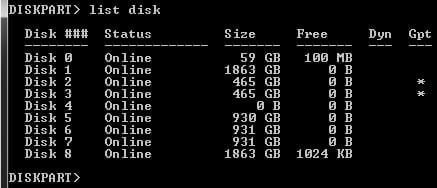
Here's what I find using DiskPart.

That "Clean" command worries me...is that the only option there is? Other than data recovery?
 

Attachments

  • diskpart1.jpg
    diskpart1.jpg
    12 KB · Views: 5

My Computer

Computer Manufacturer/Model Number
homebrew
OS
Ultimate x64
CPU
AMD Phenom II 1090T
Motherboard
ASUS M4A87TD/USB3
Memory
4GB (for now. lol)
Graphics Card(s)
SAPPHIRE 100186L Radeon X1950XT
Sound Card
onboard
Monitor(s) Displays
LG W2252TQ
Screen Resolution
1680x1050
Hard Drives
(1) Crucial 64GB SSD
(1) WD 2TB Caviar Black
(2) Samsung 500GB HD501LJ
(3) WD MyBook 1TB
(1) WD MyBook 2TB
PSU
Rosewill RP550V2-D-SL
Case
Antec
Cooling
some fans
Keyboard
Logitech Wave
Mouse
IBM thingy
If it's USB, try a different USB port. Also try a new cable (is it in a dock? Is it connected directly to the USB port on the motherboard (ie, not a monitor hub, usb hub, etc.).
 

My Computer

Computer type
PC/Desktop
Computer Manufacturer/Model Number
custom
OS
windows 7 Pro 64 Bit
CPU
i5 4670K
Motherboard
Asus Max Hero 1150 socket
Memory
16GB DDR3@933mhz
Graphics Card(s)
Radeon R9 390 8192mb
Monitor(s) Displays
Dell U2415 x3
Screen Resolution
1920 (5760) x 1200 x3
Hard Drives
System: Kingston 128GB SSD

Installing to Samsung 860 EVO 500GB
WD Black 2 TB & 1 TB
PSU
Corsair CX750M
Cooling
Hyper 312
Internet Speed
50mbps
Guy another thing you can try is make a bootable Ubuntu disk set the BIOS to boot from the optical when it loads go to the TRY not the Install and use TRY when it is fully loaded it will show all drives connected to the machine click on them and open them it doesn't rely on Windows so you should be able to "see" what is on / in the drive/s.
It doesn't take long and you can use whatever burning software you like I use ImgBurn for my stuff like that. The Official ImgBurn Website
I use this for drives that cannot be accessed for whatever reason and it just takes a bit of digging down if you get into any problems post back.

Download Ubuntu | Ubuntu
 

My Computer

Computer type
PC/Desktop
Computer Manufacturer/Model Number
Own build (new) Desk1 / Asus ROG Win 7 / Desk2 1st build
OS
Desk1 7 Home Prem / Desk2 10 Pro / Main lap Asus ROG 10 Pro 2 laptop Toshiba 7 Pro Asus P2520 7 & 10
CPU
Desk1 i5 3750K / Laptop i7 GTX 860M / Desk2 i5 2500
Motherboard
Desk1 Asus P877-V / Desk2 Gigabyte H67 UD3H / Laptop ?
Memory
Desk1 8GB (1866) / Desk2 16GB (1333) / Laptop 8Gb DDR3
Graphics Card(s)
Desk 1& 2NVidia GTX 650 & Laptops on board Intel
Sound Card
Desk 1 & 2 -XONAR DG Realtek High Def audio Laptop
Monitor(s) Displays
Desk 1 Benq HD 2450 / Desk2 Philips 24" / Laptop 17.5"
Screen Resolution
1920x1080 D1 & D2 & Laptop 1
Hard Drives
Desk1 Samsung 120GB 830 SSD
Asus ROG 256GB 850 Pro SSD
Desk2 Samsung 840 256 SSD
Toshiba 120GB EVO
PSU
Desk 1 Corsair HX 1050/ Laptop ? / Desk 2 Corsair HX 650
Case
Desk 1 Cooler HAF XM ? Toshiba laptop / Desk2 Coolermaster
Cooling
Fans on all Desk1 -2 Desk2 - all Coolermasters 5 Laptop ?
Keyboard
Desk 1 MS Sidewinder X6 Desk 2 MS Sidewinder X 4
Mouse
Desk 1&2 - Gigabyte MS 900 gamer - laptop - Logitec wireless
Internet Speed
ADSL2+
Other Info
One other Desktop (tester) and spare Toshba laptop both with SSD's
Running Kaspersky 2016 ISS on all machines config'd identically
Logitec audio stereo systems on each machine (x3)
Canon MG5250MFC
Router/modem TP-Link running WPA2SK
Back
Top