Solved Bad Image Error due to file "npmproxy.dll"

jskamelia

New member
Local time
10:22 PM
Messages
4
I keep getting intermittent "(insert program name) - Bad Image" error pop-up. The message blames the file "npmproxy.dll". The pop-up is normally associated with an Apple program (I run Outlook and use iCloud and iTunes for syncing). I have spent countless hours trying to fix this. I have re-installed all Apple software several times. I have run many Windows repair tools including virus scans, etc. Nothing seems to work.

I have run SFC both in regular and safe modes. SFC finds an error with the file "npmproxy.dll" but cannot repair it. Says the "source file in the store is corrupt"? I've down loaded a supposedly good copy of npmproxy.dll from Microsoft but have have not been able to replace the corrupt file ... if it is really corrupt. The SFC log excerpt is attached.

I'm ready to buy a Mac! Is there a solution? Or is this just a strange software conflict that I have to live with.

Running Windows 7 with all updates on a two year old Acer Aspire Timeline laptop. I do not have any original system disks as these were not provided by Acer.
 

Attachments

My Computer My Computer

Computer type
Laptop
Computer Manufacturer/Model Number
Acer
OS
Windows 7 64 bit
CPU
Intel i5 1.7 GHz Dula core qaud processors
Memory
6 GB
Graphics Card(s)
Intel HD Graphics 4000
Hard Drives
450 GB
Antivirus
Norton
Browser
Chrome

My Computer My Computer

Computer type
PC/Desktop
Computer Manufacturer/Model Number
Home Made
OS
Windows 7 Ultimate x64
CPU
Q6600 3.1ghz
Motherboard
Gigabyte GA-P35-DS3L
Memory
Kingston DDR2 6400 8GB
Graphics Card(s)
Gigabyte Radeon HD 6850 1GB 256-Bit
Sound Card
On board
Monitor(s) Displays
Acer X243H
Screen Resolution
1920x1080
Hard Drives
Intel 330 120GB SSD
WD 2TB 7200
PSU
Thermaltake Toughpower 750W Semi Modular
Case
Modified Alienware
Keyboard
A4Tech
Mouse
Gigabyte ECO600
Antivirus
Comodo
Browser
Cyberfox
Thanks for responding.

It has been a few weeks since I worked on replacing the file. I'm pretty sure I did run into a permissions barrier and was not able to exchange the file. Also I am running 64 bit but did not think to copy to SysWOW64 also. I know that I cannot just cut/paste from my desktop. - blocked by permissions.

I am not clear on the tutorial you are mentioning. Can you provide a link to its detailed contents and I will try to follow the steps.

PS - We loved Melbourne.
 

My Computer My Computer

Computer type
Laptop
Computer Manufacturer/Model Number
Acer
OS
Windows 7 64 bit
CPU
Intel i5 1.7 GHz Dula core qaud processors
Memory
6 GB
Graphics Card(s)
Intel HD Graphics 4000
Hard Drives
450 GB
Antivirus
Norton
Browser
Chrome
I found the tutorial but I still cannot change the permissions.

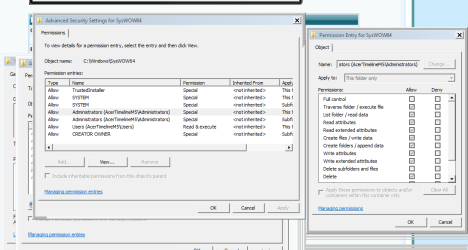
I get to step 2 (E and onto step 4 but cannot change anything. There is no Edit button. Only View. See attached screenshot. All the boxes are grayed-out and I'm not able to change anything.
 

Attachments

  • Capture.PNG
    Capture.PNG
    23.4 KB · Views: 1

My Computer My Computer

Computer type
Laptop
Computer Manufacturer/Model Number
Acer
OS
Windows 7 64 bit
CPU
Intel i5 1.7 GHz Dula core qaud processors
Memory
6 GB
Graphics Card(s)
Intel HD Graphics 4000
Hard Drives
450 GB
Antivirus
Norton
Browser
Chrome
Hi again and work was taking precedent. It has to be done in 2 stages 1st right click the file choose Properties then choose the Security Tab click Advanced and in the window that pops up select the Owner tab then click Edit click on the admin account and click apply then click the user name account and apply also then click OK a number of times including any popups untill it's all closed once that's done right click the file again and click properties choose the Security tab and click Edit and choose administrator and tick Full Control then Apply and do the same for the User account then OK it all until it's closed then try to replace the file in both locations. Are you sure the replacement file you downloaded is for the 64 system. Yeah Melbourne is great glad you liked it hope this works and hope one of the gurus here might have a look also
 

My Computer My Computer

Computer type
PC/Desktop
Computer Manufacturer/Model Number
Home Made
OS
Windows 7 Ultimate x64
CPU
Q6600 3.1ghz
Motherboard
Gigabyte GA-P35-DS3L
Memory
Kingston DDR2 6400 8GB
Graphics Card(s)
Gigabyte Radeon HD 6850 1GB 256-Bit
Sound Card
On board
Monitor(s) Displays
Acer X243H
Screen Resolution
1920x1080
Hard Drives
Intel 330 120GB SSD
WD 2TB 7200
PSU
Thermaltake Toughpower 750W Semi Modular
Case
Modified Alienware
Keyboard
A4Tech
Mouse
Gigabyte ECO600
Antivirus
Comodo
Browser
Cyberfox

My Computer My Computer

Computer type
PC/Desktop
Computer Manufacturer/Model Number
Home Made
OS
Windows 7 Ultimate x64
CPU
Q6600 3.1ghz
Motherboard
Gigabyte GA-P35-DS3L
Memory
Kingston DDR2 6400 8GB
Graphics Card(s)
Gigabyte Radeon HD 6850 1GB 256-Bit
Sound Card
On board
Monitor(s) Displays
Acer X243H
Screen Resolution
1920x1080
Hard Drives
Intel 330 120GB SSD
WD 2TB 7200
PSU
Thermaltake Toughpower 750W Semi Modular
Case
Modified Alienware
Keyboard
A4Tech
Mouse
Gigabyte ECO600
Antivirus
Comodo
Browser
Cyberfox
I successfully used the Take Ownership program. I was unable to change the System32 file .... error message that the file was already in use by another program.

I was able to change the Syswow64 file. On restart I no longer have the Bad Image error. Hooray!!!

Thanks so much.
 

My Computer My Computer

Computer type
Laptop
Computer Manufacturer/Model Number
Acer
OS
Windows 7 64 bit
CPU
Intel i5 1.7 GHz Dula core qaud processors
Memory
6 GB
Graphics Card(s)
Intel HD Graphics 4000
Hard Drives
450 GB
Antivirus
Norton
Browser
Chrome
Back
Top