Bad Image is worse than the Blue Screen

Novel8

New member
Member
VIP
Local time
6:50 PM
Messages
182
This is what happened. I went on my new build desktop and tried to tweak some areas in my Bios. Fortunately, at the end, the entire list of changes appeared, and i was able to take a screenshot in the event that I made a mistake, i could check that list. For some reason, I could not get my pc started. I took the flash drive where I copied that list and checked it out on my net book...so I could do a search from my browser on the net book on how I could rectify my desktop problem. As soon as I entered and viewed that screenshot, a message appeared that had a name of a dll file and said "Bad Image". each time I tried to X it or clck on OK, it would go and a similar message appeared only with a different name, but regardless, they all say "Bad Image"..I have read various ways to get rid of it in this forum and Microsoft and still no end to this problem. At times i am able to get to my net book desktop, use start, run SFC /scannow, the box appears but its all black and a cursor that won't accept a key. I tried system restore...no getting into it to change it. The one good thing about that list, I went back to my desktop and get into the Bios, undo what changes made and now my desktop is back to normal. In the process of making that list, it has now made my net book unusable. Any hope for me and my net book?
 

My Computer My Computer

At a glance

Win 7 x64.Win 10AMD A10 7850K8 gbNil
Computer type
PC/Desktop
Computer Manufacturer/Model Number
Build OEM Desktop
OS
Win 7 x64.Win 10
CPU
AMD A10 7850K
Motherboard
Asus A88X-Pro
Memory
8 gb
Graphics Card(s)
Nil
Sound Card
Nil
Monitor(s) Displays
Insignia
Screen Resolution
1376 x
Hard Drives
500 gb
Case
ABS
Keyboard
Sony
Mouse
OEM
Antivirus
Windows defender, Windows essential, Malware, autospyware
Browser
Firefox,Vivaldi
The image is probably corrupt. What is the file extension of the image? Can you view the details of the image / properties?

Although if you just want to get your BIOS settings back you can just reset your CMOS by pulling out the BIOS battery for 15 minutes for it to reset itself to default. Simple and super easy to do. Next time don't mess with the BIOS if you don't know what you are doing.
 

My Computer My Computer

At a glance

Windows 7 Pro x64Intel Core i7 920Corsair XMS3 12GB (3x2GB) DDR3 1333EVGA GTX 470 1280MB GDDR5 DX11
Computer Manufacturer/Model Number
Me
OS
Windows 7 Pro x64
CPU
Intel Core i7 920
Motherboard
ASUS P6T Deluxe V2
Memory
Corsair XMS3 12GB (3x2GB) DDR3 1333
Graphics Card(s)
EVGA GTX 470 1280MB GDDR5 DX11
Monitor(s) Displays
ASUS VW246H | ACER AL2216W
Screen Resolution
3600x1080
Hard Drives
1x Corsair Vertex 3 SSD (120GB)
1x Corsair Vertex 2 SSD (60GB)
2x Western Digital Black (500GB/1TB)
1x External WD Green eSATA (1TB)
PSU
Corsair 850HX
Case
Velocity Micro FullTower
Keyboard
Logitech G110
Mouse
Logitech G500
Internet Speed
http://www.speedtest.net/result/1226664359.png
Antivirus
MSE
Browser
Chrome
Other Info
Logitech Z-5500 5.1 Surround Sound
Logitech C260 Webcam
Creative Fatal1ty Headset
  • Like
Reactions: Arc
The image is probably corrupt. What is the file extension of the image? Can you view the details of the image / properties?

Although if you just want to get your BIOS settings back you can just reset your CMOS by pulling out the BIOS battery for 15 minutes for it to reset itself to default. Simple and super easy to do. Next time don't mess with the BIOS if you don't know what you are doing.

With that image saved on my flash drive i was able to get into Bios and undo the changes that I did and all is well again on my desktop where I am writing this....BUT, when I had the problem earlier and tried to get help from my net book, now my net book is infected.after i inserted that flash drive to read my changes.and I did nothing to that net book Bios
 

My Computer My Computer

At a glance

Win 7 x64.Win 10AMD A10 7850K8 gbNil
Computer type
PC/Desktop
Computer Manufacturer/Model Number
Build OEM Desktop
OS
Win 7 x64.Win 10
CPU
AMD A10 7850K
Motherboard
Asus A88X-Pro
Memory
8 gb
Graphics Card(s)
Nil
Sound Card
Nil
Monitor(s) Displays
Insignia
Screen Resolution
1376 x
Hard Drives
500 gb
Case
ABS
Keyboard
Sony
Mouse
OEM
Antivirus
Windows defender, Windows essential, Malware, autospyware
Browser
Firefox,Vivaldi
Try a System Restore from System Recovery Options on the booted Win7 installation media or System Repair Disk.

If that fails try a few Startup Repairs


If that fails work through the steps for Troubleshooting Windows 7 Failure to Start

I am not having a problem getting into windows...it just not working normally, because that confounded message is still on and prevents me from going to some of my links as one normally does. So far I have not been able to get rid of it. For a brief moment I was able to get to system restore and used it to a few days prior to the mess and I thought finally all is well. Then I got a message that it was not completed cause an antivirus program is preventing it from continuing. I checked my antivirus program Avast, Comodo and saw nothing there that would make me to disable them...BTW, each time i try to X that message a new one pops up replacing it, but the main one is something like SPVC~1.dll
 

My Computer My Computer

At a glance

Win 7 x64.Win 10AMD A10 7850K8 gbNil
Computer type
PC/Desktop
Computer Manufacturer/Model Number
Build OEM Desktop
OS
Win 7 x64.Win 10
CPU
AMD A10 7850K
Motherboard
Asus A88X-Pro
Memory
8 gb
Graphics Card(s)
Nil
Sound Card
Nil
Monitor(s) Displays
Insignia
Screen Resolution
1376 x
Hard Drives
500 gb
Case
ABS
Keyboard
Sony
Mouse
OEM
Antivirus
Windows defender, Windows essential, Malware, autospyware
Browser
Firefox,Vivaldi
You cannot run both Avast and Comodo without causing problems, often severe. Disable one or the other and reboot.
 

My Computer My Computer

At a glance

Windows 7 Pro 64 bitIntel i58GB KINGSTON DUAL-DDR3 1600MHz2GB AMD RADEON™ R7 250
Computer type
PC/Desktop
Computer Manufacturer/Model Number
PC Specialist Custom
OS
Windows 7 Pro 64 bit
CPU
Intel i5
Motherboard
ASUS® H81M-PLUS
Memory
8GB KINGSTON DUAL-DDR3 1600MHz
Graphics Card(s)
2GB AMD RADEON™ R7 250
Hard Drives
120GB KINGSTON V300 SSD
1TB WD CAVIAR BLACK WD1003FZEX
I got rid of both of them and tried System restore again . This was the first time I ever used S R on a Win 7 system and it sucks. On XP you could see various dates of points and choose...here it said it would be restored to May 16..cause i am doing it today the 17th..my problem started the 15th. When it finished restoring and self rebooted, up comes that same damm message: "C:\Progra~2\search~1\bin\SPCV64~1.Dll".
 

My Computer My Computer

At a glance

Win 7 x64.Win 10AMD A10 7850K8 gbNil
Computer type
PC/Desktop
Computer Manufacturer/Model Number
Build OEM Desktop
OS
Win 7 x64.Win 10
CPU
AMD A10 7850K
Motherboard
Asus A88X-Pro
Memory
8 gb
Graphics Card(s)
Nil
Sound Card
Nil
Monitor(s) Displays
Insignia
Screen Resolution
1376 x
Hard Drives
500 gb
Case
ABS
Keyboard
Sony
Mouse
OEM
Antivirus
Windows defender, Windows essential, Malware, autospyware
Browser
Firefox,Vivaldi
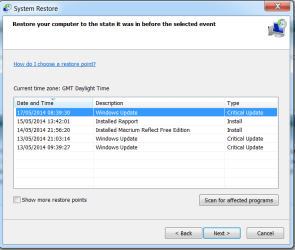
System Restore will have restored both of them so you are right back where you started. Also, you NEED one of them. System Restore will display as many restore points as are available and if there are even more available then tick the check box at the bottom.
 

Attachments

  • Capture.PNG
    Capture.PNG
    17 KB · Views: 29

My Computer My Computer

At a glance

Windows 7 Pro 64 bitIntel i58GB KINGSTON DUAL-DDR3 1600MHz2GB AMD RADEON™ R7 250
Computer type
PC/Desktop
Computer Manufacturer/Model Number
PC Specialist Custom
OS
Windows 7 Pro 64 bit
CPU
Intel i5
Motherboard
ASUS® H81M-PLUS
Memory
8GB KINGSTON DUAL-DDR3 1600MHz
Graphics Card(s)
2GB AMD RADEON™ R7 250
Hard Drives
120GB KINGSTON V300 SSD
1TB WD CAVIAR BLACK WD1003FZEX
There is no tick or arrow at the bottom...that is what i was saying, it only gave me a choice prior may 16th. This problem came up either the 14 or 15th...regardless, it did not help. i did the link it showed on Scan for Affected program and found none. Xp's R S showed a calendar of various points. ..but not this version. I do not get what image u show here. I wish I did. Seems I have no alternative but to do a recovery, and hope that would do the trick...Never did a recovery and hope it only applies to windows.
 

My Computer My Computer

At a glance

Win 7 x64.Win 10AMD A10 7850K8 gbNil
Computer type
PC/Desktop
Computer Manufacturer/Model Number
Build OEM Desktop
OS
Win 7 x64.Win 10
CPU
AMD A10 7850K
Motherboard
Asus A88X-Pro
Memory
8 gb
Graphics Card(s)
Nil
Sound Card
Nil
Monitor(s) Displays
Insignia
Screen Resolution
1376 x
Hard Drives
500 gb
Case
ABS
Keyboard
Sony
Mouse
OEM
Antivirus
Windows defender, Windows essential, Malware, autospyware
Browser
Firefox,Vivaldi
Try a System Restore from System Recovery Options on the booted Win7 installation media or System Repair Disk.

If that fails try a few Startup Repairs


If that fails work through the steps for Troubleshooting Windows 7 Failure to Start

I am not having a problem getting into windows...it just not working normally, because that confounded message is still on and prevents me from going to some of my links as one normally does. So far I have not been able to get rid of it. For a brief moment I was able to get to system restore and used it to a few days prior to the mess and I thought finally all is well. Then I got a message that it was not completed cause an antivirus program is preventing it from continuing. I checked my antivirus program Avast, Comodo and saw nothing there that would make me to disable them...BTW, each time i try to X that message a new one pops up replacing it, but the main one is something like SPVC~1.dll

This is why I said to run System Restore from disk, not from within the OS where your dueling AV's can interfere.

We see nothing but problems here with Comodo. I would uninstall it and Avast and install the AV recommended by almost everyone here for best performance, Microsoft Security Essentials.

If the PC will not run stably then try a few Startup Repairs to check over the boot, proceed with the steps for Troubleshooting Windows 7 Failure to Start to work from boot mode to check for infection, repair System files, and try to get it to a stable desktop.
 
Eureeka!!! I think I finally got rid of the pest...As a last resort, I d/l malware free and ran it, and now its been an hour and the message does not appear, I looked at the list of detected files and I could not see the name of the file that was causing the problem most of them started with "PuP....and malware said they were harmless, and just quaranteed them. I deleted all of them.
 

My Computer My Computer

At a glance

Win 7 x64.Win 10AMD A10 7850K8 gbNil
Computer type
PC/Desktop
Computer Manufacturer/Model Number
Build OEM Desktop
OS
Win 7 x64.Win 10
CPU
AMD A10 7850K
Motherboard
Asus A88X-Pro
Memory
8 gb
Graphics Card(s)
Nil
Sound Card
Nil
Monitor(s) Displays
Insignia
Screen Resolution
1376 x
Hard Drives
500 gb
Case
ABS
Keyboard
Sony
Mouse
OEM
Antivirus
Windows defender, Windows essential, Malware, autospyware
Browser
Firefox,Vivaldi
Good luck with that then! Please do take the advice about not running two AVs at the same time. Another vote here for MSE.
 

My Computer My Computer

At a glance

Windows 7 Pro 64 bitIntel i58GB KINGSTON DUAL-DDR3 1600MHz2GB AMD RADEON™ R7 250
Computer type
PC/Desktop
Computer Manufacturer/Model Number
PC Specialist Custom
OS
Windows 7 Pro 64 bit
CPU
Intel i5
Motherboard
ASUS® H81M-PLUS
Memory
8GB KINGSTON DUAL-DDR3 1600MHz
Graphics Card(s)
2GB AMD RADEON™ R7 250
Hard Drives
120GB KINGSTON V300 SSD
1TB WD CAVIAR BLACK WD1003FZEX
Good luck with that then! Please do take the advice about not running two AVs at the same time. Another vote here for MSE.

What do u mean about 2 AVs???? What does MSE got to do with it?
 

My Computer My Computer

At a glance

Win 7 x64.Win 10AMD A10 7850K8 gbNil
Computer type
PC/Desktop
Computer Manufacturer/Model Number
Build OEM Desktop
OS
Win 7 x64.Win 10
CPU
AMD A10 7850K
Motherboard
Asus A88X-Pro
Memory
8 gb
Graphics Card(s)
Nil
Sound Card
Nil
Monitor(s) Displays
Insignia
Screen Resolution
1376 x
Hard Drives
500 gb
Case
ABS
Keyboard
Sony
Mouse
OEM
Antivirus
Windows defender, Windows essential, Malware, autospyware
Browser
Firefox,Vivaldi
Are you reading our advice? It is based on tens of thousands of cases we've dealt with here since Win7 was released.

We have made it clear that you should not run two AV's and that the AV's you are running can be problematic. We recommended the AV that is most highly favored here for best performance.

You also said that you couldn't System Restore to before the problem, but you ran System Restore from the OS when I specifically said to run it from the booted Win7 installation disk or System Repair Disk.

Do you have a problem understanding these clear steps we've given? If so then please ask back all the questions you need to understand them.

Click the blue links to see illustrated tutorials.
 
I mentioned that i got rid of both of those antiviurs programs...at first system restore would not complete its work cause of one of those programs...so i got rid of them. I did not install either one of them, somehow they were included in my OEM OS. I was looking for Mse ensential but read that MS was discontinuing it. So now all is well and I thank you and others who particpated, and I will sign off now until the next weird error or mishap occurs. LOL
 

My Computer My Computer

At a glance

Win 7 x64.Win 10AMD A10 7850K8 gbNil
Computer type
PC/Desktop
Computer Manufacturer/Model Number
Build OEM Desktop
OS
Win 7 x64.Win 10
CPU
AMD A10 7850K
Motherboard
Asus A88X-Pro
Memory
8 gb
Graphics Card(s)
Nil
Sound Card
Nil
Monitor(s) Displays
Insignia
Screen Resolution
1376 x
Hard Drives
500 gb
Case
ABS
Keyboard
Sony
Mouse
OEM
Antivirus
Windows defender, Windows essential, Malware, autospyware
Browser
Firefox,Vivaldi
Back
Top