
Bad RAM? Help Interpret Memtest86 (28,416 errors then 0 errors)

josh99ta

New member
Local time
10:28 AM
Messages
59
I'm really confused on whether I have bad RAM or not because of the memtest results I'm getting. I've already had to replace the mobo and graphics card in my nearly brand new built desktop as I had problems with both (mobo wasn't W7 compatible, graphics card crapped out).

As I had two major problems, I wanted to make sure my RAM was 100% okay. I currently have four 2GB Corsair Dominator DDR2 sticks of RAM (two matched pairs). Here is what I came up with via memtest...

The first time I ran the test, it came back with 28,416 errors in the first pass alone. Here is a screenshot.
mm95jm.jpg


I'm not sure what all the details mean other than there are a LOT of errors there. Any help interpreting those results?

So I knew I have potentially bad RAM or a bad slot on the mobo. I pulled two of the sticks (one of the matched pairs), then retested via memtest. I let all these memtests go for seven passes and 10 hours of run time just to be 100% for sure. 0 errors with those two sticks pulled.

So then I wanted to verify I didn't have a bad slot, so I moved the two known good sticks to the two now-empty slots. Ran memtest, 0 errors.

So then I knew at least one of the two sticks I originally pulled must be bad. I plugged one stick back in and ran memtest again to see if it was the bad stick, 0 errors.

So now I think I have the bad stick isolated to the only one not in the board now. But I want to verify and be 100% for sure, so I plug it in and ran memtest again fully expecting to see a ton of errors again. It's been seven passes and 10 hours now and 0 errors.

What gives?

This is the same four sticks that gave me 28,416 errors, with the only difference being the fact that they moved around in the slots due to my memtesting, and now they're giving me 0 errors. How is that possible? Do you guys think I do have bad RAM? If all my RAM is good, why would the first time I ran the test report a whopping 28k+ errors?

Thanks a ton for any help here. I'm FAR from tech-savvy and I'm learning all of this as I go so I appreciate all the help I can get.
 

My Computer

Computer Manufacturer/Model Number
Built Desktop
OS
Windows 7 Home Premium 64bit
CPU
Intel Core2Duo E6850, LGA775, 3GHz, 4MB Cache, 1333 MHz FSB
Motherboard
GIGABYTE GA-EP43-UD3L
Memory
Corsair Dominator CM2X2048-8500C5D
Graphics Card(s)
HIS ATi Radeon HD 4850 (512MB GDDR3)
Monitor(s) Displays
Samsung SyncMaster 2253BW
Screen Resolution
1680x1050
Hard Drives
Asus DRW-2014L1T DVD-R/RW LightScribe 20X Drive
Case
Raidmax Smilodon Dirktooth
Cooling
Zalman CNPS9500A LED Intel Fan, CoolMax Case Fans
Keyboard
Logitech Wave Wireless
Mouse
Logitech Wave Wireless
Internet Speed
Edimax Wireless 802.11n 32-bit PCI Adapter (29.57/3.88 Mb/s)
Well, there is the possibility that some clutter got into the ram slots when you put the ram in the first time, which cleared out when you reseated the ram.

The other possibility is that the ram wasn't properly seated until you reseated them.
 

My Computer

Computer Manufacturer/Model Number
Alienware Area 51 Desktop and Dell Inspirion 17R (N7010)
OS
Windows 7 Ultimate x64 and Home Premium x64
CPU
Intel i7 960 (3.2 GHz Quad Core)
Motherboard
Alienware Intel based X58
Memory
12 Gigs (Triple Channel)
Graphics Card(s)
Alienware OEM nVidia GTX 560 Ti (1.25 Gig)
Sound Card
Creative Labs X-Fi Titanium
Monitor(s) Displays
Samsung PX2370 LED 23" Monitor
Screen Resolution
1920x1080
Hard Drives
2 320 Gig SATA in Raid 1 Configuration (System/App)
1 1 Tera SATA (Games)
1 1 Tera SATA (Data/Music/Videos)
PSU
750 Watt Power Supply
Case
Alienware Area 51 Desktop
Cooling
Liquid Cooled
Keyboard
Logitech G510
Mouse
Microsoft Trackball Explorer
Internet Speed
Cable
I was thinking one may not have been completely seated the first time around with all the errors. As they're all in there now and showing 0 errors I should be good to go, correct?
 

My Computer

Computer Manufacturer/Model Number
Built Desktop
OS
Windows 7 Home Premium 64bit
CPU
Intel Core2Duo E6850, LGA775, 3GHz, 4MB Cache, 1333 MHz FSB
Motherboard
GIGABYTE GA-EP43-UD3L
Memory
Corsair Dominator CM2X2048-8500C5D
Graphics Card(s)
HIS ATi Radeon HD 4850 (512MB GDDR3)
Monitor(s) Displays
Samsung SyncMaster 2253BW
Screen Resolution
1680x1050
Hard Drives
Asus DRW-2014L1T DVD-R/RW LightScribe 20X Drive
Case
Raidmax Smilodon Dirktooth
Cooling
Zalman CNPS9500A LED Intel Fan, CoolMax Case Fans
Keyboard
Logitech Wave Wireless
Mouse
Logitech Wave Wireless
Internet Speed
Edimax Wireless 802.11n 32-bit PCI Adapter (29.57/3.88 Mb/s)
You should be fine if you ran the tests several times and didn't get any errors. Of course, Memtest86 is only good for the basic bad memory testing, Windows will definitely put the memory through much more rigorous testing based on actual speed timing and voltages as another thread showed for Jalepi as far as stability is concerned.
 

My Computer

Computer Manufacturer/Model Number
Alienware Area 51 Desktop and Dell Inspirion 17R (N7010)
OS
Windows 7 Ultimate x64 and Home Premium x64
CPU
Intel i7 960 (3.2 GHz Quad Core)
Motherboard
Alienware Intel based X58
Memory
12 Gigs (Triple Channel)
Graphics Card(s)
Alienware OEM nVidia GTX 560 Ti (1.25 Gig)
Sound Card
Creative Labs X-Fi Titanium
Monitor(s) Displays
Samsung PX2370 LED 23" Monitor
Screen Resolution
1920x1080
Hard Drives
2 320 Gig SATA in Raid 1 Configuration (System/App)
1 1 Tera SATA (Games)
1 1 Tera SATA (Data/Music/Videos)
PSU
750 Watt Power Supply
Case
Alienware Area 51 Desktop
Cooling
Liquid Cooled
Keyboard
Logitech G510
Mouse
Microsoft Trackball Explorer
Internet Speed
Cable
That appears to be the case. While memtest checked out fine, I've had several BSOD crashes that are directly related to memory errors yesterday when I was really taxing the system. Looks like I've got faulty RAM somewhere. For now since memtest checked out okay on all sticks, I've pulled two and I'm hoping for some stability for a week or two, then I'll contact Corsair about replacing the sticks I pulled if it turns out they're causing the problems.


Quick question related though. I did some searching in relation to my motherboard to see what RAM Gigabyte recommends, and they say 2x2GB DDR2 PC2-6400 1.8V. Since the Corsair I have is PC2-8500 2.1V and Gigabyte recommends PC2-6400 1.8V, would that make any differences or cause any problems?
 

My Computer

Computer Manufacturer/Model Number
Built Desktop
OS
Windows 7 Home Premium 64bit
CPU
Intel Core2Duo E6850, LGA775, 3GHz, 4MB Cache, 1333 MHz FSB
Motherboard
GIGABYTE GA-EP43-UD3L
Memory
Corsair Dominator CM2X2048-8500C5D
Graphics Card(s)
HIS ATi Radeon HD 4850 (512MB GDDR3)
Monitor(s) Displays
Samsung SyncMaster 2253BW
Screen Resolution
1680x1050
Hard Drives
Asus DRW-2014L1T DVD-R/RW LightScribe 20X Drive
Case
Raidmax Smilodon Dirktooth
Cooling
Zalman CNPS9500A LED Intel Fan, CoolMax Case Fans
Keyboard
Logitech Wave Wireless
Mouse
Logitech Wave Wireless
Internet Speed
Edimax Wireless 802.11n 32-bit PCI Adapter (29.57/3.88 Mb/s)
It could if your settings are set at 2.1.. it may be more than your mobo can handle... have you tried setting them to 1.8v???
 

My Computer

Computer type
PC/Desktop
Computer Manufacturer/Model Number
LENOVO K450 @3.0GHZ
OS
64-bit Windows 8.1 Pro
CPU
Core(TM) i5 CPU 4330 Haswell @ 3.20GHz
Motherboard
LENOVO
Memory
12.00 GB
Graphics Card(s)
Intel(R) HD Graphics
Sound Card
Intel HD integtrated
Monitor(s) Displays
HP 25' ISP Monitor
Screen Resolution
1900/1020
Hard Drives
(1) ST1000DM003-1CH162 (2) Generic STORAGE DEVICE USB Device (3) Generic STORAGE DEVICE USB Device
Internet Speed
100mb down/10mb up
I'm a complete rookie on this sort of stuff, so I'm not really sure how to set them to 1.8V. I do know the RAM was overclocked in the BIOS initially (set to turbo) straight out of the box, and it was causing massive crashes left and right. Now it's only when things get really intensive that it crashes (Lightroom exporting big RAW photography files). How can I verify the actual voltage and set it to 1.8V if it isn't already?
 

My Computer

Computer Manufacturer/Model Number
Built Desktop
OS
Windows 7 Home Premium 64bit
CPU
Intel Core2Duo E6850, LGA775, 3GHz, 4MB Cache, 1333 MHz FSB
Motherboard
GIGABYTE GA-EP43-UD3L
Memory
Corsair Dominator CM2X2048-8500C5D
Graphics Card(s)
HIS ATi Radeon HD 4850 (512MB GDDR3)
Monitor(s) Displays
Samsung SyncMaster 2253BW
Screen Resolution
1680x1050
Hard Drives
Asus DRW-2014L1T DVD-R/RW LightScribe 20X Drive
Case
Raidmax Smilodon Dirktooth
Cooling
Zalman CNPS9500A LED Intel Fan, CoolMax Case Fans
Keyboard
Logitech Wave Wireless
Mouse
Logitech Wave Wireless
Internet Speed
Edimax Wireless 802.11n 32-bit PCI Adapter (29.57/3.88 Mb/s)
Boot into your BIOS settings... you should find the option to set your memory voltages there.. word to the wise... in the future, find out what your mobo manufacturer recommends before making any upgrades.. you are obviously using ram that does not match what Gigabyte says you can use... It may be easier, in the long run, to replace your ram with 2x2GB DDR2 PC2-6400 1.8V
 

My Computer

Computer type
PC/Desktop
Computer Manufacturer/Model Number
LENOVO K450 @3.0GHZ
OS
64-bit Windows 8.1 Pro
CPU
Core(TM) i5 CPU 4330 Haswell @ 3.20GHz
Motherboard
LENOVO
Memory
12.00 GB
Graphics Card(s)
Intel(R) HD Graphics
Sound Card
Intel HD integtrated
Monitor(s) Displays
HP 25' ISP Monitor
Screen Resolution
1900/1020
Hard Drives
(1) ST1000DM003-1CH162 (2) Generic STORAGE DEVICE USB Device (3) Generic STORAGE DEVICE USB Device
Internet Speed
100mb down/10mb up
Okay, I'll poke around the BIOS and see if I can find something.

Gigabyte, per their website, actually says the ram is part of the QVL list and compatible. Corsair CM2X2048-8500C5D is my RAM (I have two pairs of the 2x2GB sticks), Gigabyte GA-EP43-UD3L is my mobo. They're compatible. I was just wondering if the voltage difference could be causing an issue (I've heard it both ways, run your RAM at 2.1 regardless of the mobo voltage, or only run it at mobo voltage regardless of RAM voltage). I was just hoping for someone with real tech knowledge to say what the real right way to do it is.
 

My Computer

Computer Manufacturer/Model Number
Built Desktop
OS
Windows 7 Home Premium 64bit
CPU
Intel Core2Duo E6850, LGA775, 3GHz, 4MB Cache, 1333 MHz FSB
Motherboard
GIGABYTE GA-EP43-UD3L
Memory
Corsair Dominator CM2X2048-8500C5D
Graphics Card(s)
HIS ATi Radeon HD 4850 (512MB GDDR3)
Monitor(s) Displays
Samsung SyncMaster 2253BW
Screen Resolution
1680x1050
Hard Drives
Asus DRW-2014L1T DVD-R/RW LightScribe 20X Drive
Case
Raidmax Smilodon Dirktooth
Cooling
Zalman CNPS9500A LED Intel Fan, CoolMax Case Fans
Keyboard
Logitech Wave Wireless
Mouse
Logitech Wave Wireless
Internet Speed
Edimax Wireless 802.11n 32-bit PCI Adapter (29.57/3.88 Mb/s)
Tews has plenty of tech knowledge for this. You need to run the memory at manufacture specs. Manufacture being Corsair. So run it at 2.1 volts and check the cas latencys also. Your board should handle it either way and should have a way to adjust the memory voltage.
 

My Computer

Computer type
PC/Desktop
Computer Manufacturer/Model Number
Home built
OS
Windows 7 Ult, Windows 8.1 Pro,
CPU
Q9650-4.275GHz, E8600 4.5GHz, E6750-3.8GHz
Motherboard
Evga 780i FTW
Memory
G.Skill PC2 9600 1200Mhz 5 5 5 15 2T
Graphics Card(s)
GTX480
Sound Card
Asus Xonar D2
Monitor(s) Displays
HannsG
Screen Resolution
1680X1050
Hard Drives
GSkill Phoenix Pro 120GB SSD
PSU
ThermalTake Toughpower 1000Watt modular
Case
ThermalTake XaserV
Cooling
Xigmatek S1283
Keyboard
Logitech G15
Mouse
Logitech G9
Internet Speed
T1
First thing you should do is get some information on your RAM.
Then we can give you some advice on which way to go.

D/L CPUZ and post a snip of the CPU, Mainboard, Memory, and SPD tabs.

For posting the information , enter 'Snipping tool' in the Start button > Search box, hit enter. Select the area you want to post and save to a convenient place.
How to Post a Screenshot in Seven Forums

Can you fill out your System Specs?
Click the 'My System Specs" at the lower left of any of your posts and Click "update your System Specs", this will let us know what system your running.
We'll be able to give you better suggestions.

If your RAM is on your motherboards QVL list you will be OK, might need to do a little adjusting, running 8GB with 4 RAM cards sometimes requires a little help.
 

My Computer

Computer type
PC/Desktop
Computer Manufacturer/Model Number
76~2.0
OS
Windows 7 Ult x64 - SP1/ Windows 8 Pro x64
CPU
Intel Core i5-3570K 4.6GHz
Motherboard
Gigabyte GA-Z77X UD3H, f18
Memory
8GB (2X4GB) DDR3 1600 Corsair Vengeance CL8 1.5v
Graphics Card(s)
Sapphire HD 7770 Vapor-X OC 1GB DDR5
Sound Card
Onboard VIA VT2021
Monitor(s) Displays
22" LCD Dell
Screen Resolution
1680x1050
Hard Drives
Samsung 840Pro 128GB SSD,
Seagate Barracuda 500GB SATA2 7200rpm 32MB cache, Seagate Barracuda 1TB SATA2 7200rpm 32MB cache,
PSU
Corsair HX650W
Case
Cooler Master Storm Scout
Cooling
Corsair H80 2x12cm Noctua NF P12 , 2x14cm case fans
Keyboard
Logitech Wave
Mouse
CM Sentinel
Internet Speed
Dismal
Antivirus
Avast
Browser
Opera Next
Other Info
Haswell laptop: HP Envy 17t-j, i7-4700MQ, GeForce 740M 2GB DDR3, 17.3" Full HD 1920x1080, 16GB RAM, Samsung 840 Pro 128GB, 1TB Hitachi 7200 HDD,
Desktop: eSATA ports,
External eSATA Seagate 500GB SATA2 7200rpm,
External WD USB 500GB
On a side note to others... MemTest is okay to test for faulty ram. At this point this seems less about faulty ram and probably configuration issue. In the past, I have seen memory not have problems, but still have bios config issues when Windows gets involved. I don't know if there is any real serious ram tester that can really strain a system on the level of Windows tasks to help identify BIOS configuration issues.
 

My Computer

Computer Manufacturer/Model Number
Alienware Area 51 Desktop and Dell Inspirion 17R (N7010)
OS
Windows 7 Ultimate x64 and Home Premium x64
CPU
Intel i7 960 (3.2 GHz Quad Core)
Motherboard
Alienware Intel based X58
Memory
12 Gigs (Triple Channel)
Graphics Card(s)
Alienware OEM nVidia GTX 560 Ti (1.25 Gig)
Sound Card
Creative Labs X-Fi Titanium
Monitor(s) Displays
Samsung PX2370 LED 23" Monitor
Screen Resolution
1920x1080
Hard Drives
2 320 Gig SATA in Raid 1 Configuration (System/App)
1 1 Tera SATA (Games)
1 1 Tera SATA (Data/Music/Videos)
PSU
750 Watt Power Supply
Case
Alienware Area 51 Desktop
Cooling
Liquid Cooled
Keyboard
Logitech G510
Mouse
Microsoft Trackball Explorer
Internet Speed
Cable
On a side note to others... MemTest is okay to test for faulty ram. At this point this seems less about faulty ram and probably configuration issue. In the past, I have seen memory not have problems, but still have bios config issues when Windows gets involved. I don't know if there is any real serious ram tester that can really strain a system on the level of Windows tasks to help identify BIOS configuration issues.

It's typical for the chipset voltage to be increased a bit depending on how much memory is being run. For my Nvidia board with 4GB memory, it absolutely will not run stable unless I bump up the NB voltage to 1.45, even if I'm not overclocking. If was to install 8GB then it's very likely I would need to bump the NB voltage to 1.50. The T1 and T2 setting can also have an effect on stablity.

So you are correct in that sometimes other adjustments are required to get memory running stable depending on the amount of memory and the board being used.

Also, memory speed needs to work with the correct divider and FSB.

Pc2 8500 is made to run at 1066Mhz where the pc2 6400 is made to run at 800Mhz. But you can easily turn the 8500 down to 800Mhz where it should be just as stable. These adjustments are typicaly required for any type of enthusiast board. :)
 

My Computer

Computer type
PC/Desktop
Computer Manufacturer/Model Number
Home built
OS
Windows 7 Ult, Windows 8.1 Pro,
CPU
Q9650-4.275GHz, E8600 4.5GHz, E6750-3.8GHz
Motherboard
Evga 780i FTW
Memory
G.Skill PC2 9600 1200Mhz 5 5 5 15 2T
Graphics Card(s)
GTX480
Sound Card
Asus Xonar D2
Monitor(s) Displays
HannsG
Screen Resolution
1680X1050
Hard Drives
GSkill Phoenix Pro 120GB SSD
PSU
ThermalTake Toughpower 1000Watt modular
Case
ThermalTake XaserV
Cooling
Xigmatek S1283
Keyboard
Logitech G15
Mouse
Logitech G9
Internet Speed
T1
Great to know guys. I'm glad it's most likely a configuration issue. I'll get right on CPUZ and updating my system info so you guys can be more specific in your help. I'll report back shortly.
 

My Computer

Computer Manufacturer/Model Number
Built Desktop
OS
Windows 7 Home Premium 64bit
CPU
Intel Core2Duo E6850, LGA775, 3GHz, 4MB Cache, 1333 MHz FSB
Motherboard
GIGABYTE GA-EP43-UD3L
Memory
Corsair Dominator CM2X2048-8500C5D
Graphics Card(s)
HIS ATi Radeon HD 4850 (512MB GDDR3)
Monitor(s) Displays
Samsung SyncMaster 2253BW
Screen Resolution
1680x1050
Hard Drives
Asus DRW-2014L1T DVD-R/RW LightScribe 20X Drive
Case
Raidmax Smilodon Dirktooth
Cooling
Zalman CNPS9500A LED Intel Fan, CoolMax Case Fans
Keyboard
Logitech Wave Wireless
Mouse
Logitech Wave Wireless
Internet Speed
Edimax Wireless 802.11n 32-bit PCI Adapter (29.57/3.88 Mb/s)
You might need to go into bios and switch the memory over to the Manual memory settings, with my board it's called the "Expert" memory settings, in order for the other memory settings to show up in bios.

Getting the exact Corsair memory ID numbers would be helpful for looking up the correct specs for your memory. Sometimes the auto settings work ok, other times not.
 

My Computer

Computer type
PC/Desktop
Computer Manufacturer/Model Number
Home built
OS
Windows 7 Ult, Windows 8.1 Pro,
CPU
Q9650-4.275GHz, E8600 4.5GHz, E6750-3.8GHz
Motherboard
Evga 780i FTW
Memory
G.Skill PC2 9600 1200Mhz 5 5 5 15 2T
Graphics Card(s)
GTX480
Sound Card
Asus Xonar D2
Monitor(s) Displays
HannsG
Screen Resolution
1680X1050
Hard Drives
GSkill Phoenix Pro 120GB SSD
PSU
ThermalTake Toughpower 1000Watt modular
Case
ThermalTake XaserV
Cooling
Xigmatek S1283
Keyboard
Logitech G15
Mouse
Logitech G9
Internet Speed
T1
Reporting back with the details and CPUID results...

Corsair CM2X2048-8500C5D (XMS2-8500 2048mb 1066mhz 5-5-5-15 2.1V ver2.1)

CPUID results attached, system info updated, the more I am researching the more I am confident this is a BIOS configuration issue also, that stuff is just mostly greek to me and I need help from someone walking me through what settings I should change and what I should set them to.
 

Attachments

  • CPUIDresults.jpg
    CPUIDresults.jpg
    336.3 KB · Views: 86

My Computer

Computer Manufacturer/Model Number
Built Desktop
OS
Windows 7 Home Premium 64bit
CPU
Intel Core2Duo E6850, LGA775, 3GHz, 4MB Cache, 1333 MHz FSB
Motherboard
GIGABYTE GA-EP43-UD3L
Memory
Corsair Dominator CM2X2048-8500C5D
Graphics Card(s)
HIS ATi Radeon HD 4850 (512MB GDDR3)
Monitor(s) Displays
Samsung SyncMaster 2253BW
Screen Resolution
1680x1050
Hard Drives
Asus DRW-2014L1T DVD-R/RW LightScribe 20X Drive
Case
Raidmax Smilodon Dirktooth
Cooling
Zalman CNPS9500A LED Intel Fan, CoolMax Case Fans
Keyboard
Logitech Wave Wireless
Mouse
Logitech Wave Wireless
Internet Speed
Edimax Wireless 802.11n 32-bit PCI Adapter (29.57/3.88 Mb/s)
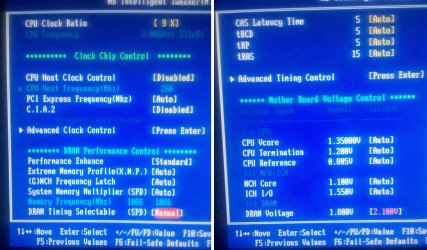
Go to your BIOS and give us your CPU, DRAM and North Bridge (NB) voltages.

This is important info, as chev65 says, you may need a bump.
 

My Computer

Computer type
PC/Desktop
Computer Manufacturer/Model Number
76~2.0
OS
Windows 7 Ult x64 - SP1/ Windows 8 Pro x64
CPU
Intel Core i5-3570K 4.6GHz
Motherboard
Gigabyte GA-Z77X UD3H, f18
Memory
8GB (2X4GB) DDR3 1600 Corsair Vengeance CL8 1.5v
Graphics Card(s)
Sapphire HD 7770 Vapor-X OC 1GB DDR5
Sound Card
Onboard VIA VT2021
Monitor(s) Displays
22" LCD Dell
Screen Resolution
1680x1050
Hard Drives
Samsung 840Pro 128GB SSD,
Seagate Barracuda 500GB SATA2 7200rpm 32MB cache, Seagate Barracuda 1TB SATA2 7200rpm 32MB cache,
PSU
Corsair HX650W
Case
Cooler Master Storm Scout
Cooling
Corsair H80 2x12cm Noctua NF P12 , 2x14cm case fans
Keyboard
Logitech Wave
Mouse
CM Sentinel
Internet Speed
Dismal
Antivirus
Avast
Browser
Opera Next
Other Info
Haswell laptop: HP Envy 17t-j, i7-4700MQ, GeForce 740M 2GB DDR3, 17.3" Full HD 1920x1080, 16GB RAM, Samsung 840 Pro 128GB, 1TB Hitachi 7200 HDD,
Desktop: eSATA ports,
External eSATA Seagate 500GB SATA2 7200rpm,
External WD USB 500GB
Roger that. Here is a screenshot from my BIOS screen where I believe the voltages in question are...
 

Attachments

  • BIOSscreen.jpg
    BIOSscreen.jpg
    313 KB · Views: 81

My Computer

Computer Manufacturer/Model Number
Built Desktop
OS
Windows 7 Home Premium 64bit
CPU
Intel Core2Duo E6850, LGA775, 3GHz, 4MB Cache, 1333 MHz FSB
Motherboard
GIGABYTE GA-EP43-UD3L
Memory
Corsair Dominator CM2X2048-8500C5D
Graphics Card(s)
HIS ATi Radeon HD 4850 (512MB GDDR3)
Monitor(s) Displays
Samsung SyncMaster 2253BW
Screen Resolution
1680x1050
Hard Drives
Asus DRW-2014L1T DVD-R/RW LightScribe 20X Drive
Case
Raidmax Smilodon Dirktooth
Cooling
Zalman CNPS9500A LED Intel Fan, CoolMax Case Fans
Keyboard
Logitech Wave Wireless
Mouse
Logitech Wave Wireless
Internet Speed
Edimax Wireless 802.11n 32-bit PCI Adapter (29.57/3.88 Mb/s)
Need to find the NB voltage.
 

My Computer

Computer type
PC/Desktop
Computer Manufacturer/Model Number
76~2.0
OS
Windows 7 Ult x64 - SP1/ Windows 8 Pro x64
CPU
Intel Core i5-3570K 4.6GHz
Motherboard
Gigabyte GA-Z77X UD3H, f18
Memory
8GB (2X4GB) DDR3 1600 Corsair Vengeance CL8 1.5v
Graphics Card(s)
Sapphire HD 7770 Vapor-X OC 1GB DDR5
Sound Card
Onboard VIA VT2021
Monitor(s) Displays
22" LCD Dell
Screen Resolution
1680x1050
Hard Drives
Samsung 840Pro 128GB SSD,
Seagate Barracuda 500GB SATA2 7200rpm 32MB cache, Seagate Barracuda 1TB SATA2 7200rpm 32MB cache,
PSU
Corsair HX650W
Case
Cooler Master Storm Scout
Cooling
Corsair H80 2x12cm Noctua NF P12 , 2x14cm case fans
Keyboard
Logitech Wave
Mouse
CM Sentinel
Internet Speed
Dismal
Antivirus
Avast
Browser
Opera Next
Other Info
Haswell laptop: HP Envy 17t-j, i7-4700MQ, GeForce 740M 2GB DDR3, 17.3" Full HD 1920x1080, 16GB RAM, Samsung 840 Pro 128GB, 1TB Hitachi 7200 HDD,
Desktop: eSATA ports,
External eSATA Seagate 500GB SATA2 7200rpm,
External WD USB 500GB
Hey Dave, on the Gigabyte boards the MCH Core voltage is the Northbridge voltage, that just call it MCH Core for some unknown reason. Is 1.10 correct or should it be higher (1.2-1.4 range)?
 

My Computer

Computer Manufacturer/Model Number
Built Desktop
OS
Windows 7 Home Premium 64bit
CPU
Intel Core2Duo E6850, LGA775, 3GHz, 4MB Cache, 1333 MHz FSB
Motherboard
GIGABYTE GA-EP43-UD3L
Memory
Corsair Dominator CM2X2048-8500C5D
Graphics Card(s)
HIS ATi Radeon HD 4850 (512MB GDDR3)
Monitor(s) Displays
Samsung SyncMaster 2253BW
Screen Resolution
1680x1050
Hard Drives
Asus DRW-2014L1T DVD-R/RW LightScribe 20X Drive
Case
Raidmax Smilodon Dirktooth
Cooling
Zalman CNPS9500A LED Intel Fan, CoolMax Case Fans
Keyboard
Logitech Wave Wireless
Mouse
Logitech Wave Wireless
Internet Speed
Edimax Wireless 802.11n 32-bit PCI Adapter (29.57/3.88 Mb/s)
Back
Top