Bad sector

I had the same problem before. Mine got totally fixed when the shop I bought the PC in replaced the serial ata cable in the PC. I noticed the bad sectors in my PC's HDD after my PC started freezing and had trouble booting every after freezing.

Try replacing your serial ata cable with a new one. .
 

My Computer

OS
Windows 7 Ultimate x64 (desktop) / x64 (laptop)
CPU
AMD Phenom 2 X3 720 2.8 GHz (desktop) / AMD Dual-Core E-350
Motherboard
ASRock N68-VS3 UCC / Acer Aspire 5253
Memory
4 Gb DDR3 / 4Gb DD3
Graphics Card(s)
Nvidia GeForce GTS 450 2048 Mb / AMD Radeon HD 6310
Sound Card
High Definition Audio Device
Monitor(s) Displays
ViewSonic
Screen Resolution
1024 x 768 / 1366 x 768
Hard Drives
313GB Seagate ST332041 8AS SCSI Disk Device (ATA) / 500 Gb HDD
PSU
Electron ATX-600W
Case
Some Case
Cooling
AMD built-in cooling fan
Keyboard
Logitech Keyboard
Mouse
A4tech Infrared Mouse / Philips Infrared Mouse
Internet Speed
1 Mbps
Other Info
Information of the PC's specs courtesy of Speccy freeware. Lol.
I had the same problem before. Mine got totally fixed when the shop I bought the PC in replaced the serial ata cable in the PC. I noticed the bad sectors in my PC's HDD after my PC started freezing and had trouble booting every after freezing.

Try replacing your serial ata cable with a new one. .

It is not my laptop internal drive,it is my external HD.
 

My Computer

Computer Manufacturer/Model Number
aspire 5920
OS
Windows 8 Professional x64
CPU
core 2 duo T5550
Memory
4 GB
Graphics Card(s)
GMA X3100
Hard Drives
160 GB + 320 GB
Internet Speed
2 mbps
You can't do read smart on an external USB drive even if the drive supports it. The drive has to be sata attached.
"CrystalDiskInfo" appears to allow some SMART data to be displayed for external USB connected HDDs.
 

My Computer

Computer type
PC/Desktop
Computer Manufacturer/Model Number
Own build
OS
Windows 7x64 Home Premium SP1
CPU
Intel i7 2600k
Motherboard
ASUS P8Z68 Deluxe
Memory
G.Skill Ripjaws (DDR3-1600) 2x4GB
Graphics Card(s)
Nvidia GeForce GTS 450; Intel HD Graphics 3000(GT2+)
Monitor(s) Displays
Dell Ultrasharp IPS panel U2311H, Samsung SyncMaster P2350
Screen Resolution
1920x1080
Hard Drives
Samsung 850 Pro SSD 256GB, Samsung SSD 840 120GB, Seagates 1TB Barracuda ST31000528AS x2
PSU
Seasonic M12II 520W
Case
Lian Li Lancool PC-K60
Cooling
Case: 1x120mm, 3x140mm CPU: Hyper 212+
Keyboard
Logitech MK520 (wireless)
Mouse
Logitech MK520
Internet Speed
6-7 Mbps
Antivirus
Norton Security Premium, Malwarebytes on 2 (MSE on 3rd PC)
Browser
FireFox
Other Info
Audio: Logitech Z523 2.1
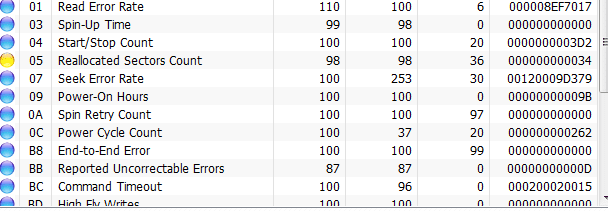
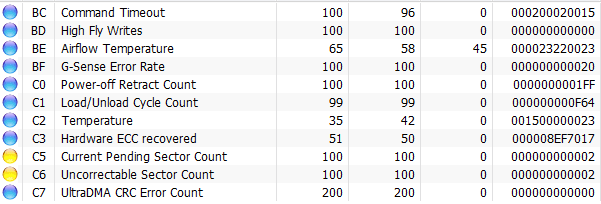
in crystal disk info I found out 3 errors..

Should I get it replaced?Should I ignore this?
 

Attachments

  • hd2.PNG
    hd2.PNG
    8 KB · Views: 9
  • hd3.PNG
    hd3.PNG
    8 KB · Views: 6

My Computer

Computer Manufacturer/Model Number
aspire 5920
OS
Windows 8 Professional x64
CPU
core 2 duo T5550
Memory
4 GB
Graphics Card(s)
GMA X3100
Hard Drives
160 GB + 320 GB
Internet Speed
2 mbps
Quick answer - I don't know.

I haven't gotten around to read up on the meaning of the SMART data.
There is a link to Wikipedia under help on SMART.
I'm guessing the colour coding: Blue = Good, Yellow = caution?, Red = Problem?

One of my external HDD hit 50C and went yellow once.
 

My Computer

Computer type
PC/Desktop
Computer Manufacturer/Model Number
Own build
OS
Windows 7x64 Home Premium SP1
CPU
Intel i7 2600k
Motherboard
ASUS P8Z68 Deluxe
Memory
G.Skill Ripjaws (DDR3-1600) 2x4GB
Graphics Card(s)
Nvidia GeForce GTS 450; Intel HD Graphics 3000(GT2+)
Monitor(s) Displays
Dell Ultrasharp IPS panel U2311H, Samsung SyncMaster P2350
Screen Resolution
1920x1080
Hard Drives
Samsung 850 Pro SSD 256GB, Samsung SSD 840 120GB, Seagates 1TB Barracuda ST31000528AS x2
PSU
Seasonic M12II 520W
Case
Lian Li Lancool PC-K60
Cooling
Case: 1x120mm, 3x140mm CPU: Hyper 212+
Keyboard
Logitech MK520 (wireless)
Mouse
Logitech MK520
Internet Speed
6-7 Mbps
Antivirus
Norton Security Premium, Malwarebytes on 2 (MSE on 3rd PC)
Browser
FireFox
Other Info
Audio: Logitech Z523 2.1
Quick answer - I don't know.

I haven't gotten around to read up on the meaning of the SMART data.
There is a link to Wikipedia under help on SMART.
I'm guessing the colour coding: Blue = Good, Yellow = caution?, Red = Problem?

One of my external HDD hit 50C and went yellow once.

Temperature is below 35.it is yellow due to 3 errors
 

My Computer

Computer Manufacturer/Model Number
aspire 5920
OS
Windows 8 Professional x64
CPU
core 2 duo T5550
Memory
4 GB
Graphics Card(s)
GMA X3100
Hard Drives
160 GB + 320 GB
Internet Speed
2 mbps
Quick answer - I don't know.

I haven't gotten around to read up on the meaning of the SMART data.
There is a link to Wikipedia under help on SMART.
I'm guessing the colour coding: Blue = Good, Yellow = caution?, Red = Problem?

One of my external HDD hit 50C and went yellow once.

Temperature is below 35.it is yellow due to 3 errors
Yes I know it's not temp. All I was commenting on was the possible significance of the colour coding.
Maybe you could read up on the meaning of your SMART error data and post back.
 

My Computer

Computer type
PC/Desktop
Computer Manufacturer/Model Number
Own build
OS
Windows 7x64 Home Premium SP1
CPU
Intel i7 2600k
Motherboard
ASUS P8Z68 Deluxe
Memory
G.Skill Ripjaws (DDR3-1600) 2x4GB
Graphics Card(s)
Nvidia GeForce GTS 450; Intel HD Graphics 3000(GT2+)
Monitor(s) Displays
Dell Ultrasharp IPS panel U2311H, Samsung SyncMaster P2350
Screen Resolution
1920x1080
Hard Drives
Samsung 850 Pro SSD 256GB, Samsung SSD 840 120GB, Seagates 1TB Barracuda ST31000528AS x2
PSU
Seasonic M12II 520W
Case
Lian Li Lancool PC-K60
Cooling
Case: 1x120mm, 3x140mm CPU: Hyper 212+
Keyboard
Logitech MK520 (wireless)
Mouse
Logitech MK520
Internet Speed
6-7 Mbps
Antivirus
Norton Security Premium, Malwarebytes on 2 (MSE on 3rd PC)
Browser
FireFox
Other Info
Audio: Logitech Z523 2.1
Quick answer - I don't know.

I haven't gotten around to read up on the meaning of the SMART data.
There is a link to Wikipedia under help on SMART.
I'm guessing the colour coding: Blue = Good, Yellow = caution?, Red = Problem?

One of my external HDD hit 50C and went yellow once.

Temperature is below 35.it is yellow due to 3 errors
Yes I know it's not temp. All I was commenting on was the possible significance of the colour coding.
Maybe you could read up on the meaning of your SMART error data and post back.

Well I don`t know how..thats why I have posted the report before
 

My Computer

Computer Manufacturer/Model Number
aspire 5920
OS
Windows 8 Professional x64
CPU
core 2 duo T5550
Memory
4 GB
Graphics Card(s)
GMA X3100
Hard Drives
160 GB + 320 GB
Internet Speed
2 mbps
I've pointed you in the direction of tool and the information. If someone gives me that I'm grateful and do my own reading.
 

My Computer

Computer type
PC/Desktop
Computer Manufacturer/Model Number
Own build
OS
Windows 7x64 Home Premium SP1
CPU
Intel i7 2600k
Motherboard
ASUS P8Z68 Deluxe
Memory
G.Skill Ripjaws (DDR3-1600) 2x4GB
Graphics Card(s)
Nvidia GeForce GTS 450; Intel HD Graphics 3000(GT2+)
Monitor(s) Displays
Dell Ultrasharp IPS panel U2311H, Samsung SyncMaster P2350
Screen Resolution
1920x1080
Hard Drives
Samsung 850 Pro SSD 256GB, Samsung SSD 840 120GB, Seagates 1TB Barracuda ST31000528AS x2
PSU
Seasonic M12II 520W
Case
Lian Li Lancool PC-K60
Cooling
Case: 1x120mm, 3x140mm CPU: Hyper 212+
Keyboard
Logitech MK520 (wireless)
Mouse
Logitech MK520
Internet Speed
6-7 Mbps
Antivirus
Norton Security Premium, Malwarebytes on 2 (MSE on 3rd PC)
Browser
FireFox
Other Info
Audio: Logitech Z523 2.1
Back
Top