
Badware - VIA HD Audio Deck

jimbo45

New member
Guru
Gold Member
VIP
Local time
8:54 PM
Messages
5,941
Location
Hafnarfjörður IS
Hi there
This piece of software isn't malware or a virus but a really irritating part of the VIA HD audio software
- a little popup message always starts in the system tray when you boot your system from HD Via messaging centre.

That's why I think "Badware" is a more appropriate name for it.

The actual mixer itself is fine screenshot enc, but is there any way to get rid of the start popup from the messaging centre. (I think Real Player also used to do something like that as well).

I don't really want to remove the entire application as the mixer is good.

Cheers
jimbo
 

Attachments
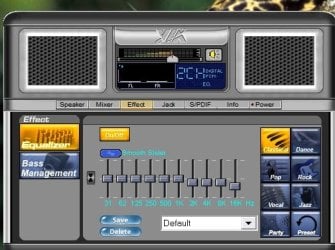
  • via_audio.jpg
    via_audio.jpg
    37.7 KB · Views: 4,562

My Computer

Computer type
PC/Desktop
Computer Manufacturer/Model Number
Custom built, several laptops HP/ASUS
OS
Linux CENTOS 7 / various Windows OS'es and servers
CPU
Intel i7 Intel i5
Memory
8GB, 16GB
Graphics Card(s)
On Motherboard
Sound Card
Realtek HD audio
Monitor(s) Displays
Apple Cinema display, Samsung LCD
Screen Resolution
1920 X 1080
Hard Drives
4 X 1TB SATA
Mouse
Toshiba wireless laser
Internet Speed
> 20MB up
Hi jimbo,

What does the popup say? Have you checked the startup options?
 

My Computer

Computer type
PC/Desktop
Computer Manufacturer/Model Number
Dwarf Dwf/11/2012 r09/2013
OS
Windows 8.1 Pro RTM x64
CPU
Intel Core-i5-3570K 4-core @ 3.4GHz (Ivy Bridge) (OC 4.4GHz)
Motherboard
ASRock Z77 Extreme4-M
Memory
4 x 4GB DDR3-1600 Corsair Vengeance CMZ8GX3M2A1600C9B (16GB)
Graphics Card(s)
MSI GeForce GTX770 Gaming OC 2GB
Sound Card
Realtek High Definition on board solution (ALC 898)
Monitor(s) Displays
ViewSonic VA1912w Widescreen (VGA)
Screen Resolution
1440x900
Hard Drives
OCZ Agility 3 SSD 120GB SATA III x2 (RAID 0)
Samsung HD501LJ 500GB SATA II x2
Hitachi HDS721010CLA332 1TB SATA II
Iomega 1.5TB Ext USB 2.0
WD 2.0TB Ext USB 3.0
PSU
XFX Pro Series 850W Semi-Modular
Case
Gigabyte IF233
Cooling
1 x 120mm Front Inlet 1 x 120mm Rear Exhaust
Keyboard
Microsoft Comfort Curve Keyboard 3000 (USB)
Mouse
Microsoft Comfort Mouse 3000 for Business (USB)
Internet Speed
NetGear DG834Gv3 ADSL Modem/Router (Ethernet) ~4.0 Mb/s (O2)
Antivirus
Avast! 8.0.1497
Browser
IE 11
Other Info
Optical Drive: HL-DT-ST BD-RE BH10LS30 SATA Bluray
Lexmark S305 Printer/Scanner/Copier (USB)
WEI Score: 8.1/8.1/8.5/8.5/8.25
Asus Eee PC 1011PX Netbook (Windows 7 x86 Starter)
Hi there
just a little tiny box which says Hdeck Message
Welcome -- and then disappears.

program is Hdeck.exe - pefectly legit program - just has that annoying message - only lasts for a second or so.

If you run it from the menu you get the little message as well -- I've disabled it from the startup.

Cheers
jimbo
 

My Computer

Computer type
PC/Desktop
Computer Manufacturer/Model Number
Custom built, several laptops HP/ASUS
OS
Linux CENTOS 7 / various Windows OS'es and servers
CPU
Intel i7 Intel i5
Memory
8GB, 16GB
Graphics Card(s)
On Motherboard
Sound Card
Realtek HD audio
Monitor(s) Displays
Apple Cinema display, Samsung LCD
Screen Resolution
1920 X 1080
Hard Drives
4 X 1TB SATA
Mouse
Toshiba wireless laser
Internet Speed
> 20MB up
First off, this was a great annoyance for me aswell. I am used to the Realtek mixer, which they have had the good manor of putting a checkbox option "Display icon in system tray" on. I was disappointed when I realized that VIA has no similar option in their mixer applet.

Of course, I found a descent work-around in pulling the good ol' msconfig.exe and thus disable hdeck.exe from even launching during Windoze boot-up. However, it felt kinda messy. Not that I use the VIA mixer, cus it's really just calling the same strings as sndvol32.exe anyways so, I find the whole mixer applet superfluous in all. But still, blocking the initial launch of hdeck.exe felt bad, like I was overriding something vital.

However, tonight, I finally found the real solution. It appears that VIA has thought of the user's possible unwillingness of using the HD Deck. However, they've hidden the feature real well. Now check this out.

Start / Run:
%PROGRAMFILES%\VIA\VIAudioi\HDADeck\HDeck.ini

That's the key. Now these are the two values I've found of great interest.

Initial_and_Exit=0
Show_Tray_Icon=1

Default values are as present above. In my case, I changed Initial_and_Exit to 1. Now, during Windoze boot-up, it calls hdeck.exe, but it sort of just flashes by memory, to be initialized followed by an instant termination, sort of. This process is 100% invisible. It all happens in the far background, so no annoyance.

For those who for some reason still wants hdeck.exe to be a present background process running on your system, but without the system tray icon, I suppose Show_Tray_Icon=0 would be the correct approach.

Anyways, just thought I'd share this.
Hope it'll be of any help for someone.
 

My Computer

Computer Manufacturer/Model Number
Asus T3-P5G31A
OS
Windoze
Definitely something not right with this software/driver. I use a lifecam 5000 for Skype and it's integrated microphone kept on failing - the only way to resolve it was to plug it into another USB port, once a port had been used it wouldn't work again so i couldn't plug it back into a previously used one. Once all the ports (8 of them) had been used I had to reinstall the lifecam software and drivers. (This did not put me in a celebratory mood.)
Then during Skype calls the audio of the person I'd called would reverb or echo making the call impossible to listen to. Switching USB ports would fix it. Then the reverb started happening to all system sounds.
Going into VIA HD Deck and selecting independent headphones would sometimes fix it, sometimes not.

Solution for me was Add Remove Programs. Find the VIA install (wasn't actually called audio deck, can't recall it's name), and uninstalled it.
Everything works correctly now, using the normal Microsoft audio controller.
 

My Computer

Computer Manufacturer/Model Number
Homebuilt
OS
Windows 7
CPU
Core 2 Duo
Motherboard
Asus P5Q SE Plus
Memory
8Gb
Graphics Card(s)
Nv 9550GT
Sound Card
OnBoard
Monitor(s) Displays
Samsung SM930BF - Acer AL1916
Hard Drives
Samsung500Gb + others
PSU
650W
Case
Alienware
Cooling
Chassis fan set to Q-Fan
Keyboard
Microsoft wireless
Other Info
Wacom Intuos 3
I call these "ill behaving" programs that do what they want and add crap that you don't want and either can't get rid of or have a hard time disabling. Unfortunately you need the audio drivers but on other software such as RealPlayer I just dumped the program.
 

My Computer

Computer type
PC/Desktop
Computer Manufacturer/Model Number
My Own Build
OS
Windows 10 64 bit
CPU
Intel i7 6700K
Motherboard
ASUS ROG Maximus VIII Hero
Memory
16GB Corsair Dominator
Graphics Card(s)
Intel CPU Graphics
Sound Card
RealTek
Monitor(s) Displays
27" Dell S2719dgf
Screen Resolution
2560X1440
Hard Drives
1 TB Samsung 850 EVO SSD for Win 10 Pro
500GB Samsung 850 EVO SSD for Win 10 Insider
2 TB drive for backup
PSU
EVGA Supernova 750G2
Case
BeQuiet Silent Base 600
Cooling
Deepcool Captain 120EX
Keyboard
Microsoft Wireless 2000
Mouse
Microsoft wireless
Internet Speed
100 MB/sec (Cable)
Antivirus
Microsoft Defender and Malwarebytes
Browser
Edge/Firefox
Other Info
Cakewalk (Sonar) by BandLab and Studio One 4.1 Pro recording studio software. MOTU 896Mk3 Hybrid recording interface, Frontier Tranzport wireless control unit, Behringer X-Touch Control Surface.
Five USB connected optical drives for CD Audio production using Nero BurningROM
Back
Top