Base System Device drivers error - unable to find drivers

oldman4

New member
Local time
5:15 AM
Messages
6
Hi there,

I have an HP Pavilion DV7 2185dx laptop running a freshly installed windows 7 upgrade from windows Vista. Ever since the upgrade my CPU is constantly running at 98-100% all the time meaning I cannot do anything on my PC. After researching a bit online it could possibly be the driver errors I see in device manager?

In device manager I see that I have some drivers missing and all attempts to update these have failed and i've seen other users here post the missing drivers and be directed to the fixes.

Device type: Other Devices
Manufacturer: Unknown
Location: PCI bus 6, device 0, function 1

PCI\VEN_197B&DEV_2382&SUBSYS_3624103C&REV_00
PCI\VEN_197B&DEV_2382&SUBSYS_3624103C
PCI\VEN_197B&DEV_2382&CC_088000
PCI\VEN_197B&DEV_2382&CC_0880

Device type: Other Devices
Manufacturer: Unknown
Location: PCI bus 6, device 0, function 3

PCI\VEN_197B&DEV_2383&SUBSYS_3624103C&REV_00
PCI\VEN_197B&DEV_2383&SUBSYS_3624103C
PCI\VEN_197B&DEV_2383&CC_088000
PCI\VEN_197B&DEV_2383&CC_0880

Device type: Other Devices
Manufacturer: Unknown
Location: PCI bus 6, device 0, function 4

PCI\VEN_197B&DEV_2384&SUBSYS_3624103C&REV_00
PCI\VEN_197B&DEV_2384&SUBSYS_3624103C
PCI\VEN_197B&DEV_2384&CC_088000
PCI\VEN_197B&DEV_2384&CC_0880

Device type: Other Devices
Manufacturer: Unknown
Location: on Intel(R) ICH9M LPC Interface Controller - 2919

ACPI\ENE0100
*ENE0100


So if the updated drivers fix these errors and yet the CPU usage does not go back down I may have to try something else. I would load pics to this thread but I fear the PC will crash as it has done twice this morning just from opening firefox.

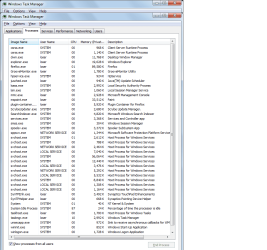
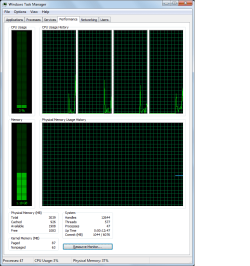
As a note yes I have rebooted, yes I have run a virus scan and yes I have made sure that almost all prgrammes are not running. I have loaded up pics of the CPU usage and Processes running too.

Cheers
 

Attachments

  • CPU usage.png
    CPU usage.png
    19.5 KB · Views: 58
  • Processes.png
    Processes.png
    40.3 KB · Views: 60

My Computer My Computer

At a glance

Windows 7 Home Premium 32 bitQ9000 quad core 2.00GHz8GB Ram
Computer Manufacturer/Model Number
HP Pavillion DV7 2185DX
OS
Windows 7 Home Premium 32 bit
CPU
Q9000 quad core 2.00GHz
Memory
8GB Ram

My Computer My Computer

At a glance

Windows 7 Pro x64AMD FX 4100 4 Core 3.6GHz AM3+16GB G.Skill RipjawsXRadeon 6850
Computer Manufacturer/Model Number
Home build
OS
Windows 7 Pro x64
CPU
AMD FX 4100 4 Core 3.6GHz AM3+
Motherboard
ASROCK 970 Extreme3
Memory
16GB G.Skill RipjawsX
Graphics Card(s)
Radeon 6850
Sound Card
ASUS Xonar D1
Monitor(s) Displays
ASUS 23" LCD
Hard Drives
SSD 120GB
WD 750GB Black series
WD 640GB Black series
PSU
700W
Case
Antec 100
Cooling
Hyper 212 Plus
Internet Speed
50MB
Thank you mgp1964,

I checked out that link and looked through the drivers. Some of them did not seem like thibgs I use on the laptop such as quick launch buttons etc so do I really need these? If so I will load them but seems silly to load things when you don't need them and HP ALWAYS has so many superflous apps and programmes bundled with their laptops.

As a note I loaded the following and still no fixes to the device manager base system errors.

sp-44777, 45041, 45043, 45044, 45112, 45708, 45823

Cheers
 

My Computer My Computer

At a glance

Windows 7 Home Premium 32 bitQ9000 quad core 2.00GHz8GB Ram
Computer Manufacturer/Model Number
HP Pavillion DV7 2185DX
OS
Windows 7 Home Premium 32 bit
CPU
Q9000 quad core 2.00GHz
Memory
8GB Ram
Actually, I believe the problem may now be fixed mgp1964. I had restarted the PC after loading the drivers I had noted above yet the CPU continued to run as before.

I did however go to bed and this morning when I started the PC it seems to be working like it used to which means it is operating around the 3-10% mark (and this is with Firefox and a few other apps running in the background).

I will keep an eye on it for a day and if no further problems I will mark this problem as solved.

Cheers
 

Attachments

  • cpu speed.png
    cpu speed.png
    18.2 KB · Views: 30

My Computer My Computer

At a glance

Windows 7 Home Premium 32 bitQ9000 quad core 2.00GHz8GB Ram
Computer Manufacturer/Model Number
HP Pavillion DV7 2185DX
OS
Windows 7 Home Premium 32 bit
CPU
Q9000 quad core 2.00GHz
Memory
8GB Ram
Sorry about the slow response, what with xmas and NY we've been a bit busy.

As for the laptop, sadly the problem continues however it appears to now work fine for about an hour (or so) before the CPU starts to ramp up to the 100% mark and then I have had two frozen blue/gray screens which force me to turn the laptop off.

I was wondering if the heat could be a problem? As the PC starts off fine when cold but then after an hour it tends to get hot? Especially since the weather here is around the 40 degree celsius or 104 farenheit lately. I have heard that sometimes the paste on the heat sink can dry out and cause the temp to rise too high but then i'm not too sure.

Any other ideas as to what this CPU problem could be? I'm resigned to maybe taking it to a technician although would prefer to try other things first.

Cheers
 

My Computer My Computer

At a glance

Windows 7 Home Premium 32 bitQ9000 quad core 2.00GHz8GB Ram
Computer Manufacturer/Model Number
HP Pavillion DV7 2185DX
OS
Windows 7 Home Premium 32 bit
CPU
Q9000 quad core 2.00GHz
Memory
8GB Ram
Anyone? Any help appreciated.
 

My Computer My Computer

At a glance

Windows 7 Home Premium 32 bitQ9000 quad core 2.00GHz8GB Ram
Computer Manufacturer/Model Number
HP Pavillion DV7 2185DX
OS
Windows 7 Home Premium 32 bit
CPU
Q9000 quad core 2.00GHz
Memory
8GB Ram
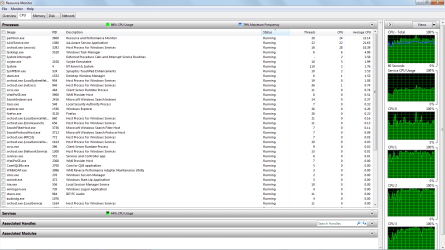
Hi oldman. In the Star Search panel type resmon and hit Enter. In the wwindow that opens click the CPU tab and it will show you what is using the CPU cycles.
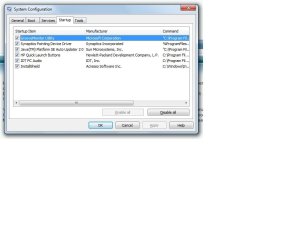
In the same Search, type msconfig, open the Startup tab. Post snip of both in your next post. http://www.sevenforums.com/tutorials/9733-screenshots-files-upload-post-seven-forums.html#post93869

You can try removing crapware too since many of this unneeded garbage reduces performance. Try this Crappy PC No More! | The PC Decrapifier it will identify software it deems crapware. You can choose which to remove. Most of the HP update and other software just repeats what Windows does and is not needed.
 

My Computer My Computer

At a glance

Windows 7 Ultimate X64 SP1Intel i5-2550K, Differing ~4.4-4.8GHz No buil...16GB G.Skill Sniper 1866MHz @ 2133MHz 2x8GBASUS GTX650TIB-DC2OC-2GD5, (650TI Boost)
Computer type
PC/Desktop
Computer Manufacturer/Model Number
Home Built Desktop By DataTech
OS
Windows 7 Ultimate X64 SP1
CPU
Intel i5-2550K, Differing ~4.4-4.8GHz No built in GPU
Motherboard
ASUS P8Z68-V PRO/GEN3
Memory
16GB G.Skill Sniper 1866MHz @ 2133MHz 2x8GB
Graphics Card(s)
ASUS GTX650TIB-DC2OC-2GD5, (650TI Boost)
Sound Card
Onboard Realtek 5-1
Monitor(s) Displays
Samsung P2570HD
Screen Resolution
1920x1080
Hard Drives
Samsung 840 Pro 256GB SSD for OS, 500GB Seagate Constellation (Enterprise drive) for Data
PSU
Corsair HX650W
Case
Inwin Dragon Rider
Cooling
Hyper 212 EVO w/two Noctua fans, push-pull, @1300 RPM
Keyboard
E-Z Eyes, bright yellow keys with large characters
Mouse
steelseries SENSEI Laser Pro Gaming
Internet Speed
48-51Mbs Mbs down, 11 Mbs up Xfinity Cable
Antivirus
Norton Internet Security 2013
Browser
IE 10, Opera, Pale Moon if needed
Other Info
4 case fans, LG BluRay-RE, ASUS DVD-RW, Mr. Fusion power supply, 1.21 gigawatts.
Thanks for your help Britton30,

Copies of the Resmon and MSConfig attached. I think I removed most of the HP crap but will run that 'decrapper' of yours as there are always things that i'm unsure about removing whenever I play with the PC. Can't be any worse I suppose.

As a note, over the past few days the pc is running slow as soon as I start up and doesn't wait for an hour like it used to.
 

Attachments

  • resmon.png
    resmon.png
    53.2 KB · Views: 24
  • msconfig.jpg
    msconfig.jpg
    39.4 KB · Views: 43

My Computer My Computer

At a glance

Windows 7 Home Premium 32 bitQ9000 quad core 2.00GHz8GB Ram
Computer Manufacturer/Model Number
HP Pavillion DV7 2185DX
OS
Windows 7 Home Premium 32 bit
CPU
Q9000 quad core 2.00GHz
Memory
8GB Ram
Back
Top