Base System Device no driver

zx81

New member
Power User
Local time
10:07 PM
Messages
285
Location
Utrecht
Hello all,

I succesfully installed Windows 7 Home Premium x64.

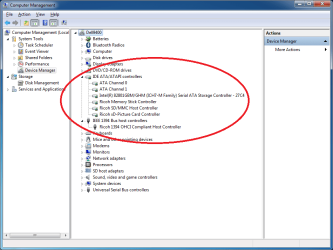
Only one device in devicemanager has no driver, or is not functioning correct.

see picture below:
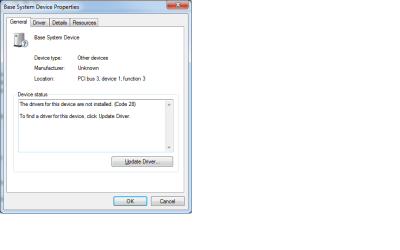
BaseSystemDeviceNoDriver.png

Does someone has a suggestion how to solve this?

Thanks in advance!

zx81
 

My Computer

Computer Manufacturer/Model Number
Dell Inpspiron 1720
OS
Windows 7 Home Premium x64
CPU
Intel 1720 Core 2 Duo 2.00GHz,800,2M
Memory
4GB 667MHz DDR2 SDRAM (2x2048)
Graphics Card(s)
NVIDIA Geforce Go 8600M GT 256MB DDR2
Sound Card
SigmaTel
Monitor(s) Displays
17.0" Widescreen WXGA+ (1440x900) TFT with TrueLife
Screen Resolution
1440x900
Hard Drives
2x160GB 5400RPM Serial ATA
Mouse
Logitech
Wouldn't worry about it and just disable it.

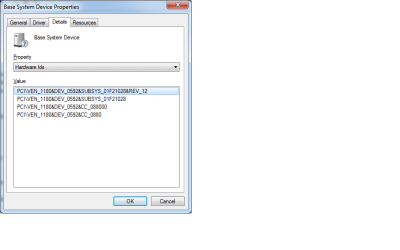
Unless you actually know what it does and want the functionality. In this case, right click it in the device manager, properties, details tab, change dropdown to hardware ids. Copy and paste what you see to here.
 

My Computer

Computer Manufacturer/Model Number
self built
OS
7600.20510 x86
CPU
P4 550 3.4 GHz HT running at 3.5 GHz
Motherboard
MSI PM8M3-V (MS-7211 v1.x) Micro-ATX mainboard
Memory
OCZ 2 GB(2x1GB) DDR400mHz running @ 414 mHz
Graphics Card(s)
HIS Radeon HD 3850 IceQ 3 Turbo HDMI Dual DL-DVI AGP
Sound Card
MOTU Traveler firewire studio interface 192 kHz 24 bit
Monitor(s) Displays
22" widescreen Acer X223W LCD, 17" Compaq P75 CRT
Screen Resolution
1680x1050 and 1280x1024
Hard Drives
SATA I x2 WD, 400 GB and 120 GB, SATA 2 WD Caviar Black 1 TB
PSU
350W generic
Case
Cybertronpc, it glows blue
Cooling
stock cpu fan, Ice-Q 3 gpu and system, many case fans
Keyboard
Logitch Classical Keyboard 200
Mouse
Logitech Mediaplay cordless
Internet Speed
1792/448 kbits/sec
Other Info
SATA II PCI fake RAID adapter, 1 GB Readyboost, original ATI Remote Wonder (even works with WMC perfectly), Logitech Rumblepad 2 game controller x2
My guess is Mobile Broadband card (or empty slot for one), WiFi catcher or smart battery (installing Dell Quickset would take care of the second two). Did you install Dell's chipset drivers? Sometimes they are needed for the magnetic lid-close sensor (for sleep, etc.).
Have you looked these drivers over? Drivers & Downloads
 

My Computer

Computer type
PC/Desktop
Computer Manufacturer/Model Number
Dell: XPS 420 (2), XPS M1330 (several), XPS 14z, Mini 9, Mini 10v
OS
W8 Pro, W7 Ultimate, XP Pro x64, Vista x64, Ubuntu
CPU
Q6600, Q6700, T7500, T7500, N270, N270
Motherboard
Dell
Memory
8GB, 8GB, 4GB, 4GB, 2GB, 2GB
Graphics Card(s)
ATI, nVidia, nVidia, nVidia, Intel, Intel
Monitor(s) Displays
Dell 2408WFP
Hard Drives
A drawer full. OCZ Vertex's in RAID 0. Vertex 3's, Vertex 4, Samsung 830's, Samsung 840's, Intel 330. Don't use dino drives any more except for servers.
Keyboard
Logitech Wave
Internet Speed
29 Mbps DL / .95 Mbps UL
Other Info
New project(2013)...Another low power server. Zotac H67ITX, i3-2100T, Windows Server 2012 Essentials on Samsung SSD.
Previous project...Low power (38-40 watts using Kill-a-Watt) Windows Home Server. Zotac ION (Atom 330, GeForce9400), 4GB RAM, 2x2TB WD Green, IN WIM miniITX Case. Fits on a shelf in laundry closet, practically silent.
click on details choose the hardware id and cut and paste it into google.

You will figure out what it is that way and then you can find the driver for it
 

My Computer

Computer Manufacturer/Model Number
Dell XPS 720 H2C
OS
7 Enterprise
CPU
Intel Core 2 Extreme QX6850 factory overclocked 3.67GHz
Motherboard
Dell Inc., Model 0P611C, NVIDIA nForce 680i SLI
Memory
4GB Dual Channel DDR2 SDRAM (800 MHz, 4 DIMMs)
Graphics Card(s)
dual nVidia GeForce 8800GTX ultra 768MB SLI
Sound Card
Sound Blaster X-Fi XtremeMusic
Monitor(s) Displays
Dual Dell 2208WFP ultra sharp
Screen Resolution
1680x1050 * 2
Hard Drives
to many to count... but raid5 running on 4 western digital RE3 1TB
PSU
1k watt
Case
AWESOME HUGE(search google if you want to see it)
Cooling
H2C hybrid liquid radiator & thermoelectric
Keyboard
Dell Multimedia USB Keyboard
Mouse
Premium Dell USB Optical Corded XPS Scroll Mouse
Internet Speed
none...
Other Info
http://www.dell.com/us/en/dfh/desktops/xpsdt_720h2c/pd.aspx?refid=xpsdt_720h2c&cs=22&s=dfh
Did your laptop come with a SD card reader? If so, did it install? If not, it's probably a Ricoh reader and it'll need drivers from Dell (or from Windows Update, as mine did).
 

My Computer

Computer Manufacturer/Model Number
Dell XPS 15 L502x
OS
Windows 7 Ultimate x64 SP1
CPU
Core i7-2670QM
Memory
8GB DDR3 PC3-10600
Graphics Card(s)
Intel HD Graphics 3000 + GeForce GT 540M
Screen Resolution
1920x1080
Hard Drives
1TB 5400RPM Seagate
Wouldn't worry about it and just disable it.

Unless you actually know what it does and want the functionality. In this case, right click it in the device manager, properties, details tab, change dropdown to hardware ids. Copy and paste what you see to here.

Thank you torrentg,

Here you go:
BaseSystemDeviceNoDriverHardwareID.png

I hope this will help installing the correct driver.

Best regards,

Wouter
 

My Computer

Computer Manufacturer/Model Number
Dell Inpspiron 1720
OS
Windows 7 Home Premium x64
CPU
Intel 1720 Core 2 Duo 2.00GHz,800,2M
Memory
4GB 667MHz DDR2 SDRAM (2x2048)
Graphics Card(s)
NVIDIA Geforce Go 8600M GT 256MB DDR2
Sound Card
SigmaTel
Monitor(s) Displays
17.0" Widescreen WXGA+ (1440x900) TFT with TrueLife
Screen Resolution
1440x900
Hard Drives
2x160GB 5400RPM Serial ATA
Mouse
Logitech

My Computer

Computer Manufacturer/Model Number
Dell Inpspiron 1720
OS
Windows 7 Home Premium x64
CPU
Intel 1720 Core 2 Duo 2.00GHz,800,2M
Memory
4GB 667MHz DDR2 SDRAM (2x2048)
Graphics Card(s)
NVIDIA Geforce Go 8600M GT 256MB DDR2
Sound Card
SigmaTel
Monitor(s) Displays
17.0" Widescreen WXGA+ (1440x900) TFT with TrueLife
Screen Resolution
1440x900
Hard Drives
2x160GB 5400RPM Serial ATA
Mouse
Logitech

My Computer

Computer Manufacturer/Model Number
Dell Inpspiron 1720
OS
Windows 7 Home Premium x64
CPU
Intel 1720 Core 2 Duo 2.00GHz,800,2M
Memory
4GB 667MHz DDR2 SDRAM (2x2048)
Graphics Card(s)
NVIDIA Geforce Go 8600M GT 256MB DDR2
Sound Card
SigmaTel
Monitor(s) Displays
17.0" Widescreen WXGA+ (1440x900) TFT with TrueLife
Screen Resolution
1440x900
Hard Drives
2x160GB 5400RPM Serial ATA
Mouse
Logitech
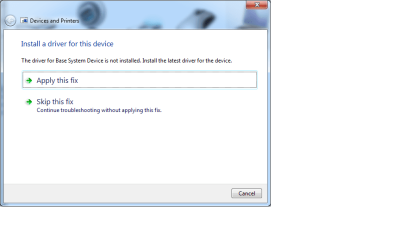
When I use Devices And Printers, I see my laptop Icon, this icon has one exlamation mark. When I rightclick the laptop icon, I can choose troubleshoot, and I can choose to apply a fix or skip it.
Devices and printers fix or not.png

I would like to know what happens when I just select Apply this fix, before I do that, I like to know what changes are going to commited on my system.

Hope someone can help me to do the right thing.

Thanks in advance,

zx81
 

My Computer

Computer Manufacturer/Model Number
Dell Inpspiron 1720
OS
Windows 7 Home Premium x64
CPU
Intel 1720 Core 2 Duo 2.00GHz,800,2M
Memory
4GB 667MHz DDR2 SDRAM (2x2048)
Graphics Card(s)
NVIDIA Geforce Go 8600M GT 256MB DDR2
Sound Card
SigmaTel
Monitor(s) Displays
17.0" Widescreen WXGA+ (1440x900) TFT with TrueLife
Screen Resolution
1440x900
Hard Drives
2x160GB 5400RPM Serial ATA
Mouse
Logitech
searching for: "pci\ven_1180&dev_0592&CC_088000 dell inspiron"

came up with this link... as well as other links indicating the other users are right about it being a ricoh card reader.

So I would download this driver:Dell Drivers and Downloads

Double click it and extract it to the c:\dell folder
Then right click on the unknown device and update driver but point it at the dell folder

If its the right driver it will work.
 

My Computer

Computer Manufacturer/Model Number
Dell XPS 720 H2C
OS
7 Enterprise
CPU
Intel Core 2 Extreme QX6850 factory overclocked 3.67GHz
Motherboard
Dell Inc., Model 0P611C, NVIDIA nForce 680i SLI
Memory
4GB Dual Channel DDR2 SDRAM (800 MHz, 4 DIMMs)
Graphics Card(s)
dual nVidia GeForce 8800GTX ultra 768MB SLI
Sound Card
Sound Blaster X-Fi XtremeMusic
Monitor(s) Displays
Dual Dell 2208WFP ultra sharp
Screen Resolution
1680x1050 * 2
Hard Drives
to many to count... but raid5 running on 4 western digital RE3 1TB
PSU
1k watt
Case
AWESOME HUGE(search google if you want to see it)
Cooling
H2C hybrid liquid radiator & thermoelectric
Keyboard
Dell Multimedia USB Keyboard
Mouse
Premium Dell USB Optical Corded XPS Scroll Mouse
Internet Speed
none...
Other Info
http://www.dell.com/us/en/dfh/desktops/xpsdt_720h2c/pd.aspx?refid=xpsdt_720h2c&cs=22&s=dfh
When I use Devices And Printers, I see my laptop Icon, this icon has one exlamation mark. When I rightclick the laptop icon, I can choose troubleshoot, and I can choose to apply a fix or skip it.
View attachment 33655

I would like to know what happens when I just select Apply this fix, before I do that, I like to know what changes are going to commited on my system.

Hope someone can help me to do the right thing.

Thanks in advance,

zx81

Apply this fix just runs you through some steps to try and automagically fix your problem. Which if it can't find the driver it probably wont work.
 

My Computer

Computer Manufacturer/Model Number
Dell XPS 720 H2C
OS
7 Enterprise
CPU
Intel Core 2 Extreme QX6850 factory overclocked 3.67GHz
Motherboard
Dell Inc., Model 0P611C, NVIDIA nForce 680i SLI
Memory
4GB Dual Channel DDR2 SDRAM (800 MHz, 4 DIMMs)
Graphics Card(s)
dual nVidia GeForce 8800GTX ultra 768MB SLI
Sound Card
Sound Blaster X-Fi XtremeMusic
Monitor(s) Displays
Dual Dell 2208WFP ultra sharp
Screen Resolution
1680x1050 * 2
Hard Drives
to many to count... but raid5 running on 4 western digital RE3 1TB
PSU
1k watt
Case
AWESOME HUGE(search google if you want to see it)
Cooling
H2C hybrid liquid radiator & thermoelectric
Keyboard
Dell Multimedia USB Keyboard
Mouse
Premium Dell USB Optical Corded XPS Scroll Mouse
Internet Speed
none...
Other Info
http://www.dell.com/us/en/dfh/desktops/xpsdt_720h2c/pd.aspx?refid=xpsdt_720h2c&cs=22&s=dfh
searching for: "pci\ven_1180&dev_0592&CC_088000 dell inspiron"

came up with this link... as well as other links indicating the other users are right about it being a ricoh card reader.

So I would download this driver:Dell Drivers and Downloads

Double click it and extract it to the c:\dell folder
Then right click on the unknown device and update driver but point it at the dell folder

If its the right driver it will work.

jrc3, thank you for your response!
I am sorry I was so slow to react!

I want to keep my system stable, and I use Windows 7 x64, the driver you suggest is for XP and Vista, I am not yet understanding enough about Windows 7 to know for sure my system will not crash if I install your recommended driver.

Correct me if I am wrong, I am here to understand Windows 7.

Thanks a lot for your help!

zx81
 

My Computer

Computer Manufacturer/Model Number
Dell Inpspiron 1720
OS
Windows 7 Home Premium x64
CPU
Intel 1720 Core 2 Duo 2.00GHz,800,2M
Memory
4GB 667MHz DDR2 SDRAM (2x2048)
Graphics Card(s)
NVIDIA Geforce Go 8600M GT 256MB DDR2
Sound Card
SigmaTel
Monitor(s) Displays
17.0" Widescreen WXGA+ (1440x900) TFT with TrueLife
Screen Resolution
1440x900
Hard Drives
2x160GB 5400RPM Serial ATA
Mouse
Logitech
I have installed windows xp drivers with no problems at all on windows 7.

Windows 7 will tell you if they are incompatible and I have found with the ricoh drivers on my dell laptop that they are already signed and install without prompting for unsigned drivers and work without a problem.

Sometimes when you install a xp driver windows 7 will finally find a driver on windows update too!
 

My Computer

Computer Manufacturer/Model Number
Dell XPS 720 H2C
OS
7 Enterprise
CPU
Intel Core 2 Extreme QX6850 factory overclocked 3.67GHz
Motherboard
Dell Inc., Model 0P611C, NVIDIA nForce 680i SLI
Memory
4GB Dual Channel DDR2 SDRAM (800 MHz, 4 DIMMs)
Graphics Card(s)
dual nVidia GeForce 8800GTX ultra 768MB SLI
Sound Card
Sound Blaster X-Fi XtremeMusic
Monitor(s) Displays
Dual Dell 2208WFP ultra sharp
Screen Resolution
1680x1050 * 2
Hard Drives
to many to count... but raid5 running on 4 western digital RE3 1TB
PSU
1k watt
Case
AWESOME HUGE(search google if you want to see it)
Cooling
H2C hybrid liquid radiator & thermoelectric
Keyboard
Dell Multimedia USB Keyboard
Mouse
Premium Dell USB Optical Corded XPS Scroll Mouse
Internet Speed
none...
Other Info
http://www.dell.com/us/en/dfh/desktops/xpsdt_720h2c/pd.aspx?refid=xpsdt_720h2c&cs=22&s=dfh
I have installed windows xp drivers with no problems at all on windows 7.

Windows 7 will tell you if they are incompatible and I have found with the ricoh drivers on my dell laptop that they are already signed and install without prompting for unsigned drivers and work without a problem.

Sometimes when you install a xp driver windows 7 will finally find a driver on windows update too!

I use Windows 7 Home Premium x64, windows XP drivers are 32-bit if I am correct.

I think I will wait installing the driver(s) until Dell or Microsoft release a x64 driver.

I thank you very much for helping/teaching me!

zx81
 

My Computer

Computer Manufacturer/Model Number
Dell Inpspiron 1720
OS
Windows 7 Home Premium x64
CPU
Intel 1720 Core 2 Duo 2.00GHz,800,2M
Memory
4GB 667MHz DDR2 SDRAM (2x2048)
Graphics Card(s)
NVIDIA Geforce Go 8600M GT 256MB DDR2
Sound Card
SigmaTel
Monitor(s) Displays
17.0" Widescreen WXGA+ (1440x900) TFT with TrueLife
Screen Resolution
1440x900
Hard Drives
2x160GB 5400RPM Serial ATA
Mouse
Logitech
Hello all,

The missing driver was a card reader driver, jrc3, you are right!

The way I installed the driver was very easy ;-)

Start-> Devices and Printers-> There was an exclamation mark at the laptop icon
I right click the laptop icon, and choose Troubleshoot

From there the troubleshoot option detected a problem with a missing driver.
Then select Fix the problem.

After I choose to fix the problem, I got a screen with a driver to download from Dell.
And instructions on how to install the downloaded driver.
You may choose to restart system after installing the driver, but even without doing so, your system is free of the exclamation mark.

Now every driver is installed correctly.

I hope someone find this usefully.

Have a nice day!

zx81
 

My Computer

Computer Manufacturer/Model Number
Dell Inpspiron 1720
OS
Windows 7 Home Premium x64
CPU
Intel 1720 Core 2 Duo 2.00GHz,800,2M
Memory
4GB 667MHz DDR2 SDRAM (2x2048)
Graphics Card(s)
NVIDIA Geforce Go 8600M GT 256MB DDR2
Sound Card
SigmaTel
Monitor(s) Displays
17.0" Widescreen WXGA+ (1440x900) TFT with TrueLife
Screen Resolution
1440x900
Hard Drives
2x160GB 5400RPM Serial ATA
Mouse
Logitech
yes, the missing driver is a card reader, if u have HP just download the driver (Ricoh 5 in 1 Card Reader) from HP's website
 

My Computer

OS
Windows 7 Ultimate x64
Base System Device Driver missing - Ricoh Card Reader

The driver is also found on the Dell Drivers and Utilities CD/DVD that comes with each new machine. When you first run that disc it will install an installer programme and the you can run the disc. In most case the software will detect which OS you are using.

Also, all the drivers are on the Dell website.

Most, but not all drivers are XP/Win XP/Win 7 compatible.

Once you have run and installed all the drivers from the disc Windows Update will then pick up on any driver updates.
 

My Computer

OS
Win XP Pro, Win 7 Win Vista
I know thread is over a year old but this might help some of the people.

I had the problem that other people are having. But I found the drive and here is the driver for any body that needs it.

Drivers and Downloads
 

My Computer

Computer type
PC/Desktop
OS
Windows 10, 7, x64
I always put the wireless or ethernet driver on the external file backup device so I can install it to get online quickly if the network driver is not provided by installer.

Then after connecting to your network via bottom right System tray icon if necessary, install all Important and Optional Updates after enabling Automatically get recommended drivers and updates for your hardware. This is how Win7 automates drivers - in Win8 you don't even interact with them at all, and these were improvements made originally in Win7!

Any drivers missing thereafter can be found on the Support Downloads webpage for your PC or device model. If it's Unknown you can trace it using Hardware Identification.
 
Back
Top