I have some basic Win 7 Home Premium questions re creating/restoring IMAGES of my C drive ( and hidden partitions) using native Windows backup and restore. Never really used it before as I use other software instead, but wanted to explore this option a bit further:
QUESTIONS:
1) When I created my first image, it created a directory , with mutliple files ( one large 32 GB one and many timy ones. I assume this is normal?
2) I note the directory name was time stamped, so I assume this means that every subsequent time I create an image, it will create another new directory and new set of files.....(and that I would need to manaually delete the old images if start running out of space). Is that correct?
3) Can the creation of Windows system images be scheduled?? I know the file-by-file backups can, but I didnt see anything similar for images.
4) Suppose my bootable hard drive crashed, and I buy a new drive. How do I restore the image. Is the system repair disc bootable??? and does it prompt me to pick an image??
Thanks.
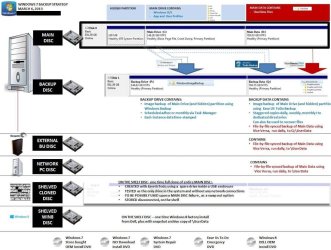
My set up is as follows
Windows 7 Home Premium, SP1
Disk 0 ( my main drive)
-bootable
-hidden partiion
-C: partiton ( for the opeartions sytem, paaas, user profiles and settings)
-D: partition( for personal user data files)
Disk 1 (my internal backup drive)
-not bootable
-contains copies of system image of the hidden and C: drive (using Windows system image)
-contains copies of system image of the hidden and C: drive (using EaseUs)
-contains copies of my data files ( using Vice Versa)
An external USB drive
-not bootable
-contains time staggered copies of system image of the hidden and C: drive (using EaseUs)
-contains time staggered copies of my data files ( using Vice Versa)
Other machines and standalone hard drive literral yon the shelf
-contains older copies of system image of the hidden and C: drive (using EaseUs)
-contains older copies of my data files ( using Vice Versa)
Other software
-Store bought* Windows 7 SP1 OEM install DVD
-Windows 7 SP1* DVS created from Digital Reiver ISO file
-Windows 7 sytem repair disk
*Machine is Dell XPS 8500, whihc came with WIndows 8. It is now running Windows 7;
QUESTIONS:
1) When I created my first image, it created a directory , with mutliple files ( one large 32 GB one and many timy ones. I assume this is normal?
2) I note the directory name was time stamped, so I assume this means that every subsequent time I create an image, it will create another new directory and new set of files.....(and that I would need to manaually delete the old images if start running out of space). Is that correct?
3) Can the creation of Windows system images be scheduled?? I know the file-by-file backups can, but I didnt see anything similar for images.
4) Suppose my bootable hard drive crashed, and I buy a new drive. How do I restore the image. Is the system repair disc bootable??? and does it prompt me to pick an image??
Thanks.
My set up is as follows
Windows 7 Home Premium, SP1
Disk 0 ( my main drive)
-bootable
-hidden partiion
-C: partiton ( for the opeartions sytem, paaas, user profiles and settings)
-D: partition( for personal user data files)
Disk 1 (my internal backup drive)
-not bootable
-contains copies of system image of the hidden and C: drive (using Windows system image)
-contains copies of system image of the hidden and C: drive (using EaseUs)
-contains copies of my data files ( using Vice Versa)
An external USB drive
-not bootable
-contains time staggered copies of system image of the hidden and C: drive (using EaseUs)
-contains time staggered copies of my data files ( using Vice Versa)
Other machines and standalone hard drive literral yon the shelf
-contains older copies of system image of the hidden and C: drive (using EaseUs)
-contains older copies of my data files ( using Vice Versa)
Other software
-Store bought* Windows 7 SP1 OEM install DVD
-Windows 7 SP1* DVS created from Digital Reiver ISO file
-Windows 7 sytem repair disk
*Machine is Dell XPS 8500, whihc came with WIndows 8. It is now running Windows 7;
My Computer
At a glance
DELL Win 7 Home Premium 64 BitIntel Core i7-930 (8MB L2, 2.8GHz) // ntel Co...16GB // 18GB DDR3 SDRAM 1333Mhhz 6 DIMMS (3x2...AMD HD7570 // AMD Radeon HD6750 // ATI Radeon...
- Computer type
- PC/Desktop
- Computer Manufacturer/Model Number
- DELL XPS 8500 // DELL XPS Studio 9100 // DELL Dim 9200
- OS
- DELL Win 7 Home Premium 64 Bit
- CPU
- Intel Core i7-930 (8MB L2, 2.8GHz) // ntel Core 2 Quad Q6600
- Motherboard
- ?? // Dell A02 BIOS // ??
- Memory
- 16GB // 18GB DDR3 SDRAM 1333Mhhz 6 DIMMS (3x2, 3x4) //4 GB
- Graphics Card(s)
- AMD HD7570 // AMD Radeon HD6750 // ATI Radeon HD5670 1 GB GD
- Sound Card
- ?? // THX TruStudio PC //?
- Monitor(s) Displays
- Dual Dell 2405 WFP-HC24 //SAmsung 27" // Triple 19" LCD
- Screen Resolution
- 1900 x 1200
- Hard Drives
- Main :WD Caviar Black 1 TB SATA WD1002FAEX
Backup :WD Caviar Black 1 TB SATA WD1002FAEX
- PSU
- ?? // Ultra 900W // ??