Basic Video Editing Programs

Chips

New member
Member
VIP
Local time
11:25 AM
Messages
204
I need a program that'll allow me to do some very basic editing of video files. Just trimming off beginnings and ends really, nothing fancy. Just something that'll do the job without losing the quality of the file itself. Even better if it'll trim audio files as well. Any suggestions?
 

My Computer

Computer type
PC/Desktop
OS
Windows 10

My Computer

Computer Manufacturer/Model Number
Micro-Star International/MS-7529
OS
Windows 7 Ultimate x32
CPU
DualCore Intel Pentium E2200, 2218 MHz (11 x 202)
Motherboard
MSI G31M3 V2 (MS-7529) (2 PCI, 1 PCI-E x16,2 DDR2 DIMM)
Memory
2 GB DDR2-800 DDR2 SDRAM
Graphics Card(s)
nVIDIA GeForce 9500GT 1GB
Sound Card
Realtek ALC888/1200 @ Intel 82801GB ICH7
Monitor(s) Displays
Samsung SyncMaster 2253BW (Digital) 22'' LCD
Screen Resolution
1680x1050
Hard Drives
SAMSUNG HD322IJ ATA Device (298 GB , IDE)

My Computer

Computer Manufacturer/Model Number
HP, Dell, Gateway, Toshiba - 4 laptops and 2 desktops
OS
Vista, Windows7, Mint Mate, Zorin, Windows 8
CPU
from 1.6GHz Duo to i7
Monitor(s) Displays
2x HP w2207
Hard Drives
5x HDD, 7x SSD, 12x Externals
Keyboard
with trackball - no mices
Mouse
Trackball mice
Internet Speed
DSL 6000
you want avidemux

you need to google it, because the link wont work on this site.

it will allow you to trim the ends off a file and save it real quickly in the same format without having to re-transcode, so no loss of quality. (and lots more features ...)

and it's free!

google avidemux!
 

My Computer

Computer Manufacturer/Model Number
mickey megabyte 1234
OS
ultimate 64 sp1
CPU
i5 2500K [email protected]
Motherboard
MSI P67A-GD53
Memory
8 gigs GSkill Ripjaws 1600
Graphics Card(s)
amd hd6950
Sound Card
creative x-fi gamer
Monitor(s) Displays
samsung 24"
Screen Resolution
1920x1080
Hard Drives
ocz vertex 2e 60 gig, samsung f3 1tb, buffalo 2tb ext
PSU
antec 550
Case
antec three hundred
Cooling
i'm a cooling fan
Keyboard
saitek eclipse ii
Mouse
logitech g3
Internet Speed
about 4 Mbps
Other Info
i love win7
I'm afraid there is a little more to it. What fileformats would you want to edit ?
For MP3 Audio I'd recommend MP3DirectCut if you want to have more control about the trimming or even split a CD into single tracks. If that doesn't matter and you just want to remove "silence" at start and/or end of a MP3 or simply normalize a file/change the volume without re encoding use the free version of MPTrim and WavTrim.

As for Video I suggest you try out a few to see what fits your needs best. Like most freeware programs they all have their limitations (but maybe in an area you wouldn't need anyways ;)
Windows Live Movie Maker (which should already on your computer)
AVIdemux v2.5.3 which handles almost all common formats but might need a little time to get used to.
VirtualDub (mainly for AVI and also a little "uncommon" in its use but can handle material that gets served by Avisynth.
VirtualDubMod (which also handles MKV and OGM... PLUS has the benefit of supporting 2 audio tracks

Well I'm not so good with general answers, so tell me what exactly you ant to do and we'll see what's best

-DG
 

My Computer

Computer Manufacturer/Model Number
HP m8000n
OS
Windows 7 Ultimate x86
CPU
DualCore AMD Athlon 64 X2, 2600 MHz 5200+
Motherboard
Asus M2N68-LA (Narra)
Memory
Samsung 2GB DDR2
Graphics Card(s)
Onboard NVIDIA GeForce 6150SE nForce 430
Sound Card
Onboard nVIDIA nForce 6100-430 (MCP61P)
Monitor(s) Displays
Westinghouse 19" LED
Screen Resolution
1280x1024
Hard Drives
SATA II Seagate Barracuda 500GB
USB II WD Elements 500GB
USB II WD My Book 1TB
USB II WD My Book 2TB
PSU
Stock (HP)
Case
Stock (HP)
Cooling
Stock
Keyboard
Logitech Classic KB 200
Mouse
Standard HP opticle USB mouse
I've got a load of AVIs that need trimming of stuff I don't really need. I've also got some MP3s with talking at their beginnings of the tracks I want to cut off. Some MP3s I also would like to slice together to make one big track.
 

My Computer

Computer type
PC/Desktop
OS
Windows 10
i do feel that avidemux is the perfect tool for this trimming job.

here's a quick'n'dirty tutorial.

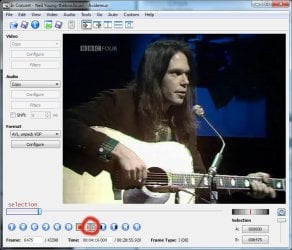
for example, here i have a neil young video from 1972 (?). let's say that i really don't like the first song, and i want to delete it.

i would load the video file into avidemux, then fast forward (by using the slider or arrow buttons) to the end of the unwanted portion - see first picture.

i would then press the B button - this sets the endpoint of a selection. i didn't need to press A (startpoint), as it assumes that A is the start of the file. if i wanted to make a selection in the middle of the clip, i would press A at the startpoint, then B at the endpoint.

ok, now that i have my selection selected, i simply press the delete button on my keyboard.

job nearly done. i just have to save the movie. it will not get re-transcoded, meaning you will not lose any quality. it will keep the same exact video format as the original.

one thing to note is that the program doesn't add the .avi file extension - so make sure you type this in when you save.

unfortunately, avidemux will only work with video files. to edit your mp3s you will need an audio editing program. audacity is a good freebie,a nd simple to use.

 

Attachments

  • neil.jpg
    neil.jpg
    70.6 KB · Views: 21

My Computer

Computer Manufacturer/Model Number
mickey megabyte 1234
OS
ultimate 64 sp1
CPU
i5 2500K [email protected]
Motherboard
MSI P67A-GD53
Memory
8 gigs GSkill Ripjaws 1600
Graphics Card(s)
amd hd6950
Sound Card
creative x-fi gamer
Monitor(s) Displays
samsung 24"
Screen Resolution
1920x1080
Hard Drives
ocz vertex 2e 60 gig, samsung f3 1tb, buffalo 2tb ext
PSU
antec 550
Case
antec three hundred
Cooling
i'm a cooling fan
Keyboard
saitek eclipse ii
Mouse
logitech g3
Internet Speed
about 4 Mbps
Other Info
i love win7

My Computer

Computer type
PC/Desktop
Computer Manufacturer/Model Number
Custom Built
OS
Windows 7 Ultimate x64
CPU
Intel(R) Core(TM) 2 Quad Q8200 @ 2.33 GHz
Motherboard
Asus P5KPL-AM SE Motherboard
Memory
2x2GB Kingston DDR2
Graphics Card(s)
1GB AMD Radeon HD 5450
Sound Card
VIA Technologies High Definition Audio Device
Monitor(s) Displays
Samsung SyncMaster 733NW
Screen Resolution
1440x900
Hard Drives
SEAGATE 320GB Barracuda® 7200.12, SATA 3 Gb/s, 7200 RPM, 16MB cache x 2
Case
Custom Casing
Cooling
Ice cubes from the freezer ;)
Keyboard
Generic Plug & Play Keyboard
Mouse
Optical Mouse
Internet Speed
Very slow
the problem with wlmm is that it will only save files using wmv format.

you will lose quality by the fact that the software has to recompress an already compressed format.

avidemux will save the file in the same format as the original, saving both time and quality.
 

My Computer

Computer Manufacturer/Model Number
mickey megabyte 1234
OS
ultimate 64 sp1
CPU
i5 2500K [email protected]
Motherboard
MSI P67A-GD53
Memory
8 gigs GSkill Ripjaws 1600
Graphics Card(s)
amd hd6950
Sound Card
creative x-fi gamer
Monitor(s) Displays
samsung 24"
Screen Resolution
1920x1080
Hard Drives
ocz vertex 2e 60 gig, samsung f3 1tb, buffalo 2tb ext
PSU
antec 550
Case
antec three hundred
Cooling
i'm a cooling fan
Keyboard
saitek eclipse ii
Mouse
logitech g3
Internet Speed
about 4 Mbps
Other Info
i love win7

My Computer

Computer Manufacturer/Model Number
Put together
OS
Win7 Pro-64 Bit
CPU
i7-2600-3.4GHz
Motherboard
ASRock Z68M
Memory
8 GIG DDR3
Graphics Card(s)
onboard
Sound Card
onboard
Hard Drives
Seagate 1TB 7200RPM
PSU
680 W
Case
black
Cooling
stock fans
Keyboard
Microsoft
Mouse
Microsoft optical
the problem with wlmm is that it will only save files using wmv format.

you will lose quality by the fact that the software has to recompress an already compressed format.

avidemux will save the file in the same format as the original, saving both time and quality.
Although what you say is true, the effect is very minimal and at least I cannot notice it. My video camera records in .mov (HD) and when I edit those files with WLMM, I get a very good result.
 

My Computer

Computer Manufacturer/Model Number
HP, Dell, Gateway, Toshiba - 4 laptops and 2 desktops
OS
Vista, Windows7, Mint Mate, Zorin, Windows 8
CPU
from 1.6GHz Duo to i7
Monitor(s) Displays
2x HP w2207
Hard Drives
5x HDD, 7x SSD, 12x Externals
Keyboard
with trackball - no mices
Mouse
Trackball mice
Internet Speed
DSL 6000
whs, you're starting from an HD source, which is great.

the op didn't specify the source of his clips, they could be anything - from HD to amateur youtube, shakily shot on a mobile phone and badly compressed.

try compressing it again, and you will lose even more quality and gain more artifacts.

not to mention the time involved in having to analyse and process every frame during the save/re-transcoding procedure.

but it is true that wlmm have a familiar-looking interface that would not intimidate beginners (who probably wouldn't care too much about quality - or even be aware of the issues involved in compressing video).

(of course i am not saying that you are one of these, whs)

i just know which program i would use for this specific purpose of trimming clips.
 

My Computer

Computer Manufacturer/Model Number
mickey megabyte 1234
OS
ultimate 64 sp1
CPU
i5 2500K [email protected]
Motherboard
MSI P67A-GD53
Memory
8 gigs GSkill Ripjaws 1600
Graphics Card(s)
amd hd6950
Sound Card
creative x-fi gamer
Monitor(s) Displays
samsung 24"
Screen Resolution
1920x1080
Hard Drives
ocz vertex 2e 60 gig, samsung f3 1tb, buffalo 2tb ext
PSU
antec 550
Case
antec three hundred
Cooling
i'm a cooling fan
Keyboard
saitek eclipse ii
Mouse
logitech g3
Internet Speed
about 4 Mbps
Other Info
i love win7
Yeah, I agree with what you say. But fo the occasional video and an easy interface I always recommend WLMM. But for more demanding tasks, e.g. a lot of text pages like I have them in my tutorials, I use Machete. (Example: Chapter1 Desktop on Vimeo ).
As one friend once said: If you have a video with car chases and explosions, a quality degradation will be hard to notice. But for slow motion or stand still text, you will immediately notice it.
 

My Computer

Computer Manufacturer/Model Number
HP, Dell, Gateway, Toshiba - 4 laptops and 2 desktops
OS
Vista, Windows7, Mint Mate, Zorin, Windows 8
CPU
from 1.6GHz Duo to i7
Monitor(s) Displays
2x HP w2207
Hard Drives
5x HDD, 7x SSD, 12x Externals
Keyboard
with trackball - no mices
Mouse
Trackball mice
Internet Speed
DSL 6000
...
As one friend once said: If you have a video with car chases and explosions, a quality degradation will be hard to notice. But for slow motion or stand still text, you will immediately notice it.

not the other way round?

you could compress the hell out of text-only movies, but you would soon see the blocks on a fast car-chase scene.

but i think i know what you mean -the eye/brain has time to notice the artefacts if they don't move much...
 

My Computer

Computer Manufacturer/Model Number
mickey megabyte 1234
OS
ultimate 64 sp1
CPU
i5 2500K [email protected]
Motherboard
MSI P67A-GD53
Memory
8 gigs GSkill Ripjaws 1600
Graphics Card(s)
amd hd6950
Sound Card
creative x-fi gamer
Monitor(s) Displays
samsung 24"
Screen Resolution
1920x1080
Hard Drives
ocz vertex 2e 60 gig, samsung f3 1tb, buffalo 2tb ext
PSU
antec 550
Case
antec three hundred
Cooling
i'm a cooling fan
Keyboard
saitek eclipse ii
Mouse
logitech g3
Internet Speed
about 4 Mbps
Other Info
i love win7
The problem with text is that it blurs and gets hard to read. If you look at my example, the lossless editing allows you to have a clear text - even in small print as e.g. on my sidebar.
 

My Computer

Computer Manufacturer/Model Number
HP, Dell, Gateway, Toshiba - 4 laptops and 2 desktops
OS
Vista, Windows7, Mint Mate, Zorin, Windows 8
CPU
from 1.6GHz Duo to i7
Monitor(s) Displays
2x HP w2207
Hard Drives
5x HDD, 7x SSD, 12x Externals
Keyboard
with trackball - no mices
Mouse
Trackball mice
Internet Speed
DSL 6000
I just remembered a couple very important pointers to my post above

as for AVIDemux (I took the liberty to recycle mickey's pic :D
with AVIs it's extremely important to ONLY cut on Keyframes (here Frame Typ I) and not on B- or P-Frames.
The reason for that lies in the way AVI compresses material to save space. During encoding, every so many seconds the encoder takes a full picture from the video stream. That's the Keyframe which holds the complete information of that particular picture.The others are P and B-frames and cutting there leads to distorted/garbled pictures because the picture information simply isn't there anymore. (Predicted picture-frames which hold the difference to the frame before itself and Bi-predictive picture frames which additionally holds the difference to the next frame)
so where is the beef?
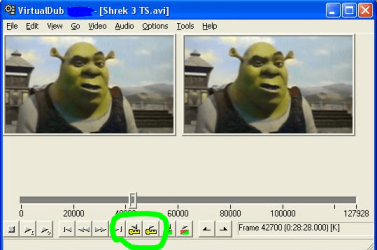
It basically means you need to use the buttons I marked in Green to navigate to the spot you'd like to cut at.

Capture.PNG

As for VirtualDub (that program works quite similar to Avidemux. The important buttons are here in the shape of yellow keys) but IMHO more important is, that VD has an inherently problem with AVI containers that hold audio tracks encoded with variable bit-rate. (The end result becomes unsynchronized...it has gotten better with recent builds tho)
Here is some excellent Docu for VD

More Info about Keyframes etc you'll find HERE

Capture2.PNG

For those clips you'd rather use VirtualDubMod (or one of the other programs)

-DG
 

My Computer

Computer Manufacturer/Model Number
HP m8000n
OS
Windows 7 Ultimate x86
CPU
DualCore AMD Athlon 64 X2, 2600 MHz 5200+
Motherboard
Asus M2N68-LA (Narra)
Memory
Samsung 2GB DDR2
Graphics Card(s)
Onboard NVIDIA GeForce 6150SE nForce 430
Sound Card
Onboard nVIDIA nForce 6100-430 (MCP61P)
Monitor(s) Displays
Westinghouse 19" LED
Screen Resolution
1280x1024
Hard Drives
SATA II Seagate Barracuda 500GB
USB II WD Elements 500GB
USB II WD My Book 1TB
USB II WD My Book 2TB
PSU
Stock (HP)
Case
Stock (HP)
Cooling
Stock
Keyboard
Logitech Classic KB 200
Mouse
Standard HP opticle USB mouse
Sledge, that is a good point. As far as I know, other lossless editors act the same. But this is a disadvantage of these editors because the key frames are often far and apart. Thus it is not always possible to cut/edit where you like. WLMM does not have that problem - but, of course, it has other shortcomings.
 

My Computer

Computer Manufacturer/Model Number
HP, Dell, Gateway, Toshiba - 4 laptops and 2 desktops
OS
Vista, Windows7, Mint Mate, Zorin, Windows 8
CPU
from 1.6GHz Duo to i7
Monitor(s) Displays
2x HP w2207
Hard Drives
5x HDD, 7x SSD, 12x Externals
Keyboard
with trackball - no mices
Mouse
Trackball mice
Internet Speed
DSL 6000
Thanks everyone for the info. I eventually got avidemux. Pretty good program. But what about something for editing MP3 files? Is there anything good out there?
 

My Computer

Computer type
PC/Desktop
OS
Windows 10
audacity is a pretty-good freeware audio editor, for your mp3s.
 

My Computer

Computer Manufacturer/Model Number
mickey megabyte 1234
OS
ultimate 64 sp1
CPU
i5 2500K [email protected]
Motherboard
MSI P67A-GD53
Memory
8 gigs GSkill Ripjaws 1600
Graphics Card(s)
amd hd6950
Sound Card
creative x-fi gamer
Monitor(s) Displays
samsung 24"
Screen Resolution
1920x1080
Hard Drives
ocz vertex 2e 60 gig, samsung f3 1tb, buffalo 2tb ext
PSU
antec 550
Case
antec three hundred
Cooling
i'm a cooling fan
Keyboard
saitek eclipse ii
Mouse
logitech g3
Internet Speed
about 4 Mbps
Other Info
i love win7

My Computer

Computer Manufacturer/Model Number
HP m8000n
OS
Windows 7 Ultimate x86
CPU
DualCore AMD Athlon 64 X2, 2600 MHz 5200+
Motherboard
Asus M2N68-LA (Narra)
Memory
Samsung 2GB DDR2
Graphics Card(s)
Onboard NVIDIA GeForce 6150SE nForce 430
Sound Card
Onboard nVIDIA nForce 6100-430 (MCP61P)
Monitor(s) Displays
Westinghouse 19" LED
Screen Resolution
1280x1024
Hard Drives
SATA II Seagate Barracuda 500GB
USB II WD Elements 500GB
USB II WD My Book 1TB
USB II WD My Book 2TB
PSU
Stock (HP)
Case
Stock (HP)
Cooling
Stock
Keyboard
Logitech Classic KB 200
Mouse
Standard HP opticle USB mouse
Back
Top