BAT file to copy file to multiple locations?

nevesswodniw

New member
Member
Local time
10:16 AM
Messages
35
Hi, I have a file with no extension called simply, D:\file

I want to copy this to multiple locations, eg e:\file , f:\file

sometimes there will already be an older version, so I would like it to overwrite the file.


Is this possible with a bat file?


I tried a simple copy command in a bat file, but it wouldn't copy at all.


thanks.
 

My Computer My Computer

At a glance

7 Ult x64 sp1intel iddr3 2GB+nvidia pcie
OS
7 Ult x64 sp1
CPU
intel i
Motherboard
z68
Memory
ddr3 2GB+
Graphics Card(s)
nvidia pcie
Monitor(s) Displays
lcd
Hard Drives
sata2
PSU
600W
Cooling
fans
Have you tried 'xcopy' with the /y flag. This should copy the files and overwrite without it prompting you.... Would this suut your needs?
 

My Computer My Computer

At a glance

Windows 7 Ultimate x86Intel Pentium D 925 @ 3.00GHz1GB DDR2 667MHzOverclocked Asus ATI Radeon X1600 Pro 512MB
Computer Manufacturer/Model Number
Packard Bell iMedia 2218 -- Has Been Running For Almost 7 Years!
OS
Windows 7 Ultimate x86
CPU
Intel Pentium D 925 @ 3.00GHz
Motherboard
Socket 775 MCP73VT-PM
Memory
1GB DDR2 667MHz
Graphics Card(s)
Overclocked Asus ATI Radeon X1600 Pro 512MB
Sound Card
Sound Blaster Audigy 570
Monitor(s) Displays
19" LCD Monitor; MW19E-AAA
Screen Resolution
1440 x 900
Hard Drives
500gb 7200rpm (Windows 7) ---
160gb 7200rpm (Backup) ---
1TB Iomega External Drive (7200rpm)
PSU
250w Packard Bell Standard
Case
Packard Bell standard
Cooling
Intel Socket 775 Air Cooler
Keyboard
Wired PS/2 Keyboard
Mouse
Dell Wireless USB Mouse
Internet Speed
Wireles --- Download - 6.63 Mbps Upload - 0.38 Mbps
Other Info
Currently Planning To Build New Computer --- Also Got A Samsung Galaxy Ace II (Plays All Games You Throw At It)
.....I tried a simple copy command in a bat file, but it wouldn't copy at all....
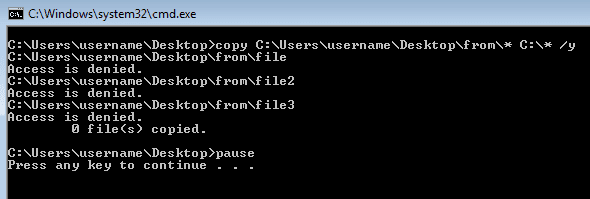
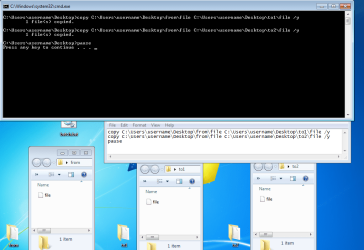
As long as you have access rights (permissions) to copy to the area of interest, then copy should work just fine. Like pedro said, you will want the "/y" switch on the end to handle overwriting any existing file(s).

It is probably best to workout the syntax using the command prompt window or include a pause in your batch file so that you can see any errors that might occur:
batch-error.png

batch1.png

or with wildcards

batch2.png
 

My Computer My Computer

At a glance

W7 Pro SP1 64biti78GBIntel HD Graphics
Computer type
Laptop
Computer Manufacturer/Model Number
Employer provided Dell Latitude
OS
W7 Pro SP1 64bit
CPU
i7
Memory
8GB
Graphics Card(s)
Intel HD Graphics
Hard Drives
crappy SSD
Antivirus
Employer mandated Symantec Endpoint Protection
Browser
Pale Moon 64bit, IE11 64bit & Chrome 64bit
You may find yourself that you would like more "flags" or "switches" which will help refine and customize the xcopy command- here is whee i learned xcopy switches from

http://ss64.com/nt/xcopy.html
 

My Computer My Computer

At a glance

Windows 7 Ultimate x86Intel Pentium D 925 @ 3.00GHz1GB DDR2 667MHzOverclocked Asus ATI Radeon X1600 Pro 512MB
Computer Manufacturer/Model Number
Packard Bell iMedia 2218 -- Has Been Running For Almost 7 Years!
OS
Windows 7 Ultimate x86
CPU
Intel Pentium D 925 @ 3.00GHz
Motherboard
Socket 775 MCP73VT-PM
Memory
1GB DDR2 667MHz
Graphics Card(s)
Overclocked Asus ATI Radeon X1600 Pro 512MB
Sound Card
Sound Blaster Audigy 570
Monitor(s) Displays
19" LCD Monitor; MW19E-AAA
Screen Resolution
1440 x 900
Hard Drives
500gb 7200rpm (Windows 7) ---
160gb 7200rpm (Backup) ---
1TB Iomega External Drive (7200rpm)
PSU
250w Packard Bell Standard
Case
Packard Bell standard
Cooling
Intel Socket 775 Air Cooler
Keyboard
Wired PS/2 Keyboard
Mouse
Dell Wireless USB Mouse
Internet Speed
Wireles --- Download - 6.63 Mbps Upload - 0.38 Mbps
Other Info
Currently Planning To Build New Computer --- Also Got A Samsung Galaxy Ace II (Plays All Games You Throw At It)
Thanks guys, You helped me with the pause command :p

It said cannot find file, so had to use xcopy /h because it is hidden, wouldnt have figured it out without pause.


Thanks again!
 

My Computer My Computer

At a glance

7 Ult x64 sp1intel iddr3 2GB+nvidia pcie
OS
7 Ult x64 sp1
CPU
intel i
Motherboard
z68
Memory
ddr3 2GB+
Graphics Card(s)
nvidia pcie
Monitor(s) Displays
lcd
Hard Drives
sata2
PSU
600W
Cooling
fans
thx for posting back.
glad it is working for you now.
 

My Computer My Computer

At a glance

W7 Pro SP1 64biti78GBIntel HD Graphics
Computer type
Laptop
Computer Manufacturer/Model Number
Employer provided Dell Latitude
OS
W7 Pro SP1 64bit
CPU
i7
Memory
8GB
Graphics Card(s)
Intel HD Graphics
Hard Drives
crappy SSD
Antivirus
Employer mandated Symantec Endpoint Protection
Browser
Pale Moon 64bit, IE11 64bit & Chrome 64bit
Back
Top