bat script to install many programs and reboot between them

goodboot

New member
Local time
1:39 AM
Messages
5
Hello. I'm creating this bat script, but it's not working (it's rebooting, but no restart after that):
Could anyone help? Run it as update 0 with admin rights
Code:
 @[URL="https://www.sevenforums.com/members/echo.html"]echo[/URL] off 

title Install stage %1%
echo.

IF "%1%"=="0" (
        echo program 0 will be run here
        REG ADD HKLM\SOFTWARE\Microsoft\Windows\CurrentVersion\RunOnce /f /v SP2 /t REG_SZ /d ""%~dp0update 1""
        
        pause
        shutdown /r /t 0
        
        )
IF "%1%"=="1" (
        echo program 1 will be run here
        REG ADD HKLM\SOFTWARE\Microsoft\Windows\CurrentVersion\RunOnce /f /v SP2 /t REG_SZ /d ""%~dp0update 2""
     
        pause
        shutdown /r /t 0
     
        )
IF "%1%"=="2" (
        echo program 2 will be run here
        REG ADD HKLM\SOFTWARE\Microsoft\Windows\CurrentVersion\RunOnce /f /v SP2 /t REG_SZ /d ""%~dp0update 3""

        pause
        shutdown /r /t 0
        )
IF "%1%"=="3" (
        echo program 3 will be run here
        REG ADD HKLM\SOFTWARE\Microsoft\Windows\CurrentVersion\RunOnce /f /v SP2 /t REG_SZ /d ""%~dp0update 4""

        pause
        shutdown /r /t 0
        )

IF "%1%"=="4" (
        echo Installation complete!
        pause
        )
 

My Computers

System One System Two

  • OS
    Win7 x64 Pro
  • Computer type
    PC/Desktop
Check the actual value of this fragment:

Code:
""%~dp0update 2""

I suspect that this variable could be the culprit of it, as dp0 is inherently unreliable to begin with, but check in particular if it already contains the bat file name or the trailing backslash, you may need to include it in your own.
Just for testing, try this line inside the file:

Code:
ECHO ""%~dp0update 2""

This should output something along the lines of "c:\users\goodboot\desktop\update.bat 2" (just making up the file path) that when ran should launch the installer again. I'm thinking that it won't point correctlty to that location.
 

My Computer

Computer type
Laptop
Computer Manufacturer/Model Number
Toshiba Sattelite A665-S6092
OS
Windows 7 Ultimate x64
CPU
Intel Core i7-740QM
Memory
8 GB DDR3
Graphics Card(s)
NVIDIA GeForce 330GT
Screen Resolution
1366x768
Hard Drives
Samsung 840 SSD 500GB
1TB USB3 external HD
Cooling
Coolermaster Notepal U3 notebook cooling pad
Internet Speed
3mbps ASDL
Antivirus
ClamWin 0.98.7
Browser
Opera 12.17 x86 (main), Firefox 38 (sec), IE11 (last resort)
Ok thanks.
this give me error:
Code:
REG ADD HKLM\SOFTWARE\Microsoft\Windows\CurrentVersion\RunOnce /f /v SP2 /t REG_SZ /d ""%~dp0update 1""
this give me registry value: "C:\tmp\update.bat 2"
Code:
REG ADD HKLM\SOFTWARE\Microsoft\Windows\CurrentVersion\RunOnce /f /v SP2x /t REG_SZ /d """%~dp0update.bat" 2""

and this give me "C:\tmp\update.bat" 1 <--- argument is after " and it is working
Code:
REG ADD HKLM\SOFTWARE\Microsoft\Windows\CurrentVersion\RunOnce /f /v SP2xx /t REG_SZ /d ""%~dp0update.bat" 1"

This is finished script that install only some selected Windows 7 updates (but I'm not sure it is 100% correct!)
I made it for use in virtual machine. And just checked that it is working (VirtualBox)
correct updates selection are from this tutorial: Updated! Steps For Installing And Updating Windows 7 SP1 | Tech Support Guy
some of ideas in script are from scripts included in this unofficial "SP2" (https://www.elektroda.pl/rtvforum/topic3783066.html)

Code:
@echo off

rem Windows 7 Minimall updater script 
rem most important updates file names 
rem Important! Write  files without extension here!

set "file1=windows6.1-kb4474419-v3-x64" & rem sha2 update 2019 (msu)
set "file2=windows6.1-kb4490628-x64"    & rem  Servicing Stack Update 2019 (msu)
set "file3=windows6.1-kb3125574-v4-x64" & rem Convenience Rollup 2016

set "file4=ndp48-x86-x64-allos-enu" & rem Net framework (exe)

cls & color 1F & title Windows 7 minimal updater.
REM ========start install only if user answered YES========
IF "%1%"=="" (
    :startloop
    cls & echo Windows 7 minimal updater. 
    echo This script will install only some important updates:
    echo -sha2 update 2019
    echo -Servicing Stack Update 2019
    echo -Convenience Rollup 2016
    echo -Net framework
    echo (before run make sure that all listed installer are in directory where script is)
    
    CHOICE /N /CS /C:YN /M " Do you want to intall now? [Y/N]"
    IF ERRORLEVEL ==2 (goto :end)
    IF ERRORLEVEL ==1 (timeout 5 & goto :startinstall)
    goto :startloop 
)
REM ==================================================
IF "%1%"=="1" (
  :startinstall
     rem make temp dirs
    md "%SYSTEMDRIVE%\updatetemp" & md "%SYSTEMDRIVE%\Logs"

    rem unpack msu to cab
    Echo Unpacking %file1%.msu & expand -f:* "%~dp0%file1%.msu" "%SYSTEMDRIVE%\updatetemp" 
    
    rem install unpacked cab
    Echo Instaling %file1%.cab & dism.exe /online /add-package /packagepath:"%SYSTEMDRIVE%\updatetemp\%file1%.cab" /quiet /norestart /logpath:"%SYSTEMDRIVE%\logs\%file1%.log"
  
    rem add autostart after reboot
        REG ADD HKLM\SOFTWARE\Microsoft\Windows\CurrentVersion\RunOnce /f /v SP2 /t REG_SZ /d "\"%~dp0update.bat\" 2"
        
        rem clean up temp dir
        del /s /q "%SYSTEMDRIVE%\updatetemp\*.*"
    timeout 5 & shutdown /r /t 0
        )
IF "%1%"=="2" (
        rem wusa.exe "%~dp0%file2%" /quiet /norestart
    Echo Unpacking %file2%.msu & expand -f:* "%~dp0%file2%.msu" "%SYSTEMDRIVE%\updatetemp" 
    Echo Instaling %file2%.cab & dism.exe /online /add-package /packagepath:"%SYSTEMDRIVE%\updatetemp\%file2%.cab" /quiet /norestart /logpath:"%SYSTEMDRIVE%\logs\%file2%.log"
    del /s /q "%SYSTEMDRIVE%\updatetemp\*.*"
    
        REG ADD HKLM\SOFTWARE\Microsoft\Windows\CurrentVersion\RunOnce /f /v SP2 /t REG_SZ /d "\"%~dp0update.bat\" 3"
        timeout 5 & shutdown /r /t 0
        )
IF "%1%"=="3" (
    Echo Unpacking %file3%.msu & expand -f:* "%~dp0%file3%.msu" "%SYSTEMDRIVE%\updatetemp" 
    Echo Instaling %file3%.cab & dism.exe /online /add-package /packagepath:"%SYSTEMDRIVE%\updatetemp\%file3%.cab" /quiet /norestart /logpath:"%SYSTEMDRIVE%\logs\%file2%.log"
    del /s /q "%SYSTEMDRIVE%\updatetemp\*.*"
    
        REG ADD HKLM\SOFTWARE\Microsoft\Windows\CurrentVersion\RunOnce /f /v SP2 /t REG_SZ /d "\"%~dp0update.bat\" 4"
    
        timeout 5 & shutdown /r /t 0
        )
IF "%1%"=="4" (
        "%~dp0%file4%" /q /norestart
        
        REG ADD HKLM\SOFTWARE\Microsoft\Windows\CurrentVersion\RunOnce /f /v SP2 /t REG_SZ /d "\"%~dp0update.bat\" 99"
        timeout 5 & shutdown /r /t 0
        )
        
IF "%1%"=="99" (
        echo Installation complete!
        )
goto :eof        

rem =========================================================================        
rem Script for installing full directory (not used here, not tested yet)
IF "%1%"=="5" (
    for %%X in ("%~dp0%folder2%\*.msu") do (
        Echo Unpacking %%X 
        expand -f:* "%%~fX.msu" "%SYSTEMDRIVE%\updatetemp" 
        Echo Instaling %%nX.cab 
        dism.exe /online /add-package /packagepath:"%SYSTEMDRIVE%\updatetemp\%%nX.cab" /quiet /norestart /logpath:"%SYSTEMDRIVE%\logs\%%nX.log"
    )
    REG ADD HKLM\SOFTWARE\Microsoft\Windows\CurrentVersion\RunOnce /f /v SP2 /t REG_SZ /d "\"%~dp0update.bat\" 99"
    timeout 5
        shutdown /r /t 0
    )
  )
And main problem is that install cab through DISM feels much slower than manually with clicking on msu. :-(

EDIT: unfortunately it freezee at something:-)
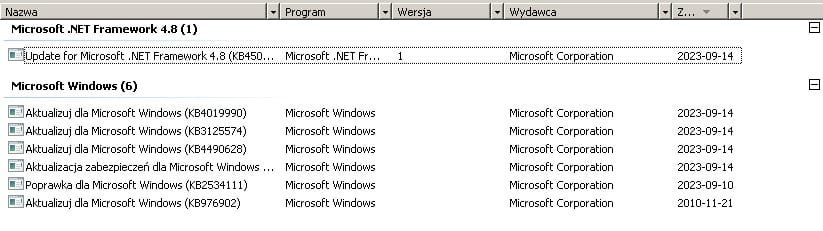
EDIT2: But it finished installing updates:
up.jpg
 

My Computers

System One System Two

  • OS
    Win7 x64 Pro
  • Computer type
    PC/Desktop
Back
Top