
Solved Batch file to automatically log a user off after a time of inactivity

blockie

New member
Member
VIP
Local time
9:28 PM
Messages
605
Location
in Assisted Care facility, Calif
Those of you who have read my posts over the past couple of weeks know what am doing on a computer belonging to an Assisted Living facility.
I have the user accounts set up plus I have removed the "Switch User and Sleep menu items from the context menu of "START.......SHUTDOWN. I have reminded the users to log off several times. I have used BRINKS tutorial to create a LOG OFF shortcut and pinned the shortcut to the task bar. Some of the users STILL fail to logoff when they are done using the computer. I am now wanting to log them out of their account after an adjustable period of inactivity Maybe you wizards can come up with a tutorial to accomplish this.
What I am thinking is a screensaver type of auto log-off. The screensaver would come on after a predetermined period of inactivity. It would have a warning msg and display a countdown. At the end of the countdown the log-off command would be initiated.
External (administrator) inputs
1. Length of inactivity.
2. Length of warning, time it is displayed.
3. Maybe text of the warning.
 

My Computer My Computer

At a glance

W7 Ultimate2.2 bh Intel Core i3-2330M4MBOn Board
Computer type
Laptop
Computer Manufacturer/Model Number
Asus
OS
W7 Ultimate
CPU
2.2 bh Intel Core i3-2330M
Motherboard
Asustek Computer Inc. P53E 1.0
Memory
4MB
Graphics Card(s)
On Board
Sound Card
On Board
Monitor(s) Displays
On Board
Screen Resolution
1366 X 768
Hard Drives
ST9500423AS
ST2000DM USB Backup Drive External
Hi Blockie -

Since Sleep or Hibernate would save the same user session and not Log Off it's probably not what you want even though the PC would be suspended until awakened or resumed.

Doing a search I found two methods that might work for you that also provide templates for either Task Scheduler in any version, or Group Policy controls if you have Pro or Ultimate.

automatic logout after inactivity/idle using Task Scheduler

WizardSoft - AutoLogoff cleanup & end inactive Windows sessions using Group Policy.
 
Thanks Greg,
I forgot to mention that the computer in question is running W7 Premier 64bit. That makes it not able to take advantage of Group Policy, I believe. It also saves from paying $260 for the program.
The first suggestion about using the Task Scheduler was interesting although the thread turned into a pi..ing contest and I was not able to separate the wheat from the chaff, so to speak.
Bill
 
Last edited:

My Computer My Computer

At a glance

W7 Ultimate2.2 bh Intel Core i3-2330M4MBOn Board
Computer type
Laptop
Computer Manufacturer/Model Number
Asus
OS
W7 Ultimate
CPU
2.2 bh Intel Core i3-2330M
Motherboard
Asustek Computer Inc. P53E 1.0
Memory
4MB
Graphics Card(s)
On Board
Sound Card
On Board
Monitor(s) Displays
On Board
Screen Resolution
1366 X 768
Hard Drives
ST9500423AS
ST2000DM USB Backup Drive External
The Task Scheduler alternative works, using Idle Timers, with one small issue: system checks the idle timer only once every 15 minutes. Whatever conditions you use, it is never exact.

For instance I use these settings but sometimes it takes almost half an hour idle time before system logs me out:

2013-05-14_151225.png
 

My Computer My Computer

At a glance

Windows 10 Pro x64 EN-GB1.6 GHz Intel Core i7-720QM Processor6 GBATI Mobility Radeon HD 5850 Graphics
Computer type
Laptop
Computer Manufacturer/Model Number
HP ENVY 17-1150eg
OS
Windows 10 Pro x64 EN-GB
CPU
1.6 GHz Intel Core i7-720QM Processor
Memory
6 GB
Graphics Card(s)
ATI Mobility Radeon HD 5850 Graphics
Sound Card
Beats sound system with integrated subwoofer
Monitor(s) Displays
17" laptop display, 22" LED and 32" Full HD TV through HDMI
Screen Resolution
1600*900 (1), 1920*1080 (2&3)
Hard Drives
Internal: 2 x 500 GB SATA Hard Disk Drive 7200 rpm
External: 2TB for backups, 3TB USB3 network drive for media
Cooling
As Envy runs a bit warm, I have it on a Cooler Master pad
Keyboard
Logitech diNovo Media Desktop Laser (bluetooth)
Mouse
Logitech Performance Mouse MX
Internet Speed
50/10 Mbps VDSL
Antivirus
Windows Defender 4.3.9431.0
Browser
Maxthon 3.5.2., IE11
OK. Now, before I start. Is the TS choice universal? That is does it work for all the users accounts? Usually a second user does not start right away. If a second user logged into his/her account and began to do work, would he/she be logged out also? That would open another bag of worms.
Bill
 

My Computer My Computer

At a glance

W7 Ultimate2.2 bh Intel Core i3-2330M4MBOn Board
Computer type
Laptop
Computer Manufacturer/Model Number
Asus
OS
W7 Ultimate
CPU
2.2 bh Intel Core i3-2330M
Motherboard
Asustek Computer Inc. P53E 1.0
Memory
4MB
Graphics Card(s)
On Board
Sound Card
On Board
Monitor(s) Displays
On Board
Screen Resolution
1366 X 768
Hard Drives
ST9500423AS
ST2000DM USB Backup Drive External
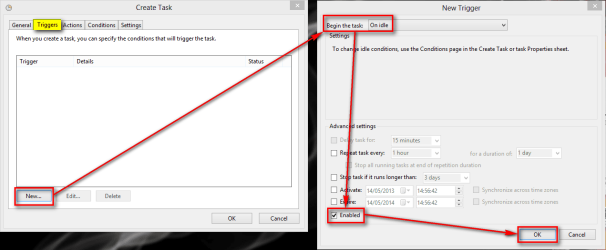
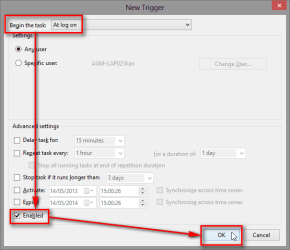
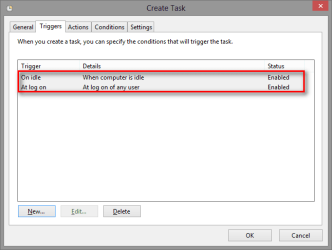
You need to use two triggers, On Idle and At log on.

Set first On Idle trigger:
2013-05-14_150011.png
Do the same procedure for At log on trigger:
2013-05-14_150213.png
It results this:
2013-05-14_150258.png

Kari
 

My Computer My Computer

At a glance

Windows 10 Pro x64 EN-GB1.6 GHz Intel Core i7-720QM Processor6 GBATI Mobility Radeon HD 5850 Graphics
Computer type
Laptop
Computer Manufacturer/Model Number
HP ENVY 17-1150eg
OS
Windows 10 Pro x64 EN-GB
CPU
1.6 GHz Intel Core i7-720QM Processor
Memory
6 GB
Graphics Card(s)
ATI Mobility Radeon HD 5850 Graphics
Sound Card
Beats sound system with integrated subwoofer
Monitor(s) Displays
17" laptop display, 22" LED and 32" Full HD TV through HDMI
Screen Resolution
1600*900 (1), 1920*1080 (2&3)
Hard Drives
Internal: 2 x 500 GB SATA Hard Disk Drive 7200 rpm
External: 2TB for backups, 3TB USB3 network drive for media
Cooling
As Envy runs a bit warm, I have it on a Cooler Master pad
Keyboard
Logitech diNovo Media Desktop Laser (bluetooth)
Mouse
Logitech Performance Mouse MX
Internet Speed
50/10 Mbps VDSL
Antivirus
Windows Defender 4.3.9431.0
Browser
Maxthon 3.5.2., IE11
Did it and it worked, at least once. Will leave it enabled to be sure. Now for the ACTION. I would like to call a screensaver, have it run for 30 seconds displaying a warning and let it start the log off as it closes. Spent most of the afternoon looking for such a screensaver or a program to create a SS with the necessary options. Couldn't find one. Maybe one of you wizards can suggest something. Hoping !
Bill
 

My Computer My Computer

At a glance

W7 Ultimate2.2 bh Intel Core i3-2330M4MBOn Board
Computer type
Laptop
Computer Manufacturer/Model Number
Asus
OS
W7 Ultimate
CPU
2.2 bh Intel Core i3-2330M
Motherboard
Asustek Computer Inc. P53E 1.0
Memory
4MB
Graphics Card(s)
On Board
Sound Card
On Board
Monitor(s) Displays
On Board
Screen Resolution
1366 X 768
Hard Drives
ST9500423AS
ST2000DM USB Backup Drive External
That could be tricky. The program would be launched when the system is already starting the log off process.
 

My Computer My Computer

At a glance

Windows 10 Pro x64 EN-GB1.6 GHz Intel Core i7-720QM Processor6 GBATI Mobility Radeon HD 5850 Graphics
Computer type
Laptop
Computer Manufacturer/Model Number
HP ENVY 17-1150eg
OS
Windows 10 Pro x64 EN-GB
CPU
1.6 GHz Intel Core i7-720QM Processor
Memory
6 GB
Graphics Card(s)
ATI Mobility Radeon HD 5850 Graphics
Sound Card
Beats sound system with integrated subwoofer
Monitor(s) Displays
17" laptop display, 22" LED and 32" Full HD TV through HDMI
Screen Resolution
1600*900 (1), 1920*1080 (2&3)
Hard Drives
Internal: 2 x 500 GB SATA Hard Disk Drive 7200 rpm
External: 2TB for backups, 3TB USB3 network drive for media
Cooling
As Envy runs a bit warm, I have it on a Cooler Master pad
Keyboard
Logitech diNovo Media Desktop Laser (bluetooth)
Mouse
Logitech Performance Mouse MX
Internet Speed
50/10 Mbps VDSL
Antivirus
Windows Defender 4.3.9431.0
Browser
Maxthon 3.5.2., IE11
Kari,
I think you misunderstand what I am thinking. I would like the ACTION tab of the task to operate in this fashion.
1. Start a screensaver
a. This SS would only be about 30 second long
b. It would display a warning that the system is about to log off, with a timer to countdown to zero, if possible.
2. At time zero, see 1b above, or if countdown timer is not available, initiate the program to log off after the SS closes, see 1a above.
 

My Computer My Computer

At a glance

W7 Ultimate2.2 bh Intel Core i3-2330M4MBOn Board
Computer type
Laptop
Computer Manufacturer/Model Number
Asus
OS
W7 Ultimate
CPU
2.2 bh Intel Core i3-2330M
Motherboard
Asustek Computer Inc. P53E 1.0
Memory
4MB
Graphics Card(s)
On Board
Sound Card
On Board
Monitor(s) Displays
On Board
Screen Resolution
1366 X 768
Hard Drives
ST9500423AS
ST2000DM USB Backup Drive External
No, I understood you. It's just that I have been testing an playing this idle timer so much I doubt it works as you planned. Tasks with idle timer are IMO the most difficult to get working as you'd like to.
 

My Computer My Computer

At a glance

Windows 10 Pro x64 EN-GB1.6 GHz Intel Core i7-720QM Processor6 GBATI Mobility Radeon HD 5850 Graphics
Computer type
Laptop
Computer Manufacturer/Model Number
HP ENVY 17-1150eg
OS
Windows 10 Pro x64 EN-GB
CPU
1.6 GHz Intel Core i7-720QM Processor
Memory
6 GB
Graphics Card(s)
ATI Mobility Radeon HD 5850 Graphics
Sound Card
Beats sound system with integrated subwoofer
Monitor(s) Displays
17" laptop display, 22" LED and 32" Full HD TV through HDMI
Screen Resolution
1600*900 (1), 1920*1080 (2&3)
Hard Drives
Internal: 2 x 500 GB SATA Hard Disk Drive 7200 rpm
External: 2TB for backups, 3TB USB3 network drive for media
Cooling
As Envy runs a bit warm, I have it on a Cooler Master pad
Keyboard
Logitech diNovo Media Desktop Laser (bluetooth)
Mouse
Logitech Performance Mouse MX
Internet Speed
50/10 Mbps VDSL
Antivirus
Windows Defender 4.3.9431.0
Browser
Maxthon 3.5.2., IE11
What if we look at third party timers at least for part of the total scheme. I am still thinking of a SS type of program to inform the user of what is going on.
 

My Computer My Computer

At a glance

W7 Ultimate2.2 bh Intel Core i3-2330M4MBOn Board
Computer type
Laptop
Computer Manufacturer/Model Number
Asus
OS
W7 Ultimate
CPU
2.2 bh Intel Core i3-2330M
Motherboard
Asustek Computer Inc. P53E 1.0
Memory
4MB
Graphics Card(s)
On Board
Sound Card
On Board
Monitor(s) Displays
On Board
Screen Resolution
1366 X 768
Hard Drives
ST9500423AS
ST2000DM USB Backup Drive External
My Computer My Computer

At a glance

W7 Ultimate2.2 bh Intel Core i3-2330M4MBOn Board
Computer type
Laptop
Computer Manufacturer/Model Number
Asus
OS
W7 Ultimate
CPU
2.2 bh Intel Core i3-2330M
Motherboard
Asustek Computer Inc. P53E 1.0
Memory
4MB
Graphics Card(s)
On Board
Sound Card
On Board
Monitor(s) Displays
On Board
Screen Resolution
1366 X 768
Hard Drives
ST9500423AS
ST2000DM USB Backup Drive External
Nice find, I think that is the best possible solution for you.
 

My Computer My Computer

At a glance

Windows 10 Pro x64 EN-GB1.6 GHz Intel Core i7-720QM Processor6 GBATI Mobility Radeon HD 5850 Graphics
Computer type
Laptop
Computer Manufacturer/Model Number
HP ENVY 17-1150eg
OS
Windows 10 Pro x64 EN-GB
CPU
1.6 GHz Intel Core i7-720QM Processor
Memory
6 GB
Graphics Card(s)
ATI Mobility Radeon HD 5850 Graphics
Sound Card
Beats sound system with integrated subwoofer
Monitor(s) Displays
17" laptop display, 22" LED and 32" Full HD TV through HDMI
Screen Resolution
1600*900 (1), 1920*1080 (2&3)
Hard Drives
Internal: 2 x 500 GB SATA Hard Disk Drive 7200 rpm
External: 2TB for backups, 3TB USB3 network drive for media
Cooling
As Envy runs a bit warm, I have it on a Cooler Master pad
Keyboard
Logitech diNovo Media Desktop Laser (bluetooth)
Mouse
Logitech Performance Mouse MX
Internet Speed
50/10 Mbps VDSL
Antivirus
Windows Defender 4.3.9431.0
Browser
Maxthon 3.5.2., IE11
Back
Top