
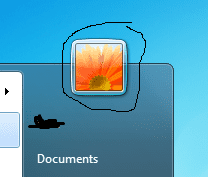
Alright, I'm doing a little bit of research to help automate some customizations that I'm doing for my client's computers. I've got most of what I need done. But what I am trying to do now is set the user's current profile picture to one that is already there. The picture itself isn't going to change, and the user account has already been created. I just need to set that picture to the user's picture then walk out. I know it sounds kind of confusing... I have attached a .png with what I'm trying to change with the batch file. All I'm really trying to do is to automate the whole setting of the picture. (start > control panel > user accounts > change your picture). anyone got any ideas?
Attachments
My Computer
- Computer type
- PC/Desktop
- Computer Manufacturer/Model Number
- Custom Build
- OS
- Windows 8.1
- CPU
- Intel i7 4790K 4.0GHz
- Motherboard
- Asus Maximus VI Formula
- Memory
- 32 GB
- Graphics Card(s)
- EVGA
- Sound Card
- On-Board Audio
- Monitor(s) Displays
- HP Pavilion 23xi
- Screen Resolution
- 1920 x 1200
- Hard Drives
- 1x 500GB SSD
1x 3TB HHDD
4x 1TB in 1+0 RAID
- PSU
- 750W
- Case
- Antec
- Cooling
- 4 Fans + Liquid Cooling System
- Keyboard
- Razer Black Widow Ultimate
- Mouse
- Logitech G700
- Internet Speed
- 23 MB/s
- Antivirus
- Avast! Antivirus
- Browser
- Google Chrome


