batch renamming files

artoo

New member
Local time
4:37 PM
Messages
30
Hi,

Does anyone know of a program or a fast way to rename filenames similar to this partial list

1bbea_set01_112432_019.jpg
1mbi5_set01_112432_016.jpg
3ppi_set01_112432_022.jpg
3scst_set01_112432_007.jpg
4chxb_set01_112432_017.jpg
5yvc5_set01_112432_006.jpg
06gz_set01_112432_002.jpg
0wauz_set01_112432_028.jpg
7zgmg_set01_112432_025.jpg
8t1ck_set01_112432_022.jpg
9d1i6_set01_112432_044.jpg
9l0pf_set01_112432_072.jpg


and turn it into

set01_112432_019.jpg
set01_112432_016.jpg
set01_112432_022.jpg
set01_112432_007.jpg
set01_112432_017.jpg
set01_112432_006.jpg
set01_112432_002.jpg
set01_112432_028.jpg
set01_112432_025.jpg
set01_112432_022.jpg
set01_112432_044.jpg
set01_112432_072.jpg

Thanks.
 

My Computer

OS
Windows 7 Ultimate
Yep:

Name It Your Way file renamer.

It's free, here:

Name It Your Way (NIYoW) - Professional free utility for mass renaming of files and folders

Good interface, well designed.

You will need to load your files into it and then make a rule to chop characters from the left edge of the file names.

It looks like you usually have 6 characters that need to be cut off, but sometimes you need to chop only 5.

So, I'd make a rule to chop 5 and then take a look at the results.

And then maybe make another rule to chop 1 character from those that still have that one extra unwanted character.

For safety's sake: make a copy of your originals before you begin.

The program has a bit of a learning curve, but it has a good wizard and should not take you long to figure out.
 

My Computer

Computer type
PC/Desktop
Computer Manufacturer/Model Number
Ignatz Special; 4 speed manual gearbox; factory air conditioning; one of one
OS
Windows 7 Home Premium SP1, 64-bit
CPU
Intel Skylake i5-6600K, not overclocked
Motherboard
AsRock Z170M Extreme 4, micro ATX
Memory
8 GB HyperX DDR4-2666 (2 x 4 GB)
Graphics Card(s)
none; graphics are integrated on CPU
Sound Card
onboard: Realtek ALC1150; external: USB Behringer UF0-202
Monitor(s) Displays
Dell S2340M 23 inch IPS
Screen Resolution
1600 x 900
Hard Drives
System: Crucial MX100 series SSD, 128 GB;
Data: Samsung Spinpoint 103SJ, 1 TB;
Backup: WD Caviar Green WD30EZRX-00D8PB0, 3 TB
PSU
Rosewill SilentNight 500 watt fanless, semi-modular
Case
Antec Solo II
Cooling
Noctua NH-U12S; Noctua F12 intake, Noctua S12A exhaust
Keyboard
Microsoft 200 6JH-00001 USB
Mouse
Dell or Microsoft optical wired; USB
Antivirus
Microsoft Security Essentials and Malwarebytes Premium
Browser
Pale Moon
Other Info
All fans PWM; speeds at idle: CPU circa 500 rpm; intake circa 600 rpm; exhaust circa 600 rpm; CPU temps 27 idle and 47 C load in a warm room (27 C/81 F) when running Intel Extreme Tuning Utility stress test.
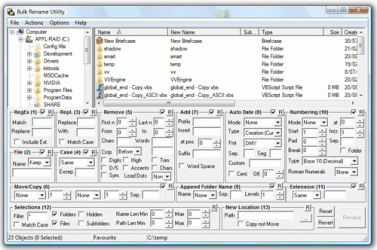
Another method is to use Bulk Rename utility.

It is free and very powerful with lots of options... shows a preview of new filename before you apply..

Initially you may be baffled with so many options... but you will get used to the interface with usage...

It works with x64 also.

I have been using it since my XP days and even now also.
 

Attachments

  • Bulk rename utility.gif
    Bulk rename utility.gif
    44.1 KB · Views: 5

My Computer

Computer Manufacturer/Model Number
Toshiba Satellite P775-S7232
OS
MS Windows 7 Ultimate 64-bit SP1
CPU
i5-2410M 2.3GHz (2.9GHz Turbo-Boost) Sandy Bridge 32nm
Motherboard
Toshiba PHRAA ver. PSBY1U-00F003
Memory
4GB+4GB Samsung DDR3 PC3-10700 (1333 MHz)
Graphics Card(s)
Video Intel(R) HD Graphics Family, 1696MB available memory
Sound Card
Realtek High Definition Audio version=6.0.1.6323
Monitor(s) Displays
17.3 " Trubrite TFT LCD, LED Backlit
Screen Resolution
1600x900 32 bit, Native support for 720P content
Hard Drives
TOSHIBA MK6476GSXN
580.614 [GB] partitioned C: 80GB and D: 500GB with hidden recovery partitons.

Spare bay for 2nd HDD but no SATA connector :-(
PSU
Toshiba AC/DC Adapter
Case
Notebook
Cooling
Built-in Fan
Keyboard
Premium Raised Tile keyboard
Mouse
Logitech M215 wireless mouse
Internet Speed
Not fast enough
Other Info
Built-in Harman Kardon speakers with Dolby Advanced Audio, Waves MaxxAudio® 3. HDMI, 1xUSB3+3xUSB2 ports, WebCam, Battery life 4hrs 11mins, 4GB Readyboost SDHC card, WD My Book Essential Ext HDDs 2 TB, 2x1TB, My Passport SE 1TB and WDTV 1st Gen for Multimedia playing on a Sony Wega 32" LCD.
Recent addition to my toys are Asus Transformer Pad TF300T with 32GB onboard sd card + 32GB microsd card.
I have made a batch renamer called Advanced Renamer that will do the job: Advanced Renamer - Fast and feature rich batch rename utility

What you need to do is load the files into the list by dragging them from explorer into the program. Then add a method called Remove and configure it to remove the first 6 characters. Verify the new names in the list and hit Start Batch.

I know because I made the software this can be considered advertising, but the software is free and I believe it can help you out. Ofcourse the other tools suggested will also do the job.
 

My Computer

OS
Windows 7 32 bit
Thanks, I'll try these out.
 

My Computer

OS
Windows 7 Ultimate
Back
Top