Battery Dying at 60%!

davidbuza

New member
Local time
8:56 AM
Messages
5
Hi everyone! I have an ASUS PRO P ESSENTIAL bough almost one and a half year ago, and I have a problem with its battery. When I'm working on my computer using my laptop battery only,once the laptop reaches 50% - 60% it shuts down instantly, without any warning at all. This happens even though the computer says I have another 2 hours to play around with the computer. I made a little research on the internet about this, and people say that the problem isn't the battery, but the hardware... I don't know which part of the computer is responsible to this but I wanna mention that the laptop warns me to change the battery, saying it has a sort of problem so my computer might suddenly shut down... I don't know should I believe that or not...
I hope the reason isn't the battery because I have to buy another one, cause my warranty expired...
Please help me guys!!!
Thank you!
 

My Computer

Computer type
PC/Desktop
Computer Manufacturer/Model Number
Asus
OS
Windosw 7 Professional 64 bit system.
CPU
Core i5 2.20 Ghz
Memory
4 GB RAM
Graphics Card(s)
Intel HD Graphics 5500
Hello David, :)

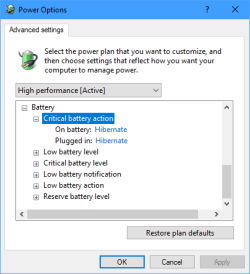
This is not likely, but double check your advanced power settings to see what is set for Battery like below. If one of the "level" settings was set to 50-60% and its "action" was set to "Shutdown" without "Low battery notification" turned on, this could be a possible reason.

Battery_power_options.png

In addition, you can run a Power Efficiency Diagnostics Report to see what it reports for your battery's health.

Do you have all the latest drivers installed from Asus for your model?

:ar: Power Efficiency Diagnostics Report - Windows 7 Help Forums
 

My Computer

Computer type
PC/Desktop
Computer Manufacturer/Model Number
Self built custom
OS
64-bit Windows 11 Pro for Workstations
CPU
Intel i7-8700K OC'd to 5 GHz
Motherboard
ASUS ROG Maximus XI Formula Z390
Memory
64 GB (4x16GB) G.SKILL TridentZ RGB DDR4 3600 MHz
Graphics Card(s)
ASUS ROG-STRIX-GTX1080TI-O11G-GAMING
Sound Card
Integrated
Monitor(s) Displays
2 x Samsung Odyssey G7 27"
Screen Resolution
2560x1440
Hard Drives
1TB Samsung 990 PRO M.2,
4TB Samsung 990 PRO PRO M.2,
TerraMaster F8 SSD Plus NAS
PSU
Seasonic Prime Titanium 850W
Case
Thermaltake Core P3
Cooling
Corsair Hydro H115i
Keyboard
Logitech wireless K800
Mouse
Logitech MX Master 4
Internet Speed
2 Gb/s Download and 100 Mb/s Upload
Antivirus
Malwarebyte Anti-Malware Premium
Browser
Google Chrome
Other Info
Logitech Z625 speaker system,
Logitech BRIO 4K Pro webcam,
HP Color LaserJet Pro MFP M477fdn,
APC SMART-UPS RT 1000 XL - SURT1000XLI,
Galaxy S23 Plus phone
I have already checked the battery options, and none of these are set to shut down at 60%...
 

My Computer

Computer type
PC/Desktop
Computer Manufacturer/Model Number
Asus
OS
Windosw 7 Professional 64 bit system.
CPU
Core i5 2.20 Ghz
Memory
4 GB RAM
Graphics Card(s)
Intel HD Graphics 5500
I forgot to mention, after the laptop shuts down by itself, when I try to POWER ON, there appears a black screen saying: "Repair Computer" and "Start Windows Normally"
 

My Computer

Computer type
PC/Desktop
Computer Manufacturer/Model Number
Asus
OS
Windosw 7 Professional 64 bit system.
CPU
Core i5 2.20 Ghz
Memory
4 GB RAM
Graphics Card(s)
Intel HD Graphics 5500
That sounds like a recovery screen you would get after an improper shutdown.

This could be a sign of the battery failing.

If this doesn't happen while the laptop is plugged in, then it could be the battery.

You could generate a Power Efficiency Diagnostics Report, and see what it shows is left for battery capacity to help get an indication of your battery health.

Power Efficiency Diagnostics Report - Windows 7 Help Forums
 

My Computer

Computer type
PC/Desktop
Computer Manufacturer/Model Number
Self built custom
OS
64-bit Windows 11 Pro for Workstations
CPU
Intel i7-8700K OC'd to 5 GHz
Motherboard
ASUS ROG Maximus XI Formula Z390
Memory
64 GB (4x16GB) G.SKILL TridentZ RGB DDR4 3600 MHz
Graphics Card(s)
ASUS ROG-STRIX-GTX1080TI-O11G-GAMING
Sound Card
Integrated
Monitor(s) Displays
2 x Samsung Odyssey G7 27"
Screen Resolution
2560x1440
Hard Drives
1TB Samsung 990 PRO M.2,
4TB Samsung 990 PRO PRO M.2,
TerraMaster F8 SSD Plus NAS
PSU
Seasonic Prime Titanium 850W
Case
Thermaltake Core P3
Cooling
Corsair Hydro H115i
Keyboard
Logitech wireless K800
Mouse
Logitech MX Master 4
Internet Speed
2 Gb/s Download and 100 Mb/s Upload
Antivirus
Malwarebyte Anti-Malware Premium
Browser
Google Chrome
Other Info
Logitech Z625 speaker system,
Logitech BRIO 4K Pro webcam,
HP Color LaserJet Pro MFP M477fdn,
APC SMART-UPS RT 1000 XL - SURT1000XLI,
Galaxy S23 Plus phone
Back
Top