
Battery Icon Gone

smith55j

New member
Local time
3:12 PM
Messages
3
At the beginning of the summer, I got some kind of virus or bug that crashed my computer for a few weeks. I finally fixed the virus problem and noticed my battery icon was missing. I have just now gotten around to this problem, but I have had to keep my computer plugged into the wall for it to work, so now it's pretty much a desktop. I am going to be heading back to school in a few weeks and I want to get this problem fixed. Hopefully someone can help me!!? I've tried all that I can. :confused:
 

My Computer

Computer Manufacturer/Model Number
Hewlett - packard
OS
Windows 7 64 Bit
CPU
HP Pavilion dv7 - 3065dx Notebook PC
It helps a great deal if you elaborate on 'I've tried all that I can.'.

No you haven't tried all that you can.

1. Which laptop?
2. Which OS?
3. Have you gone to Power options in the control panel?

You didn't tell us anything, and you expect us to give a hand.

How about you tell us what you got, so that the rest of us might be able to make an educated guess.
 

My Computer

Computer Manufacturer/Model Number
Wall-E Custom Scrap Pile Edition
OS
Win 7 Ultimate x64
CPU
i7-930
Motherboard
x58a-ud3r
Memory
6GB Corsair
Graphics Card(s)
eVGA GTX 460 1GB
Sound Card
8 Channel HD / Onboard
Monitor(s) Displays
HP 2509m
Screen Resolution
1920*1080
Hard Drives
WD 500GB Black Boot Drive
WD 1TB Black Storage Drive
PSU
ThermalTake TR2 RX 650W
Case
Generic '98 ATX
Cooling
Air
Internet Speed
20/5

My Computer

Computer type
PC/Desktop
Computer Manufacturer/Model Number
Self built custom
OS
64-bit Windows 11 Pro for Workstations
CPU
Intel i7-8700K OC'd to 5 GHz
Motherboard
ASUS ROG Maximus XI Formula Z390
Memory
64 GB (4x16GB) G.SKILL TridentZ RGB DDR4 3600 MHz
Graphics Card(s)
ASUS ROG-STRIX-GTX1080TI-O11G-GAMING
Sound Card
Integrated
Monitor(s) Displays
2 x Samsung Odyssey G7 27"
Screen Resolution
2560x1440
Hard Drives
1TB Samsung 990 PRO M.2,
4TB Samsung 990 PRO PRO M.2,
TerraMaster F8 SSD Plus NAS
PSU
Seasonic Prime Titanium 850W
Case
Thermaltake Core P3
Cooling
Corsair Hydro H115i
Keyboard
Logitech wireless K800
Mouse
Logitech MX Master 4
Internet Speed
2 Gb/s Download and 100 Mb/s Upload
Antivirus
Malwarebyte Anti-Malware Premium
Browser
Google Chrome
Other Info
Logitech Z625 speaker system,
Logitech BRIO 4K Pro webcam,
HP Color LaserJet Pro MFP M477fdn,
APC SMART-UPS RT 1000 XL - SURT1000XLI,
Galaxy S23 Plus phone
I have a HP Pavilion Dv7 Notebook PC, AMD Turion II Ultra Dual Core Mobile M600 2.40 GHZ, I have Windows 7 64 Bit OS, and I have looked through all my options throughout the control panel that I feel would be connected, also I've looked through out the internet at a bunch of sites, along with friends that have tried helping me solve the problem.

Windows 7 Home Premium**
 
Last edited by a moderator:

My Computer

Computer Manufacturer/Model Number
Hewlett - packard
OS
Windows 7 64 Bit
CPU
HP Pavilion dv7 - 3065dx Notebook PC
Hello Smith55j

If your having to keep your notebook plugged in for it to work its not a battery icon issue as much as its a battery issue. Check to make sure the battery is inserted correctly and charging.There is usually a led light on the notebook to indicate this. Try a third party battery meter like Battery Meter: A small but full featured battery meter for your laptop and UMPC. | Mioplanet this may help diagnose if the battery is available or not.

Danny
 

My Computer

Computer Manufacturer/Model Number
acer aspire 5935g
OS
Windows 7 Home Premium x64 SP1
CPU
intel(R)core(TM)2 duo CPU T6600 @ 2.20GHz
Motherboard
intel gm45/gm47 revision 07
Memory
3 gb ddr3
Graphics Card(s)
ati radeon hd4570/512mb
Monitor(s) Displays
lop156wh2-tle1 15.3 flat
Screen Resolution
1366x768
Hard Drives
OCZ-Agility3 60gig ssd
320gig external hdd
500gig external hdd
Mouse
Optical
Internet Speed
30Mbps Down/30Mbps Up
Hello Smith55j

If your having to keep your notebook plugged in for it to work its not a battery icon issue as much as its a battery issue. Check to make sure the battery is inserted correctly and charging.There is usually a led light on the notebook to indicate this. Try a third party battery meter like Battery Meter: A small but full featured battery meter for your laptop and UMPC. | Mioplanet this may help diagnose if the battery is available or not.

Danny


Danny using your battery meter it says full and is at 255% charge it reads, so I'm guessing that my battery is fine but it just doesn't work when it is unplugged.
 

My Computer

Computer Manufacturer/Model Number
Hewlett - packard
OS
Windows 7 64 Bit
CPU
HP Pavilion dv7 - 3065dx Notebook PC
Danny using your battery meter it says full and is at 255% charge it reads, so I'm guessing that my battery is fine but it just doesn't work when it is unplugged.

I think that could mean its broken, if its over 100%
 

My Computer

Computer Manufacturer/Model Number
Dell XPS L720x
OS
Windows 7 Ultimate 64-Bit
CPU
Core i5-2410m 2.30Ghz
Motherboard
Unknown
Memory
6GB DDR3
Graphics Card(s)
Nvidia Geforce 550m
Monitor(s) Displays
Dell Display
Screen Resolution
1600x900
Hard Drives
120GB OCZ Agility III Sata-III
1tb Samsung Spinpoint

External 1TB WD WD10TPVT
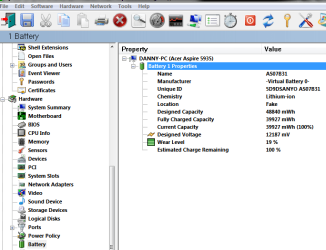
Firstly try and turn on the notebook with the ac adapter disconnected.If it wont start up then reconnect the adapter boot up and download this- http://www.gtopala.com/siw-download.html
The free version is at the bottom
Under battery on the left hand side it will give you a wear level on the battery.This may help to decide if its the battery that has gone.

Capture.PNG

Danny
 

My Computer

Computer Manufacturer/Model Number
acer aspire 5935g
OS
Windows 7 Home Premium x64 SP1
CPU
intel(R)core(TM)2 duo CPU T6600 @ 2.20GHz
Motherboard
intel gm45/gm47 revision 07
Memory
3 gb ddr3
Graphics Card(s)
ati radeon hd4570/512mb
Monitor(s) Displays
lop156wh2-tle1 15.3 flat
Screen Resolution
1366x768
Hard Drives
OCZ-Agility3 60gig ssd
320gig external hdd
500gig external hdd
Mouse
Optical
Internet Speed
30Mbps Down/30Mbps Up
Even if the battery is bad, that should not prevent the icon from showing in the System tray. Try the fix Brink posted, see if it helps.
 

My Computer

Computer type
PC/Desktop
Computer Manufacturer/Model Number
Lenovo IdeaCenter 450
OS
Windows 10 Pro X64
CPU
Intel Quad Core i7-4770 @ 3.4Ghz
Memory
16.0GB PC3-12800 DDR3 SDRAM 1600 MHz
Graphics Card(s)
Intel Integrated HD Graphics
Sound Card
Realtek HD Audio
Monitor(s) Displays
HP 22" LCD
Screen Resolution
1680 x 1050
Hard Drives
250GB Samsung EVO SATA-3 SSD
2TB Seagate ST2000DM001 SATA-2
1.5TB Seagate ST3150041AS SATA
Keyboard
Dell USB
Mouse
Lenovo USB
Internet Speed
Cable via Road Runner 3MB Upload, 30MB Download
Antivirus
Windows Defender, MBAM Pro, MBAE
Browser
Seamonkey
Other Info
UEFI/GPT
PLDS DVD-RW DH16AERSH
Back
Top