Solved BCD missing status:0xc000000f & Diskpart won't list my main partition

tisungeni

New member
Local time
7:48 PM
Messages
57
BCD missing status:0xc000000f & Diskpart won't list my main partition

My pc won't boot up cause i made some software changes but didn't save things properly. It's running Windows 7 Ultimate 64bit. I checked online and found i could boot up from an installation disc and repair it. But the recovery tools didn't work and I found that I could rebuild the BCD folder.

I was trying to rebuild my BCD file using some online instructions (http://support.microsoft.com/kb/2004518)… i was using method 2.But I accidentally typed in Bcdedit /export C:\BCD instead of Bcdedit /export C:\BCD_Backup and pressed ENTER. And it said the command was completed. I thought i would correct the error by typing in Bcdedit /export C:\BCD_Backup and the rest of the commands. they all completed successfully so I thought it was alright.

However when i restarted the pc I got an error at startup that says: status: 0xc000000f. apparently my boot folder is missing. SoI searched for some more solutions online and most said i've to go to the partition with the boot folder and OS using diskpart.

But when i run diskpart and run the command to list partition or list volume my original C partition isn't listed. It shows my System Reserved partition with the C letter assigned to it. Originally it was assigned letter E. And it shows that its active. I've tried running bootrec commands and restarting the pc but it's still not fixed.

I've tried searching for a solutions online but I can't find any. Please help:cry:. Thanks for all the help.

I've tried running RECOVER and RESCAN commands in diskpart but they don't show the partition. I've tried getting more solutions but I can't find 1 that works. Been working on this for a half a day now. I need help asap. Thanks for taking the time to help out.
 

My Computer My Computer

At a glance

Windows 7 Professional 64bitIntel (R) Core(TM) i7-3630QM @2.4GHz8GB RAMNVIDIA Quadro K1000M
Computer type
Laptop
Computer Manufacturer/Model Number
HP Elitebook 8570w
OS
Windows 7 Professional 64bit
CPU
Intel (R) Core(TM) i7-3630QM @2.4GHz
Memory
8GB RAM
Graphics Card(s)
NVIDIA Quadro K1000M
Screen Resolution
1920X1080
But I accidentally typed in Bcdedit /export C:\BCD instead of Bcdedit /export C:\BCD_Backup and pressed ENTER. And it said the command was completed.
I can't see how this could be the cause of your problem.

Have you carried out either:
A) Run startup repair from a system repair disc (3 times rebooting each time)
or
B)
>bootrec /scanos
This should come back and identify the Windows 7 OS partition.
then
rebuild the MBR
>bootrec /fixmbr
then
Fix the Partition Boot Record/Boot sector.
>bootrec /fixboot
then
importantly, rebuild the BCD
>Bootrec /rebuildbcd


If so then I suggest you make a Partition Boot CD (using another PC of course) and have a closer look at your HDD particularly the "C" partition. Note that letter assignments like C are given by Windows. Boot discs, including the system repair disk, don't know this and assign arbitrary letters.
 

My Computer My Computer

At a glance

Windows 7x64 Home Premium SP1Intel i7 2600kG.Skill Ripjaws (DDR3-1600) 2x4GBNvidia GeForce GTS 450; Intel HD Graphics 300...
Computer type
PC/Desktop
Computer Manufacturer/Model Number
Own build
OS
Windows 7x64 Home Premium SP1
CPU
Intel i7 2600k
Motherboard
ASUS P8Z68 Deluxe
Memory
G.Skill Ripjaws (DDR3-1600) 2x4GB
Graphics Card(s)
Nvidia GeForce GTS 450; Intel HD Graphics 3000(GT2+)
Monitor(s) Displays
Dell Ultrasharp IPS panel U2311H, Samsung SyncMaster P2350
Screen Resolution
1920x1080
Hard Drives
Samsung 850 Pro SSD 256GB, Samsung SSD 840 120GB, Seagates 1TB Barracuda ST31000528AS x2
PSU
Seasonic M12II 520W
Case
Lian Li Lancool PC-K60
Cooling
Case: 1x120mm, 3x140mm CPU: Hyper 212+
Keyboard
Logitech MK520 (wireless)
Mouse
Logitech MK520
Internet Speed
6-7 Mbps
Antivirus
Norton Security Premium, Malwarebytes on 2 (MSE on 3rd PC)
Browser
FireFox
Other Info
Audio: Logitech Z523 2.1
I don't have a system repair disc. But I'll try the option B. I did try the fixmbr, fixboot and rebuildbcd. and it didn't work. I'll also tried running startup repair more than 3 times consecutively. That Didn't work either.

If option B fails I'll try making da Partition Boot CD. Thanks for all the help. I will update the results.
 

My Computer My Computer

At a glance

Windows 7 Professional 64bitIntel (R) Core(TM) i7-3630QM @2.4GHz8GB RAMNVIDIA Quadro K1000M
Computer type
Laptop
Computer Manufacturer/Model Number
HP Elitebook 8570w
OS
Windows 7 Professional 64bit
CPU
Intel (R) Core(TM) i7-3630QM @2.4GHz
Memory
8GB RAM
Graphics Card(s)
NVIDIA Quadro K1000M
Screen Resolution
1920X1080
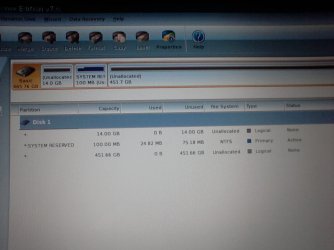
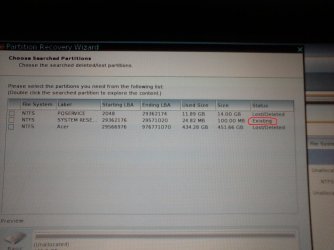
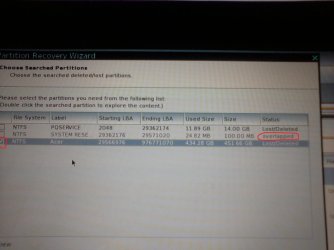
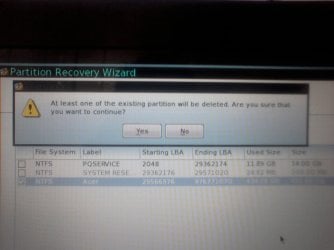
I tried option B and it didn't work. So I got MIniTool Partition Home Edition and burned it and booted up. I can see my disk and its showing 3 partitions. @ of those are "Unallocated" and the not labelled. The System Reserved is active. I run Rebuild MBR but that didn't solve the problem. So I ran partition recovery wizard and did a full scan and quick scan. IT listed 3 partitions; system reserved and the other 2 which are labelled PQSERVICE and ACER. Apparently PQSERVICE is a hidden partition with factory settings in it created by Acer. I tried to select all 3 but when I select the ACER partition, the SYSTEM RESERVED becomes inaccessible. The status changes from "Existing" to "Overlapped". And if I continue to the next step, the recovery wizard tells me that the existing partition would have to be deleted. I don't know if I should continue. Isn't SYSTEM RESERVED supposed to be a sort of backup to the main partition? What will happen if I go ahead and delete it? Is it important that I keep it?

Thanks for all the help so far.:)
 

My Computer My Computer

At a glance

Windows 7 Professional 64bitIntel (R) Core(TM) i7-3630QM @2.4GHz8GB RAMNVIDIA Quadro K1000M
Computer type
Laptop
Computer Manufacturer/Model Number
HP Elitebook 8570w
OS
Windows 7 Professional 64bit
CPU
Intel (R) Core(TM) i7-3630QM @2.4GHz
Memory
8GB RAM
Graphics Card(s)
NVIDIA Quadro K1000M
Screen Resolution
1920X1080
PQSERVICE is the ACER factory restore partition. This enables you to restore the PC to its initial state like it was when you first turned the PC on. The ACER partition is probably the Windows OS partition. If there is another unallocated partition it is probably a user data partition.
My old ACER partitions like this:
PQService (hidden); System Reserved (active); ACER (Windows OS) ; Data

I'm puzzled how your last 2 partitions became unallocated???
However, I would select the unallocated ACER partition and run the partition Recovery Wizard just on it. Do not fiddle with the PQService partition.

If all else fails you will need to do a factory restore. Have you also made your Factory Restore DVDs?
Let us know what you decide to do.
 

My Computer My Computer

At a glance

Windows 7x64 Home Premium SP1Intel i7 2600kG.Skill Ripjaws (DDR3-1600) 2x4GBNvidia GeForce GTS 450; Intel HD Graphics 300...
Computer type
PC/Desktop
Computer Manufacturer/Model Number
Own build
OS
Windows 7x64 Home Premium SP1
CPU
Intel i7 2600k
Motherboard
ASUS P8Z68 Deluxe
Memory
G.Skill Ripjaws (DDR3-1600) 2x4GB
Graphics Card(s)
Nvidia GeForce GTS 450; Intel HD Graphics 3000(GT2+)
Monitor(s) Displays
Dell Ultrasharp IPS panel U2311H, Samsung SyncMaster P2350
Screen Resolution
1920x1080
Hard Drives
Samsung 850 Pro SSD 256GB, Samsung SSD 840 120GB, Seagates 1TB Barracuda ST31000528AS x2
PSU
Seasonic M12II 520W
Case
Lian Li Lancool PC-K60
Cooling
Case: 1x120mm, 3x140mm CPU: Hyper 212+
Keyboard
Logitech MK520 (wireless)
Mouse
Logitech MK520
Internet Speed
6-7 Mbps
Antivirus
Norton Security Premium, Malwarebytes on 2 (MSE on 3rd PC)
Browser
FireFox
Other Info
Audio: Logitech Z523 2.1
My concern is on the System Reserved partition because once I select the Acer partition its status changes form "exisitng" to "overlapped" and I can't select it anymore. Which mean if I go ahead and recover Acer partitino it will be deleted.

Image1 is how partition wizard list my disk when it boots upIMAGE 1.jpg
Then the rest is what i'm trying to explain.IMAGE 2.jpg
IMAGE 3.jpg
IMAGE 4.jpg
 

My Computer My Computer

At a glance

Windows 7 Professional 64bitIntel (R) Core(TM) i7-3630QM @2.4GHz8GB RAMNVIDIA Quadro K1000M
Computer type
Laptop
Computer Manufacturer/Model Number
HP Elitebook 8570w
OS
Windows 7 Professional 64bit
CPU
Intel (R) Core(TM) i7-3630QM @2.4GHz
Memory
8GB RAM
Graphics Card(s)
NVIDIA Quadro K1000M
Screen Resolution
1920X1080
Your ACER partition structure appears to be
PQService; System Reserved; ACER Windows OS
I don't know what you have done previously to the PC but I wouldn't guarantee PQService or ACER (C) hasn't been damaged. However, the size of the contents looks ok.
I think PQService and ACER should be primary not logical. Did you change them accidentally?
You could try using Partition Wizard to change ACER from logical to primary and see what the partition recovery wizard says when you select ACER. This may be cause of the overlapping partition message.

I would also try setting PQService to primary and see if recovery wizard allows its recovery.
 
Last edited:

My Computer My Computer

At a glance

Windows 7x64 Home Premium SP1Intel i7 2600kG.Skill Ripjaws (DDR3-1600) 2x4GBNvidia GeForce GTS 450; Intel HD Graphics 300...
Computer type
PC/Desktop
Computer Manufacturer/Model Number
Own build
OS
Windows 7x64 Home Premium SP1
CPU
Intel i7 2600k
Motherboard
ASUS P8Z68 Deluxe
Memory
G.Skill Ripjaws (DDR3-1600) 2x4GB
Graphics Card(s)
Nvidia GeForce GTS 450; Intel HD Graphics 3000(GT2+)
Monitor(s) Displays
Dell Ultrasharp IPS panel U2311H, Samsung SyncMaster P2350
Screen Resolution
1920x1080
Hard Drives
Samsung 850 Pro SSD 256GB, Samsung SSD 840 120GB, Seagates 1TB Barracuda ST31000528AS x2
PSU
Seasonic M12II 520W
Case
Lian Li Lancool PC-K60
Cooling
Case: 1x120mm, 3x140mm CPU: Hyper 212+
Keyboard
Logitech MK520 (wireless)
Mouse
Logitech MK520
Internet Speed
6-7 Mbps
Antivirus
Norton Security Premium, Malwarebytes on 2 (MSE on 3rd PC)
Browser
FireFox
Other Info
Audio: Logitech Z523 2.1
I just went ahead and recovered my ACER partition. The SYSTEM RESERVED partition was deleted. I then ran the recovery wizard again and recover the SYSTEM RESERVED partition. So they are all back. I set the ACER and SYSYTEM RESERVED as primary and left the PQSERVICE as logical.

I started up my pc and it still couldn't boot but now it says BOOTMGR is missing PRESS Ctrl+Atl+del. So i tried to rebuild the BCD using bootrec and bcdedit commands like before and all the commands worked. It even showed the installed windows os and i added it to the bcd store. but when i restarted it gave save error.

I tried running the commands again. the first three commands complete successfully. but i run into a problem at the fourth command for attributes.

bcdedit /export c:\bcd_backup
c:
cd boot
attrib bcd-s-h-r (here it says file not found)
ren c:\boot\bcd bcd.old (here it says a duplicate files exists)
bootrec /rebuildbcd ( here it scans but doesn't find any windows installations)
 

My Computer My Computer

At a glance

Windows 7 Professional 64bitIntel (R) Core(TM) i7-3630QM @2.4GHz8GB RAMNVIDIA Quadro K1000M
Computer type
Laptop
Computer Manufacturer/Model Number
HP Elitebook 8570w
OS
Windows 7 Professional 64bit
CPU
Intel (R) Core(TM) i7-3630QM @2.4GHz
Memory
8GB RAM
Graphics Card(s)
NVIDIA Quadro K1000M
Screen Resolution
1920X1080
Code:
diskpart
list vol
exit

system reserved=C? your acer partition with win7 is called D? PQSERVICE is called E?

Code:
diskpart
sel vol c
det part
sel vol d
det part
sel part e
det part

Which partition is active?
 

My Computer My Computer

At a glance

Microsoft Windows 7 Home Premium 64-bits 7601...Intel(R) Core(TM) i3 CPU M 370 @ 2.40GHz4,00 GBATI Mobility Radeon HD 5400 Series
Computer type
Laptop
Computer Manufacturer/Model Number
ACER ASPIRE 5742G
OS
Microsoft Windows 7 Home Premium 64-bits 7601 Multiprocessor Free Service Pack 1
CPU
Intel(R) Core(TM) i3 CPU M 370 @ 2.40GHz
Motherboard
Acer Aspire 5742G
Memory
4,00 GB
Graphics Card(s)
ATI Mobility Radeon HD 5400 Series
Sound Card
(1) AMD High Definition Audio Device (2) Realtek High Defi
Screen Resolution
1366 x 768 x 32 bits (4294967296 colors) @ 60 Hz
Hard Drives
WDC WD5000BEVT-22ZAT0
bcdedit /export c:\bcd_backup
c:
cd boot
attrib bcd-s-h-r (here it says file not found)
ren c:\boot\bcd bcd.old (here it says a duplicate files exists)
bootrec /rebuildbcd ( here it scans but doesn't find any windows installations)

You did export bcd store succesfully.

attrib bcd-s-h-r should be: attrib -h -s -r bcd

ren c:\boot\bcd bcd.old should be: ren c:\boot\bcd bcd.old2
if bcd.old alreadyy exists. Those commands are not needed at all btw!! No reason (yet) to beleive bcd store is corrupt.
 

My Computer My Computer

At a glance

Microsoft Windows 7 Home Premium 64-bits 7601...Intel(R) Core(TM) i3 CPU M 370 @ 2.40GHz4,00 GBATI Mobility Radeon HD 5400 Series
Computer type
Laptop
Computer Manufacturer/Model Number
ACER ASPIRE 5742G
OS
Microsoft Windows 7 Home Premium 64-bits 7601 Multiprocessor Free Service Pack 1
CPU
Intel(R) Core(TM) i3 CPU M 370 @ 2.40GHz
Motherboard
Acer Aspire 5742G
Memory
4,00 GB
Graphics Card(s)
ATI Mobility Radeon HD 5400 Series
Sound Card
(1) AMD High Definition Audio Device (2) Realtek High Defi
Screen Resolution
1366 x 768 x 32 bits (4294967296 colors) @ 60 Hz
Hard Drives
WDC WD5000BEVT-22ZAT0
Assume "system reserved" and "Acer" have drive letters C and D now (If different repalce dirve letters in follwing commands)

Code:
chkdsk/f  c:
chkdsk/f d:

Any problems on system reserved, any problems on Acer? Are disk problems repaired?
If repaired... run commands again to check if problems are really gone.
 

My Computer My Computer

At a glance

Microsoft Windows 7 Home Premium 64-bits 7601...Intel(R) Core(TM) i3 CPU M 370 @ 2.40GHz4,00 GBATI Mobility Radeon HD 5400 Series
Computer type
Laptop
Computer Manufacturer/Model Number
ACER ASPIRE 5742G
OS
Microsoft Windows 7 Home Premium 64-bits 7601 Multiprocessor Free Service Pack 1
CPU
Intel(R) Core(TM) i3 CPU M 370 @ 2.40GHz
Motherboard
Acer Aspire 5742G
Memory
4,00 GB
Graphics Card(s)
ATI Mobility Radeon HD 5400 Series
Sound Card
(1) AMD High Definition Audio Device (2) Realtek High Defi
Screen Resolution
1366 x 768 x 32 bits (4294967296 colors) @ 60 Hz
Hard Drives
WDC WD5000BEVT-22ZAT0
I just checked PQSERVICE is D.
 

My Computer My Computer

At a glance

Windows 7 Professional 64bitIntel (R) Core(TM) i7-3630QM @2.4GHz8GB RAMNVIDIA Quadro K1000M
Computer type
Laptop
Computer Manufacturer/Model Number
HP Elitebook 8570w
OS
Windows 7 Professional 64bit
CPU
Intel (R) Core(TM) i7-3630QM @2.4GHz
Memory
8GB RAM
Graphics Card(s)
NVIDIA Quadro K1000M
Screen Resolution
1920X1080

My Computer My Computer

At a glance

Microsoft Windows 7 Home Premium 64-bits 7601...Intel(R) Core(TM) i3 CPU M 370 @ 2.40GHz4,00 GBATI Mobility Radeon HD 5400 Series
Computer type
Laptop
Computer Manufacturer/Model Number
ACER ASPIRE 5742G
OS
Microsoft Windows 7 Home Premium 64-bits 7601 Multiprocessor Free Service Pack 1
CPU
Intel(R) Core(TM) i3 CPU M 370 @ 2.40GHz
Motherboard
Acer Aspire 5742G
Memory
4,00 GB
Graphics Card(s)
ATI Mobility Radeon HD 5400 Series
Sound Card
(1) AMD High Definition Audio Device (2) Realtek High Defi
Screen Resolution
1366 x 768 x 32 bits (4294967296 colors) @ 60 Hz
Hard Drives
WDC WD5000BEVT-22ZAT0
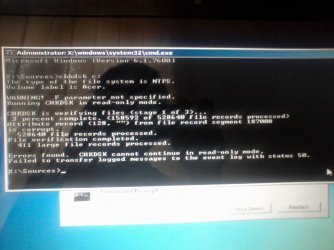
NO Acer is C and its the active one. System Reserved is E. I run chkdsk c: and it found some errors but says its in read-only mode so it can't continue. here is an image
Photo-0070.jpg
 

My Computer My Computer

At a glance

Windows 7 Professional 64bitIntel (R) Core(TM) i7-3630QM @2.4GHz8GB RAMNVIDIA Quadro K1000M
Computer type
Laptop
Computer Manufacturer/Model Number
HP Elitebook 8570w
OS
Windows 7 Professional 64bit
CPU
Intel (R) Core(TM) i7-3630QM @2.4GHz
Memory
8GB RAM
Graphics Card(s)
NVIDIA Quadro K1000M
Screen Resolution
1920X1080
chkdsk/f c:
chkdsk/f e:

as I told you.
 

My Computer My Computer

At a glance

Microsoft Windows 7 Home Premium 64-bits 7601...Intel(R) Core(TM) i3 CPU M 370 @ 2.40GHz4,00 GBATI Mobility Radeon HD 5400 Series
Computer type
Laptop
Computer Manufacturer/Model Number
ACER ASPIRE 5742G
OS
Microsoft Windows 7 Home Premium 64-bits 7601 Multiprocessor Free Service Pack 1
CPU
Intel(R) Core(TM) i3 CPU M 370 @ 2.40GHz
Motherboard
Acer Aspire 5742G
Memory
4,00 GB
Graphics Card(s)
ATI Mobility Radeon HD 5400 Series
Sound Card
(1) AMD High Definition Audio Device (2) Realtek High Defi
Screen Resolution
1366 x 768 x 32 bits (4294967296 colors) @ 60 Hz
Hard Drives
WDC WD5000BEVT-22ZAT0
sorry. my bad
 

My Computer My Computer

At a glance

Windows 7 Professional 64bitIntel (R) Core(TM) i7-3630QM @2.4GHz8GB RAMNVIDIA Quadro K1000M
Computer type
Laptop
Computer Manufacturer/Model Number
HP Elitebook 8570w
OS
Windows 7 Professional 64bit
CPU
Intel (R) Core(TM) i7-3630QM @2.4GHz
Memory
8GB RAM
Graphics Card(s)
NVIDIA Quadro K1000M
Screen Resolution
1920X1080
ok the errors on ahve been fixed. On E there weren't any errors. I'll try rebuilding the BCD again now
 

My Computer My Computer

At a glance

Windows 7 Professional 64bitIntel (R) Core(TM) i7-3630QM @2.4GHz8GB RAMNVIDIA Quadro K1000M
Computer type
Laptop
Computer Manufacturer/Model Number
HP Elitebook 8570w
OS
Windows 7 Professional 64bit
CPU
Intel (R) Core(TM) i7-3630QM @2.4GHz
Memory
8GB RAM
Graphics Card(s)
NVIDIA Quadro K1000M
Screen Resolution
1920X1080
"system reserved" was active prior to having problems. It has bootmgr and boot menu. And it was called C when Acer and PQSERVICE were lost.

Do you want to have "system reserved" as the boot partition? If not you have to create bootmgr and boot menu from scratch on Acer partition. Easy to accomplish btw.

But maybe better is to mark "system reserved" as active. It is already holding bootmgr and bootmenu. At least if partition is not corrupt. If corrupt we can format it and create stuff from scratch.

Tell me what you want.
 

My Computer My Computer

At a glance

Microsoft Windows 7 Home Premium 64-bits 7601...Intel(R) Core(TM) i3 CPU M 370 @ 2.40GHz4,00 GBATI Mobility Radeon HD 5400 Series
Computer type
Laptop
Computer Manufacturer/Model Number
ACER ASPIRE 5742G
OS
Microsoft Windows 7 Home Premium 64-bits 7601 Multiprocessor Free Service Pack 1
CPU
Intel(R) Core(TM) i3 CPU M 370 @ 2.40GHz
Motherboard
Acer Aspire 5742G
Memory
4,00 GB
Graphics Card(s)
ATI Mobility Radeon HD 5400 Series
Sound Card
(1) AMD High Definition Audio Device (2) Realtek High Defi
Screen Resolution
1366 x 768 x 32 bits (4294967296 colors) @ 60 Hz
Hard Drives
WDC WD5000BEVT-22ZAT0
diskpart
sel vol e (so system reserved)
active
exit


Now reboot.
 

My Computer My Computer

At a glance

Microsoft Windows 7 Home Premium 64-bits 7601...Intel(R) Core(TM) i3 CPU M 370 @ 2.40GHz4,00 GBATI Mobility Radeon HD 5400 Series
Computer type
Laptop
Computer Manufacturer/Model Number
ACER ASPIRE 5742G
OS
Microsoft Windows 7 Home Premium 64-bits 7601 Multiprocessor Free Service Pack 1
CPU
Intel(R) Core(TM) i3 CPU M 370 @ 2.40GHz
Motherboard
Acer Aspire 5742G
Memory
4,00 GB
Graphics Card(s)
ATI Mobility Radeon HD 5400 Series
Sound Card
(1) AMD High Definition Audio Device (2) Realtek High Defi
Screen Resolution
1366 x 768 x 32 bits (4294967296 colors) @ 60 Hz
Hard Drives
WDC WD5000BEVT-22ZAT0
I've tried to run the commands again but the problem remains. when i run the attrib command it still says "file not found"
 

My Computer My Computer

At a glance

Windows 7 Professional 64bitIntel (R) Core(TM) i7-3630QM @2.4GHz8GB RAMNVIDIA Quadro K1000M
Computer type
Laptop
Computer Manufacturer/Model Number
HP Elitebook 8570w
OS
Windows 7 Professional 64bit
CPU
Intel (R) Core(TM) i7-3630QM @2.4GHz
Memory
8GB RAM
Graphics Card(s)
NVIDIA Quadro K1000M
Screen Resolution
1920X1080
Back
Top