bcdedit list is empty? -- How to edit startup?

Necrowizard

New member
Local time
3:12 AM
Messages
9
Hello,

When I go to bcdedit, there are no entries at all.
When I go to msconfig, then to the boot tab, there are also no entries at all.

I want to alter the boot settings (setting the amount of memory lower (dont ask)), but I cant find windows 7 in any boot related program...

Where to I edit the boot options of windows 7?

Thanks
 

My Computer

OS
Windows 7 Professional
You seem to be having a problem displaying the bcd entries for the correct store.

Did you try opening an elevated command prompt and typing:

bcdedit /enum /v

then press enter.

You could also d/l the free Easybcd - see if that displays the entries:

Download EasyBCD 1.7.2 - NeoSmart Technologies

Click the Download link at the bottom of the page.

On second thought - as you seem to be examining the wrong bcd - you might try the beta version and load up the bcd store from the System partition .

Any idea how you came to switch the bcd store you were trying to view?
 
Last edited:

My Computers

System One System Two

  • Computer type
    PC/Desktop
    OS
    7 X64
    CPU
    i5 8400
    Motherboard
    gigabyte b365m ds3h
    Memory
    2x8gb 3200mhz
    Hard Drives
    various
    PSU
    pure power 11 400w cm
    Case
    Coolermaster
    Cooling
    cryorig m9i
  • Computer type
    PC/Desktop
    OS
    7x64
    CPU
    g5400
    Motherboard
    ga b365m ds3h
    Memory
    8gb ddr4 2400
    PSU
    xfx pro 450w
Hey,


I tried Easybcd (and Vistaboot Pro) and they also cant find anything

212dbb5.jpg


when I go to the detailed view, it only says
Resume from Hibernate
---------------------
identifier {80341d15-8de1-11de-88eb-bb94c5fcb239}
But I can not do anything with it...

I checked around, and found that the grubloader file, and bootmgr file are located on D:\ ...

bcdedit.exe (and Easybcd) are probably trying to load it from C:
is there a way to specify the location they are suppose to use?

Gr.


edit:

I tried easyBCD 2 beta, and that says:

There are a total of 0 entries listed in the bootloader.

Default:
Timeout: 0 seconds.
EasyBCD Boot Device: D:\

so apparently it does detect that my boot drive is D: (don't know why its D: ... but still)
 

My Computer

OS
Windows 7 Professional
I suspect that you have also installed a flavour of Linux since you mention grubloader. If that is the case, you have probably overwritten the BCD files with that and, as such, you need to be in your Linux installation in order to be able to modify the entries.
 

My Computer

Computer type
PC/Desktop
Computer Manufacturer/Model Number
Dwarf Dwf/11/2012 r09/2013
OS
Windows 8.1 Pro RTM x64
CPU
Intel Core-i5-3570K 4-core @ 3.4GHz (Ivy Bridge) (OC 4.4GHz)
Motherboard
ASRock Z77 Extreme4-M
Memory
4 x 4GB DDR3-1600 Corsair Vengeance CMZ8GX3M2A1600C9B (16GB)
Graphics Card(s)
MSI GeForce GTX770 Gaming OC 2GB
Sound Card
Realtek High Definition on board solution (ALC 898)
Monitor(s) Displays
ViewSonic VA1912w Widescreen (VGA)
Screen Resolution
1440x900
Hard Drives
OCZ Agility 3 SSD 120GB SATA III x2 (RAID 0)
Samsung HD501LJ 500GB SATA II x2
Hitachi HDS721010CLA332 1TB SATA II
Iomega 1.5TB Ext USB 2.0
WD 2.0TB Ext USB 3.0
PSU
XFX Pro Series 850W Semi-Modular
Case
Gigabyte IF233
Cooling
1 x 120mm Front Inlet 1 x 120mm Rear Exhaust
Keyboard
Microsoft Comfort Curve Keyboard 3000 (USB)
Mouse
Microsoft Comfort Mouse 3000 for Business (USB)
Internet Speed
NetGear DG834Gv3 ADSL Modem/Router (Ethernet) ~4.0 Mb/s (O2)
Antivirus
Avast! 8.0.1497
Browser
IE 11
Other Info
Optical Drive: HL-DT-ST BD-RE BH10LS30 SATA Bluray
Lexmark S305 Printer/Scanner/Copier (USB)
WEI Score: 8.1/8.1/8.5/8.5/8.25
Asus Eee PC 1011PX Netbook (Windows 7 x86 Starter)
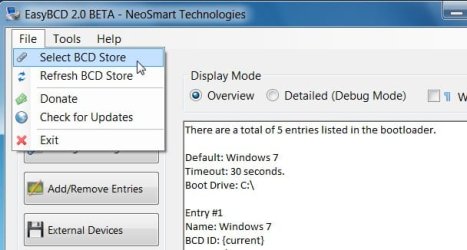
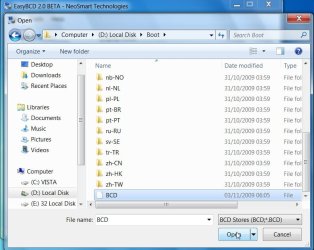
You need to find the pale yellow boot folder on the system partition . bcd should be in there.

You can load it up with Easy 2.0, Like this:

EASY-1-2009-11-04_181833.jpg

EASY-2-2009-11-04_181940.jpg

EASY-3-2009-11-04_182010.jpg

EASY-4-2009-11-04_182037.jpg

Easier than using the commands.
 

My Computers

System One System Two

  • Computer type
    PC/Desktop
    OS
    7 X64
    CPU
    i5 8400
    Motherboard
    gigabyte b365m ds3h
    Memory
    2x8gb 3200mhz
    Hard Drives
    various
    PSU
    pure power 11 400w cm
    Case
    Coolermaster
    Cooling
    cryorig m9i
  • Computer type
    PC/Desktop
    OS
    7x64
    CPU
    g5400
    Motherboard
    ga b365m ds3h
    Memory
    8gb ddr4 2400
    PSU
    xfx pro 450w
Back
Top