
Hi,
I am using Outloook 2010 and recently I have installed Business Contact Manager 2010. I have entered all my customer data and now I discovered that I made a some big mistakes:
I have modified the Business Contact form and filled the Company details in there and also the contacts belonging to the company. As a result of the modification I have many new fields (which is not a problem) and lost some important fields including email, address (i have replaced these for new fields that I created myself).
Of course, I should have kept the important fields such as address and email, etc. and I should have created an account for each company and fill in the details in the Account form. Then create a business contact and fill in the contact details in the Business Contact form and add these to the accounts.
I want to open each Business Contact Form and copy and paste the company details into a new created account via the Account form. Then I want to create a new business contact WITH THE STANDARD BUSINESS CONTACT FORM and copy paste the contact details from the MODIFIED BUSINESS CONTACT FORM into it.
My problem is: how can I have the standard business contact form and the modified business contact form at the same time? I could reset the modified form to get the standard form but then I lose the contact details before I pasted them into the standard form..
I hope someone knows a solution as I spent 60+ hours on this already.
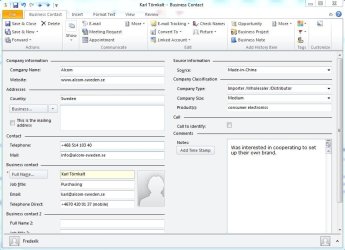
I have attached a screenshot of the modified business contact form for a fictive account /contact that represents my real ones.
Clausule
I am using Outloook 2010 and recently I have installed Business Contact Manager 2010. I have entered all my customer data and now I discovered that I made a some big mistakes:
I have modified the Business Contact form and filled the Company details in there and also the contacts belonging to the company. As a result of the modification I have many new fields (which is not a problem) and lost some important fields including email, address (i have replaced these for new fields that I created myself).
Of course, I should have kept the important fields such as address and email, etc. and I should have created an account for each company and fill in the details in the Account form. Then create a business contact and fill in the contact details in the Business Contact form and add these to the accounts.
I want to open each Business Contact Form and copy and paste the company details into a new created account via the Account form. Then I want to create a new business contact WITH THE STANDARD BUSINESS CONTACT FORM and copy paste the contact details from the MODIFIED BUSINESS CONTACT FORM into it.
My problem is: how can I have the standard business contact form and the modified business contact form at the same time? I could reset the modified form to get the standard form but then I lose the contact details before I pasted them into the standard form..
I hope someone knows a solution as I spent 60+ hours on this already.
I have attached a screenshot of the modified business contact form for a fictive account /contact that represents my real ones.
Clausule
Attachments
My Computer
- Computer Manufacturer/Model Number
- Acer 4820-TG
- OS
- Windows 7 Ultimate x64
- CPU
- Intel Core i5 M480 @ 2.67GHz
- Memory
- 4GB


