

I've recently restored my os from an image, and today I've found that my "LG WH10LS30 10X Blu-ray Burner with LightScribe" drive is not showing up under Computer.
What I've checked, tried, and found so far:
- Tools > Folder Options > View > "Hide empty drives" is UNchecked.
- Device Manager:
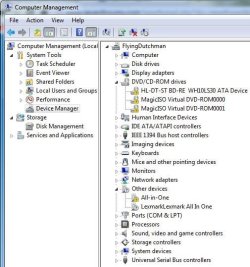
- Since it's an old image, I thought maybe I just hadn't installed the specific software & drivers yet. I got the disc out, popped it in- and DUH, the computer isn't recognizing the drive.
- I tried reinstalling the driver from Device Manager & navigating to "Computer" & letting it search > still not there, and says that Windows had chosen the best one already.
- Luckily, I've been making it a habit to rip any important CDs, like anything that installs a driver. I found my image of the disc, only to be further disheartened that MagicISO's drivers were gone, too. But it was installed. ???
- Even more luckily, it had also been extracted already. I ran the autorun.exe:
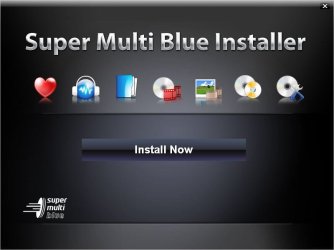
Clicked "Install Now.l" Select English, 2 small windows load their bars as usual, then:
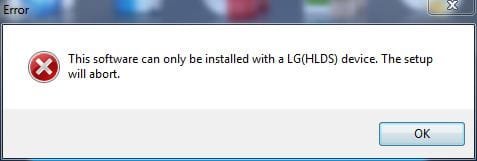
- I downloaded Driver Sweeper, installed, and ran. But it did not show anything about a DVD/CD-ROM drive, only Jmicron and Marvell storage. I didn't proceed further for fear of uninstalling a driver for one of my hard drives.
- I forget why, but I went to Programs & Features, and noticed that ALL of the CyberLink software that came with it was in fact installed. So I had in fact have it properly installed once upon a time before I took this image.
I'm at a complete loss. Any other ideas?
P.S.- In the Device Manager window, the 2 MagicISO drives only showed up once I re-installed that program.
What I've checked, tried, and found so far:
- Tools > Folder Options > View > "Hide empty drives" is UNchecked.
- Device Manager:
- Since it's an old image, I thought maybe I just hadn't installed the specific software & drivers yet. I got the disc out, popped it in- and DUH, the computer isn't recognizing the drive.
- I tried reinstalling the driver from Device Manager & navigating to "Computer" & letting it search > still not there, and says that Windows had chosen the best one already.
- Luckily, I've been making it a habit to rip any important CDs, like anything that installs a driver. I found my image of the disc, only to be further disheartened that MagicISO's drivers were gone, too. But it was installed. ???
- Even more luckily, it had also been extracted already. I ran the autorun.exe:
Clicked "Install Now.l" Select English, 2 small windows load their bars as usual, then:
- I've also tried uninstalling the device, then running the autorun's Install Now. Same error.
- I tried disabling the device, then running it, same error.
- I tried, after re-enabling & uninstalling, to set Windows to NOT auto-install drivers, then running it, same error.
- I tried disabling the device, then running it, same error.
- I tried, after re-enabling & uninstalling, to set Windows to NOT auto-install drivers, then running it, same error.
- I downloaded Driver Sweeper, installed, and ran. But it did not show anything about a DVD/CD-ROM drive, only Jmicron and Marvell storage. I didn't proceed further for fear of uninstalling a driver for one of my hard drives.
- I forget why, but I went to Programs & Features, and noticed that ALL of the CyberLink software that came with it was in fact installed. So I had in fact have it properly installed once upon a time before I took this image.
I'm at a complete loss. Any other ideas?
P.S.- In the Device Manager window, the 2 MagicISO drives only showed up once I re-installed that program.
My Computer
At a glance
Windows 7 Pro x64 SP1AMD Phenom II x6 1090T Black Edition 3.2GHzPatriot G ‘Sector 5’ Edition 8GB (2 x 4GB) 16...
- Computer type
- PC/Desktop
- OS
- Windows 7 Pro x64 SP1
- CPU
- AMD Phenom II x6 1090T Black Edition 3.2GHz
- Motherboard
- ASUS M4A88TD-V EVO/USB3
- Memory
- Patriot G ‘Sector 5’ Edition 8GB (2 x 4GB) 1600MHz
- Sound Card
- (onboard) Realtek® ALC 892 8-Channel High Definition Audio
- Monitor(s) Displays
- ViewSonic VX2253 22"
- Screen Resolution
- 1920x1080
- Hard Drives
- Transcend SSD720 2.5" SATAIII 64GB SSD; Western Digital Caviar Green WD20EARS 2TB 64MB 3.5" HDD
LG WH10LS30 10X Blu-ray Burner with LightScribe
- PSU
- CORSAIR TX Series 950W ATX12V 80 Plus Bronze
- Case
- Cooler Master HAF X NVidia Edition; 5 Green LED Fans!
- Cooling
- CORSAIR A70 120mm Dual-Fan
- Keyboard
- Verbatim 97472 Mini Wireless Slim
- Mouse
- bundled Verbatim 97472 Wireless
- Antivirus
- Avast
- Browser
- Chrome
- Other Info
- Ultraportable/Desktop Replacement Laptop:
circa Oct 2006,
Dell XPS M1210,
Windows 7 Professional 32-bit,
Intel Core 2 Duo T7200 2.0GHz,
3.25 (4) GB of RAM,
NVidia GeForce Go 7400,
500GB Seagate Momentus 7200RPM HDD
