Be Aware Updated Explorer.exe : Windows Update KB977074

sergiogarcia9

︻┳テ=一
Guru
Local time
6:05 AM
Messages
4,755
Hi Guys

Just noticed this yesterday when i updated my Laptop via Windows Update, that this update updates the explorer.exe, which will effect if you got a Custom start button installed.

After installing the update, you'll have to restart and when you are back from the restart your start button will now be changed to the default Windows 7 Start button, so you'll have to change it again if you wanna have a custom start button.

Note: I dont know if this update is out for x86 based systems ;)

Name:
Updated for Windows 7 for x64-based systems (KB977074)


Just wanted to let you all know ;)
 

My Computer My Computer

Computer type
PC/Desktop
Computer Manufacturer/Model Number
Airbot 2.0
OS
Windows 7 Ultimate x64 SP1
CPU
Core i7 920 (D0) @ 4Ghz, *26c idle *65c full load on air
Motherboard
Asus P6X58D Premium - Sata 6Gb/s - USB 3.0
Memory
12GB DDR3 Corsair Dominator -CMD12GX3M6A1600C8 at 1600MHz
Graphics Card(s)
Zotac Geforce GTX 770
Sound Card
ASUS Xonar D2X
Monitor(s) Displays
1 LG 24" Flatron W2453V-PF 1 Samsung 24" P2450H both 2ms RT
Screen Resolution
1920x1080@60hz
Hard Drives
1 Samsung 250GB 840 Evo SSD
1 OCZ Vertex2 180GB SSD
1 TB Samsung Spinpoint F1 7200RPM 32MB cache
2 500GB WD Caviar Blacks 7200RPM 32MB cache (WD5001AALS)

Pioneer DVD Burner DVR-S18M
PSU
Corsair HX1000W
Case
Cooler Master HAF 932
Cooling
Case Fans *3 230mm, *1 140mm/CPU - *Tuniq Tower 120 Extreme
Keyboard
Logitech Wireless MK700
Mouse
Logitech Wireless MK700
Internet Speed
DL 15 Mbps UL 0.98 Mbps
Antivirus
None
Browser
Firefox Nightly
Other Info
Processor-7.7 *RAM- 7.9 *Graphics-7.9 *Gaming Graphics- 7.9 *SSD- 7.8 W.E.I final score= 7.7
*Phone- LG Nexus 5
After this update I can't take ownership of explorer.exe anymore so I'm stuck with the default orb :(
 

My Computer My Computer

OS
win7
Mine still works as it should :confused: Did you right click it to change permissions etc, or is the problem something else?
 
Thanks for the heads up...just noticed that my orb had changed. Got it changed back now. :)
 

My Computer My Computer

Computer type
PC/Desktop
Computer Manufacturer/Model Number
SuperBeast
OS
Windows 10 Tech Preview 9926 x64
CPU
AMD FX-8350
Motherboard
Gigabyte GA-990FXA-UD3
Memory
16GB DDR3 1333
Graphics Card(s)
Asus R9 290 DirectCU II OC, Gigabyte Windforce R9 290 OC
Sound Card
Integrated w/ Creative A250 2.1 speakers
Monitor(s) Displays
Main: Asus VN289H 28" Secondary: Acer G246HL 24"
Screen Resolution
1920x1080
Hard Drives
128 GB SanDisk Ultra Plus (Windows drive)

240 GB Crucial M500 SSD (Games drive)

1 TB WDC WD10EACS 7200RPM HDD (Data drive)

2 TB Seagate Expansion Desktop external HDD (Backup drive)
PSU
900w Antec HCG-900
Case
Raidmax Agusta Full ATX
Cooling
Corsair H80
Keyboard
Cooler Master Devastator MB24
Mouse
Cooler Master Devastator MS2K 1000/1600/2000 DPI
Internet Speed
100Mbps cable
Antivirus
Avast!
Browser
Chrome
got it working now, must have been one of those temporary things that could have driven me up the wall all night

no need for alarm folks

lol
 

My Computer My Computer

OS
win7
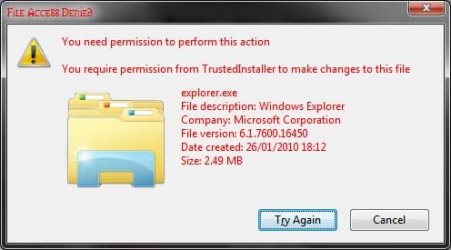
awhile ago, i noticed my start icon changed back to the stupid orb. I couldn't have been that the restorator's trial ran out as that happened long before the icon switch. now when i try to change the name of the C:\Windows\explorer.exe file I get the message below (after clearing warnings and permissions and stuff). this is most annoying >.<

ok, apparently the "take ownership" script doesnt work on the updated explorer.exe and you have to manually do it. grrr
 

Attachments

  • explorerexenamechange.jpg
    explorerexenamechange.jpg
    19.1 KB · Views: 30
Last edited:

My Computer My Computer

Computer Manufacturer/Model Number
Toshiba Satellite 350D
OS
Win7 Ultimate Build 7600 RTM
CPU
AMD Turion 64 X2 Mobile Technology TL-60 2.00GHz
Memory
3.00 GB (2.87GB usable)
Graphics Card(s)
ATI Radeon X1250
Sound Card
Realtek High Definition Audio
Monitor(s) Displays
Generic PnP Monitor (Laptop)
Hard Drives
Toshiba MK2546GSX ATA Device
awhile ago, i noticed my start icon changed back to the stupid orb. I couldn't have been that the restorator's trial ran out as that happened long before the icon switch. now when i try to change the name of the C:\Windows\explorer.exe file I get the message below (after clearing warnings and permissions and stuff). this is most annoying >.<
Have you re done the taking permission of explorer.exe, since it changed?
 
Just for the sake of information, could someone post/verify the hash info for the new version of explorer.exe installed by this update?

Mine reads as:
CRC32: D51CA30A
MD5: 9AAAEC8DAC27AA17B053E6352AD233AE
SHA-1: 0F841176602288EE1BE832573265F88CA78F4BA7
SHA-256: 2D5173ACF0BD6AC49670F7C83FD79AF552BA9D989DE8BA557459191C08A8A1AF

Using HashTab 3.0.0

I notice that mine reads modified on 31-Oct-09, but created on 27-Jan-10, the latter being the date I installed the update.
 

My Computers My Computers

System One System Two

  • Computer type
    Laptop
    Computer Manufacturer/Model Number
    Custom
    OS
    Windows 10 Professional 64-Bit
    CPU
    Intel Core i7 8700K
    Motherboard
    Asus Maximus X Code
    Memory
    G.Skill TridentZ RGB DDR4 4000 F4-4000C18D-16GTZR
    Graphics Card(s)
    Zotac GeForce GTX-1660 Ti AMP 6GB
    Sound Card
    ROG SupremeFX S1220 (Onboard)
    Monitor(s) Displays
    Dell UP2716D
    Screen Resolution
    2560x1440
    Hard Drives
    Samsung 980 Pro PCIe NVMe 500GB
    Samsung 970 Evo PCIe NVMe 250GB
    Samsung 860 Evo SATA III 2TB
    WD Black WD2003FZEX 2TB x 3
    ODD - GH24NSC0
    PSU
    Coolermaster V1000
    Case
    Corsair Obsidian 450D
    Cooling
    Corsair H115i - Corsair SP140 Red x 2
    Keyboard
    Logitech G213
    Mouse
    Logitech G102
    Internet Speed
    100 Mbps (Supposedly) - Asianet India FTTH
    Antivirus
    Avast Free!
    Browser
    Maxthon Cloud Browser 5.xx
    Other Info
    Asus FX-553VD (960 Evo, 860 Evo, 16GB)
    Samsung Galaxy C9 Pro
    Canon EOS 70D
  • Computer type
    Laptop
    System Manufacturer/Model Number
    Asus FX503VD
    OS
    Windows 10 Pro x64
    CPU
    Intel Core i7 7700HQ
    Memory
    2 x 8GB Samsung DDR4 2400
    Graphics Card(s)
    GTX 1050
    Screen Resolution
    1920 x 1080
    Hard Drives
    Samsung 960 Evo PCIe NVMe 250GB Boot
    Samsung 840 Pro Series 256 GB SSD (MZ-7PD256BW);
Here's mine, done with File Hash Checker by Julien Manici
File Hash Checker

SHA1: 0F841176602288EE1BE832573265F88CA78F4BA7
MD5: 9AAAEC8DAC27AA17B053E6352AD233AE
 
Well, they match up.

Thanks for the help.

NPP
 

My Computers My Computers

System One System Two

  • Computer type
    Laptop
    Computer Manufacturer/Model Number
    Custom
    OS
    Windows 10 Professional 64-Bit
    CPU
    Intel Core i7 8700K
    Motherboard
    Asus Maximus X Code
    Memory
    G.Skill TridentZ RGB DDR4 4000 F4-4000C18D-16GTZR
    Graphics Card(s)
    Zotac GeForce GTX-1660 Ti AMP 6GB
    Sound Card
    ROG SupremeFX S1220 (Onboard)
    Monitor(s) Displays
    Dell UP2716D
    Screen Resolution
    2560x1440
    Hard Drives
    Samsung 980 Pro PCIe NVMe 500GB
    Samsung 970 Evo PCIe NVMe 250GB
    Samsung 860 Evo SATA III 2TB
    WD Black WD2003FZEX 2TB x 3
    ODD - GH24NSC0
    PSU
    Coolermaster V1000
    Case
    Corsair Obsidian 450D
    Cooling
    Corsair H115i - Corsair SP140 Red x 2
    Keyboard
    Logitech G213
    Mouse
    Logitech G102
    Internet Speed
    100 Mbps (Supposedly) - Asianet India FTTH
    Antivirus
    Avast Free!
    Browser
    Maxthon Cloud Browser 5.xx
    Other Info
    Asus FX-553VD (960 Evo, 860 Evo, 16GB)
    Samsung Galaxy C9 Pro
    Canon EOS 70D
  • Computer type
    Laptop
    System Manufacturer/Model Number
    Asus FX503VD
    OS
    Windows 10 Pro x64
    CPU
    Intel Core i7 7700HQ
    Memory
    2 x 8GB Samsung DDR4 2400
    Graphics Card(s)
    GTX 1050
    Screen Resolution
    1920 x 1080
    Hard Drives
    Samsung 960 Evo PCIe NVMe 250GB Boot
    Samsung 840 Pro Series 256 GB SSD (MZ-7PD256BW);
Back
Top