Been Getting BSOD Randomly for a Few Months...

A stop 0xF4 is storage related. It may be the driver ... the storage controller driver, but you use the generic storage controller, which does not fail in this way.

Do you use any Backup programs like Acronis or Paragon etc? They also often cause it.
 

My Computer My Computer

At a glance

Microsoft Windows 10 Pro Insider Preview 64-bitIntel(R) Core(TM) i3-4130 CPU @ 3.40GHzCorsair Vengence 4GB x2 (8.00GB Dual-Channel ...2047MB GeForce GTS 450 (ZOTAC International)
Computer type
PC/Desktop
Computer Manufacturer/Model Number
Self Assembled
OS
Microsoft Windows 10 Pro Insider Preview 64-bit
CPU
Intel(R) Core(TM) i3-4130 CPU @ 3.40GHz
Motherboard
Gigabyte Technology Co., Ltd. B85M-D3H
Memory
Corsair Vengence 4GB x2 (8.00GB Dual-Channel DDR3 @ 798MHz)
Graphics Card(s)
2047MB GeForce GTS 450 (ZOTAC International)
Sound Card
Onboard (Realtek High Definition Audio)
Monitor(s) Displays
LG Flatron E2040T
Screen Resolution
1600x900
Hard Drives
Western Digital 1 TB
Seagate 500 GB
PSU
Corsair VS550
Case
Cooler Master K380
Cooling
Cooler Master Seidon 120V Plus
Keyboard
Logitech MK260r
Mouse
Logitech MK260r
Internet Speed
PMPL Broadband
Antivirus
Windows Defender + MBAM
Browser
Firefox
Other Info
Dell Studio 15" Laptop
Not sure if I use any of that. How would I check?
 

My Computer My Computer

At a glance

Windows 7 Professional, 64-bit.i7 2600K @ 3.8Ghz8GB KingstonGTX 780 Ti EVGA 2GB
Computer type
PC/Desktop
OS
Windows 7 Professional, 64-bit.
CPU
i7 2600K @ 3.8Ghz
Motherboard
MSI P67A-C43 (MS-7673)
Memory
8GB Kingston
Graphics Card(s)
GTX 780 Ti EVGA 2GB
Screen Resolution
1920x1080
Hard Drives
A-RAM Elite Series SSD @ 120GB, WD Green 1TB HDD
PSU
Cooler Master 750W GX2 Series 80+ Bronze Power Supply
Cooling
Cooler Master Hyper 212 EVO
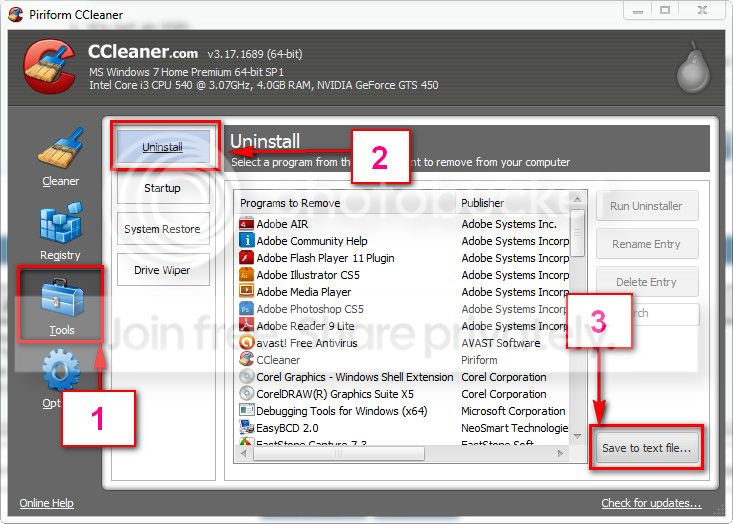
Download and install CCleaner. Then run it.
Go to "Tools" .... by default it will open the "uninstall" tab.
Click on save as text file. Save it on your desktop.
Upload the text file for us.
2012-11-02_224417.jpg
 

My Computer My Computer

At a glance

Microsoft Windows 10 Pro Insider Preview 64-bitIntel(R) Core(TM) i3-4130 CPU @ 3.40GHzCorsair Vengence 4GB x2 (8.00GB Dual-Channel ...2047MB GeForce GTS 450 (ZOTAC International)
Computer type
PC/Desktop
Computer Manufacturer/Model Number
Self Assembled
OS
Microsoft Windows 10 Pro Insider Preview 64-bit
CPU
Intel(R) Core(TM) i3-4130 CPU @ 3.40GHz
Motherboard
Gigabyte Technology Co., Ltd. B85M-D3H
Memory
Corsair Vengence 4GB x2 (8.00GB Dual-Channel DDR3 @ 798MHz)
Graphics Card(s)
2047MB GeForce GTS 450 (ZOTAC International)
Sound Card
Onboard (Realtek High Definition Audio)
Monitor(s) Displays
LG Flatron E2040T
Screen Resolution
1600x900
Hard Drives
Western Digital 1 TB
Seagate 500 GB
PSU
Corsair VS550
Case
Cooler Master K380
Cooling
Cooler Master Seidon 120V Plus
Keyboard
Logitech MK260r
Mouse
Logitech MK260r
Internet Speed
PMPL Broadband
Antivirus
Windows Defender + MBAM
Browser
Firefox
Other Info
Dell Studio 15" Laptop
Here it is.
 

My Computer My Computer

At a glance

Windows 7 Professional, 64-bit.i7 2600K @ 3.8Ghz8GB KingstonGTX 780 Ti EVGA 2GB
Computer type
PC/Desktop
OS
Windows 7 Professional, 64-bit.
CPU
i7 2600K @ 3.8Ghz
Motherboard
MSI P67A-C43 (MS-7673)
Memory
8GB Kingston
Graphics Card(s)
GTX 780 Ti EVGA 2GB
Screen Resolution
1920x1080
Hard Drives
A-RAM Elite Series SSD @ 120GB, WD Green 1TB HDD
PSU
Cooler Master 750W GX2 Series 80+ Bronze Power Supply
Cooling
Cooler Master Hyper 212 EVO
There is not any program to monitoring the HDDs etc. So better you get the earlier suggestions done by somebody you know able to do it, and let us know the results.
 

My Computer My Computer

At a glance

Microsoft Windows 10 Pro Insider Preview 64-bitIntel(R) Core(TM) i3-4130 CPU @ 3.40GHzCorsair Vengence 4GB x2 (8.00GB Dual-Channel ...2047MB GeForce GTS 450 (ZOTAC International)
Computer type
PC/Desktop
Computer Manufacturer/Model Number
Self Assembled
OS
Microsoft Windows 10 Pro Insider Preview 64-bit
CPU
Intel(R) Core(TM) i3-4130 CPU @ 3.40GHz
Motherboard
Gigabyte Technology Co., Ltd. B85M-D3H
Memory
Corsair Vengence 4GB x2 (8.00GB Dual-Channel DDR3 @ 798MHz)
Graphics Card(s)
2047MB GeForce GTS 450 (ZOTAC International)
Sound Card
Onboard (Realtek High Definition Audio)
Monitor(s) Displays
LG Flatron E2040T
Screen Resolution
1600x900
Hard Drives
Western Digital 1 TB
Seagate 500 GB
PSU
Corsair VS550
Case
Cooler Master K380
Cooling
Cooler Master Seidon 120V Plus
Keyboard
Logitech MK260r
Mouse
Logitech MK260r
Internet Speed
PMPL Broadband
Antivirus
Windows Defender + MBAM
Browser
Firefox
Other Info
Dell Studio 15" Laptop
Sounds good. Will get right onto this. Thanks.
 

My Computer My Computer

At a glance

Windows 7 Professional, 64-bit.i7 2600K @ 3.8Ghz8GB KingstonGTX 780 Ti EVGA 2GB
Computer type
PC/Desktop
OS
Windows 7 Professional, 64-bit.
CPU
i7 2600K @ 3.8Ghz
Motherboard
MSI P67A-C43 (MS-7673)
Memory
8GB Kingston
Graphics Card(s)
GTX 780 Ti EVGA 2GB
Screen Resolution
1920x1080
Hard Drives
A-RAM Elite Series SSD @ 120GB, WD Green 1TB HDD
PSU
Cooler Master 750W GX2 Series 80+ Bronze Power Supply
Cooling
Cooler Master Hyper 212 EVO
I'm really not sure when I'll be able to get this properly looked at. Would a re-install of Windows 7 fix this issue at all, or not really?

Make it sure that the SSD (Not sure about the brand, may be ARam?) AR120GBE is running with up-to-date firmware. How old the disc is?

How do I do this? I'm not sure if it's ARam, how do I check?

As I said above, I'm really not sure when I'll be able to get someone in to look at the computer. Over the past day or so I've been getting quite a lot of blue screens. It's impossible for me to open up the PC by myself. Is there anything else, like the above, that we can do before me having to get someone in to look at it?
 
Last edited:

My Computer My Computer

At a glance

Windows 7 Professional, 64-bit.i7 2600K @ 3.8Ghz8GB KingstonGTX 780 Ti EVGA 2GB
Computer type
PC/Desktop
OS
Windows 7 Professional, 64-bit.
CPU
i7 2600K @ 3.8Ghz
Motherboard
MSI P67A-C43 (MS-7673)
Memory
8GB Kingston
Graphics Card(s)
GTX 780 Ti EVGA 2GB
Screen Resolution
1920x1080
Hard Drives
A-RAM Elite Series SSD @ 120GB, WD Green 1TB HDD
PSU
Cooler Master 750W GX2 Series 80+ Bronze Power Supply
Cooling
Cooler Master Hyper 212 EVO

My Computer My Computer

At a glance

Microsoft Windows 10 Pro Insider Preview 64-bitIntel(R) Core(TM) i3-4130 CPU @ 3.40GHzCorsair Vengence 4GB x2 (8.00GB Dual-Channel ...2047MB GeForce GTS 450 (ZOTAC International)
Computer type
PC/Desktop
Computer Manufacturer/Model Number
Self Assembled
OS
Microsoft Windows 10 Pro Insider Preview 64-bit
CPU
Intel(R) Core(TM) i3-4130 CPU @ 3.40GHz
Motherboard
Gigabyte Technology Co., Ltd. B85M-D3H
Memory
Corsair Vengence 4GB x2 (8.00GB Dual-Channel DDR3 @ 798MHz)
Graphics Card(s)
2047MB GeForce GTS 450 (ZOTAC International)
Sound Card
Onboard (Realtek High Definition Audio)
Monitor(s) Displays
LG Flatron E2040T
Screen Resolution
1600x900
Hard Drives
Western Digital 1 TB
Seagate 500 GB
PSU
Corsair VS550
Case
Cooler Master K380
Cooling
Cooler Master Seidon 120V Plus
Keyboard
Logitech MK260r
Mouse
Logitech MK260r
Internet Speed
PMPL Broadband
Antivirus
Windows Defender + MBAM
Browser
Firefox
Other Info
Dell Studio 15" Laptop
Correct. I didn't build this computer. :)

fUH050k.png
 

My Computer My Computer

At a glance

Windows 7 Professional, 64-bit.i7 2600K @ 3.8Ghz8GB KingstonGTX 780 Ti EVGA 2GB
Computer type
PC/Desktop
OS
Windows 7 Professional, 64-bit.
CPU
i7 2600K @ 3.8Ghz
Motherboard
MSI P67A-C43 (MS-7673)
Memory
8GB Kingston
Graphics Card(s)
GTX 780 Ti EVGA 2GB
Screen Resolution
1920x1080
Hard Drives
A-RAM Elite Series SSD @ 120GB, WD Green 1TB HDD
PSU
Cooler Master 750W GX2 Series 80+ Bronze Power Supply
Cooling
Cooler Master Hyper 212 EVO

My Computer My Computer

At a glance

Microsoft Windows 10 Pro Insider Preview 64-bitIntel(R) Core(TM) i3-4130 CPU @ 3.40GHzCorsair Vengence 4GB x2 (8.00GB Dual-Channel ...2047MB GeForce GTS 450 (ZOTAC International)
Computer type
PC/Desktop
Computer Manufacturer/Model Number
Self Assembled
OS
Microsoft Windows 10 Pro Insider Preview 64-bit
CPU
Intel(R) Core(TM) i3-4130 CPU @ 3.40GHz
Motherboard
Gigabyte Technology Co., Ltd. B85M-D3H
Memory
Corsair Vengence 4GB x2 (8.00GB Dual-Channel DDR3 @ 798MHz)
Graphics Card(s)
2047MB GeForce GTS 450 (ZOTAC International)
Sound Card
Onboard (Realtek High Definition Audio)
Monitor(s) Displays
LG Flatron E2040T
Screen Resolution
1600x900
Hard Drives
Western Digital 1 TB
Seagate 500 GB
PSU
Corsair VS550
Case
Cooler Master K380
Cooling
Cooler Master Seidon 120V Plus
Keyboard
Logitech MK260r
Mouse
Logitech MK260r
Internet Speed
PMPL Broadband
Antivirus
Windows Defender + MBAM
Browser
Firefox
Other Info
Dell Studio 15" Laptop
Thank you!

Do I download the A-RAM SATA III Elite Series? A-Ram Website

Edit: Okay so I used the one above in the link I posted, it worked, but the firmware version says it's still the same as before. Is that correct? Just seems odd.
 
Last edited:

My Computer My Computer

At a glance

Windows 7 Professional, 64-bit.i7 2600K @ 3.8Ghz8GB KingstonGTX 780 Ti EVGA 2GB
Computer type
PC/Desktop
OS
Windows 7 Professional, 64-bit.
CPU
i7 2600K @ 3.8Ghz
Motherboard
MSI P67A-C43 (MS-7673)
Memory
8GB Kingston
Graphics Card(s)
GTX 780 Ti EVGA 2GB
Screen Resolution
1920x1080
Hard Drives
A-RAM Elite Series SSD @ 120GB, WD Green 1TB HDD
PSU
Cooler Master 750W GX2 Series 80+ Bronze Power Supply
Cooling
Cooler Master Hyper 212 EVO
Bump. Is the above the right one?

I plan to get a new PC case, I have one picked out already. So once I get that in the post, I'll get someone in to install it for me and they can also take a look at what you suggested earlier, Arc.
 

My Computer My Computer

At a glance

Windows 7 Professional, 64-bit.i7 2600K @ 3.8Ghz8GB KingstonGTX 780 Ti EVGA 2GB
Computer type
PC/Desktop
OS
Windows 7 Professional, 64-bit.
CPU
i7 2600K @ 3.8Ghz
Motherboard
MSI P67A-C43 (MS-7673)
Memory
8GB Kingston
Graphics Card(s)
GTX 780 Ti EVGA 2GB
Screen Resolution
1920x1080
Hard Drives
A-RAM Elite Series SSD @ 120GB, WD Green 1TB HDD
PSU
Cooler Master 750W GX2 Series 80+ Bronze Power Supply
Cooling
Cooler Master Hyper 212 EVO
Bump.

In the past two BSOD I have gotten, the error was "ntfs.sys". What is that caused by?

Edit: Oh, and sometimes my computer will freeze up for, like, two seconds and I cannot move my cursor or anything and it will make a loud buzzing sound out of my speakers... this will happen randomly, and everything goes back to normal within a few seconds. Could this be because of the BSOD?
 

My Computer My Computer

At a glance

Windows 7 Professional, 64-bit.i7 2600K @ 3.8Ghz8GB KingstonGTX 780 Ti EVGA 2GB
Computer type
PC/Desktop
OS
Windows 7 Professional, 64-bit.
CPU
i7 2600K @ 3.8Ghz
Motherboard
MSI P67A-C43 (MS-7673)
Memory
8GB Kingston
Graphics Card(s)
GTX 780 Ti EVGA 2GB
Screen Resolution
1920x1080
Hard Drives
A-RAM Elite Series SSD @ 120GB, WD Green 1TB HDD
PSU
Cooler Master 750W GX2 Series 80+ Bronze Power Supply
Cooling
Cooler Master Hyper 212 EVO
Small bump. :D
 

My Computer My Computer

At a glance

Windows 7 Professional, 64-bit.i7 2600K @ 3.8Ghz8GB KingstonGTX 780 Ti EVGA 2GB
Computer type
PC/Desktop
OS
Windows 7 Professional, 64-bit.
CPU
i7 2600K @ 3.8Ghz
Motherboard
MSI P67A-C43 (MS-7673)
Memory
8GB Kingston
Graphics Card(s)
GTX 780 Ti EVGA 2GB
Screen Resolution
1920x1080
Hard Drives
A-RAM Elite Series SSD @ 120GB, WD Green 1TB HDD
PSU
Cooler Master 750W GX2 Series 80+ Bronze Power Supply
Cooling
Cooler Master Hyper 212 EVO
There's no response or evidence you're working at all through the dozens of steps in the tutorials linked for you. So why are you bumping the thread. Show some evidence of doing the work and we'll continue.


Last edited:
I did a clean reinstall, and then a few days later I got the above BSOD with the above error. I've never had that error before and was wanting to know what it could be causing that - seeing as I reinstalled Windows 7.

I know you cannot just say one thing that might be causing (could be lots of things), but I'd like to know what it could be. Before I was getting a different BSOD error and now I get this.

Have you even read through the whole thread? Because if you have, you'd know that for some damn reason we cannot get the dump files to appear. Derp. I've tried everything that people have suggested to get them to appear and have failed each time.

The REASON why I BUMPED this thread was because I asked a question. Did you not see that post?
 

My Computer My Computer

At a glance

Windows 7 Professional, 64-bit.i7 2600K @ 3.8Ghz8GB KingstonGTX 780 Ti EVGA 2GB
Computer type
PC/Desktop
OS
Windows 7 Professional, 64-bit.
CPU
i7 2600K @ 3.8Ghz
Motherboard
MSI P67A-C43 (MS-7673)
Memory
8GB Kingston
Graphics Card(s)
GTX 780 Ti EVGA 2GB
Screen Resolution
1920x1080
Hard Drives
A-RAM Elite Series SSD @ 120GB, WD Green 1TB HDD
PSU
Cooler Master 750W GX2 Series 80+ Bronze Power Supply
Cooling
Cooler Master Hyper 212 EVO
You never reported back on the hardware tests, especially booted HD Diagnostic extended CD scan followed by Disk Check. Archie asked you again later, still no reply I can see.

Start back at the top of the thread and report back each step that was given. If you have a problem running one you need to ask back for more help.

Compare the install you did with these same steps to get a perfect Clean Reinstall - Factory OEM Windows 7 as you may want to do it over if it was done much differently, e.g. drivers mass downloaded and installed instead of using Windows Updates after enabling Automatically deliver drivers via Windows Update (Step 3) .

OK seeing as we are getting no dumps we could be a bit proactive about it and start running some tests to rule things out

First off if your OCing in anyway stop, return everything to stock settings for the purposes of testing


If you havent already, fill in your system specs so we know what we are dealing with
http://www.sevenforums.com/tutorials/180324-system-info-see-your-system-specs.html

Run some scans to check against virus or infection
http://support.kaspersky.com/5350
http://www.sevenforums.com/tutorials/166445-windows-defender-offline.html


Run some basic hardware tests
http://www.sevenforums.com/tutorials/105647-ram-test-memtest86.html
http://www.sevenforums.com/tutorials/433-disk-check.html (windows based check)
http://www.carrona.org/hddiag.html (bootable disk check)

You could also try running driver verifier to see if we can flush out any faulting drivers
http://www.sevenforums.com/crash-lo...-driver-verifier-identify-issues-drivers.html
 
Back
Top