Been having issues with MS Paint.

DameonLG

New member
Local time
2:31 PM
Messages
2
It's a strange issue, two actually.

If I try to use the, let's call it the recolor function, to try to erase and recolor sprites of a certain color, it only does so on SOME of them, even though the pixels are identically shaded and colored, so I end up having to delete them one at a time.

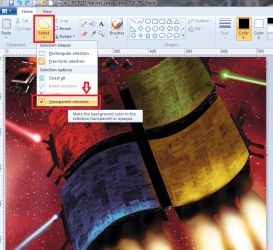
Also, sometimes when I go to move a sprite, even if I have it set up so whatever color behind the sprite is set to be transparent, when I move it, the background is noticeably NOT transparent. Ranging from the entire background behind the sprite, to only a few pixels.

I've noticed this tends to happen with the pixels I've recently worked on, such as deleting the background behind a sprite, or something along those lines.

I'm currently using Windows 7 with the built in Paint.
 

My Computer

OS
Windows 7 Home Premium 64bit
I am a big fan of Windows 7 Paint.

1. The recolor function will only recolor the pixels with the very same color, meaning if another pixel beside it is 1% darker or lighter, it is considered as a different type of pixel and it will not be recolored. I think this is an issue with pictures saved in JPEG or .jpg format but this is a bit theoetical. Try saving your pictures in Bitmap (.bmp) format. In my theory this will help you a little bit because bitmap pictures tend to have less types of pixels allowed, however, it may be poorer in quality.

2. Are you sure you even using the transparency selection on??? Actually, if you have used the "Free form selection", it sets back to "rectangular selection" after you used it everytime, so it will always crop rectangular portions unless you choose the "free form selection" again WITH the "transparency selection" checked. If you close Paint, it reverts back to default. It is again set to rectangular selection with the transparency unchecked.
 

Attachments

  • gsdgsd.png
    gsdgsd.png
    207.8 KB · Views: 53

My Computer

Computer Manufacturer/Model Number
Custom Built
OS
Windows 7 Ultimate 32 Bit, Windows Developer Preview, Linux Mint 9 Gnome 32 Bit
CPU
Intel Pentium Dual CPU E2180@2GHz
Motherboard
Elitegroup 671T-M3
Graphics Card(s)
NVIDIA GeForce 7200 GS
Monitor(s) Displays
AOC TFT1560 15" LCD Monitor
Screen Resolution
1024x768
Keyboard
Logitech USB Keyboard
I know the recolor function is attempting to recolor the same shades, because I use the eye dropper to select the shades from a previous point and add them to another.

Also, yes, I make sure the transparency is on. I have to toggle it off and then on again, sometimes more than once, to get it to work. As well well as having to try to cut something and paste it, then recut and repaste it multiple times. It's like trying to jimmy something that's broken into working for you. It's very irritating.
 

My Computer

OS
Windows 7 Home Premium 64bit
Can you at least post a screenshot that explains your problem??? I can't really think of what the root of this issue is. I think I saw someone customize the spreading of the Paintbrush tool in Windows XP Paint on Youtube by using Cheat Engine. Since when did this problem started to happen??? How long have you been using Paint and have you used any programs that might affect MS Paint???

I do have a feeling a registry error is responsible but please do not use registry cleaners at this point yet.

But it is in fact possible to download Windows XP's Paint then use it on Windows 7 but its really inferior, technically. I have tried this myself, maybe 2 months ago and Windows XP's Paint does work with Windows 7.

http://www.sheeptech.com/download/mspaint.exe
 

My Computer

Computer Manufacturer/Model Number
Custom Built
OS
Windows 7 Ultimate 32 Bit, Windows Developer Preview, Linux Mint 9 Gnome 32 Bit
CPU
Intel Pentium Dual CPU E2180@2GHz
Motherboard
Elitegroup 671T-M3
Graphics Card(s)
NVIDIA GeForce 7200 GS
Monitor(s) Displays
AOC TFT1560 15" LCD Monitor
Screen Resolution
1024x768
Keyboard
Logitech USB Keyboard
Back
Top