Solved Beeping/Chirping HDD- help interpreting SMART results

Zach1928

New member
Member
Local time
8:07 AM
Messages
89
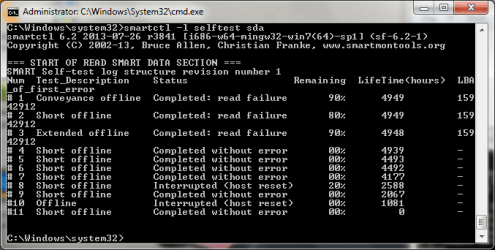
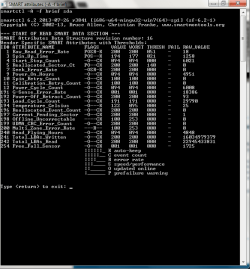
Hello folks, I've got a laptop drive thats beeping/chirping so I hit up the WD forum and the guy that responded pointed me to the Smartmontools site and I just wanted to get a second opinion(s) about the results. He said it was faulty to some extent so I'll attach the tests and see what y'all think.

Thanks in advance!
 

Attachments

  • full report.png
    full report.png
    19.9 KB · Views: 2
  • conveyance.png
    conveyance.png
    16.8 KB · Views: 21
  • brieftest.png
    brieftest.png
    18.8 KB · Views: 0

My Computer My Computer

Computer type
Laptop
Computer Manufacturer/Model Number
Dell XPS 15 L502X
OS
Windows 7 Home Premium 64bit
CPU
i7 2720qm
Memory
6gb DDR3 1333
Graphics Card(s)
Gt 540m
Sound Card
Waves MaxxAudio3
Screen Resolution
1366*768
Hard Drives
750gb WD Scorpio black
Mouse
G500
Yeah. It looks SMART is telling you it's starting to go bad on you. A noisy HDD is never a good thing.
 

My Computer My Computer

Computer type
PC/Desktop
Computer Manufacturer/Model Number
Mellon Labs (custom build)
OS
Win 7 Pro x64/Win 10 Pro x64 dual boot
CPU
AMD FX 8350 Vishera @ 4200
Motherboard
ASUS M5A97 R2.0
Memory
16 GB Mushkin Blackline DDR3-2400 @ 1866 (9-10-10-10-31)
Graphics Card(s)
XFX Radeon R9 280 Double D Black Edition
Sound Card
Realtek HD Audio on MB. Sounds great.
Monitor(s) Displays
Acer 24", Acer 22"
Screen Resolution
3840 x 1080
Hard Drives
1 x Mushkin Chronos 120 GB SSD (Win 10)
1 x Samsung 850 EVO 250 GB SSD (Win 7)
1 x WD 1TB SATA Blue
1 x WD 1TB SATA Green
PSU
Corsair TX-750
Case
CoolerMaster HAF 912+
Cooling
Coolermaster Seidon 240M Liquid AIO. 6 case fans
Keyboard
Logitech G710+
Mouse
Logitech G500s
Internet Speed
Much better since I got fiber, but still way overpriced.
Antivirus
MSE, Malware Bytes for scanning
Browser
Firefox
Other Info
Corsair VOID USB headphones.

A Mellon Labs X-1 - LCD Smartie driven system status display.

Brought to you by the letter E
Mellon Head is absolutely correct.

You'd better back up everything now and get a new HDD.

Here's some tips to make an image of your full OS and a way to put it on your new HDD, to avoid having to do a reinstall:

If you purchase a Seagate, WD or Maxtor, you can get the Acronis Trueimage software (free) and make an image of your OS and

put it on your external hdd. ( or my preference an 2nd internal hdd)

If you need to recover your OS ( including programs, updates, etc) you can do it with a few clicks.

You can also use Easeus for free and any hdd will work.

Seagate - DiscWizard | Seagate

WD - WD Support

Easeus - EASEUS Todo Backup Free 6.1 Download for Windows / FileHorse.com
 

My Computer My Computer

Computer type
PC/Desktop
Computer Manufacturer/Model Number
Self-Built
OS
Windows 7 Professional X64
CPU
Core i7 (2nd gen) i7-2600K / 3.40GHz
Motherboard
ASUS P8Z77-V Intel 7 Series Motherboard
Memory
DDR3 2400MHz (OC) 16gb
Graphics Card(s)
Intel(R) HD Graphics 3000, -1988 Mb
Sound Card
8 ChannelsAudio Chipset Realtek ALC892
Monitor(s) Displays
LG 29UM65 Black 29"
Screen Resolution
2560 x 1080
Hard Drives
840 EVO 250 GB SSD ;2tb (2);Seagate;1tb Seagate; 750 gb Seagate; wd ext (2) 750 gb,WD 2tb X 2;WD 3TB Black
PSU
750 watt
Case
Thermaltake RX -1
Cooling
2120mm Fans Included 1Other Fan Ports 5x 200mm Fan Ports
Keyboard
Microsoft Digital Media Pro
Mouse
Microsoft Wireless 6000
Internet Speed
U-verse 18 mbps
Antivirus
MSE
Browser
Firefox, Chrome and my favorite: Pale Moon
Other Info
HdHomerun Dual Tuner.
SRS Audio Lab,
Pioneer BDR 208-DBK
PS3-What a difference in my Surround Sound Receiver!
HP 4540s - My new Toy.
Epson R280 Printer- To personalize my Dvds.
Canon MP 560 - For scanning.
Ughh are either of you able to dumb down what these pics are describing? I don't even know what I'm looking at
 

My Computer My Computer

Computer type
Laptop
Computer Manufacturer/Model Number
Dell XPS 15 L502X
OS
Windows 7 Home Premium 64bit
CPU
i7 2720qm
Memory
6gb DDR3 1333
Graphics Card(s)
Gt 540m
Sound Card
Waves MaxxAudio3
Screen Resolution
1366*768
Hard Drives
750gb WD Scorpio black
Mouse
G500
Are you talking about the links to imaging programs?

You just download the programs, tell the program where you want the image to go ( your new internal or external hdd.

You can then take out your failing hdd and use your newly imaged hdd to boot.

If you're talking about your pics they are showing read/write errors, which will get progressively worse until it dies without warning.
 

My Computer My Computer

Computer type
PC/Desktop
Computer Manufacturer/Model Number
Self-Built
OS
Windows 7 Professional X64
CPU
Core i7 (2nd gen) i7-2600K / 3.40GHz
Motherboard
ASUS P8Z77-V Intel 7 Series Motherboard
Memory
DDR3 2400MHz (OC) 16gb
Graphics Card(s)
Intel(R) HD Graphics 3000, -1988 Mb
Sound Card
8 ChannelsAudio Chipset Realtek ALC892
Monitor(s) Displays
LG 29UM65 Black 29"
Screen Resolution
2560 x 1080
Hard Drives
840 EVO 250 GB SSD ;2tb (2);Seagate;1tb Seagate; 750 gb Seagate; wd ext (2) 750 gb,WD 2tb X 2;WD 3TB Black
PSU
750 watt
Case
Thermaltake RX -1
Cooling
2120mm Fans Included 1Other Fan Ports 5x 200mm Fan Ports
Keyboard
Microsoft Digital Media Pro
Mouse
Microsoft Wireless 6000
Internet Speed
U-verse 18 mbps
Antivirus
MSE
Browser
Firefox, Chrome and my favorite: Pale Moon
Other Info
HdHomerun Dual Tuner.
SRS Audio Lab,
Pioneer BDR 208-DBK
PS3-What a difference in my Surround Sound Receiver!
HP 4540s - My new Toy.
Epson R280 Printer- To personalize my Dvds.
Canon MP 560 - For scanning.
I was referring to the pictures haha, I'll take a look at the imaging programs though
 

My Computer My Computer

Computer type
Laptop
Computer Manufacturer/Model Number
Dell XPS 15 L502X
OS
Windows 7 Home Premium 64bit
CPU
i7 2720qm
Memory
6gb DDR3 1333
Graphics Card(s)
Gt 540m
Sound Card
Waves MaxxAudio3
Screen Resolution
1366*768
Hard Drives
750gb WD Scorpio black
Mouse
G500
:thumbsup:
 

My Computer My Computer

Computer type
PC/Desktop
Computer Manufacturer/Model Number
Self-Built
OS
Windows 7 Professional X64
CPU
Core i7 (2nd gen) i7-2600K / 3.40GHz
Motherboard
ASUS P8Z77-V Intel 7 Series Motherboard
Memory
DDR3 2400MHz (OC) 16gb
Graphics Card(s)
Intel(R) HD Graphics 3000, -1988 Mb
Sound Card
8 ChannelsAudio Chipset Realtek ALC892
Monitor(s) Displays
LG 29UM65 Black 29"
Screen Resolution
2560 x 1080
Hard Drives
840 EVO 250 GB SSD ;2tb (2);Seagate;1tb Seagate; 750 gb Seagate; wd ext (2) 750 gb,WD 2tb X 2;WD 3TB Black
PSU
750 watt
Case
Thermaltake RX -1
Cooling
2120mm Fans Included 1Other Fan Ports 5x 200mm Fan Ports
Keyboard
Microsoft Digital Media Pro
Mouse
Microsoft Wireless 6000
Internet Speed
U-verse 18 mbps
Antivirus
MSE
Browser
Firefox, Chrome and my favorite: Pale Moon
Other Info
HdHomerun Dual Tuner.
SRS Audio Lab,
Pioneer BDR 208-DBK
PS3-What a difference in my Surround Sound Receiver!
HP 4540s - My new Toy.
Epson R280 Printer- To personalize my Dvds.
Canon MP 560 - For scanning.
Back
Top