
Belkin Network

The security settings for a simple "unsecured home network" is "Home". To change from "Work" to "Home" click the work link with the mouse and select "Home".

View attachment 67733

I am using "Home" so that is why "Home" is shown in the screen shot.

Cheers!
Robert

The reason that I chose "Work" instead of "Home" is because I have read here that is necessary, since both of my rigs are not running W7. Is this true or not?
 

My Computer

Computer Manufacturer/Model Number
DIY
OS
W7x64 Pro, SuSe 12.1/** W7 x64 Pro, XP MCE
CPU
Phenom II 1090T w/Noctua NH-D14 /**4400+ X2 w/CM Hyper TX 3
Motherboard
ASRock 890FX Deluxe 4/**A8N-SLI
Memory
2 x 2GB Patriot PGS34g1600LLKA/**4x1GB Corsair VS
Graphics Card(s)
EVGA GTX460 SC/**EVGA 8800GTS
Sound Card
Asus Xonar D2X/**Xonar D1
Monitor(s) Displays
Acer X233H, Dell E152FPc /**LG M237-WD
Screen Resolution
1920x1080 & 1024x768/**1980x1080
Hard Drives
WDC 2TB, 1.5TB, 1TB, 500GB,Seagate 500GB , Maxtor 80GB /**500GB Seagate & WDC 1TB Black
PSU
CM RS600 w/ APC BX1000G/**Antec 500 TP w/ APC BX1000
Case
HAF922/**Antec 1040IIB
Cooling
3x200mm, 1x140 and 1x120mm/**5x80mm fans
Keyboard
Logitech Media USB/**Saitek Eclipse
Mouse
Cordless Trackman Wheel/**Ditto
Internet Speed
3.3Mbps
Other Info
SB 560 5.1 w/ Sennheiser RS140/**Creative T20 speakers, Dvico FusionHDTV7 Gold RT, Cisco E3000, HP 5510V AIO, Linksys E3000, Belkin F5U237 hub and **F5D8055 adapter
(** = 2nd rig)
Shouldn't the router's display show wireless devices, even before making a connection>
No. It shows 0, and no symbol 5 (re: my earlier post) when no wireless devices are connected.

I've had a really s**t day today, no time to SF before midnight my time, trying to solve some delivery problems (Western European air traffic still standing still, deliveries in wrong countries and airports). I'll make some tests tomorrow, will report back with results. To reproduce your issue I just want to check: the USB adapter is used by Seven or XP?

Kari
 

My Computer

Computer type
Laptop
Computer Manufacturer/Model Number
HP ENVY 17-1150eg
OS
Windows 10 Pro x64 EN-GB
CPU
1.6 GHz Intel Core i7-720QM Processor
Memory
6 GB
Graphics Card(s)
ATI Mobility Radeon HD 5850 Graphics
Sound Card
Beats sound system with integrated subwoofer
Monitor(s) Displays
17" laptop display, 22" LED and 32" Full HD TV through HDMI
Screen Resolution
1600*900 (1), 1920*1080 (2&3)
Hard Drives
Internal: 2 x 500 GB SATA Hard Disk Drive 7200 rpm
External: 2TB for backups, 3TB USB3 network drive for media
Cooling
As Envy runs a bit warm, I have it on a Cooler Master pad
Keyboard
Logitech diNovo Media Desktop Laser (bluetooth)
Mouse
Logitech Performance Mouse MX
Internet Speed
50/10 Mbps VDSL
Antivirus
Windows Defender 4.3.9431.0
Browser
Maxthon 3.5.2., IE11
Home or Work will work as the location. For the group, you most definitely want workgroup, not homegroup. I changed my location as suggested by Iseeuu from Work to Home. I cannot tell any difference.
 

My Computer

Computer Manufacturer/Model Number
Home built
OS
Windows 7 Ultimate 32 bit
CPU
Intel(R) Pentium(R) 4 CPU 3.00GHz
Motherboard
ASUS P4P800-VM Motherboard Chipset: Intel 865G + ICH5
Memory
2.50 GB RAM
Graphics Card(s)
NVIDIA GeForce 7600 GS
Sound Card
SoundMax Integrated Digital Audio (Chip)
Monitor(s) Displays
ViewSonic VX 1962 wm
Screen Resolution
1680 X 1050
Hard Drives
Seagate Barracuda 7200.10 80 GB
ST380215A ATA Device 18.6 GB
Western Digital "My Book" external hard drive 750 GB
Cooling
Fan based
Keyboard
Microsoft Comfort Curve Keyboard 2000 v10 USB
Mouse
Logitec optic USB
Internet Speed
3.01 Mb/s download 0.64 Mb/s upload
Shouldn't the router's display show wireless devices, even before making a connection>
No. It shows 0, and no symbol 5 (re: my earlier post) when no wireless devices are connected.

I've had a really s**t day today, no time to SF before midnight my time, trying to solve some delivery problems (Western European air traffic still standing still, deliveries in wrong countries and airports). I'll make some tests tomorrow, will report back with results. To reproduce your issue I just want to check: the USB adapter is used by Seven or XP?

Kari

The adapter is on XP.
 

My Computer

Computer Manufacturer/Model Number
DIY
OS
W7x64 Pro, SuSe 12.1/** W7 x64 Pro, XP MCE
CPU
Phenom II 1090T w/Noctua NH-D14 /**4400+ X2 w/CM Hyper TX 3
Motherboard
ASRock 890FX Deluxe 4/**A8N-SLI
Memory
2 x 2GB Patriot PGS34g1600LLKA/**4x1GB Corsair VS
Graphics Card(s)
EVGA GTX460 SC/**EVGA 8800GTS
Sound Card
Asus Xonar D2X/**Xonar D1
Monitor(s) Displays
Acer X233H, Dell E152FPc /**LG M237-WD
Screen Resolution
1920x1080 & 1024x768/**1980x1080
Hard Drives
WDC 2TB, 1.5TB, 1TB, 500GB,Seagate 500GB , Maxtor 80GB /**500GB Seagate & WDC 1TB Black
PSU
CM RS600 w/ APC BX1000G/**Antec 500 TP w/ APC BX1000
Case
HAF922/**Antec 1040IIB
Cooling
3x200mm, 1x140 and 1x120mm/**5x80mm fans
Keyboard
Logitech Media USB/**Saitek Eclipse
Mouse
Cordless Trackman Wheel/**Ditto
Internet Speed
3.3Mbps
Other Info
SB 560 5.1 w/ Sennheiser RS140/**Creative T20 speakers, Dvico FusionHDTV7 Gold RT, Cisco E3000, HP 5510V AIO, Linksys E3000, Belkin F5U237 hub and **F5D8055 adapter
(** = 2nd rig)
Home or Work will work as the location. For the group, you most definitely want workgroup, not homegroup. I changed my location as suggested by Iseeuu from Work to Home. I cannot tell any difference.
Basically there's only one difference: computers connected to a Work network can not join homegroup. All Windows computers must belong to a workgroup and can join the homegroup.

In Seekermeister's case homegroup is not even an option, other rig running XP, so there's no difference. My reason to recommend Home is mostly a feeling issue; when networking computers at home I like to call it Home network.

As so often, Brink has made a nice tutorial about choosing network type: http://www.sevenforums.com/tutorials/43629-network-location-set-home-work-public-network.html.

Kari
 

My Computer

Computer type
Laptop
Computer Manufacturer/Model Number
HP ENVY 17-1150eg
OS
Windows 10 Pro x64 EN-GB
CPU
1.6 GHz Intel Core i7-720QM Processor
Memory
6 GB
Graphics Card(s)
ATI Mobility Radeon HD 5850 Graphics
Sound Card
Beats sound system with integrated subwoofer
Monitor(s) Displays
17" laptop display, 22" LED and 32" Full HD TV through HDMI
Screen Resolution
1600*900 (1), 1920*1080 (2&3)
Hard Drives
Internal: 2 x 500 GB SATA Hard Disk Drive 7200 rpm
External: 2TB for backups, 3TB USB3 network drive for media
Cooling
As Envy runs a bit warm, I have it on a Cooler Master pad
Keyboard
Logitech diNovo Media Desktop Laser (bluetooth)
Mouse
Logitech Performance Mouse MX
Internet Speed
50/10 Mbps VDSL
Antivirus
Windows Defender 4.3.9431.0
Browser
Maxthon 3.5.2., IE11
Home or Work will work as the location. For the group, you most definitely want workgroup, not homegroup. I changed my location as suggested by Iseeuu from Work to Home. I cannot tell any difference.
Carl;

According to this link: Choosing a network location the "Home Network" location turns "Discovery" on by default.

From a security point of view, a "home network", built around a router, exposes the home user to very little risk (unless the user chooses to configure remote access to the network from the Internet). A router is essentially a "dumb" server. If you turn off ping reply, the router won't be detected by a hacker, and even then the router holds no personal data that can be stolen. Using WAP2-PSK encryption for the wireless signal provides the most reasonable security to keep others from intercepting the signal.

In a Work environment, the Server is a computer and serves the client computers in a Domain. This difference requires different security settings to protect the user and server from compromise, as there is ample data there worth stealing. (not to me)

So by design, the Home security settings are adequate for a Home Network, the Work settings for a Work Network, and Public settings for Internet cafes and public networks and such.

Cheers!
Robert
 

My Computer

OS
...
The reason I suggested Work instead of Home is because there is less confusion between Work as a type and workgroup. It took me a while to see understand these were two different animals. And I understand that if you set Work as the location, you cannot form or join a homegroup. And he does not want to form a homegroup with his XP machine.

Thanks, Robert; I read your post after I had posted. I appreciate the explanation. I did not know what if any differences there were in security between the two. I certainly understand and agree with the security of a router.
 
Last edited:

My Computer

Computer Manufacturer/Model Number
Home built
OS
Windows 7 Ultimate 32 bit
CPU
Intel(R) Pentium(R) 4 CPU 3.00GHz
Motherboard
ASUS P4P800-VM Motherboard Chipset: Intel 865G + ICH5
Memory
2.50 GB RAM
Graphics Card(s)
NVIDIA GeForce 7600 GS
Sound Card
SoundMax Integrated Digital Audio (Chip)
Monitor(s) Displays
ViewSonic VX 1962 wm
Screen Resolution
1680 X 1050
Hard Drives
Seagate Barracuda 7200.10 80 GB
ST380215A ATA Device 18.6 GB
Western Digital "My Book" external hard drive 750 GB
Cooling
Fan based
Keyboard
Microsoft Comfort Curve Keyboard 2000 v10 USB
Mouse
Logitec optic USB
Internet Speed
3.01 Mb/s download 0.64 Mb/s upload
I just discovered another element is the frazzled web that I'm trying to unravel. I opened Network Connections in XP and saw that it said that the wireless connection was firewalled. Not knowing how to deal with that, except shutting the firewalls down on both computers, and then trying to connect again, I still am running into the same problems as before. I don't know that it will endure a reboot, but after restarting the firewalls, Network Connections no longer says that it is firewalled...at least in XP, but I do not know how to check that in W7.
 

My Computer

Computer Manufacturer/Model Number
DIY
OS
W7x64 Pro, SuSe 12.1/** W7 x64 Pro, XP MCE
CPU
Phenom II 1090T w/Noctua NH-D14 /**4400+ X2 w/CM Hyper TX 3
Motherboard
ASRock 890FX Deluxe 4/**A8N-SLI
Memory
2 x 2GB Patriot PGS34g1600LLKA/**4x1GB Corsair VS
Graphics Card(s)
EVGA GTX460 SC/**EVGA 8800GTS
Sound Card
Asus Xonar D2X/**Xonar D1
Monitor(s) Displays
Acer X233H, Dell E152FPc /**LG M237-WD
Screen Resolution
1920x1080 & 1024x768/**1980x1080
Hard Drives
WDC 2TB, 1.5TB, 1TB, 500GB,Seagate 500GB , Maxtor 80GB /**500GB Seagate & WDC 1TB Black
PSU
CM RS600 w/ APC BX1000G/**Antec 500 TP w/ APC BX1000
Case
HAF922/**Antec 1040IIB
Cooling
3x200mm, 1x140 and 1x120mm/**5x80mm fans
Keyboard
Logitech Media USB/**Saitek Eclipse
Mouse
Cordless Trackman Wheel/**Ditto
Internet Speed
3.3Mbps
Other Info
SB 560 5.1 w/ Sennheiser RS140/**Creative T20 speakers, Dvico FusionHDTV7 Gold RT, Cisco E3000, HP 5510V AIO, Linksys E3000, Belkin F5U237 hub and **F5D8055 adapter
(** = 2nd rig)
An update.

I made some testing today, trying to reproduce your hardware setup as closely as possible (Belkin N1 Vision router, XP machine using Belkin N1 USB wireless adapter, one Seven rig hardwired to router, one Seven machine wireless, all computers in same subnet and workgroup).

I reseted my router, and re-connected Seven rigs to it. Then I installed Belkin USB adapter to an XP laptop, using latest drivers from Belkin's support site. I then disabled XP's other NIC's (LAN & WiFi) and connected it to my home workgroup, same as my Seven rigs, using the mentioned USB adapter.

Everything went smoothly, the XP found Seven shares immediately after the installation and reboot. All Seven rigs found XP shares, also without problems.

I then connected an old USB printer to XP, sharing it, and could print from Seven. Also printing from XP worked when printer was connected to a Seven rig and shared.

All computers, also the XP, were able to use a shared network media drive.

Kari
 

My Computer

Computer type
Laptop
Computer Manufacturer/Model Number
HP ENVY 17-1150eg
OS
Windows 10 Pro x64 EN-GB
CPU
1.6 GHz Intel Core i7-720QM Processor
Memory
6 GB
Graphics Card(s)
ATI Mobility Radeon HD 5850 Graphics
Sound Card
Beats sound system with integrated subwoofer
Monitor(s) Displays
17" laptop display, 22" LED and 32" Full HD TV through HDMI
Screen Resolution
1600*900 (1), 1920*1080 (2&3)
Hard Drives
Internal: 2 x 500 GB SATA Hard Disk Drive 7200 rpm
External: 2TB for backups, 3TB USB3 network drive for media
Cooling
As Envy runs a bit warm, I have it on a Cooler Master pad
Keyboard
Logitech diNovo Media Desktop Laser (bluetooth)
Mouse
Logitech Performance Mouse MX
Internet Speed
50/10 Mbps VDSL
Antivirus
Windows Defender 4.3.9431.0
Browser
Maxthon 3.5.2., IE11
That is very good, that only leaves the question as to why it is not working for me? The only thing that I noticed in your summary that I have not done, is to install the "lastest" driver for the adapter. I had considered it, but since they didn't date the driver, or provide some means of comparison, I had no way to know whether it would be later than what came with the adapter. Since nothing else has worked, I guess that I will try it anyway, since there seems that there is nothing to lose.

EDIT: I nearly missed where you said that you used home workgroup on both computers. This is something that I have asked about several times, and nobody has given me an answer that I understood. You combine the words "home" and "work" in this statement. I have been thinking that these terms described forms of the network type...i.e. home, work, public, but "workgroup" is a term used in a different fashion...isn't it? Words, words, words, they can be very confusing at times.
 

My Computer

Computer Manufacturer/Model Number
DIY
OS
W7x64 Pro, SuSe 12.1/** W7 x64 Pro, XP MCE
CPU
Phenom II 1090T w/Noctua NH-D14 /**4400+ X2 w/CM Hyper TX 3
Motherboard
ASRock 890FX Deluxe 4/**A8N-SLI
Memory
2 x 2GB Patriot PGS34g1600LLKA/**4x1GB Corsair VS
Graphics Card(s)
EVGA GTX460 SC/**EVGA 8800GTS
Sound Card
Asus Xonar D2X/**Xonar D1
Monitor(s) Displays
Acer X233H, Dell E152FPc /**LG M237-WD
Screen Resolution
1920x1080 & 1024x768/**1980x1080
Hard Drives
WDC 2TB, 1.5TB, 1TB, 500GB,Seagate 500GB , Maxtor 80GB /**500GB Seagate & WDC 1TB Black
PSU
CM RS600 w/ APC BX1000G/**Antec 500 TP w/ APC BX1000
Case
HAF922/**Antec 1040IIB
Cooling
3x200mm, 1x140 and 1x120mm/**5x80mm fans
Keyboard
Logitech Media USB/**Saitek Eclipse
Mouse
Cordless Trackman Wheel/**Ditto
Internet Speed
3.3Mbps
Other Info
SB 560 5.1 w/ Sennheiser RS140/**Creative T20 speakers, Dvico FusionHDTV7 Gold RT, Cisco E3000, HP 5510V AIO, Linksys E3000, Belkin F5U237 hub and **F5D8055 adapter
(** = 2nd rig)
If I understand his post correctly, Kari chose "Home" as the location of the network and "workgroup" for his group as opposed to "homegroup". This is exactly what I should have done when I initially formed my group.
 

My Computer

Computer Manufacturer/Model Number
Home built
OS
Windows 7 Ultimate 32 bit
CPU
Intel(R) Pentium(R) 4 CPU 3.00GHz
Motherboard
ASUS P4P800-VM Motherboard Chipset: Intel 865G + ICH5
Memory
2.50 GB RAM
Graphics Card(s)
NVIDIA GeForce 7600 GS
Sound Card
SoundMax Integrated Digital Audio (Chip)
Monitor(s) Displays
ViewSonic VX 1962 wm
Screen Resolution
1680 X 1050
Hard Drives
Seagate Barracuda 7200.10 80 GB
ST380215A ATA Device 18.6 GB
Western Digital "My Book" external hard drive 750 GB
Cooling
Fan based
Keyboard
Microsoft Comfort Curve Keyboard 2000 v10 USB
Mouse
Logitec optic USB
Internet Speed
3.01 Mb/s download 0.64 Mb/s upload
Yes, sorry for being a bit vague with that. A workgroup, network type 'Home' on all rigs.
 

My Computer

Computer type
Laptop
Computer Manufacturer/Model Number
HP ENVY 17-1150eg
OS
Windows 10 Pro x64 EN-GB
CPU
1.6 GHz Intel Core i7-720QM Processor
Memory
6 GB
Graphics Card(s)
ATI Mobility Radeon HD 5850 Graphics
Sound Card
Beats sound system with integrated subwoofer
Monitor(s) Displays
17" laptop display, 22" LED and 32" Full HD TV through HDMI
Screen Resolution
1600*900 (1), 1920*1080 (2&3)
Hard Drives
Internal: 2 x 500 GB SATA Hard Disk Drive 7200 rpm
External: 2TB for backups, 3TB USB3 network drive for media
Cooling
As Envy runs a bit warm, I have it on a Cooler Master pad
Keyboard
Logitech diNovo Media Desktop Laser (bluetooth)
Mouse
Logitech Performance Mouse MX
Internet Speed
50/10 Mbps VDSL
Antivirus
Windows Defender 4.3.9431.0
Browser
Maxthon 3.5.2., IE11
I found another point of confusion. When I select the Network link in the Start Menu, it shows both computers, as expected, when connected via cable, but when going to the Network Map, the two icons representing the computers are somewhat strange. The first icon simply says Newhope, the name I gave for the secondary rig, but without the number 2 appended at the end. The second icon's name is also just Newhope, because that is the way that I did name it.

However, the MAC address given for the first icon is not that of the secondary rig, nor what I entered into the routersetup config. The second icon's MAC address is as expected.

Why would the MAC address and name not match the secondary's ID? Perhaps it is seeing a MAC that has been renamed by the router, but would that also be true of the name?

EDIT: In addition to the above, the last number of the secondary's IP is one number higher than what is shown in ipconfig /all.
 

My Computer

Computer Manufacturer/Model Number
DIY
OS
W7x64 Pro, SuSe 12.1/** W7 x64 Pro, XP MCE
CPU
Phenom II 1090T w/Noctua NH-D14 /**4400+ X2 w/CM Hyper TX 3
Motherboard
ASRock 890FX Deluxe 4/**A8N-SLI
Memory
2 x 2GB Patriot PGS34g1600LLKA/**4x1GB Corsair VS
Graphics Card(s)
EVGA GTX460 SC/**EVGA 8800GTS
Sound Card
Asus Xonar D2X/**Xonar D1
Monitor(s) Displays
Acer X233H, Dell E152FPc /**LG M237-WD
Screen Resolution
1920x1080 & 1024x768/**1980x1080
Hard Drives
WDC 2TB, 1.5TB, 1TB, 500GB,Seagate 500GB , Maxtor 80GB /**500GB Seagate & WDC 1TB Black
PSU
CM RS600 w/ APC BX1000G/**Antec 500 TP w/ APC BX1000
Case
HAF922/**Antec 1040IIB
Cooling
3x200mm, 1x140 and 1x120mm/**5x80mm fans
Keyboard
Logitech Media USB/**Saitek Eclipse
Mouse
Cordless Trackman Wheel/**Ditto
Internet Speed
3.3Mbps
Other Info
SB 560 5.1 w/ Sennheiser RS140/**Creative T20 speakers, Dvico FusionHDTV7 Gold RT, Cisco E3000, HP 5510V AIO, Linksys E3000, Belkin F5U237 hub and **F5D8055 adapter
(** = 2nd rig)
My three devices each have an IP address in which the last digit is consecutively higher.
 

My Computer

Computer Manufacturer/Model Number
Home built
OS
Windows 7 Ultimate 32 bit
CPU
Intel(R) Pentium(R) 4 CPU 3.00GHz
Motherboard
ASUS P4P800-VM Motherboard Chipset: Intel 865G + ICH5
Memory
2.50 GB RAM
Graphics Card(s)
NVIDIA GeForce 7600 GS
Sound Card
SoundMax Integrated Digital Audio (Chip)
Monitor(s) Displays
ViewSonic VX 1962 wm
Screen Resolution
1680 X 1050
Hard Drives
Seagate Barracuda 7200.10 80 GB
ST380215A ATA Device 18.6 GB
Western Digital "My Book" external hard drive 750 GB
Cooling
Fan based
Keyboard
Microsoft Comfort Curve Keyboard 2000 v10 USB
Mouse
Logitec optic USB
Internet Speed
3.01 Mb/s download 0.64 Mb/s upload
I would understand that, if I were speaking of 3 separate devices, but I'm only speaking of one device...my secondary rig.
 

My Computer

Computer Manufacturer/Model Number
DIY
OS
W7x64 Pro, SuSe 12.1/** W7 x64 Pro, XP MCE
CPU
Phenom II 1090T w/Noctua NH-D14 /**4400+ X2 w/CM Hyper TX 3
Motherboard
ASRock 890FX Deluxe 4/**A8N-SLI
Memory
2 x 2GB Patriot PGS34g1600LLKA/**4x1GB Corsair VS
Graphics Card(s)
EVGA GTX460 SC/**EVGA 8800GTS
Sound Card
Asus Xonar D2X/**Xonar D1
Monitor(s) Displays
Acer X233H, Dell E152FPc /**LG M237-WD
Screen Resolution
1920x1080 & 1024x768/**1980x1080
Hard Drives
WDC 2TB, 1.5TB, 1TB, 500GB,Seagate 500GB , Maxtor 80GB /**500GB Seagate & WDC 1TB Black
PSU
CM RS600 w/ APC BX1000G/**Antec 500 TP w/ APC BX1000
Case
HAF922/**Antec 1040IIB
Cooling
3x200mm, 1x140 and 1x120mm/**5x80mm fans
Keyboard
Logitech Media USB/**Saitek Eclipse
Mouse
Cordless Trackman Wheel/**Ditto
Internet Speed
3.3Mbps
Other Info
SB 560 5.1 w/ Sennheiser RS140/**Creative T20 speakers, Dvico FusionHDTV7 Gold RT, Cisco E3000, HP 5510V AIO, Linksys E3000, Belkin F5U237 hub and **F5D8055 adapter
(** = 2nd rig)
I found another point of confusion. When I select the Network link in the Start Menu, it shows both computers, as expected, when connected via cable, but when going to the Network Map, the two icons representing the computers are somewhat strange. The first icon simply says Newhope, the name I gave for the secondary rig, but without the number 2 appended at the end. The second icon's name is also just Newhope, because that is the way that I did name it.

However, the MAC address given for the first icon is not that of the secondary rig, nor what I entered into the routersetup config. The second icon's MAC address is as expected.

Why would the MAC address and name not match the secondary's ID? Perhaps it is seeing a MAC that has been renamed by the router, but would that also be true of the name?

EDIT: In addition to the above, the last number of the secondary's IP is one number higher than what is shown in ipconfig /all.
OK, log in to the router and go to the DHCP page. What computers are shown there, by what names? Did you clone any MAC addresses, or manually assign IP addresses?
 

My Computer

OS
...
I finally received a response from Belkin, but considering the fact that they seem to have mixed up the data that i already gave them, I'm not too sure how much to trust them. Here is their response:

We apologize for the inconvenience caused and for the delayed response.

We understand that the Belkin Utility does not work.

We are not sure about the device being used. From the information provided, we see that the router is F5D8055 version 2000. Windows Utility, by default, takes over the Belkin Utility on Windows Vista and Windows 7 computer. Thus, Belkin Utility will not work.

Please follow the steps given below for wireless configuration using Windows Utility:

A) If the operating system is Vista:

- Click "Start" on the bottom left hand side of your computer screen and choose "Control Panel".
- Click on "Network and Internet" and then "Network and Sharing Center".
- In the "Network and Sharing Center" window, click "Manage wireless networks" on the top left hand side.
- Remove all the networks under "Preferred Network". Close all the windows.
- On the desktop or the main screen of the computer, click "Start" and choose "Connect To".
- A window would come up showing all the available networks. Highlight your network and click "Connect".

B) If the operating system in Windows 7:

The easiest way to connect to a wireless network would be through the system tray:

- Click on “Connections” icon on "System Tray" (bottom right hand corner) to find available networks in range
- Identify your network by "SSID" or network name and click "connect"
- Selecting the option “connect automatically” will save the network in preferred networks to connect
automatically)
- Type the security keys, when prompted

The alternative way of connecting to a wireless network would be as follows:

- Click "Start" and then "Control Panel"
- In the "Control Panel" window, click "View network status and tasks" under Network and Internet"
- Towards the left, we would find "Manage Wireless Networks"
- Select the preferred network and click “remove” on the top of the window
- After removing the preferred networks, please ensure that we are on the "Network and Sharing Center" window
- Click "Connect to a network" under "Change your network settings"
- It would show all available networks. Highlight your network and connect to it

If we have not addressed your concern, please get back to us with the following information:

1) Please confirm if the adapter is F5D8055 version 2000?
2) If the problem is not being able to use the Belkin Utility?
3) What is the operating system of the wireless computer?
4) If the connection is stable when Windows Utility is used?
5) If other wireless computers work fine in the network?

I have been trying to use the Belkin Wireless Utility, instead of the Windows Utility. I did open it once, and it did show the signals, but when I tried to return to it later, it no longer showed anything. Perhaps I will have to remove the Belkin Utility for the other utility to work, but it seems that all of the time I/we have spent on this over the weekend has been in vain. When I get my second wind, I'll try this way.

EDIT: Actually, I told them that I was multi-booting between XP and W7, yet this seemed to have gone over their heads. Since the I'm only using the Belkin Wireless Utility on XP, it seems as though it should work, but maybe not.
 

My Computer

Computer Manufacturer/Model Number
DIY
OS
W7x64 Pro, SuSe 12.1/** W7 x64 Pro, XP MCE
CPU
Phenom II 1090T w/Noctua NH-D14 /**4400+ X2 w/CM Hyper TX 3
Motherboard
ASRock 890FX Deluxe 4/**A8N-SLI
Memory
2 x 2GB Patriot PGS34g1600LLKA/**4x1GB Corsair VS
Graphics Card(s)
EVGA GTX460 SC/**EVGA 8800GTS
Sound Card
Asus Xonar D2X/**Xonar D1
Monitor(s) Displays
Acer X233H, Dell E152FPc /**LG M237-WD
Screen Resolution
1920x1080 & 1024x768/**1980x1080
Hard Drives
WDC 2TB, 1.5TB, 1TB, 500GB,Seagate 500GB , Maxtor 80GB /**500GB Seagate & WDC 1TB Black
PSU
CM RS600 w/ APC BX1000G/**Antec 500 TP w/ APC BX1000
Case
HAF922/**Antec 1040IIB
Cooling
3x200mm, 1x140 and 1x120mm/**5x80mm fans
Keyboard
Logitech Media USB/**Saitek Eclipse
Mouse
Cordless Trackman Wheel/**Ditto
Internet Speed
3.3Mbps
Other Info
SB 560 5.1 w/ Sennheiser RS140/**Creative T20 speakers, Dvico FusionHDTV7 Gold RT, Cisco E3000, HP 5510V AIO, Linksys E3000, Belkin F5U237 hub and **F5D8055 adapter
(** = 2nd rig)
I'm really getting annoyed at this. I got the Windows Wireless utility running, and it does show the signal from my router, but when I hit the connect button, it opens a window asking for the network key, which I enter, and hit start. Instead of the wireless light on the adapter blinking continously, as it does with the Belkin Utility, it blinks 3 times 30 seconds after starting, and not again, until just before it times out. End result is still no connection.
 

My Computer

Computer Manufacturer/Model Number
DIY
OS
W7x64 Pro, SuSe 12.1/** W7 x64 Pro, XP MCE
CPU
Phenom II 1090T w/Noctua NH-D14 /**4400+ X2 w/CM Hyper TX 3
Motherboard
ASRock 890FX Deluxe 4/**A8N-SLI
Memory
2 x 2GB Patriot PGS34g1600LLKA/**4x1GB Corsair VS
Graphics Card(s)
EVGA GTX460 SC/**EVGA 8800GTS
Sound Card
Asus Xonar D2X/**Xonar D1
Monitor(s) Displays
Acer X233H, Dell E152FPc /**LG M237-WD
Screen Resolution
1920x1080 & 1024x768/**1980x1080
Hard Drives
WDC 2TB, 1.5TB, 1TB, 500GB,Seagate 500GB , Maxtor 80GB /**500GB Seagate & WDC 1TB Black
PSU
CM RS600 w/ APC BX1000G/**Antec 500 TP w/ APC BX1000
Case
HAF922/**Antec 1040IIB
Cooling
3x200mm, 1x140 and 1x120mm/**5x80mm fans
Keyboard
Logitech Media USB/**Saitek Eclipse
Mouse
Cordless Trackman Wheel/**Ditto
Internet Speed
3.3Mbps
Other Info
SB 560 5.1 w/ Sennheiser RS140/**Creative T20 speakers, Dvico FusionHDTV7 Gold RT, Cisco E3000, HP 5510V AIO, Linksys E3000, Belkin F5U237 hub and **F5D8055 adapter
(** = 2nd rig)
I'm beginning to think that I wasted my money on the Belkin products. I formatted one of my Linux drives and installed W7 on it, hoping the wireless networking would be somewhat easier. I only installed the Belkin Network Adapter's driver, since their support said that the software wouldn't work in W7.

When I go to Network And Sharing, then click the Connect or disconnect link, it displays a window showing the available networks, including my own. When I select my network, it asks for Network Security Key, I enter it and select OK, and shortly it says that it was unable to connect. I'm beginning to think that either the router or the adapter is defective, but how do I determine which?
 

My Computer

Computer Manufacturer/Model Number
DIY
OS
W7x64 Pro, SuSe 12.1/** W7 x64 Pro, XP MCE
CPU
Phenom II 1090T w/Noctua NH-D14 /**4400+ X2 w/CM Hyper TX 3
Motherboard
ASRock 890FX Deluxe 4/**A8N-SLI
Memory
2 x 2GB Patriot PGS34g1600LLKA/**4x1GB Corsair VS
Graphics Card(s)
EVGA GTX460 SC/**EVGA 8800GTS
Sound Card
Asus Xonar D2X/**Xonar D1
Monitor(s) Displays
Acer X233H, Dell E152FPc /**LG M237-WD
Screen Resolution
1920x1080 & 1024x768/**1980x1080
Hard Drives
WDC 2TB, 1.5TB, 1TB, 500GB,Seagate 500GB , Maxtor 80GB /**500GB Seagate & WDC 1TB Black
PSU
CM RS600 w/ APC BX1000G/**Antec 500 TP w/ APC BX1000
Case
HAF922/**Antec 1040IIB
Cooling
3x200mm, 1x140 and 1x120mm/**5x80mm fans
Keyboard
Logitech Media USB/**Saitek Eclipse
Mouse
Cordless Trackman Wheel/**Ditto
Internet Speed
3.3Mbps
Other Info
SB 560 5.1 w/ Sennheiser RS140/**Creative T20 speakers, Dvico FusionHDTV7 Gold RT, Cisco E3000, HP 5510V AIO, Linksys E3000, Belkin F5U237 hub and **F5D8055 adapter
(** = 2nd rig)
Don't panic yet!

Of course you can use, and should use, the Belkin Wireless utility on your XP rig, where you have the USB adapter connected. I did so when doing the test I mentioned earlier.

I found another point of confusion. When I select the Network link in the Start Menu, it shows both computers, as expected, when connected via cable, but when going to the Network Map, the two icons representing the computers are somewhat strange. The first icon simply says Newhope, the name I gave for the secondary rig, but without the number 2 appended at the end. The second icon's name is also just Newhope, because that is the way that I did name it.

However, the MAC address given for the first icon is not that of the secondary rig, nor what I entered into the routersetup config. The second icon's MAC address is as expected.

Why would the MAC address and name not match the secondary's ID? Perhaps it is seeing a MAC that has been renamed by the router, but would that also be true of the name?

EDIT: In addition to the above, the last number of the secondary's IP is one number higher than what is shown in ipconfig /all.

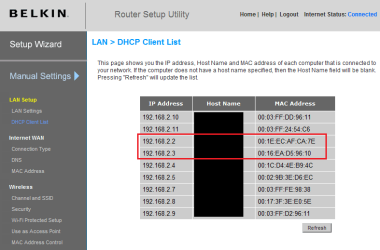
Network map shows an icon for every NIC, not one for every computer. This means that if the computer is connected to the router with both cable and wireless, both of these connections are shown as icons with the same computer name but different MAC and IP addresses.

Here's my DHCP list. The IP's 192.168.2.2 and .3 belong to the same computer, my main desktop which is both hardwired and wireless connected. You can see both of the connections have an individual MAC address:

Belkin_DHCP_List.png

Kari
 

My Computer

Computer type
Laptop
Computer Manufacturer/Model Number
HP ENVY 17-1150eg
OS
Windows 10 Pro x64 EN-GB
CPU
1.6 GHz Intel Core i7-720QM Processor
Memory
6 GB
Graphics Card(s)
ATI Mobility Radeon HD 5850 Graphics
Sound Card
Beats sound system with integrated subwoofer
Monitor(s) Displays
17" laptop display, 22" LED and 32" Full HD TV through HDMI
Screen Resolution
1600*900 (1), 1920*1080 (2&3)
Hard Drives
Internal: 2 x 500 GB SATA Hard Disk Drive 7200 rpm
External: 2TB for backups, 3TB USB3 network drive for media
Cooling
As Envy runs a bit warm, I have it on a Cooler Master pad
Keyboard
Logitech diNovo Media Desktop Laser (bluetooth)
Mouse
Logitech Performance Mouse MX
Internet Speed
50/10 Mbps VDSL
Antivirus
Windows Defender 4.3.9431.0
Browser
Maxthon 3.5.2., IE11
Back
Top