best backup software for windows 7

andrewjs18

New member
Local time
8:46 AM
Messages
14
Hi folks,

I'm looking for recommendations on good, free, backup software for windows 7.

I've been using the built-in backup software in windows and find it to be a bit lacking in functionality.

Right now my windows backups get sent to a SAMBA share, but I cannot adjust how often it does full backups, and as such, it's eating up my disk space..

What are you guys using?
 

My Computer

OS
windows 7 professional 64 bit
I have Win 7 on a separate drive from my data. to back up Win 7, I'm using Macrium Reflect Free (here is a good tutorial on how to use Macrium Reflect) once a week to make a full image. I also make an image before making any changes, such as trying out a new program. That way, if something goes pear shaped, I can restore win 7 using a previous image. In fact, I find Macrium Reflect to be far more reliable than System Restore and have System Restore turned off.

To backup my data, I use a folder/file syncing program called FreeFileSync. I have it set to Mirror. It syncs folder pairs that one has predetermined; an entire disk can be considered to be a folder. It will only copy over new and changed files on the source disk to a destination disk and delete files on the destination disk that have been deleted on the source disk. I also have it set to put any files it deletes on the destination disk to a Versioning folder on another internal disk. Since only changed data is being dealt with, he process is so fast, I can do daily backups onto two different backup HDDs.
 

My Computer

Computer type
PC/Desktop
Computer Manufacturer/Model Number
Custom Build
OS
Win 7 Ultimate 64 bit
CPU
Intel i7-3930K
Motherboard
ASUS P9X79 WS
Memory
Kingston HyperX Genesis 32GB Kit (8x4GB Modules) 1600MHz DDR
Graphics Card(s)
MSI R7850 Twin Frozr 2GD5/OC Radeon HD 7850 2GB 256-bit GDDR
Sound Card
Asus Xonar Essence STX
Monitor(s) Displays
3x Asus VG248QE 24", Vizio 32" TV
Screen Resolution
1920 x 1080, ?
Hard Drives
Samsung 128GB 840 Pro SSD (1),
Samsung 4TB 850 EVO SSDs (4)
Samsung 4TB 850 EVO SSDs (16) external backup drives used in 2.5" hot swap bays in the computer.
PSU
Corsair HX750w
Case
Antec Two Hundred v2 (modified)
Cooling
Cooler Master GeminII S524 120mm (fan replaced with a 140mm)
Keyboard
Logitech G510s
Mouse
Logitech M525 (two in use)
Internet Speed
=< 32Mbps down, 8Mbps up
Antivirus
AVAST!, MBAM, SAS, Spybot S&D (all but MBAM free) Glary Util
Browser
IE11
Other Info
LSI 9211-8i HBA card (8 SATA III ports), 2.5" & 3.5" Hot Swap Bays, HooToo HT-CR001 PCI-E to USB 3.0 Internal Hub + 6 Slot Card Reader, and LG Model CH12LS28 BD-ROM Optical Drive. Also, ScanSnap S1500 ADF duplexing scanner, Canon 9000F flat bed scanner, Corsair SP2500 2.1 speakers, Samsung CLP 415nw laser color printer, Cyberpower PP2200SW UPS
I have Win 7 on a separate drive from my data. to back up Win 7, I'm using Macrium Reflect Free (here is a good tutorial on how to use Macrium Reflect) once a week to make a full image. I also make an image before making any changes, such as trying out a new program. That way, if something goes pear shaped, I can restore win 7 using a previous image. In fact, I find Macrium Reflect to be far more reliable than System Restore and have System Restore turned off.

To backup my data, I use a folder/file syncing program called FreeFileSync. I have it set to Mirror. It syncs folder pairs that one has predetermined; an entire disk can be considered to be a folder. It will only copy over new and changed files on the source disk to a destination disk and delete files on the destination disk that have been deleted on the source disk. I also have it set to put any files it deletes on the destination disk to a Versioning folder on another internal disk. Since only changed data is being dealt with, he process is so fast, I can do daily backups onto two different backup HDDs.

I don't have access to my home computer at the moment to try out the freefilesync software, but do you happen to know if it'll sync the files/folders over a SAMBA share?

If so, this software might be PERFECT for me!

On my linux servers, I use rsync to keeps my files synced/backed up, which seems to very similar to what the software you recommended does.
 

My Computer

OS
windows 7 professional 64 bit
Sorry, I have no clue what a SAMBA share is.
 

My Computer

Computer type
PC/Desktop
Computer Manufacturer/Model Number
Custom Build
OS
Win 7 Ultimate 64 bit
CPU
Intel i7-3930K
Motherboard
ASUS P9X79 WS
Memory
Kingston HyperX Genesis 32GB Kit (8x4GB Modules) 1600MHz DDR
Graphics Card(s)
MSI R7850 Twin Frozr 2GD5/OC Radeon HD 7850 2GB 256-bit GDDR
Sound Card
Asus Xonar Essence STX
Monitor(s) Displays
3x Asus VG248QE 24", Vizio 32" TV
Screen Resolution
1920 x 1080, ?
Hard Drives
Samsung 128GB 840 Pro SSD (1),
Samsung 4TB 850 EVO SSDs (4)
Samsung 4TB 850 EVO SSDs (16) external backup drives used in 2.5" hot swap bays in the computer.
PSU
Corsair HX750w
Case
Antec Two Hundred v2 (modified)
Cooling
Cooler Master GeminII S524 120mm (fan replaced with a 140mm)
Keyboard
Logitech G510s
Mouse
Logitech M525 (two in use)
Internet Speed
=< 32Mbps down, 8Mbps up
Antivirus
AVAST!, MBAM, SAS, Spybot S&D (all but MBAM free) Glary Util
Browser
IE11
Other Info
LSI 9211-8i HBA card (8 SATA III ports), 2.5" & 3.5" Hot Swap Bays, HooToo HT-CR001 PCI-E to USB 3.0 Internal Hub + 6 Slot Card Reader, and LG Model CH12LS28 BD-ROM Optical Drive. Also, ScanSnap S1500 ADF duplexing scanner, Canon 9000F flat bed scanner, Corsair SP2500 2.1 speakers, Samsung CLP 415nw laser color printer, Cyberpower PP2200SW UPS
hello, I use REDO from redobackup.org. It's very easy and you get a startup cd. With that you can make an image on your external harddisk. And it is free.
 

My Computer

Computer Manufacturer/Model Number
Dell
OS
windows 7 x 64

My Computer

Computer type
PC/Desktop
Computer Manufacturer/Model Number
Golden Mk. I.4
OS
Windows 10 Pro x64 ; Xubuntu x64
CPU
Intel i7 860 @ 2.80 GHz O/C'ed to 4.0GHz
Motherboard
Gigabyte P55A-UD3R Rev.1. Award BIOS F13
Memory
16GB Corsair Vengance DDR3 @ 661 MHz Dual Channel (9-9-9-24)
Graphics Card(s)
EVGA NVidia GTX 560 1024MB
Sound Card
Realtek Integrated
Monitor(s) Displays
Dual Samsung SyncMaster 2494HS
Screen Resolution
1920*1080 and 1920*1080
Hard Drives
1*Samsung 840 EVO 120GB SSD;
1*OCZ Vertex 2 60GB SSD;
2*Samsung F3 SpinPoint 1TB in RAID0;
1*Samsung F1 SpinPoint 1TB;
2*Western Digital 1TB External USB 3.0
1*Western Digital 500GB External USB 3.0
1*Seagate 500GB External USB 2.0
PSU
Thermaltake ToughPower QFan 750W
Case
Thermaltake Element S VK60001W2Z
Cooling
Corsair H60 Water Cooling, 2*230mm and 2*80mm case fans
Keyboard
Logitech G110
Mouse
Logitech MX518
There are no good free things at all. So may be you will consider spending some money and buy a decent thing e.g.Acronis to backup the data?
 

My Computer

Computer type
PC/Desktop
OS
Windows XP
:sarc:
 

My Computer

Computer type
PC/Desktop
Computer Manufacturer/Model Number
Golden Mk. I.4
OS
Windows 10 Pro x64 ; Xubuntu x64
CPU
Intel i7 860 @ 2.80 GHz O/C'ed to 4.0GHz
Motherboard
Gigabyte P55A-UD3R Rev.1. Award BIOS F13
Memory
16GB Corsair Vengance DDR3 @ 661 MHz Dual Channel (9-9-9-24)
Graphics Card(s)
EVGA NVidia GTX 560 1024MB
Sound Card
Realtek Integrated
Monitor(s) Displays
Dual Samsung SyncMaster 2494HS
Screen Resolution
1920*1080 and 1920*1080
Hard Drives
1*Samsung 840 EVO 120GB SSD;
1*OCZ Vertex 2 60GB SSD;
2*Samsung F3 SpinPoint 1TB in RAID0;
1*Samsung F1 SpinPoint 1TB;
2*Western Digital 1TB External USB 3.0
1*Western Digital 500GB External USB 3.0
1*Seagate 500GB External USB 2.0
PSU
Thermaltake ToughPower QFan 750W
Case
Thermaltake Element S VK60001W2Z
Cooling
Corsair H60 Water Cooling, 2*230mm and 2*80mm case fans
Keyboard
Logitech G110
Mouse
Logitech MX518
There are no good free things at all. So may be you will consider spending some money and buy a decent thing e.g.Acronis to backup the data?

That's simply absurd and just not true. There are many excellent free programs available. Macrium Reflect, FreeFileSync, SyncToy, 7 Sticky Notes, CDBurnerXP (which works just great with Win 7), Converber, Desktop Calendar, Divvy, e-Sword, Glary Utilities, Avast Free, Malwarebyes Antimalware, SuperAntiSpyware, ZoneAlarm Free Firewall, Irfanview, etc. are just a few of the free programs I use (or have used) that are excellent.
 

My Computer

Computer type
PC/Desktop
Computer Manufacturer/Model Number
Custom Build
OS
Win 7 Ultimate 64 bit
CPU
Intel i7-3930K
Motherboard
ASUS P9X79 WS
Memory
Kingston HyperX Genesis 32GB Kit (8x4GB Modules) 1600MHz DDR
Graphics Card(s)
MSI R7850 Twin Frozr 2GD5/OC Radeon HD 7850 2GB 256-bit GDDR
Sound Card
Asus Xonar Essence STX
Monitor(s) Displays
3x Asus VG248QE 24", Vizio 32" TV
Screen Resolution
1920 x 1080, ?
Hard Drives
Samsung 128GB 840 Pro SSD (1),
Samsung 4TB 850 EVO SSDs (4)
Samsung 4TB 850 EVO SSDs (16) external backup drives used in 2.5" hot swap bays in the computer.
PSU
Corsair HX750w
Case
Antec Two Hundred v2 (modified)
Cooling
Cooler Master GeminII S524 120mm (fan replaced with a 140mm)
Keyboard
Logitech G510s
Mouse
Logitech M525 (two in use)
Internet Speed
=< 32Mbps down, 8Mbps up
Antivirus
AVAST!, MBAM, SAS, Spybot S&D (all but MBAM free) Glary Util
Browser
IE11
Other Info
LSI 9211-8i HBA card (8 SATA III ports), 2.5" & 3.5" Hot Swap Bays, HooToo HT-CR001 PCI-E to USB 3.0 Internal Hub + 6 Slot Card Reader, and LG Model CH12LS28 BD-ROM Optical Drive. Also, ScanSnap S1500 ADF duplexing scanner, Canon 9000F flat bed scanner, Corsair SP2500 2.1 speakers, Samsung CLP 415nw laser color printer, Cyberpower PP2200SW UPS
I use driveimageXML and it saved my butt more than once. The best thing about it is that it is portable, so I have a copy of it on my memory stick and if any disk fails on any of my computers, Ill take it out, put it into USB enclosure and as long as I have backup of it, I can restore it on any bootable computer or even from boot CD-ROM without running around and installing any software. It may be a little slower and is not as flashy, but it works, it copies disk bit by bit, can be scheduled for automatic backups with task scheduler and it's free for home use and very small. As far as "there are no good free things", it just makes me laugh. I guess that person never used CCcleaner, MPC, Firefox, OpenOffice/LibreOffice, 7Zip, CPU-z, Foxit, or VLC, the only program that can play 4k video on my laptop without hick up, where MS player is not even able to open it.
 

My Computer

OS
win7hp64
You are so right Lady Fitzgerald. I have many free programs and they all work fine!!!
And DowLittle Rock, you think free programs are not "decent"? Think again. I see you still play with XP. I do, sometimes on my old pc. And I have found a way to still get new updates! 14 already, for free!!
But you don't like free so sorry for mentioning it.
Have a nice day.

L.
 

My Computer

Computer Manufacturer/Model Number
Dell
OS
windows 7 x 64
Out of curiosity, I looked at dowlittlerock's other two posts and he pushes Acronis in them also.
 

My Computer

Computer type
PC/Desktop
Computer Manufacturer/Model Number
Custom Build
OS
Win 7 Ultimate 64 bit
CPU
Intel i7-3930K
Motherboard
ASUS P9X79 WS
Memory
Kingston HyperX Genesis 32GB Kit (8x4GB Modules) 1600MHz DDR
Graphics Card(s)
MSI R7850 Twin Frozr 2GD5/OC Radeon HD 7850 2GB 256-bit GDDR
Sound Card
Asus Xonar Essence STX
Monitor(s) Displays
3x Asus VG248QE 24", Vizio 32" TV
Screen Resolution
1920 x 1080, ?
Hard Drives
Samsung 128GB 840 Pro SSD (1),
Samsung 4TB 850 EVO SSDs (4)
Samsung 4TB 850 EVO SSDs (16) external backup drives used in 2.5" hot swap bays in the computer.
PSU
Corsair HX750w
Case
Antec Two Hundred v2 (modified)
Cooling
Cooler Master GeminII S524 120mm (fan replaced with a 140mm)
Keyboard
Logitech G510s
Mouse
Logitech M525 (two in use)
Internet Speed
=< 32Mbps down, 8Mbps up
Antivirus
AVAST!, MBAM, SAS, Spybot S&D (all but MBAM free) Glary Util
Browser
IE11
Other Info
LSI 9211-8i HBA card (8 SATA III ports), 2.5" & 3.5" Hot Swap Bays, HooToo HT-CR001 PCI-E to USB 3.0 Internal Hub + 6 Slot Card Reader, and LG Model CH12LS28 BD-ROM Optical Drive. Also, ScanSnap S1500 ADF duplexing scanner, Canon 9000F flat bed scanner, Corsair SP2500 2.1 speakers, Samsung CLP 415nw laser color printer, Cyberpower PP2200SW UPS
Hello LadyFitzgelard, thanks for your message. Maybe he is a salesman...
 

My Computer

Computer Manufacturer/Model Number
Dell
OS
windows 7 x 64

My Computer

Computer type
PC/Desktop
Computer Manufacturer/Model Number
Custom Build
OS
Win 7 Ultimate 64 bit
CPU
Intel i7-3930K
Motherboard
ASUS P9X79 WS
Memory
Kingston HyperX Genesis 32GB Kit (8x4GB Modules) 1600MHz DDR
Graphics Card(s)
MSI R7850 Twin Frozr 2GD5/OC Radeon HD 7850 2GB 256-bit GDDR
Sound Card
Asus Xonar Essence STX
Monitor(s) Displays
3x Asus VG248QE 24", Vizio 32" TV
Screen Resolution
1920 x 1080, ?
Hard Drives
Samsung 128GB 840 Pro SSD (1),
Samsung 4TB 850 EVO SSDs (4)
Samsung 4TB 850 EVO SSDs (16) external backup drives used in 2.5" hot swap bays in the computer.
PSU
Corsair HX750w
Case
Antec Two Hundred v2 (modified)
Cooling
Cooler Master GeminII S524 120mm (fan replaced with a 140mm)
Keyboard
Logitech G510s
Mouse
Logitech M525 (two in use)
Internet Speed
=< 32Mbps down, 8Mbps up
Antivirus
AVAST!, MBAM, SAS, Spybot S&D (all but MBAM free) Glary Util
Browser
IE11
Other Info
LSI 9211-8i HBA card (8 SATA III ports), 2.5" & 3.5" Hot Swap Bays, HooToo HT-CR001 PCI-E to USB 3.0 Internal Hub + 6 Slot Card Reader, and LG Model CH12LS28 BD-ROM Optical Drive. Also, ScanSnap S1500 ADF duplexing scanner, Canon 9000F flat bed scanner, Corsair SP2500 2.1 speakers, Samsung CLP 415nw laser color printer, Cyberpower PP2200SW UPS
hello Jeannie (what a nice name). English is not my first language. I don't know what you mean. Could you explane please

regard, Lowie
 

My Computer

Computer Manufacturer/Model Number
Dell
OS
windows 7 x 64
hello Jeannie (what a nice name). English is not my first language. I don't know what you mean. Could you explane please

regard, Lowie

I was teasing you about the way you misspelled my last name. Lard is another name for animal fat. Thanks for the compliment on my first name.

Btw, your English is better than many people here who have spoken it all their lives.
 

My Computer

Computer type
PC/Desktop
Computer Manufacturer/Model Number
Custom Build
OS
Win 7 Ultimate 64 bit
CPU
Intel i7-3930K
Motherboard
ASUS P9X79 WS
Memory
Kingston HyperX Genesis 32GB Kit (8x4GB Modules) 1600MHz DDR
Graphics Card(s)
MSI R7850 Twin Frozr 2GD5/OC Radeon HD 7850 2GB 256-bit GDDR
Sound Card
Asus Xonar Essence STX
Monitor(s) Displays
3x Asus VG248QE 24", Vizio 32" TV
Screen Resolution
1920 x 1080, ?
Hard Drives
Samsung 128GB 840 Pro SSD (1),
Samsung 4TB 850 EVO SSDs (4)
Samsung 4TB 850 EVO SSDs (16) external backup drives used in 2.5" hot swap bays in the computer.
PSU
Corsair HX750w
Case
Antec Two Hundred v2 (modified)
Cooling
Cooler Master GeminII S524 120mm (fan replaced with a 140mm)
Keyboard
Logitech G510s
Mouse
Logitech M525 (two in use)
Internet Speed
=< 32Mbps down, 8Mbps up
Antivirus
AVAST!, MBAM, SAS, Spybot S&D (all but MBAM free) Glary Util
Browser
IE11
Other Info
LSI 9211-8i HBA card (8 SATA III ports), 2.5" & 3.5" Hot Swap Bays, HooToo HT-CR001 PCI-E to USB 3.0 Internal Hub + 6 Slot Card Reader, and LG Model CH12LS28 BD-ROM Optical Drive. Also, ScanSnap S1500 ADF duplexing scanner, Canon 9000F flat bed scanner, Corsair SP2500 2.1 speakers, Samsung CLP 415nw laser color printer, Cyberpower PP2200SW UPS
thanks for the compliment Jeannie and have a good night's sleep.
Lowie.
 

My Computer

Computer Manufacturer/Model Number
Dell
OS
windows 7 x 64
Jeannie,

maybe you can help me as the instructions for using freefilesync are almost absent.

what I'd like to do is send data from computer A to computer B, and then have the two kept in sync so when something is changed/added/deleted/moved from computer A, it gets synced to computer B, but I do not want computer B to be pushing data to computer A.

each time I've tried to use the program, it keeps showing all of my data on computer B as if it's going to sync it over to computer A, which I do not want as it's like 50gb of data.
 

My Computer

OS
windows 7 professional 64 bit
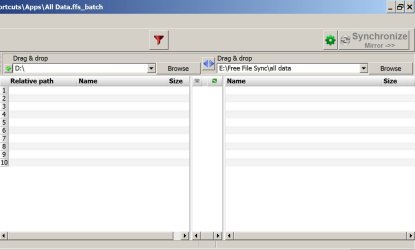
It's been a while since I set up my Free File Sync, but as I recall you select the source location in the left window, select the destination in the right window, and then use the green gear icon in the upper right to choose "mirror", which will replicate the source to the destination---left to right.

As you can see in this pic, mine is set up to mirror from D to E\free file sync\all data.

There are filters available through which you can include or exclude certain folders, file extensions, etc.

It sounds like maybe you have chosen computer B as the source (left window) and computer A as the destination (right window), when those should be reversed.

I have no idea if Free File Sync can be used to copy from computer to computer as opposed to drive to drive.
 

Attachments

  • free file sync.jpg
    free file sync.jpg
    63.4 KB · Views: 2

My Computer

Computer type
PC/Desktop
Computer Manufacturer/Model Number
Ignatz Special; 4 speed manual gearbox; factory air conditioning; one of one
OS
Windows 7 Home Premium SP1, 64-bit
CPU
Intel Skylake i5-6600K, not overclocked
Motherboard
AsRock Z170M Extreme 4, micro ATX
Memory
8 GB HyperX DDR4-2666 (2 x 4 GB)
Graphics Card(s)
none; graphics are integrated on CPU
Sound Card
onboard: Realtek ALC1150; external: USB Behringer UF0-202
Monitor(s) Displays
Dell S2340M 23 inch IPS
Screen Resolution
1600 x 900
Hard Drives
System: Crucial MX100 series SSD, 128 GB;
Data: Samsung Spinpoint 103SJ, 1 TB;
Backup: WD Caviar Green WD30EZRX-00D8PB0, 3 TB
PSU
Rosewill SilentNight 500 watt fanless, semi-modular
Case
Antec Solo II
Cooling
Noctua NH-U12S; Noctua F12 intake, Noctua S12A exhaust
Keyboard
Microsoft 200 6JH-00001 USB
Mouse
Dell or Microsoft optical wired; USB
Antivirus
Microsoft Security Essentials and Malwarebytes Premium
Browser
Pale Moon
Other Info
All fans PWM; speeds at idle: CPU circa 500 rpm; intake circa 600 rpm; exhaust circa 600 rpm; CPU temps 27 idle and 47 C load in a warm room (27 C/81 F) when running Intel Extreme Tuning Utility stress test.
Back
Top