Hi,
I have an old laptop.
HP Compaq 6820s
Processor: Intel Pentium Dual CPU T2390 1.86GHz
Memory: 2047MB(667)
Video Adapter: ATI Mobility Radeon X1350
I use Windows 7 Professional Service Pack 1 + last updates.
Browser: Google Chrome
95% of the time I use this laptop to watch videos here: Seneste vist på tv | Find TV Program | DR
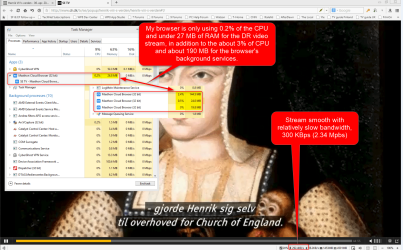
The Windows has just been installed on the fresh formatted partition. But even in this situation when I only watch the videos from the above link, they still work interrupted sometimes, and Google Chrome loads a lot the task manager.
Considering the above please answer to the next questions:
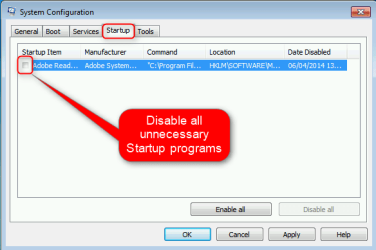
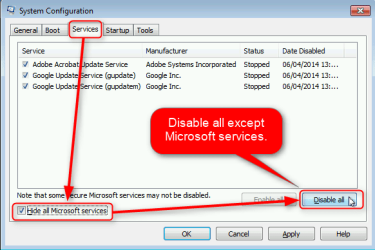
1. Which are the best optimizations for Windows 7 to help me to see those videos smoother?
2. Do you consider is there any other browser which is more dedicated and lighter for watching videos online? If no, tell me please with are the best optimizations for Google Chrome to improve it for my demand.
Thank you very much !
I have an old laptop.
HP Compaq 6820s
Processor: Intel Pentium Dual CPU T2390 1.86GHz
Memory: 2047MB(667)
Video Adapter: ATI Mobility Radeon X1350
I use Windows 7 Professional Service Pack 1 + last updates.
Browser: Google Chrome
95% of the time I use this laptop to watch videos here: Seneste vist på tv | Find TV Program | DR
The Windows has just been installed on the fresh formatted partition. But even in this situation when I only watch the videos from the above link, they still work interrupted sometimes, and Google Chrome loads a lot the task manager.
Considering the above please answer to the next questions:
1. Which are the best optimizations for Windows 7 to help me to see those videos smoother?
2. Do you consider is there any other browser which is more dedicated and lighter for watching videos online? If no, tell me please with are the best optimizations for Google Chrome to improve it for my demand.
Thank you very much !
My Computer
At a glance
windows 7
- OS
- windows 7