Best Free Security Setup?

jloc

New member
Pro User
VIP
Local time
7:56 PM
Messages
309
Location
UK
Hi, i'm looking to get a decent security setup for my PC. There's one catch, all the programs have to be free!

I need programs to run virus scans and give me complete protection against viruses and malware. I had a look around the forum and everyone has their own opinion on what the best setup is. So, leave a reply with the definitive best free security setup! :)

Thanks,
-jloc.
 
Last edited:

My Computer

Computer type
PC/Desktop
Computer Manufacturer/Model Number
HP
OS
Windows 7 Ultimate
CPU
DualCore Intel Pentium D 930, 3000 MHz (15 x 200)
Motherboard
Asus P5LP-LE (Emery)
Memory
3x512mb 1x1GB
Graphics Card(s)
NVIDIA GeForce 7800 GTX
Sound Card
Realtek ALC882/D/M @ Intel 82801GB ICH7
Monitor(s) Displays
Iiyama ProLite E2407HDS
Screen Resolution
1920 x 1080 70 Hz
Hard Drives
1TB WD10EARS-00Y5B1 ATA Device
Keyboard
Hewlett Packard Wireless Ergo
Mouse
Logitech USB Wheel Mouse
Internet Speed
20mbps Download - 2mbps Upload
Antivirus
Windows Defender - Malwarebytes Anti Malware
Browser
Google Chrome
Hi, i'm looking to get a completely secure security setup for my PC. There's one catch, all the programs have to be free!

I need programs to run virus scans and give me completely protection against viruses and malware. I had a look around the forum and everyone has their own opinion on what the best setup is. So, leave a reply with the definitive best free security setup! :)

Thanks,
-jloc.

Re your requirements in red in your post..... wishful thinking thus far! ;)

Education / knowledge is the best way to learn to avoid the nasties....
Prevention preferable to cure.

People need to understand that to protect themselves from the evils of the internet their basic protection should include....

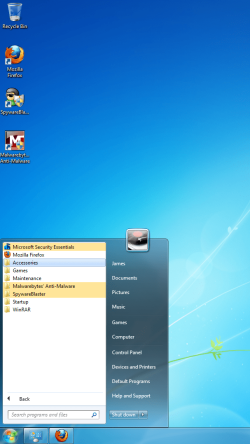
*Anti Virus Program { Microsoft Security Essentials is popular & is used by many people here.}

*Anti Malware Program . Malwarebytes.
http://www.malwarebytes.org/products

* SpywareBlaster { free}sits happily in the background offering great protection.
Read about it -
SpywareBlaster® | Prevent spyware and malware. Free download.

*Firewall. {The inbuilt Windows Firewall is considered appropriate}

*Router / firewall
Router security

One needs to exercise caution with what is clicked on.
Avoid engaging in activities such as file sharing, warez cracks, adult content, online gambling or other high-risk behaviors.

The obvious one of course is the responsibility of the person clicking the mouse.
Exercise that responsibility - Resist temptation!


My Computer

Computer Manufacturer/Model Number
LAPTOP. HP Pavilion dv7-4010TX .
OS
Win 7 Ultimate 64-bit. SP1.
CPU
Intel i7 -720QM.[1.6GHz Turbo Boost 2.8GHz. 6MB Cache.]
Memory
8 DDR 3 RAM. 1066MHZ
Graphics Card(s)
ATI 1024 MB. DDR3. Radeon HD5650
Monitor(s) Displays
17.3" High Definition Brightview LCD. LED Backlit.
Screen Resolution
1600 x 900.
Hard Drives
640GB
Case
Laptop / notebook.
Mouse
Logitech Anywhere mouse. MX.
Internet Speed
ADSL [ but too slow ]
Hi, i'm looking to get a completely secure security setup for my PC. There's one catch, all the programs have to be free!

I need programs to run virus scans and give me completely protection against viruses and malware. I had a look around the forum and everyone has their own opinion on what the best setup is. So, leave a reply with the definitive best free security setup! :)

Thanks,
-jloc.

Re your requirements in red in your post..... wishful thinking thus far! ;)

Education / knowledge is the best way to learn to avoid the nasties....
Prevention preferable to cure.

People need to understand that to protect themselves from the evils of the internet their basic protection should include....

*Anti Virus Program { Microsoft Security Essentials is popular & is used by many people here.}

*Anti Malware Program {Malwarebytes}

* SpywareBlaster { free}sits happily in the background offering great protection.
Read about it -
SpywareBlaster® | Prevent spyware and malware. Free download.

*Firewall. {The inbuilt Windows Firewall is considered appropriate}

*Router / firewall
Router security

One needs to exercise caution with what is clicked on.
Avoid engaging in activities such as file sharing, warez cracks, adult content, online gambling or other high-risk behaviors.

The obvious one of course is the responsibility of the person clicking the mouse.
Exercise that responsibility - Resist temptation!


Oh god, I have horrible spelling when i'm tired! Then again, there's nothing wrong with a completely secure security setup :p

Anyway, thanks for the recommendations. Malwarebytes is a great little program, SpywareBlaster seems good and MSE has some good reviews. Thanks :)
 

My Computer

Computer type
PC/Desktop
Computer Manufacturer/Model Number
HP
OS
Windows 7 Ultimate
CPU
DualCore Intel Pentium D 930, 3000 MHz (15 x 200)
Motherboard
Asus P5LP-LE (Emery)
Memory
3x512mb 1x1GB
Graphics Card(s)
NVIDIA GeForce 7800 GTX
Sound Card
Realtek ALC882/D/M @ Intel 82801GB ICH7
Monitor(s) Displays
Iiyama ProLite E2407HDS
Screen Resolution
1920 x 1080 70 Hz
Hard Drives
1TB WD10EARS-00Y5B1 ATA Device
Keyboard
Hewlett Packard Wireless Ergo
Mouse
Logitech USB Wheel Mouse
Internet Speed
20mbps Download - 2mbps Upload
Antivirus
Windows Defender - Malwarebytes Anti Malware
Browser
Google Chrome

My Computer

Computer Manufacturer/Model Number
Custom built machine
OS
W7 x64
CPU
Intel Q9300 2.5Ghz Quad LGA775 (Would like Q9650)
Motherboard
Gigabyte GA-EP45T-UD3R (F6 Bios)
Memory
4Gb OCZ Gold 1,333Mhz
Graphics Card(s)
Palit HD4850 O/C Sonic 512Mb DDR3, Dual DViD's
Sound Card
Azalia to twin Samson 50w Studio Monitors
Monitor(s) Displays
Twin Dell (E-IPS) U2311H 23.6" Screens
Screen Resolution
1920 x 1080 @ 60Hz
Hard Drives
Crucial M4 SSD, archives on twin Western Digital Caviar Black WD2002FAEX, 2TB, 7200rpm HDD's, Samsung Ritemaster CD/DVD Burner...
PSU
OCZ 600w
Case
Lian-Li PC8 acoustifoamed' aluminium tower
Cooling
Scythe 140mm Zipang
Keyboard
Cherry PS/2 custom model
Mouse
Lenovo USB laser "Thinkpad" Mouse
Internet Speed
ADSL2+ @14Mbps downstream & Cat6 Gigabit Ethernet
Antivirus
NOD32
Browser
Opera
Other Info
Silicon Dust HD Homerun Dual FTA (Ethernet) TV Tuners, Dray Tek Vigor 2850Vn router and 8x HP Gigabit Switch. Lian-Li CR26 Card Reader, Canon MF4430 iSensys laser printer/scanner.
Have used all but MSE on our computers here for ages & have never had any intrusions thus far...
 

My Computer

Computer Manufacturer/Model Number
LAPTOP. HP Pavilion dv7-4010TX .
OS
Win 7 Ultimate 64-bit. SP1.
CPU
Intel i7 -720QM.[1.6GHz Turbo Boost 2.8GHz. 6MB Cache.]
Memory
8 DDR 3 RAM. 1066MHZ
Graphics Card(s)
ATI 1024 MB. DDR3. Radeon HD5650
Monitor(s) Displays
17.3" High Definition Brightview LCD. LED Backlit.
Screen Resolution
1600 x 900.
Hard Drives
640GB
Case
Laptop / notebook.
Mouse
Logitech Anywhere mouse. MX.
Internet Speed
ADSL [ but too slow ]
Your best protection is frequent imaging. As JMH says, there is no way in the world you can protect yourself 100%. But with recent images, you can always bail yourself out of a tight spot - whether caused by malware or by some other system malfunction.

If you want to be really careful, run in a sandbox (e.g. Sandboxie). But then you cannot download anything into your real system without special arrangements. But at least you get a chance to scan whatever you want to transfer to the real system.
 

My Computer

Computer Manufacturer/Model Number
HP, Dell, Gateway, Toshiba - 4 laptops and 2 desktops
OS
Vista, Windows7, Mint Mate, Zorin, Windows 8
CPU
from 1.6GHz Duo to i7
Monitor(s) Displays
2x HP w2207
Hard Drives
5x HDD, 7x SSD, 12x Externals
Keyboard
with trackball - no mices
Mouse
Trackball mice
Internet Speed
DSL 6000
Thanks whs, JMH and Qdos. Hopefully i'll be a little safer now :)
 

Attachments

  • Untitled.png
    Untitled.png
    521.3 KB · Views: 75

My Computer

Computer type
PC/Desktop
Computer Manufacturer/Model Number
HP
OS
Windows 7 Ultimate
CPU
DualCore Intel Pentium D 930, 3000 MHz (15 x 200)
Motherboard
Asus P5LP-LE (Emery)
Memory
3x512mb 1x1GB
Graphics Card(s)
NVIDIA GeForce 7800 GTX
Sound Card
Realtek ALC882/D/M @ Intel 82801GB ICH7
Monitor(s) Displays
Iiyama ProLite E2407HDS
Screen Resolution
1920 x 1080 70 Hz
Hard Drives
1TB WD10EARS-00Y5B1 ATA Device
Keyboard
Hewlett Packard Wireless Ergo
Mouse
Logitech USB Wheel Mouse
Internet Speed
20mbps Download - 2mbps Upload
Antivirus
Windows Defender - Malwarebytes Anti Malware
Browser
Google Chrome
That is what I would call a 'minimum setup'. But only images can save your bacon when you get infected.
 

My Computer

Computer Manufacturer/Model Number
HP, Dell, Gateway, Toshiba - 4 laptops and 2 desktops
OS
Vista, Windows7, Mint Mate, Zorin, Windows 8
CPU
from 1.6GHz Duo to i7
Monitor(s) Displays
2x HP w2207
Hard Drives
5x HDD, 7x SSD, 12x Externals
Keyboard
with trackball - no mices
Mouse
Trackball mice
Internet Speed
DSL 6000
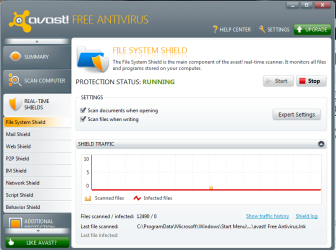
As mentioned Windows Security Essentials is a good product although in my opinion it is limited.....I choose Avast Security Free for my needs coupled with the Windows 7 firewall to complete my needs. you can always add malwarebytes as previously posted but Avast offers a multitude of scanners that provide good service including a sandbox for running questionable programs or first time runs.

Avast scanners:
Avast shields2.PNG

Backup images are the final answer to malware as mentioned above. I cannot recommend this process highly enough....I personally use Windows Home Server for this process but the backup image in Windows 7 is more than acceptable (BETTER if you store it off pc).
 

My Computer

Computer Manufacturer/Model Number
Systemax N2000 Gaming PC
OS
Windows 7 Ultimate x64
CPU
Q6600 @2.4ghz (G0 stepping)
Motherboard
XFX nforce 680i LT
Memory
8 gb OCZ vista essential sli PC-6400
Graphics Card(s)
Dual 9800gt in SLI mode
Sound Card
Integrated 8.1 High Definition Audio
Monitor(s) Displays
Dual Sceptre x246w 24 inch monitors
Screen Resolution
1920 x 1200 each monitor
Hard Drives
500 GB SATA II / 7500 rpm
PSU
Cooler Master Real Power Pro 1250W
Case
N2000 server tower
Cooling
Thermaltake Bigwater 760 is
Keyboard
MS Intelitype 6000 v2.0
Mouse
MS Intelipoint 6000
Internet Speed
Wi-power 1.5GB up / 512k down
Other Info
Windows 7 Ultimate x64, Windows 7 Pro x64, Windows Home Premium X86, Windows XP pro, Windows Home Server x86, Ubuntu 10.4 x86 and x64, Ubuntu server 10.4, SQL Server 2005, MySQL 5.0
Hi,

Don't forget to keep Adobe Reader and Flashplayer, and also Java, updated if you use that : this is something that is often overlooked, yet these applications are a prominent source of malware infections.

Use the this tutorial to help you determine what else may require updating in order to plaug other security holes:

http://www.sevenforums.com/tutorials/181981-secunia-online-software-inspector.html

Regards,
Golden
 

My Computer

Computer type
PC/Desktop
Computer Manufacturer/Model Number
Golden Mk. I.4
OS
Windows 10 Pro x64 ; Xubuntu x64
CPU
Intel i7 860 @ 2.80 GHz O/C'ed to 4.0GHz
Motherboard
Gigabyte P55A-UD3R Rev.1. Award BIOS F13
Memory
16GB Corsair Vengance DDR3 @ 661 MHz Dual Channel (9-9-9-24)
Graphics Card(s)
EVGA NVidia GTX 560 1024MB
Sound Card
Realtek Integrated
Monitor(s) Displays
Dual Samsung SyncMaster 2494HS
Screen Resolution
1920*1080 and 1920*1080
Hard Drives
1*Samsung 840 EVO 120GB SSD;
1*OCZ Vertex 2 60GB SSD;
2*Samsung F3 SpinPoint 1TB in RAID0;
1*Samsung F1 SpinPoint 1TB;
2*Western Digital 1TB External USB 3.0
1*Western Digital 500GB External USB 3.0
1*Seagate 500GB External USB 2.0
PSU
Thermaltake ToughPower QFan 750W
Case
Thermaltake Element S VK60001W2Z
Cooling
Corsair H60 Water Cooling, 2*230mm and 2*80mm case fans
Keyboard
Logitech G110
Mouse
Logitech MX518
avast,windows firewall,malwarebytes,super anti spyware,search and destroy, spyware blaster is what i use on my system atm
 

My Computer

Computer type
PC/Desktop
Computer Manufacturer/Model Number
custom build
OS
Windows 10 64bit
CPU
AMD Phenom II X4 925 (Deneb)(2.8GHz) OC 3.4GHz
Motherboard
M5A78L-MLX Plus
Memory
Corsair Vengeance DDR3 4GBX2 (8192MB)
Graphics Card(s)
XFX HD 6870 1GB (OC)- 940MHz core, mem 1150MHz
Monitor(s) Displays
Vizio 26' 1920x1080 / Acer 1336x768
Screen Resolution
1920x1080 60Hz /1336x768
Hard Drives
Kingston Digital 60GB SSDNow V300/500gb HDD Western Digital 7200rpm (/WD 160GB HDD 7200rpm
PSU
CORSAIR CX600 600w
Case
AZZA Orion 202 EVO
Cooling
cooler master hyper TX3 cpu cooler
Keyboard
Razer DeathStalker
Mouse
Logitech Optical Gaming Mouse G400
Antivirus
Defualt on win 10
Browser
Firefox
Other Info
cpu is overclocked in bios

My Computer

Computer type
PC/Desktop
OS
Windows 10 x64
CPU
Intel i5-3570K
Motherboard
Asus Maximus V Gene
Memory
Crucial 16GB
Graphics Card(s)
nVidia Geforce 660 GTX
Sound Card
onboard
Monitor(s) Displays
NEC 2490WUXi2
Screen Resolution
1920x1200
Hard Drives
Crucial M4 256GB
PSU
Corsair 650TX
Case
Fractal Design - Define Mini
Keyboard
Filco Majestouch Tenkeyless Black MX
Mouse
Logitech MBJ58
Real-Time: Avast! free - Adfender(for ads) - [Optional if you want a 3rd party firewall] TinyWall or Windows 7 FW Control Free - KeyScrambler free, SandboxIE free
Harden Tool: Spyware Blaster
On-Demand Scanners: Malwarebytes, Hitman PRO (dont activate the trial unless you really need it)
Image/Back up: Macrium Reflect Free


I think this is the best free security setup which cover all bases to be on the safe side and in case something went wrong, you'll have a back up to go to.
 

My Computer

OS
Windows 7 Home Premium x64 SP1
CPU
Intel Core i7 2720QM @ 2.20GHz
Memory
8.00 GB Dual-Channel DDR3 @ 665MHz
I will say go with Microsoft Security Essentials because I know it was made specifically for windows computers so I just play it safe and go with what Microsoft recommends. Then I just use antispyware and malwarebytes
 

My Computer

Computer Manufacturer/Model Number
Microsoft
OS
Windows 7 Professional 64 Bit
CPU
Intel CORE i3
Motherboard
Intel
Memory
3 GB RAM
Graphics Card(s)
Intel® Processor Graphics 3000
Sound Card
Intel
Monitor(s) Displays
Generic PnP Monitor
Screen Resolution
1366 x 768
Hard Drives
1 HDD NFTS
PSU
DELL PA-12
Keyboard
Standard PS/2 KeyBoard
Mouse
Synaptics Dell TouchPad
Internet Speed
82kb
I May get flamed for this but I'll say COMODO free internet security, if you set it up right it's pretty powerful.
 

My Computer

OS
Windows 7 pro
I May get flamed for this but I'll say COMODO free internet security, if you set it up right it's pretty powerful.
We do not flame people on this forum. We send them to hell and let the devil do the job. :D But your point is well taken.
 

My Computer

Computer Manufacturer/Model Number
HP, Dell, Gateway, Toshiba - 4 laptops and 2 desktops
OS
Vista, Windows7, Mint Mate, Zorin, Windows 8
CPU
from 1.6GHz Duo to i7
Monitor(s) Displays
2x HP w2207
Hard Drives
5x HDD, 7x SSD, 12x Externals
Keyboard
with trackball - no mices
Mouse
Trackball mice
Internet Speed
DSL 6000
I suggest the following, all free in their basic form:

Excellent quality anti-virus and firewall:

1) Avast! anti-virus.

2) Comodo free firewall (but use Revo Uninstaller to get rid of the Comodo dragon browser and the Geek Buddy software that automatically installs with it).

For malware and unpleasant visitors to your computer of various types:

3) Lavasoft's Ad-aware.

4) SpyBot Search & Destroy.

To keep your system (including registry) clean, tidy, and optimised, as well as blocking malware:

5) Advanced System Care (basic version free but also quite cheap to upgrade).

6) FixCleaner (likewise).

7) Ccleaner (completely free).

These last three each seem to tidy up slightly different issues in the registry, so I run all three from time to time.
I scan with all the above on my Windows 7 system, as well as on my "reserve" Windows XP machine, and have never had any problems at all (apart from the occasional 'false positive' result).

And if you want a completely free windows system with no virus or other security problems and loads of free software, go for Linux Ubuntu 10.04.3, which I dual-boot with XP... but that's another story, and here's where I sign off before the booing starts!

JMW
 

My Computer

Computer Manufacturer/Model Number
HP Pavilion dv7 Notebook PC
OS
Windows 7 Home Premium 64-bit
CPU
AMD Turion II P540 Dual-Core Processor 2.40 GHz
Memory
4.00 GB
Graphics Card(s)
ATI Mobility Radeon HD 5470
Sound Card
IDT High Definition Audio
jmward,

*** I would suggest that the following are superfluous to Windows 7 "needs" & as such would NOT recommend using same.***

3) Lavasoft's Ad-aware.

4) SpyBot Search & Destroy.

To keep your system (including registry) clean, tidy, and optimised, as well as blocking malware:

5) Advanced System Care (basic version free but also quite cheap to upgrade).

6) FixCleaner (likewise).


7) Ccleaner (completely free).
 

My Computer

Computer Manufacturer/Model Number
LAPTOP. HP Pavilion dv7-4010TX .
OS
Win 7 Ultimate 64-bit. SP1.
CPU
Intel i7 -720QM.[1.6GHz Turbo Boost 2.8GHz. 6MB Cache.]
Memory
8 DDR 3 RAM. 1066MHZ
Graphics Card(s)
ATI 1024 MB. DDR3. Radeon HD5650
Monitor(s) Displays
17.3" High Definition Brightview LCD. LED Backlit.
Screen Resolution
1600 x 900.
Hard Drives
640GB
Case
Laptop / notebook.
Mouse
Logitech Anywhere mouse. MX.
Internet Speed
ADSL [ but too slow ]
JHM Wrote: jmward,

*** I would suggest that the following are superfluous to Windows 7 "needs" & as such would NOT recommend using same.***

3) Lavasoft's Ad-aware. Used to be a good product a few years back

4) SpyBot Search & Destroy. Used to be a good product a few years back

To keep your system (including registry) clean, tidy, and optimised, as well as blocking malware:

5) Advanced System Care (basic version free but also quite cheap to upgrade). Never Used

6) FixCleaner (likewise). Never Used

7) Ccleaner (completely free) I suggest staying away from all registry cleaners BUT is you insist Ccleaner IS one of the safest.

I have to agree
 

My Computer

Computer Manufacturer/Model Number
HP 6680T
OS
Windows 7 Home Premium 64bit SP1
CPU
Intel Core i5 650 @ 3.20 GHz
Motherboard
MS-7613 (Iona-GL8E) motherboard
Memory
6 GB
Graphics Card(s)
Intergrated Intel H57
Sound Card
Intergrated Realtek ALC888S
Monitor(s) Displays
HP 2310m
Screen Resolution
1920 X 1080
Hard Drives
1 TB 1.5 TB External
PSU
300 Watt
Case
HP
Cooling
Fans
Keyboard
HP
Mouse
HP Optical
Internet Speed
6 MBPS
I May get flamed for this but I'll say COMODO free internet security, if you set it up right it's pretty powerful.
We do not flame people on this forum. We send them to hell and let the devil do the job. :D But your point is well taken.

No flame, Comodo Firewall free on Windows XP pro with Avast 6 = Solid security.

A really good product for maintaining a secure system is:
Secunia PSI: Free Computer Security - Personal Software Inspector (PSI) - Secunia

I have used it since last year and find it very very helpful in maintaining the software on my system at its latest/most secure versions as it does a very good job of monitoring the software on my pc's and verifying if a newer version is available or if windows updates are needed. Really a no brainer as an assist tool.
 

My Computer

Computer Manufacturer/Model Number
Systemax N2000 Gaming PC
OS
Windows 7 Ultimate x64
CPU
Q6600 @2.4ghz (G0 stepping)
Motherboard
XFX nforce 680i LT
Memory
8 gb OCZ vista essential sli PC-6400
Graphics Card(s)
Dual 9800gt in SLI mode
Sound Card
Integrated 8.1 High Definition Audio
Monitor(s) Displays
Dual Sceptre x246w 24 inch monitors
Screen Resolution
1920 x 1200 each monitor
Hard Drives
500 GB SATA II / 7500 rpm
PSU
Cooler Master Real Power Pro 1250W
Case
N2000 server tower
Cooling
Thermaltake Bigwater 760 is
Keyboard
MS Intelitype 6000 v2.0
Mouse
MS Intelipoint 6000
Internet Speed
Wi-power 1.5GB up / 512k down
Other Info
Windows 7 Ultimate x64, Windows 7 Pro x64, Windows Home Premium X86, Windows XP pro, Windows Home Server x86, Ubuntu 10.4 x86 and x64, Ubuntu server 10.4, SQL Server 2005, MySQL 5.0
Back
Top