Solved best installation for XP mode

Maxheadroom

New member
Power User
VIP
Local time
9:19 PM
Messages
246
hi hope this is the right section for this

ive just done a fresh install of 7 this has gone onto a ssd and its only about 100GB in size, i want to install XP mode but dont want it on my ssd as i dont want it taking up the space, is it possible to install it on another non OS hdd?

thanks
 

My Computer

Computer Manufacturer/Model Number
home built
OS
windows 7 64bit build 7600
CPU
Intel I7 920
Motherboard
ASUS P6T Deluxe V2
Memory
Corsair 6GB (3x2GB) 1600MHz Triple Channel i7
Graphics Card(s)
XFX RADEON HD 5870
Sound Card
Creative Xfi Elite pro
Monitor(s) Displays
Hyundai W240D 24" Samsung Syncmaster 930
Screen Resolution
1920x1200 and 1280x1024
Hard Drives
WD Velociraptor 150gb
Western Digital WD7502ABYS 750GB Raid Edition
PSU
Corsair 850W TX Series PSU
Case
Coolermaster HAF 932 Full Tower
Cooling
Noctua NH-U12P
Keyboard
logitech G15 orange
Mouse
logitech mx revolution
Internet Speed
13mb
I'm not 100% certain, but I don't think you can.

As you know, XP Mode installs under Virtual PC and as far as I'm aware, Virtual PC doesn't give you a choice as to where you install it as defaults to your Windows drive, which in your case will be your SSD.

To be fair, Virtual PC and XP Mode don't take up too much drive space and I would have thought that a 100 GB SSD is sufficient for your needs.

Windows Virtual PC: Home Page

http://windows.microsoft.com/en-gb/windows7/install-and-use-windows-xp-mode-in-windows-7
 

My Computer

Computer Manufacturer/Model Number
HP Pavilion Elite 495UK
OS
Windows 7 Ultimate SP1 64-Bit
CPU
Intel Core i7 870 @ 2.93GHz
Motherboard
MSI 2A9C (CPU1)
Memory
8Gb Dual-Channel DDR3 @ 664MHz
Graphics Card(s)
nVidia GeForce GTX 460 1024MB dedicated RAM
Sound Card
Realtek HD Audio
Monitor(s) Displays
HP2310i
Screen Resolution
1920 x 1080
Hard Drives
1x1954GB Hitachi HDS22020ALA 330 (RAID), 1x1954GB Hitachi External for backup and storage
PSU
460W
Case
HP Elite
Cooling
Air cooled
Keyboard
Logitech K750 solar-powered keyboard
Mouse
Logitech Wireless M180 mouse
Internet Speed
2Mb
Other Info
Pure Avanti Flow Internet Radio with iPod Dock, 64Gb iPod, HP USB Speakers, Sony MDR-V500 Headphones, Sony Vaio F-Series Laptop

My Computer

Computer type
PC/Desktop
Computer Manufacturer/Model Number
Self built custom
OS
64-bit Windows 11 Pro for Workstations
CPU
Intel i7-8700K OC'd to 5 GHz
Motherboard
ASUS ROG Maximus XI Formula Z390
Memory
64 GB (4x16GB) G.SKILL TridentZ RGB DDR4 3600 MHz
Graphics Card(s)
ASUS ROG-STRIX-GTX1080TI-O11G-GAMING
Sound Card
Integrated
Monitor(s) Displays
2 x Samsung Odyssey G7 27"
Screen Resolution
2560x1440
Hard Drives
1TB Samsung 990 PRO M.2,
4TB Samsung 990 PRO PRO M.2,
TerraMaster F8 SSD Plus NAS
PSU
Seasonic Prime Titanium 850W
Case
Thermaltake Core P3
Cooling
Corsair Hydro H115i
Keyboard
Logitech wireless K800
Mouse
Logitech MX Master 4
Internet Speed
2 Gb/s Download and 100 Mb/s Upload
Antivirus
Malwarebyte Anti-Malware Premium
Browser
Google Chrome
Other Info
Logitech Z625 speaker system,
Logitech BRIO 4K Pro webcam,
HP Color LaserJet Pro MFP M477fdn,
APC SMART-UPS RT 1000 XL - SURT1000XLI,
Galaxy S23 Plus phone
thankyou for the replys

is the XP VHD file the file that grows in size as things are saved in XP mode?
 

My Computer

Computer Manufacturer/Model Number
home built
OS
windows 7 64bit build 7600
CPU
Intel I7 920
Motherboard
ASUS P6T Deluxe V2
Memory
Corsair 6GB (3x2GB) 1600MHz Triple Channel i7
Graphics Card(s)
XFX RADEON HD 5870
Sound Card
Creative Xfi Elite pro
Monitor(s) Displays
Hyundai W240D 24" Samsung Syncmaster 930
Screen Resolution
1920x1200 and 1280x1024
Hard Drives
WD Velociraptor 150gb
Western Digital WD7502ABYS 750GB Raid Edition
PSU
Corsair 850W TX Series PSU
Case
Coolermaster HAF 932 Full Tower
Cooling
Noctua NH-U12P
Keyboard
logitech G15 orange
Mouse
logitech mx revolution
Internet Speed
13mb
Yep. The VHD file is the virtual hard disk drive that XP runs from.
 

My Computer

Computer type
PC/Desktop
Computer Manufacturer/Model Number
Self built custom
OS
64-bit Windows 11 Pro for Workstations
CPU
Intel i7-8700K OC'd to 5 GHz
Motherboard
ASUS ROG Maximus XI Formula Z390
Memory
64 GB (4x16GB) G.SKILL TridentZ RGB DDR4 3600 MHz
Graphics Card(s)
ASUS ROG-STRIX-GTX1080TI-O11G-GAMING
Sound Card
Integrated
Monitor(s) Displays
2 x Samsung Odyssey G7 27"
Screen Resolution
2560x1440
Hard Drives
1TB Samsung 990 PRO M.2,
4TB Samsung 990 PRO PRO M.2,
TerraMaster F8 SSD Plus NAS
PSU
Seasonic Prime Titanium 850W
Case
Thermaltake Core P3
Cooling
Corsair Hydro H115i
Keyboard
Logitech wireless K800
Mouse
Logitech MX Master 4
Internet Speed
2 Gb/s Download and 100 Mb/s Upload
Antivirus
Malwarebyte Anti-Malware Premium
Browser
Google Chrome
Other Info
Logitech Z625 speaker system,
Logitech BRIO 4K Pro webcam,
HP Color LaserJet Pro MFP M477fdn,
APC SMART-UPS RT 1000 XL - SURT1000XLI,
Galaxy S23 Plus phone
I would suggest downloading and install XP Mode, but then using VMWare Player instead. It can convert your XP Mode from the MS format into the VMWare format. And with VMWare, you can put the file wherever you want it. And VMWare Player is a free download too.
 

My Computer

Computer Manufacturer/Model Number
Self-Built in July 2009
OS
Windows 7 Ultimate x64
CPU
Intel Q9550 2.83Ghz OC'd to 3.40Ghz
Motherboard
Gigabyte GA-EP45-UD3R rev. 1.1, F12 BIOS
Memory
8GB G.Skill PI DDR2-800, 4-4-4-12 timings
Graphics Card(s)
EVGA 1280MB Nvidia GeForce GTX570
Sound Card
Realtek ALC899A 8 channel onboard audio
Monitor(s) Displays
23" Acer x233H
Screen Resolution
1920x1080
Hard Drives
Intel X25-M 80GB Gen 2 SSD
Western Digital 1TB Caviar Black, 32MB cache. WD1001FALS
PSU
Corsair 620HX modular
Case
Antec P182
Cooling
stock
Keyboard
ABS M1 Mechanical
Mouse
Logitech G9 Laser Mouse
Internet Speed
15/2 cable modem
Other Info
Windows and Linux enthusiast. Logitech G35 Headset.
thanks again Brink, cant plus rep you anymore i need to spread it around it seems :)

thanks pparks1 not heard of VMWare before i will have a looksy
 

My Computer

Computer Manufacturer/Model Number
home built
OS
windows 7 64bit build 7600
CPU
Intel I7 920
Motherboard
ASUS P6T Deluxe V2
Memory
Corsair 6GB (3x2GB) 1600MHz Triple Channel i7
Graphics Card(s)
XFX RADEON HD 5870
Sound Card
Creative Xfi Elite pro
Monitor(s) Displays
Hyundai W240D 24" Samsung Syncmaster 930
Screen Resolution
1920x1200 and 1280x1024
Hard Drives
WD Velociraptor 150gb
Western Digital WD7502ABYS 750GB Raid Edition
PSU
Corsair 850W TX Series PSU
Case
Coolermaster HAF 932 Full Tower
Cooling
Noctua NH-U12P
Keyboard
logitech G15 orange
Mouse
logitech mx revolution
Internet Speed
13mb
You're most welcome Max. :)
 

My Computer

Computer type
PC/Desktop
Computer Manufacturer/Model Number
Self built custom
OS
64-bit Windows 11 Pro for Workstations
CPU
Intel i7-8700K OC'd to 5 GHz
Motherboard
ASUS ROG Maximus XI Formula Z390
Memory
64 GB (4x16GB) G.SKILL TridentZ RGB DDR4 3600 MHz
Graphics Card(s)
ASUS ROG-STRIX-GTX1080TI-O11G-GAMING
Sound Card
Integrated
Monitor(s) Displays
2 x Samsung Odyssey G7 27"
Screen Resolution
2560x1440
Hard Drives
1TB Samsung 990 PRO M.2,
4TB Samsung 990 PRO PRO M.2,
TerraMaster F8 SSD Plus NAS
PSU
Seasonic Prime Titanium 850W
Case
Thermaltake Core P3
Cooling
Corsair Hydro H115i
Keyboard
Logitech wireless K800
Mouse
Logitech MX Master 4
Internet Speed
2 Gb/s Download and 100 Mb/s Upload
Antivirus
Malwarebyte Anti-Malware Premium
Browser
Google Chrome
Other Info
Logitech Z625 speaker system,
Logitech BRIO 4K Pro webcam,
HP Color LaserJet Pro MFP M477fdn,
APC SMART-UPS RT 1000 XL - SURT1000XLI,
Galaxy S23 Plus phone
is it possible to have the XP mode.vhd saved in an other place rather than the C drive?

im usind a ssd drive and its not that big, my xp mode.vhd is already at 5gb and i havent been using it that long.
 

My Computer

Computer Manufacturer/Model Number
home built
OS
windows 7 64bit build 7600
CPU
Intel I7 920
Motherboard
ASUS P6T Deluxe V2
Memory
Corsair 6GB (3x2GB) 1600MHz Triple Channel i7
Graphics Card(s)
XFX RADEON HD 5870
Sound Card
Creative Xfi Elite pro
Monitor(s) Displays
Hyundai W240D 24" Samsung Syncmaster 930
Screen Resolution
1920x1200 and 1280x1024
Hard Drives
WD Velociraptor 150gb
Western Digital WD7502ABYS 750GB Raid Edition
PSU
Corsair 850W TX Series PSU
Case
Coolermaster HAF 932 Full Tower
Cooling
Noctua NH-U12P
Keyboard
logitech G15 orange
Mouse
logitech mx revolution
Internet Speed
13mb
Hello Max,

Yes, but you can only do so at step 4D in the tutorial when you are installing XP Mode to specify where you want the VHD.

If it's already installed, then you will need to uninstall it, and do it again but being sure to specify where this time round. :)
 

My Computer

Computer type
PC/Desktop
Computer Manufacturer/Model Number
Self built custom
OS
64-bit Windows 11 Pro for Workstations
CPU
Intel i7-8700K OC'd to 5 GHz
Motherboard
ASUS ROG Maximus XI Formula Z390
Memory
64 GB (4x16GB) G.SKILL TridentZ RGB DDR4 3600 MHz
Graphics Card(s)
ASUS ROG-STRIX-GTX1080TI-O11G-GAMING
Sound Card
Integrated
Monitor(s) Displays
2 x Samsung Odyssey G7 27"
Screen Resolution
2560x1440
Hard Drives
1TB Samsung 990 PRO M.2,
4TB Samsung 990 PRO PRO M.2,
TerraMaster F8 SSD Plus NAS
PSU
Seasonic Prime Titanium 850W
Case
Thermaltake Core P3
Cooling
Corsair Hydro H115i
Keyboard
Logitech wireless K800
Mouse
Logitech MX Master 4
Internet Speed
2 Gb/s Download and 100 Mb/s Upload
Antivirus
Malwarebyte Anti-Malware Premium
Browser
Google Chrome
Other Info
Logitech Z625 speaker system,
Logitech BRIO 4K Pro webcam,
HP Color LaserJet Pro MFP M477fdn,
APC SMART-UPS RT 1000 XL - SURT1000XLI,
Galaxy S23 Plus phone
the .vhd in step 4d Brink is the Windows XP Mode base.vhd and its size stays at 1,184,240KB so its not a problem,

during set up it saves the Windows XP Mode.vhd to
C:\Users\myname\AppData\Local\Microsoft\Windows Virtual PC\Virtual Machines, and its size increases which is a problem if your hdd like mine is a fairly small ssd.
 

My Computer

Computer Manufacturer/Model Number
home built
OS
windows 7 64bit build 7600
CPU
Intel I7 920
Motherboard
ASUS P6T Deluxe V2
Memory
Corsair 6GB (3x2GB) 1600MHz Triple Channel i7
Graphics Card(s)
XFX RADEON HD 5870
Sound Card
Creative Xfi Elite pro
Monitor(s) Displays
Hyundai W240D 24" Samsung Syncmaster 930
Screen Resolution
1920x1200 and 1280x1024
Hard Drives
WD Velociraptor 150gb
Western Digital WD7502ABYS 750GB Raid Edition
PSU
Corsair 850W TX Series PSU
Case
Coolermaster HAF 932 Full Tower
Cooling
Noctua NH-U12P
Keyboard
logitech G15 orange
Mouse
logitech mx revolution
Internet Speed
13mb
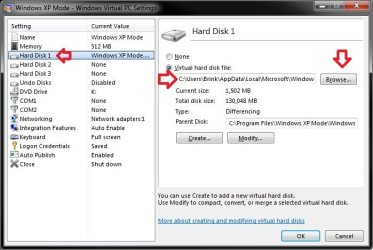
Ah, that one. You could move the VHD file to another location of your choice, then:
  • Close Windows XP Mode if opened.
  • Open the C:\Users\(user-name)\Virtual Machines folder
  • Right click on Windows XP Mode.vmcx, and click on Settings
  • Click on Browse, and select the VHD at it's new location
  • If Parent Disk (base) is empty, click on Create, and select whatever base VHD location you had there before, or create a new one where you like.
  • Click on OK when finished.
Settings.jpg
 

My Computer

Computer type
PC/Desktop
Computer Manufacturer/Model Number
Self built custom
OS
64-bit Windows 11 Pro for Workstations
CPU
Intel i7-8700K OC'd to 5 GHz
Motherboard
ASUS ROG Maximus XI Formula Z390
Memory
64 GB (4x16GB) G.SKILL TridentZ RGB DDR4 3600 MHz
Graphics Card(s)
ASUS ROG-STRIX-GTX1080TI-O11G-GAMING
Sound Card
Integrated
Monitor(s) Displays
2 x Samsung Odyssey G7 27"
Screen Resolution
2560x1440
Hard Drives
1TB Samsung 990 PRO M.2,
4TB Samsung 990 PRO PRO M.2,
TerraMaster F8 SSD Plus NAS
PSU
Seasonic Prime Titanium 850W
Case
Thermaltake Core P3
Cooling
Corsair Hydro H115i
Keyboard
Logitech wireless K800
Mouse
Logitech MX Master 4
Internet Speed
2 Gb/s Download and 100 Mb/s Upload
Antivirus
Malwarebyte Anti-Malware Premium
Browser
Google Chrome
Other Info
Logitech Z625 speaker system,
Logitech BRIO 4K Pro webcam,
HP Color LaserJet Pro MFP M477fdn,
APC SMART-UPS RT 1000 XL - SURT1000XLI,
Galaxy S23 Plus phone
i have no .vmcx in my virtual machines folder Brink, i have

windows xp mode.vhd, windows xp mode.vmc and windows xp mode.vmc.vpcbackup

none of those give a settings option when right clicked.

edit: forget that i was looking in the wrong place, found it now.

a massive thanks to you again Brink your an absolute star mate.
 

My Computer

Computer Manufacturer/Model Number
home built
OS
windows 7 64bit build 7600
CPU
Intel I7 920
Motherboard
ASUS P6T Deluxe V2
Memory
Corsair 6GB (3x2GB) 1600MHz Triple Channel i7
Graphics Card(s)
XFX RADEON HD 5870
Sound Card
Creative Xfi Elite pro
Monitor(s) Displays
Hyundai W240D 24" Samsung Syncmaster 930
Screen Resolution
1920x1200 and 1280x1024
Hard Drives
WD Velociraptor 150gb
Western Digital WD7502ABYS 750GB Raid Edition
PSU
Corsair 850W TX Series PSU
Case
Coolermaster HAF 932 Full Tower
Cooling
Noctua NH-U12P
Keyboard
logitech G15 orange
Mouse
logitech mx revolution
Internet Speed
13mb
You're most welcome. I'm happy to hear that you got it moved to where you wanted. :)
 

My Computer

Computer type
PC/Desktop
Computer Manufacturer/Model Number
Self built custom
OS
64-bit Windows 11 Pro for Workstations
CPU
Intel i7-8700K OC'd to 5 GHz
Motherboard
ASUS ROG Maximus XI Formula Z390
Memory
64 GB (4x16GB) G.SKILL TridentZ RGB DDR4 3600 MHz
Graphics Card(s)
ASUS ROG-STRIX-GTX1080TI-O11G-GAMING
Sound Card
Integrated
Monitor(s) Displays
2 x Samsung Odyssey G7 27"
Screen Resolution
2560x1440
Hard Drives
1TB Samsung 990 PRO M.2,
4TB Samsung 990 PRO PRO M.2,
TerraMaster F8 SSD Plus NAS
PSU
Seasonic Prime Titanium 850W
Case
Thermaltake Core P3
Cooling
Corsair Hydro H115i
Keyboard
Logitech wireless K800
Mouse
Logitech MX Master 4
Internet Speed
2 Gb/s Download and 100 Mb/s Upload
Antivirus
Malwarebyte Anti-Malware Premium
Browser
Google Chrome
Other Info
Logitech Z625 speaker system,
Logitech BRIO 4K Pro webcam,
HP Color LaserJet Pro MFP M477fdn,
APC SMART-UPS RT 1000 XL - SURT1000XLI,
Galaxy S23 Plus phone
Back
Top