Best MP3 library Software?

Wishmaster

New member
Guru
Gold Member
VIP
Local time
8:02 PM
Messages
4,513
Location
Southern Ohio
I'm curious what everyone is using for their MP3 librarys.
WMP, Media monky, Itunes, Zune etc .. (or any others worthy of mention)

Recently, I've been looking into other software just for something different.

Ive always used and a big fan of Media Monkey, due to its excellent tagging and organizing abilities as well customization options.

Itunes was just horrible IMO. I can't explain it, but just didnt seem so friendly with a large Music Library.. Maybe Im missing something.

Zune seems actually pretty decent. For Mp3s, Pictures and Music videos.
Overall, fairly good... and looks good.
With the exception its missing one major item, IMO. .... A Equalizer :-/

At any count, whats everyone elses experiences,thoughts, recommendations?
 

My Computer

Computer Manufacturer/Model Number
Custom (Self Build)
OS
Windows 7 Home Premium 64bit
CPU
Intel Core i7 2700k
Motherboard
eVGA P67 SLI
Memory
8GB Mushkin Redline Ridgebacks @1866
Graphics Card(s)
EVGA GTX570 SC
Sound Card
XiFi Titanium HD
Monitor(s) Displays
LG W2453V
Screen Resolution
1920x1080
Hard Drives
Intel 320 80GB -- Intel X25-V 40GB --WD Black 1TB x2 -- WD Blue 640GB
PSU
Seasonic x750
Case
Corsair 600T SE White
Cooling
eVGA Superclocked CPU Cooler
Keyboard
Saitek Cyborg
Antivirus
Kaspersky
Browser
IE
Other Info
LG BD/DVD
I currently use WMP because i have a lot of movies on my notebook, but I was given two ipod nanos (2G and 3G iirc) so I will need to use iTunes.
 

My Computer

Computer type
PC/Desktop
Computer Manufacturer/Model Number
Apple 17" iMac MA199LL (Early 2006)
OS
Windows 8 Pro (32-bit)
CPU
1.83GHz Intel Core Duo
Memory
2GB 667MHz DDR2 SDRAM (PC2-5300) (upgrade)
Graphics Card(s)
ATI Radeon X1600 with 128MB GDDR3 memory
Monitor(s) Displays
17-inch TFT active-matrix LCD, millions of colors
Screen Resolution
1440 x 900
Hard Drives
Hitachi 320GB HDT721032SLA360 7200RPM SATA II (upgrade)
Keyboard
Microsoft Wired Keyboard 600
Mouse
Microsoft Basic Optical Mouse v2.0
Internet Speed
4 Mbps
Antivirus
Microsoft Security Essentials
Browser
Google Chrome
Other Info
WEI:
Base Score: 3.9 Processor: 4.4 Memory 4.7
Graphics: 3.9 Gaming Graphics: 4.1 Primary HD: 5.9

My Computer

Computer Manufacturer/Model Number
Dell Inspiron N5010
OS
Windows 7 Ultimate x64 SP1
CPU
Intel Core i3
Memory
4 GB DDR3
Screen Resolution
1366 X 768
Hard Drives
Seagate 500 GB
Internet Speed
4 MBPS
Ive always used Itunes and I love it. It keeps everything organized and is just easy to use. Other programs like aTunes, Zune, Media Jukebox etc look like Itunes rip-offs to me.
 

My Computer

Computer type
Laptop
Computer Manufacturer/Model Number
Acer V3-551G
OS
Windows 7 Ultimate 32bit
CPU
AMD Quad-Core A8-4500M with Turbo Core up to 2.80GHz
Memory
8 GB DDR 3
Graphics Card(s)
AMD Radeon HD 7640G + 7670M (2GB dedicated VRAM)
Sound Card
AMD HD Audio device / Realtek HD Audio
Monitor(s) Displays
15.6" HD LED
Screen Resolution
1366 x 768 (32bit)
Hard Drives
1 TB HDD
Antivirus
AVG 2013 free edition
Browser
Google Chrome
Other Info
WEI scores:

Base score= 5.9

-Processor 6.7
-Memory (RAM) 7.2
-Graphics 5.9
-Gaming Graphics 6.2
-Primary hard disk 5.9

My Computer

Computer Manufacturer/Model Number
Custom (Self Build)
OS
Windows 7 Home Premium 64bit
CPU
Intel Core i7 2700k
Motherboard
eVGA P67 SLI
Memory
8GB Mushkin Redline Ridgebacks @1866
Graphics Card(s)
EVGA GTX570 SC
Sound Card
XiFi Titanium HD
Monitor(s) Displays
LG W2453V
Screen Resolution
1920x1080
Hard Drives
Intel 320 80GB -- Intel X25-V 40GB --WD Black 1TB x2 -- WD Blue 640GB
PSU
Seasonic x750
Case
Corsair 600T SE White
Cooling
eVGA Superclocked CPU Cooler
Keyboard
Saitek Cyborg
Antivirus
Kaspersky
Browser
IE
Other Info
LG BD/DVD

My Computer

Computer Manufacturer/Model Number
Dell Inspiron N5010
OS
Windows 7 Ultimate x64 SP1
CPU
Intel Core i3
Memory
4 GB DDR3
Screen Resolution
1366 X 768
Hard Drives
Seagate 500 GB
Internet Speed
4 MBPS
I personally am a big fan of Mediamonkey, but the two other biggies in the realm are Winamp and J.RiverMediaJukebox. Each of them has certain functionalities that aren't optimized in the free versions, like Mediamonkey.

I like the fact that the LAME MP3 encoder can be substituted in the free Mediamonkey for the time-stamped version that comes with the free MM. I don't think you can make that switch in the other two programs, but I could be wrong. It's a nice option for converting my .flac files onto something more suitable for my Sony Walkman MP3 player.
 

My Computer

Computer type
PC/Desktop
Computer Manufacturer/Model Number
Gigabyte Technology Co., Ltd.
OS
Win 7 Ultimate 64-bit SP1 (desktop)
CPU
Intel Core 2 Duo E8400
Motherboard
Gigabyte GA-EP35-DS3R
Memory
2x 2GB OCZ DDR II SDRAM PC2-6400
Graphics Card(s)
NVIDIA GeForce 9400GT
Monitor(s) Displays
HP 2009m(primary), Acer P191W
Screen Resolution
1600x900, 1440x900
Hard Drives
Internal:WD Caviar Black 640GB 32MB cache 7200RPM
External:Samsung Story Station 1TB HDD desktop drive
500GB Toshiba portable drive
PSU
Antec Earthwatts EA500D
Case
Antec Sonata III
Cooling
4 fans
Keyboard
Logitech Wave
Mouse
Logitech M-SBF90
Internet Speed
Slow due to home Wireless-G router
Antivirus
MSE, Hitman Pro, Malwarebytes
Browser
Chrome and Palemoon
Other Info
Laptop....Acer 5750Z-4835
15.6" HD Widescreen CineCrystal™ LED-backlit LCD Display: (1366x768 resolution, 16:9 aspect ratio)
Intel® Pentium® Processor B940 (2.0GHz, 2MB L3 cache)
Windows® 7 Home Premium,500GB Hard Drive,4GB DDR3 RAM, Intel® HD Graphics,8X DVD-Super Multi Double-Layer Drive
Multi-in-1 Digital Media Card Reader,802.11b/g/n Wi-Fi
Chrome and Palemoon, MSE, Hitman Pro
I use an antique version of I-Tunes (version 4.9) as an mp3 player on my PC. I removed Quicktime and replaced it with Quicktime Lite.

But I don't let it control my library. I do that myself with Windows Explorer.

I like I-Tunes primarily because it has a full-screen interface and can be configured the way I want it. I looked at a few other applications and thought they had horrible GUIs.

For tag management, I use mp3tag.

For volume control, I use mp3gain.

For mp3 analysis, I use Encspot.

For ripping, I use CDex.

For burning, I use Imgburn.

For recording, I use Audacity.

For mass renaming, I use Name It Your Way.

I-Tunes is strictly for playback, either from the library or from individual playlists.
 

My Computer

Computer type
PC/Desktop
Computer Manufacturer/Model Number
Ignatz Special; 4 speed manual gearbox; factory air conditioning; one of one
OS
Windows 7 Home Premium SP1, 64-bit
CPU
Intel Skylake i5-6600K, not overclocked
Motherboard
AsRock Z170M Extreme 4, micro ATX
Memory
8 GB HyperX DDR4-2666 (2 x 4 GB)
Graphics Card(s)
none; graphics are integrated on CPU
Sound Card
onboard: Realtek ALC1150; external: USB Behringer UF0-202
Monitor(s) Displays
Dell S2340M 23 inch IPS
Screen Resolution
1600 x 900
Hard Drives
System: Crucial MX100 series SSD, 128 GB;
Data: Samsung Spinpoint 103SJ, 1 TB;
Backup: WD Caviar Green WD30EZRX-00D8PB0, 3 TB
PSU
Rosewill SilentNight 500 watt fanless, semi-modular
Case
Antec Solo II
Cooling
Noctua NH-U12S; Noctua F12 intake, Noctua S12A exhaust
Keyboard
Microsoft 200 6JH-00001 USB
Mouse
Dell or Microsoft optical wired; USB
Antivirus
Microsoft Security Essentials and Malwarebytes Premium
Browser
Pale Moon
Other Info
All fans PWM; speeds at idle: CPU circa 500 rpm; intake circa 600 rpm; exhaust circa 600 rpm; CPU temps 27 idle and 47 C load in a warm room (27 C/81 F) when running Intel Extreme Tuning Utility stress test.
I use an antique version of I-Tunes (version 4.9) as an mp3 player on my PC. I removed Quicktime and replaced it with Quicktime Lite.

But I don't let it control my library. I do that myself with Windows Explorer.

I like I-Tunes primarily because it has a full-screen interface and can be configured the way I want it. I looked at a few other applications and thought they had horrible GUIs.

For tag management, I use mp3tag.

For volume control, I use mp3gain.

For mp3 analysis, I use Encspot.

For ripping, I use CDex.

For burning, I use Imgburn.

For recording, I use Audacity.

For mass renaming, I use Name It Your Way.

I-Tunes is strictly for playback, either from the library or from individual playlists.
mp3Tag is great, indeed. I have used CDex in the past, and if your CD's are in good shape, it does just as well as the vaunted Exact Audio Copy. EAC is better on old, scratched CD's though, in my experience.

I also agree with you on organizing your own files with Explorer. My usage of Medaimonkey consists of playback, podcast aggregating, .flac transcoding, and loading my Walkman with tunes.
 

My Computer

Computer type
PC/Desktop
Computer Manufacturer/Model Number
Gigabyte Technology Co., Ltd.
OS
Win 7 Ultimate 64-bit SP1 (desktop)
CPU
Intel Core 2 Duo E8400
Motherboard
Gigabyte GA-EP35-DS3R
Memory
2x 2GB OCZ DDR II SDRAM PC2-6400
Graphics Card(s)
NVIDIA GeForce 9400GT
Monitor(s) Displays
HP 2009m(primary), Acer P191W
Screen Resolution
1600x900, 1440x900
Hard Drives
Internal:WD Caviar Black 640GB 32MB cache 7200RPM
External:Samsung Story Station 1TB HDD desktop drive
500GB Toshiba portable drive
PSU
Antec Earthwatts EA500D
Case
Antec Sonata III
Cooling
4 fans
Keyboard
Logitech Wave
Mouse
Logitech M-SBF90
Internet Speed
Slow due to home Wireless-G router
Antivirus
MSE, Hitman Pro, Malwarebytes
Browser
Chrome and Palemoon
Other Info
Laptop....Acer 5750Z-4835
15.6" HD Widescreen CineCrystal™ LED-backlit LCD Display: (1366x768 resolution, 16:9 aspect ratio)
Intel® Pentium® Processor B940 (2.0GHz, 2MB L3 cache)
Windows® 7 Home Premium,500GB Hard Drive,4GB DDR3 RAM, Intel® HD Graphics,8X DVD-Super Multi Double-Layer Drive
Multi-in-1 Digital Media Card Reader,802.11b/g/n Wi-Fi
Chrome and Palemoon, MSE, Hitman Pro
I use EAC to rip my music, I've used Mp3Tag to fix ID3 tags and I pretty much use Media Monkey as my player of choice.
 

My Computer

Computer Manufacturer/Model Number
Self-Built in July 2009
OS
Windows 7 Ultimate x64
CPU
Intel Q9550 2.83Ghz OC'd to 3.40Ghz
Motherboard
Gigabyte GA-EP45-UD3R rev. 1.1, F12 BIOS
Memory
8GB G.Skill PI DDR2-800, 4-4-4-12 timings
Graphics Card(s)
EVGA 1280MB Nvidia GeForce GTX570
Sound Card
Realtek ALC899A 8 channel onboard audio
Monitor(s) Displays
23" Acer x233H
Screen Resolution
1920x1080
Hard Drives
Intel X25-M 80GB Gen 2 SSD
Western Digital 1TB Caviar Black, 32MB cache. WD1001FALS
PSU
Corsair 620HX modular
Case
Antec P182
Cooling
stock
Keyboard
ABS M1 Mechanical
Mouse
Logitech G9 Laser Mouse
Internet Speed
15/2 cable modem
Other Info
Windows and Linux enthusiast. Logitech G35 Headset.
Winamp with Enhancer 017 plugin for listening music and KMPlayer for watching movies. That's basically all I need. :) +If I ever happen to burn anything, I use ImgBurn.
 

My Computer

OS
Windows 7 Ultimate 32-bit
CPU
AMD Athlon(tm) 64 Processor 3700+ ~2.2GHz
Motherboard
Asus A8N-E
Memory
2,5GB
Graphics Card(s)
Sapphire Radeon 5750 1GB
Monitor(s) Displays
Acer AL1916
Hard Drives
Western Digital Caviar 500GB,
Western Digital Caviar 80GB,
Samsung Spinpoint 80GB
I have been using Winamp for years and just waited for a chance to throw it away. At the time of iTunes 8 I loved how it looked and functioned and everything, but it didn't support HE-AAC files, which is pretty much 80% of my music collection.
Then came Win7 and WMP12 and I never looked back. I still use Winamp for ripping, though, and MPC-HC for videos.

But here is a program that was closest to replacing Winamp before WMP12: RadLight
 

My Computer

Computer type
Laptop
Computer Manufacturer/Model Number
Custom
OS
Windows 7 Home Premium x64
CPU
Intel Core i5 2500K
Motherboard
MSI MS-7750
Memory
8GB DDR3
Graphics Card(s)
nVidia GeForce GTX650 Ti BOOST
Sound Card
Realtek
Monitor(s) Displays
21' Philips
Screen Resolution
Full HD
Hard Drives
1TB
PSU
500W
i use Nero 9 for pretty much everything love it....and WinAmp for listening to trance and hip hop tunes
 

My Computer

Computer Manufacturer/Model Number
custom of course...built by grimreaper
OS
Windows 7 Ultimate X64
CPU
Intel Core 2 Quad Q9650 3.0GHz (3.6GHz 24/7) maxed 4.05GHz
Motherboard
EVGA 790i Ultra SLi Model#132-CK-NF79-A1 BIOS P10
Memory
8GB OCZ DDR3 PC3-14400 @ 1800MHz NVIDIA SLi-Ready
Graphics Card(s)
2XBFG GeForce GTX 280 OC Edition SLi'd
Sound Card
SoundBlaster X-Fi Titanium Fatal1ty Pro Series
Monitor(s) Displays
Samsung 52" 1080P LCD HDTV (LN52B550)
Screen Resolution
1920X1080 @ 60Hz
Hard Drives
3xWestern Digital WD1001FALS Caviar Black 1TB Hard Drive(s) RAID 0 x2 encased in 3xMasscool KuFormula SHF1 HDD Cooler(s)
PSU
ThermalTake ToughPower 1200W P/N:W0133RU Modularized
Case
ThermalTake P/N: VH6000BWS Armor Full-Tower
Cooling
ThermalTake SpinQ P/N: P0466 CPU Cooler
Keyboard
Logitech cordless Y-RAJ56A piece of ****
Mouse
Logitech G7 Laser Cordless mouse black
Internet Speed
10 Mbps DL-1Mbps UL wirelessly DWA-552 extreme N
Other Info
1XSamsung DVD burner SH-S223Q/BEBN SATA
1XSamsung DVD burner SH-S223L/BEBN SATA
1XLG GGW-H20L Blu-Ray burner
4XCooler Master 120mm Blue LED SickleFlow 2000 RPM
1XBelkin UPS F6C1500TWRK) backup power supply
Hi all

I think the OP meant software to MANAGE his collection -- not software used for PLAYING MUSIC -- a totally different topic.

I rip all my CD's to FLAC with standard tags

Now create an Access DB or MySQL DB with things like artist / track / album -- you can extract the tags directly . MySQL is better as it's FREE and can be used for web queries easily as well.

Link the fields together with a "Foreign Key" as the actual file or URL address of the track / song.

Now you can even access this via the Internet if you want with "Bog standard" DB queries. (WAMP - Windows Apache MySQL Php combo is easier than bothering with IIS) .

Works great

A bit of work needed to get the tag info into the Database but once you've started then its fine.

Don't forget though if you MOVE the music you will need to update the DB as well.

To play I just pass a playlist / track to winamp and it works fine as well -- winamp will play flac files directly. I'm not a big fan of highly compressed mp3 music full of nasty "artifacts" -- certainly when played through a decent sound system with good Studio quality speakers.

Note there are plenty of good GUI tools to administer mySQL type databases and create queries -- for example phpMyadmin is a good one.


http://www.phpmyadmin.net/home_page/index.php

Don't be scared to play around with Databases -- great methods of doing all sorts of useful things and MySQL is FREE.

For example once you've built your DB

1) Create your Query -- show tracks / albums say of Gene Pitney (that's going back but who cares)

2) When the list comes up double click on the track you want to play

3) Winamp plays it (I have FLAC file to be handled by Winamp as default but you can use your player of choice)

Same works for playlists -- create a Query building your playlist -- then play it.

Same methodology can be used for DVD's etc.

Incidentally using this type of approach means your music can be spread accross network drives or even at opposite ends of the Internet as all you need is the foreign key with the URL of your track linked to your ID3 tag.


I HATE "ICHOONES" BTW.


When I've got time I'll try and write this up in the tutorial section with examples so you can try it yourselves if you get stuck.

Topic - making a Music Library with MySQL. It's really EASY and will save you time and money. Maybe at the weekend when I'm stuck in some horrible airport for Hours and Hours with the new "enhanced Security" systems -- i.e a pat on the bum -- but I nver get the nice ladies however.

Cheers
jimbo
 
Last edited:

My Computer

Computer type
PC/Desktop
Computer Manufacturer/Model Number
Custom built, several laptops HP/ASUS
OS
Linux CENTOS 7 / various Windows OS'es and servers
CPU
Intel i7 Intel i5
Memory
8GB, 16GB
Graphics Card(s)
On Motherboard
Sound Card
Realtek HD audio
Monitor(s) Displays
Apple Cinema display, Samsung LCD
Screen Resolution
1920 X 1080
Hard Drives
4 X 1TB SATA
Mouse
Toshiba wireless laser
Internet Speed
> 20MB up
Thanks jimbo45.

I was actually quite interested in everyones info/opinions on both quite honestly.

As far for playback, Ive found Media monkey to be my first choice.
Just a bit easier for me to find things. Might give Winamp another try, haven't used it in a long time. But, theres always stuff out there Ive never heard of that sometimes is alot better. my main reason for this thread :) See what everyone else is recommending/tried etc.

Just curious, what do use or suggest as the best flac ripper?

Most of my stuff is in MP3 and Im considering deleting it all and re-ripping as flac. At least most of it.
 

My Computer

Computer Manufacturer/Model Number
Custom (Self Build)
OS
Windows 7 Home Premium 64bit
CPU
Intel Core i7 2700k
Motherboard
eVGA P67 SLI
Memory
8GB Mushkin Redline Ridgebacks @1866
Graphics Card(s)
EVGA GTX570 SC
Sound Card
XiFi Titanium HD
Monitor(s) Displays
LG W2453V
Screen Resolution
1920x1080
Hard Drives
Intel 320 80GB -- Intel X25-V 40GB --WD Black 1TB x2 -- WD Blue 640GB
PSU
Seasonic x750
Case
Corsair 600T SE White
Cooling
eVGA Superclocked CPU Cooler
Keyboard
Saitek Cyborg
Antivirus
Kaspersky
Browser
IE
Other Info
LG BD/DVD
Hi there

I use WINAMP for ripping to FLAC with its built in flac ripper as it includes all the ID tags and retrieves album info from Gracenote which IMO is usually better than Freedb - especially for Classical Music.

It gives you reasonable choices in track / file / artist labelling as well and the rips can include playlists if you want them.

EAC is anther good one but you need to install the separate FLAC encoder which runs as a DOS application after the EAC has made a temporary WAV file so its not as fast (by miles).

Winamp will give you fast speeds as well if you get the pro version -- the FREE version is limited to 8x rips I think. My typical CD ripping speeds are around 20 - 25X.

I don't bother with all the other features such as letting it manage media libraries etc -- I use it simply for ripping and playing .

I find also a Squeezebox radio device a great system for playing FLAC directly from the computer as well -- this is a "Streamed device" from Logitech and can play FLAC directly. Sound is more than adequate for listening casually.

Got one of these from Santa this year and loving it.

Logitech Squeezebox Radio review -- Engadget


I like FLAC as I can re-create the audio CD's if I need to from the flac files - or make new compilations of audio CD's which will play perfectly on a CD system and being LOSSLESS i can of course use the files to convert to anything else if newer systems come along.

Discs are CHEEEEEEEEEEAP these days -- 500GB small usb WD passport drive - 65 GBP / 90 USD (inc tax) will hold around 2300 complete CD equivalent's in FLAC format of around 65 mins per CD.

Cheers
jimbo
 

My Computer

Computer type
PC/Desktop
Computer Manufacturer/Model Number
Custom built, several laptops HP/ASUS
OS
Linux CENTOS 7 / various Windows OS'es and servers
CPU
Intel i7 Intel i5
Memory
8GB, 16GB
Graphics Card(s)
On Motherboard
Sound Card
Realtek HD audio
Monitor(s) Displays
Apple Cinema display, Samsung LCD
Screen Resolution
1920 X 1080
Hard Drives
4 X 1TB SATA
Mouse
Toshiba wireless laser
Internet Speed
> 20MB up
I have a rather large library with 60K+ files. I gave up on Winamp as it was getting too slow after my library got to 30K+ files, plus I never liked AOL. I never liked WMP either, as it messed my tags.

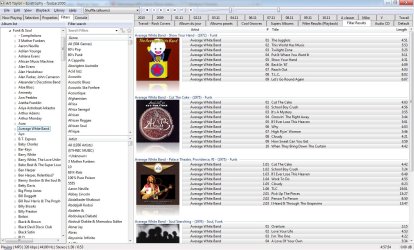
I now use foobar200, with the UI_colums extension. The UI takes a little time to configure, but you can pretty much set it up as you like, almost everything can be configured to your liking. The loading/search/filtering response is fast, and the UI_colums interface displays album covers faster than WMP.

Foobar also includes intuitive tagging, automatic file naming/moving with advanced scripting options.

I recommend it to anyone.

foobarss.jpg
 

My Computer

Computer Manufacturer/Model Number
Toshiba P300-1EI
OS
Windows 7 Ultimate 32bits
CPU
2GHz Intel T5800 dual core
Memory
3 GB
Graphics Card(s)
ATI Radeon HD3650
Sound Card
Yamaha MW10C USB mix board
Hard Drives
250 MB Seagate Momentus XT internal
1 GB 2.5" Samsung HN-M101MBB internal
1GB 3.5" Hitachi external
Back
Top