Best recorded live tv compression software?

bunyip

New member
Local time
8:45 PM
Messages
23
The problem: I recorded a really good film I want to keep. The file is just over 5GB.

I want to compress it to about 20% of that with minimal loss of quality.

I've been looking on line for several days. I found MCEBuddy,but am having trouble getting it to work.
 

My Computer

OS
Windows 7 Home Premium 64 bit
Try
Avidemux
or
Free Video Converter

They both require a bit a of learning, and avidemux probably has more encoding options.

Free advice: avidemux can "copy" the audio & video w/o re-encoding, pretty quickly. Try editing out a short portion of your video, and save that with Video & audio "copy"; then use that piece to expirement on to get the compression you want. Two pass gives best quality & size but it takes a long time. CHeck under Video (left side) -> Configure to change compression. All re-encoding/compression is pretty slow, and if you test on the whole video you might be waiting hours to see how it came out!
PS: I'm running avidemux even as we speak...
 
Last edited:

My Computer

Computer Manufacturer/Model Number
eMachines ET1831-7
OS
Windows 7 Ultimate
CPU
Pentium Dual-Core CPU E5400 @ 2.70GHz
Motherboard
EMCP73VT-PM
Memory
4096M
Graphics Card(s)
nVidia 8400GS
Sound Card
built-in Realtek
Monitor(s) Displays
Acer 20"
Screen Resolution
1680x1050
Hard Drives
Seagate ST3750528AS ATA 500G
Other Info
Dual-boot with Linux.
Thanks.

I tried free Video converter and it's spiffo. Converted the file to avi. It's now 500 meg,but has lost some quality. I will experiment with other formats. The conversion rate is quiet acceptable.

Now looking for an an app to remove the ads. I've had a quick Google.There seem to be a few around,I'll hunt. I will of course be grateful for any suggestions.
 

My Computer

OS
Windows 7 Home Premium 64 bit
You can remove the ads with Free Video converter - click the scissors to the right of the file name and you're in an editor. Do this before you convert it!
 

My Computer

Computer Manufacturer/Model Number
eMachines ET1831-7
OS
Windows 7 Ultimate
CPU
Pentium Dual-Core CPU E5400 @ 2.70GHz
Motherboard
EMCP73VT-PM
Memory
4096M
Graphics Card(s)
nVidia 8400GS
Sound Card
built-in Realtek
Monitor(s) Displays
Acer 20"
Screen Resolution
1680x1050
Hard Drives
Seagate ST3750528AS ATA 500G
Other Info
Dual-boot with Linux.
You can remove the ads with Free Video converter - click the scissors to the right of the file name and you're in an editor. Do this before you convert it!


Yes I know, I want something which will do it automatically.

Umm, the sound is out of synch. There any way to fix that?
 

My Computer

OS
Windows 7 Home Premium 64 bit
Now looking for an an app to remove the ads. I've had a quick Google.There seem to be a few around,I'll hunt. I will of course be grateful for any suggestions.
You might look into Show Analyzer. It detects commercials automatically and builds an XML file that defines the start/end of the "chapters" of program, thus eliminating the commercial pods (which are outside the bounds of the "chapters"). You need to use an automatic editing program that understands the "chapter" XML files, which as I understand things is quite a standard technique that is generally understood by many editing products.

I sort of used it for a while when I was using BeyondTV, but ultimately decided that the built-in SmartSkip functionality of BeyondTV was superior in its algorithms for detecting commercial pods.

And then when I went to Windows Media Center for watching/recording TV, I decided simply to not do any of this automatically. Instead I just use the 30-second skip button on the remote (repeatedly as needed) to manually skip through commercial pods, and then to back up one or two 12-second units if I overshoot. This is actually fine, and saves LOTS of CPU time, fan cooling, electricity, etc. Plus the recordings are available immediately, instead of having to be auto-scanned for commercial removal. Plus, this would only work on "copy-freely" content anyway, and I was also recording "copy-once" protected contents from my TWC/LA cable system using the cablecard-enabled Ceton tuner card.

Anyway, you might give Show Analyzer a shot. It's pretty highly regarded and used, with a user community and forum for discussion and exchange of the "configuration file" to tune the ad-detection process.

I'm attaching the last configugration file one I tried (which was from someone else) which worked quite well. Of course that was 1 1/2 years ago, so somebody might have built a much smarter one by now... and it would be available on the Show Analyzer forum. Note that the extension of my attachment is "TXT" but it should be "CONF", however the forum won't allow it to be attached as a ".CONF" file.

Good luck.

OOPS... just noticed it's not free. It's $30, but if it works great it's obviously worth it... and software developers need to eat too.

 

Attachments

My Computer

Computer type
PC/Desktop
Computer Manufacturer/Model Number
Home-built, two systems (1) and (2)
OS
Windows 7 Pro x64 (1), Win7 Pro X64 (2)
CPU
i5-3350p 3.1Ghz/6MB-cache (1); E8400 3.0Ghz/6MB-cache (2)
Motherboard
ASUS P8Z77-V Pro (1); ASUS P5Q3 (2)
Memory
8GB PC3-12800 DDR3 (1); 4GB PC3-10600 DDR3 (2)
Graphics Card(s)
ATI HD7750 (1), (see TV cards); ATI R7 250 (2)
Sound Card
Realtek ALC892 HD Audio (1); Realtek ALC1200 HD Audio (2)
Monitor(s) Displays
Eizo HD2441W LCD, Eizo S2433W (1); Eizo 24" S2433W (2)
Screen Resolution
1920x1200, 1920x1200 (1); 1920x1200 (2)
Hard Drives
(1) 1TB SATA-II (7200RPM), 2x2TB SATA-III (7200RPM), 250GB SATA-III (10000RPM) for OS; 2x2TB external USB 3.0

(2) 320GB SATA-II (7200RPM), 750GB SATA-II (7200RPM), 150GB SATA-II (10000RPM) for OS; 2TB external USB 3.0
PSU
Nesteq ECS-6001 600W (1); Nesteq ECS-5001 500W (2)
Case
Acousti-Case 360 (1) and (2)
Cooling
Noctua NH-U12P SE2 for CPU, 2x120mm case fans (1) and (2)
Keyboard
IBM PS/2 (1) and (2)
Mouse
Logitech MX Revolution wireless (1); Microsoft wired (2)
Internet Speed
100mbps down / 10mbps up
Antivirus
Microsoft Security Essentials; Malwarebyte Anti-Malware Pro
Browser
Firefox
Other Info
Ceton InfiniTV 4-tuner cablecard-enabled TV card as well as Hauppauge HVR-2250 OTA/ATSC 2-tuner TV card in (1), running under Win7 WMC
Umm, the sound is out of synch. There any way to fix that?

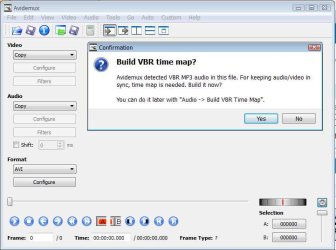
Free Converter is a little more user friendly and cleaner-looking, but it's also simpler than Avidemux, which has more audio (and video) encoding options, including an audio "Time Shift" under "Audio Filters" (left side of picture, which shows a message that might explain what's going on in your situation).

I'd been using Avi under Linux, then thought Free was nicer for Windows but went back to Avi in Windows after having some subtle problems playing AVI videos on a older DVD player (AVI files on an SD card or disk).

Avidemux has lots of info about its options and video in general, and its own forum:
Avidemux.org
start [Avidemux DokuWiki]

Video is pretty complicated, and I'm not an expert - you might want to check out a video forum.
 

Attachments

  • Avidemux1.jpg
    Avidemux1.jpg
    38.3 KB · Views: 7

My Computer

Computer Manufacturer/Model Number
eMachines ET1831-7
OS
Windows 7 Ultimate
CPU
Pentium Dual-Core CPU E5400 @ 2.70GHz
Motherboard
EMCP73VT-PM
Memory
4096M
Graphics Card(s)
nVidia 8400GS
Sound Card
built-in Realtek
Monitor(s) Displays
Acer 20"
Screen Resolution
1680x1050
Hard Drives
Seagate ST3750528AS ATA 500G
Other Info
Dual-boot with Linux.
@flemur

Thank you, I will try Avidemux. I had a quick look and it seems a bit complicated. However, as you say it has a forum,I'll give it a go.


@dsperber

Thank you,I will also try Show Analyzer.


In the meantime I've got MCEBuddy to work.It removes the ads and will convert to several formats. I've chosen mp4 because I can play the file on my PC as well as on the built-in usb player on my TV.

I haven't' tried to watch it yet.
 

My Computer

OS
Windows 7 Home Premium 64 bit
FWIW, I've never needed to use anything other than the pulldowns on the left side of the GUI to do everything I needed with Avidemux (IOW, no menus from the top)
 

My Computer

Computer Manufacturer/Model Number
eMachines ET1831-7
OS
Windows 7 Ultimate
CPU
Pentium Dual-Core CPU E5400 @ 2.70GHz
Motherboard
EMCP73VT-PM
Memory
4096M
Graphics Card(s)
nVidia 8400GS
Sound Card
built-in Realtek
Monitor(s) Displays
Acer 20"
Screen Resolution
1680x1050
Hard Drives
Seagate ST3750528AS ATA 500G
Other Info
Dual-boot with Linux.
Less bytes is less quality. There is no magic to make it smaller and keep the original quality.
 

My Computer

Computer Manufacturer/Model Number
HP, Dell, Gateway, Toshiba - 4 laptops and 2 desktops
OS
Vista, Windows7, Mint Mate, Zorin, Windows 8
CPU
from 1.6GHz Duo to i7
Monitor(s) Displays
2x HP w2207
Hard Drives
5x HDD, 7x SSD, 12x Externals
Keyboard
with trackball - no mices
Mouse
Trackball mice
Internet Speed
DSL 6000
Less bytes is less quality. There is no magic to make it smaller and keep the original quality.

Indeed.

However, I'm very impressed with MCEBuddy. It recoded to MP4,reducing size from 5 GB to 1.2.GB. Quality is excellent,though obviously not as good as the original.

-----------------------------------------------------------------------------

Show Analyzer seems to be a commercial application.I seldom buy software,and NEVER buy it on line.
 

My Computer

OS
Windows 7 Home Premium 64 bit
Back
Top