Best software for partition cloning?

ouchwhat

New member
Local time
5:48 PM
Messages
5
Hi,


I'm wondering which is the best paid partition cloning software for Windows 7?


So far I only know of Acronis true image and Norton ghost.


Any more suggestions or posts of any past experiences with these or any similar software would be great :)


Thanks!:geek:
 

My Computer

OS
Windows 7 RTM x64
I personally use Norton Ghost the most.
Mainly because of the GhostExp.exe binary that enables you to easily browse an image to extract files.

Oh, and if you haven't got it, take a look online for Hiren's Boot CD...an invaluable set of tools including the ones above - but please ensure you own a licence for running any of the licenced software on the disc ;)
 

My Computer

Computer Manufacturer/Model Number
Homebuild
OS
Windows 7 (RC)
CPU
Intel E6600 (2.4Ghz C2D)
Motherboard
Asus P5W DH Deluxe
Memory
2 x 2GB 800Mhz
Graphics Card(s)
ATI X1800 GT
Sound Card
Onboard
Monitor(s) Displays
LG 22"
Hard Drives
2 x 250GB WD (RAID0)
1 x 400GB WD
1 x 1000GB Samsung
PSU
500W
Case
Antec Sonata
Cooling
CPU - Aero7
I personally use Norton Ghost the most.
Mainly because of the GhostExp.exe binary that enables you to easily browse an image to extract files.

Oh, and if you haven't got it, take a look online for Hiren's Boot CD...an invaluable set of tools including the ones above - but please ensure you own a licence for running any of the licenced software on the disc ;)
Norton Ghost FTW also...very easy to use and pretty powerful
 

My Computer

Computer Manufacturer/Model Number
Compal JFT02 (Custom Build Laptop)
OS
Windows 7 Home Premium x64 - Mac OS X 10.6.4 x64
CPU
Intel Core 2 Duo T9300 2.5 GHz
Motherboard
JFT02
Memory
4GB Kingston DDR2-800
Graphics Card(s)
NVIDIA Geforce 8600M GT (512MB Model)
Sound Card
Realtek HD Audio
Monitor(s) Displays
WUXGA Standard Laptop Display
Screen Resolution
1680*1050
Hard Drives
Toshiba 320GB 5400RPM Laptop HD
PSU
Standard Laptop Power Supply
Case
Standard Laptop Case
Cooling
Standard Laptop Cooling
Keyboard
Standard Laptop 105 Key-Keyboard
Mouse
Synaptics Touchpad
Internet Speed
Verizion Online DSL 3360/864 kbs (dl/up)
hiya guys,
im just need your help to clarify something, before things go terribly wrong! :D
this is the way my hdd's are set up...

HDD0 - partition1 - Windows 7 ultimate x64
-partition2 - Data

HDD1 - partition1 - Windows 7 ultimate x86 - active boot
-partition2- Games Install

[both O/S's have the same Ultimate build string, 7600.16385]

using the software described above, would i successfully have a chance to clone the x64 partition, delete the x86 partition and put the x64 o/s in its place?
I realize that it will not have an active boot on that partition, so the windows 7 x64 install dvd 'should' find the error and repair it, wont it?? lol

basicly thats my problem at the moment, any help will be greatly appreciated :D


thnx guys


forum20sig.jpg

 
Last edited:

My Computer

OS
Windows 7 Ultimate [7600.16385] x64 & x86
CPU
AMD X2 4000+ [3.20ghz-overclocked,1.38v .,. 2.10ghz-stock]
Motherboard
MSI K9A2 platinum, Bios v1.8
Memory
4GCorsair XMS26400 [1012mhz-overclocked,2.10v]
Graphics Card(s)
Asus8800GTS512mb [800/1944/1100mhz-overclocked&modded bios]
Sound Card
5.1 Onboard Realtek audio
Monitor(s) Displays
FPD1960 TFT LCD 19" Gateway
Screen Resolution
1280 x 1024
Hard Drives
250gb Samsung 7200rpm - Windows 7 Ultimate x64 7600 RTM
250gb Hitachi 7200rpm - Windows 7 Ultimate x86 7600 RTM
1tb Samsung spinpoint - Data Drive
PSU
580w GTX X-power
Case
Self Modded i-cute mid gaming case [ordered antec 900 II]
Cooling
OCZ Vendetta [ordered Coolermaster V10]
Keyboard
Wireless Gaming Keyboard
Mouse
4Tech Wireless Gaming Mouse
Internet Speed
8mbps
From what I understand, your saying there's an error on the x86 partition and you want to just delete it and make it a mirror of your x64 partition?

Right now I'd suggest signing up for the Acronis 2010 Beta, since you can use it for free you should be able to easily do that.
 

My Computer

Computer Manufacturer/Model Number
Zen Productions
OS
Windows 7 Ultimate x64
CPU
Intel i7-860
Motherboard
Gigabyte GA-P55A-UD4P
Memory
Corsair Dominator 1600Mhz, 8-8-8-24 1.65v 2x2GB
Graphics Card(s)
ATI Radeon 5770 HD
Sound Card
Intel High Definition Sound
Monitor(s) Displays
Samsung P2570HD
Screen Resolution
1920x1080
Hard Drives
Western Digital Caviar Black 500gb
PSU
Corsair CMPSU-750HX 750W
Case
Antec p183
Cooling
Corsair H50 Water Cooler
Keyboard
Logitech G110
Mouse
Logitech MX Revolution
Internet Speed
768 mb/s
From what I understand, your saying there's an error on the x86 partition and you want to just delete it and make it a mirror of your x64 partition?

Right now I'd suggest signing up for the Acronis 2010 Beta, since you can use it for free you should be able to easily do that.


Its a pretty good beta and its free
 

My Computer

Computer Manufacturer/Model Number
HP Pavillion dv-7 1005 Tx
OS
Win 8 Release candidate 8400
CPU
[email protected]
Memory
4 gigs
Graphics Card(s)
Nvidia 9600M
Sound Card
HD built-in
Monitor(s) Displays
17" Wxga
Screen Resolution
1440x900
Cooling
none
Internet Speed
45Mb down 5Mb up
From what I understand, your saying there's an error on the x86 partition and you want to just delete it and make it a mirror of your x64 partition?

Right now I'd suggest signing up for the Acronis 2010 Beta, since you can use it for free you should be able to easily do that.


hiya guys, thanx for the reply

u got it one :D ive been having few probs with the x86 partition and also im running low on space, so deleting the x86 partition and replace with a mirror of the x64 + deleting the original x64 partition should save space + remove the errors which were present only on the x86 partition :D

thanx again for your help, im off to download the acronis 2010 beta. thnx dude :D
 

My Computer

OS
Windows 7 Ultimate [7600.16385] x64 & x86
CPU
AMD X2 4000+ [3.20ghz-overclocked,1.38v .,. 2.10ghz-stock]
Motherboard
MSI K9A2 platinum, Bios v1.8
Memory
4GCorsair XMS26400 [1012mhz-overclocked,2.10v]
Graphics Card(s)
Asus8800GTS512mb [800/1944/1100mhz-overclocked&modded bios]
Sound Card
5.1 Onboard Realtek audio
Monitor(s) Displays
FPD1960 TFT LCD 19" Gateway
Screen Resolution
1280 x 1024
Hard Drives
250gb Samsung 7200rpm - Windows 7 Ultimate x64 7600 RTM
250gb Hitachi 7200rpm - Windows 7 Ultimate x86 7600 RTM
1tb Samsung spinpoint - Data Drive
PSU
580w GTX X-power
Case
Self Modded i-cute mid gaming case [ordered antec 900 II]
Cooling
OCZ Vendetta [ordered Coolermaster V10]
Keyboard
Wireless Gaming Keyboard
Mouse
4Tech Wireless Gaming Mouse
Internet Speed
8mbps
Can I Clone 64 bit partition With 32bit Software

Can I Clone a 64 bit partition With 32bit cloning Software?

I know that from a quick thought It's one of those, "EARTH TO STUPID. . WAKE UP" questions but on the other hand I think that in DOS it may not matter cause I think it's a bit by bit operation but I am just a seamen mentally flatulating but I am developed enough to know that I should ask the question to get that mental gas out of my head.


I have Norton Ghost 10. which came with a Norton Ghost 2003 disk also, will one of these work with Windows 7?
I also heard that a Linux Live installation disk can allow one to make a image, is that true? I have a copy of the Latest Ubuntu somewhere around here.
 

My Computer

Computer Manufacturer/Model Number
z#k&x%
OS
64 bit Windows 7 Ultimate (Free from Windows 7 Launch Event)
CPU
I7 920 (stinking CO)
Motherboard
Gigabyte GA-EX58-UD4P
Memory
6GB Patriot Viper DDR3 (3 x 2GB) 1333 (PC3 10666) 7-7-7-20
Graphics Card(s)
MSI 4670 1GB
Sound Card
Realtek ALC889A (onboard)
Monitor(s) Displays
Samsung LN52A650
Screen Resolution
1920 X1080
Hard Drives
32GB OCZ Vertex 1VTX30G SSD (OS Boot Drive)

80GB WD Caviar Blue WD800JD (Auxilery Drive for SSD off loading)

500GB Seagate Momentus ST9500325AS (Personal Storage)
PSU
Antec EA750
Case
Antec 180 I got from Craigslist free? Or was it Freecycle
Cooling
Intel OEM, Case side off, PC Duct Taped to Window A/C unit
Keyboard
Piece of Crap I Found Dumpster Diving
Mouse
Logitech Optical Trackman (Tracking Ball)
Internet Speed
Varies, Downloads from 121MB to 12MB Upload from 3MB to 25MB
Other Info
Uber Chronometric Particle Emitter with the Verteron Exovector extrapolated to the sub neutrino level and Hyper Calibrated with a zero gravity tritonium / unobtainium alloy infused Collaborating Meter
I can say that Norton Ghost apparently does not work in Win7 yet.
 

My Computer

Computer Manufacturer/Model Number
Zen Productions
OS
Windows 7 Ultimate x64
CPU
Intel i7-860
Motherboard
Gigabyte GA-P55A-UD4P
Memory
Corsair Dominator 1600Mhz, 8-8-8-24 1.65v 2x2GB
Graphics Card(s)
ATI Radeon 5770 HD
Sound Card
Intel High Definition Sound
Monitor(s) Displays
Samsung P2570HD
Screen Resolution
1920x1080
Hard Drives
Western Digital Caviar Black 500gb
PSU
Corsair CMPSU-750HX 750W
Case
Antec p183
Cooling
Corsair H50 Water Cooler
Keyboard
Logitech G110
Mouse
Logitech MX Revolution
Internet Speed
768 mb/s
Can I Clone a 64 bit partition With 32bit cloning Software?

I know that from a quick thought It's one of those, "EARTH TO STUPID. . WAKE UP" questions but on the other hand I think that in DOS it may not matter cause I think it's a bit by bit operation but I am just a seamen mentally flatulating but I am developed enough to know that I should ask the question to get that mental gas out of my head.


I have Norton Ghost 10. which came with a Norton Ghost 2003 disk also, will one of these work with Windows 7?
I also heard that a Linux Live installation disk can allow one to make a image, is that true? I have a copy of the Latest Ubuntu somewhere around here.

If you make the image outside the 64bit OS, there's no difference with 32bit.

Acronis True Image home 2009 trial allows you to make a startup disk that will run even after 30days.

(it is in fact running on linux)
 

My Computer

OS
Win7 Build 7600 x86
CPU
Pentium II 300MHz
Motherboard
Asus
Memory
32mb EDO RAM
Graphics Card(s)
Diamond Viper
Sound Card
Soundblaster 16
Monitor(s) Displays
14" AOC CRT 16K color
Screen Resolution
800x600
Hard Drives
300mb Quantum fireball
PSU
110 Watts
Cooling
Passive
Keyboard
Trust Ergonomic
Mouse
Generic
Internet Speed
256K u 128K d
You Rock Dude, Thanx

squonksc

You Rock Dude, Thanx
 

My Computer

Computer Manufacturer/Model Number
z#k&x%
OS
64 bit Windows 7 Ultimate (Free from Windows 7 Launch Event)
CPU
I7 920 (stinking CO)
Motherboard
Gigabyte GA-EX58-UD4P
Memory
6GB Patriot Viper DDR3 (3 x 2GB) 1333 (PC3 10666) 7-7-7-20
Graphics Card(s)
MSI 4670 1GB
Sound Card
Realtek ALC889A (onboard)
Monitor(s) Displays
Samsung LN52A650
Screen Resolution
1920 X1080
Hard Drives
32GB OCZ Vertex 1VTX30G SSD (OS Boot Drive)

80GB WD Caviar Blue WD800JD (Auxilery Drive for SSD off loading)

500GB Seagate Momentus ST9500325AS (Personal Storage)
PSU
Antec EA750
Case
Antec 180 I got from Craigslist free? Or was it Freecycle
Cooling
Intel OEM, Case side off, PC Duct Taped to Window A/C unit
Keyboard
Piece of Crap I Found Dumpster Diving
Mouse
Logitech Optical Trackman (Tracking Ball)
Internet Speed
Varies, Downloads from 121MB to 12MB Upload from 3MB to 25MB
Other Info
Uber Chronometric Particle Emitter with the Verteron Exovector extrapolated to the sub neutrino level and Hyper Calibrated with a zero gravity tritonium / unobtainium alloy infused Collaborating Meter
Acronis TI 2010 has SERIOUS Problems

I just purchased and downloaded both True Image 2010 and Disk Director. When I tried installing them on my WinXP Pro computer it failed stating: TI2010 Does Not Support Dynamic or GPT Disks.

I did a search on the Acronis Knowledgebase and they directed me to a Link where I could purchase the Plus Pak for True Image 2010, which would then support GPT and Dynamic Disks.

I paid for (Another $30 !) the Plus Pak, Downloaded it and installed it.

Guess What... IT STILL DOES NOT SUPPORT DYNAMIC DISKS... Acronis solution is to blow away your existing partition and data, reformat and create a new partition that is a Basic Disk... What a TOTAL RIP OFF!

If I wanted to do that, I could use WINDOWS BACKUP !

Oh, and there is NO support available for free! You have to PAY for telephone support!

I am calling American Express and disputing the charges for vendor Fraud!
:mad:
 

My Computer

OS
WinXP Pro
Hi Craig,

Sorry to hear that.

I use Paragon - in large part because the support is astonishingly good.

Surely Acronis do a 30 day money - back guarantee?

When you have got your money back - you may wish to have a look :

Paragon Drive Backup Workstation - Overview

There is a trial version with limited fuctions.

There will also soon be Backup and Recovery 10 Suite at a lower price point.

Any feedback/questions are encouraged on any and all products - including the free versions - either send a support ticket, or post any questions here:

Official Paragon Support Forum

Hope it helps.


I just purchased and downloaded both True Image 2010 and Disk Director. When I tried installing them on my WinXP Pro computer it failed stating: TI2010 Does Not Support Dynamic or GPT Disks.

I did a search on the Acronis Knowledgebase and they directed me to a Link where I could purchase the Plus Pak for True Image 2010, which would then support GPT and Dynamic Disks.

I paid for (Another $30 !) the Plus Pak, Downloaded it and installed it.

Guess What... IT STILL DOES NOT SUPPORT DYNAMIC DISKS... Acronis solution is to blow away your existing partition and data, reformat and create a new partition that is a Basic Disk... What a TOTAL RIP OFF!

If I wanted to do that, I could use WINDOWS BACKUP !

Oh, and there is NO support available for free! You have to PAY for telephone support!

I am calling American Express and disputing the charges for vendor Fraud!
:mad:
 
Last edited:

My Computers

System One System Two

  • Computer type
    PC/Desktop
    OS
    7 X64
    CPU
    i5 8400
    Motherboard
    gigabyte b365m ds3h
    Memory
    2x8gb 3200mhz
    Hard Drives
    various
    PSU
    pure power 11 400w cm
    Case
    Coolermaster
    Cooling
    cryorig m9i
  • Computer type
    PC/Desktop
    OS
    7x64
    CPU
    g5400
    Motherboard
    ga b365m ds3h
    Memory
    8gb ddr4 2400
    PSU
    xfx pro 450w
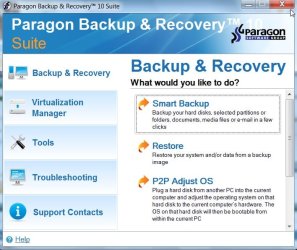
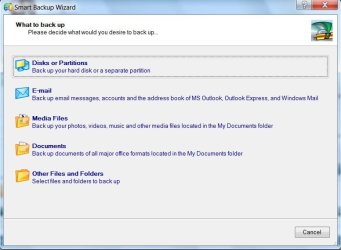
I just got hold of the new B&R 10 Suite - it looks very good:

B&RSUITE-1-2009-11-16_173220.jpg

B&RSUITE-2-2009-11-16_173320.jpg

Made an image of 7o/s partition ( 13.3gb used space)

Paragon took 7.30 mins and image size 6.38 gb ( default settings)

Windows System Image took 10 mins image size 9.87gb.

Th big difference is that with Paragon you can choose which partition to image - you can also choose where to restore it.

You can't do that with Windows System Image.
 

My Computers

System One System Two

  • Computer type
    PC/Desktop
    OS
    7 X64
    CPU
    i5 8400
    Motherboard
    gigabyte b365m ds3h
    Memory
    2x8gb 3200mhz
    Hard Drives
    various
    PSU
    pure power 11 400w cm
    Case
    Coolermaster
    Cooling
    cryorig m9i
  • Computer type
    PC/Desktop
    OS
    7x64
    CPU
    g5400
    Motherboard
    ga b365m ds3h
    Memory
    8gb ddr4 2400
    PSU
    xfx pro 450w
Back
Top