Best VLC settings for improving performance

trueone123

New member
Local time
8:47 PM
Messages
7
Hi,
Does anyone have some tips they can share regarding improving performance on VLC. Specifically if you're trying to play a high quality video file, I would like to reduce the amount of choppiness and lags while still maintaining great quality. Thank you.
 

My Computer

Computer type
Laptop
Computer Manufacturer/Model Number
Fujitsu
OS
Windows 7 Ultimate 32bit
CPU
Intel Pentium P6200
Motherboard
FUJITSU FJNBB06
Memory
2GB
Graphics Card(s)
Intel Graphics Media Accelerator HD
Sound Card
Realtek High Definition Audio
Screen Resolution
1366x768
Hard Drives
298GB Western Digital WDC WD3200BPVT-16JJ5T0 ATA Device (SATA)
Antivirus
None
Browser
Firefox
Hi and welcome to SevenForums,
Your system spec's only show 2 gigs of ram and No Antivirus please tell us what you use for an antivirus program

With only 2 gigs of ram resources are pretty scarce
Use Clean boot,
http://www.sevenforums.com/tutorials/179159-troubleshoot-application-conflicts-performing-clean-startup.html
Click Start and type in the search box,
msconfig
Click on the suggestion on top or hit the Enter key,
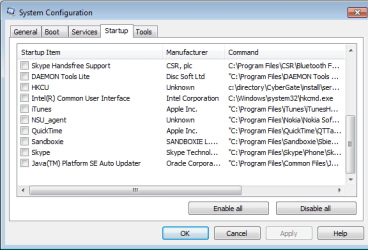
Go to the Startup section and take some screen shots for a complete list,
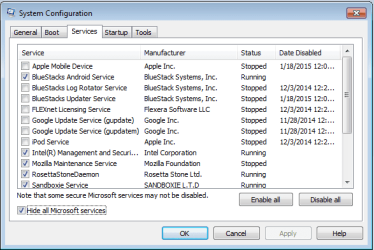
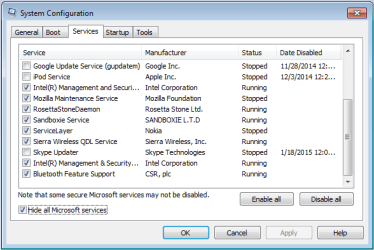
Go to the Services section and on the bottom left Check the box to Hide All Microsoft services,
Repeat the screen shots,
See the links above my signature on how to take and upload screen shots here,
Cheers.
 

My Computer

Computer type
PC/Desktop
Computer Manufacturer/Model Number
Custom assembled by me :}
OS
Win-7-Pro64bit 7-H-Prem-64bit
CPU
i7-5930K 2nd i9-9940x both water blocked VRM's too
Motherboard
ASUS SABERTOOTH X99 2nd ASUS x299 Apex
Memory
Trident-z 3200C14 2nd Trident-z 3600C16
Graphics Card(s)
EVGA 1080ti ftw3 2nd Titan Xp both water blocked
Sound Card
Built-in Realtek
Monitor(s) Displays
1-AOC G2460PG 24"G-Sync 144Hz/ 2nd 1-ASUS VG248QE 24" 144Hz
Screen Resolution
1920 x 1080 144Hz
Hard Drives
2-Samsung M.2 Evo & Evo Plus
2-Samsung 850 EVO 500GB SSD's/ 3-2.5 W.D. Black 1tb-&3-1tb/3-3.5 WD Black 1tb hdd's
PSU
EVGA SuperNOVA 1000-P2 2nd 1200-P2
Case
2-Corsair Obsidian Series 450D Black ATX Mid Tower
Cooling
Custom water loops
Keyboard
Logitech G710+/ 2nd Logitech G910
Mouse
2-RedDragon M901 Perdition 16400 dpi Gaming mouse = wired
Internet Speed
Comcast Ping 19ms 89.31mbps download speed 6.12mbps upload
Antivirus
Malwarebytes Pro/ Superantispyware Pro
Browser
FireFox & Pale moon
Other Info
2nd ASUS X299 Apex/Intel i9-9940x with Custom water loop/7H-Prem-x64/Corsair 450D case/Ram Trident-z 3600C16 4x8gb / Samsung970Evo plus 500gb SSD/Dual ssd EZ swap evo/PSU EVGA SuperNova 1200w-P2 80+Platinum/GPU Titan Xp /8-ML-140 on push-pull on 2-280GTX rads
Hello,
The player works fine when I am playing regular 700MB movies. However it starts to lag and chop when I play videos of a larger file size, and with larger resolution.
 

My Computer

Computer type
Laptop
Computer Manufacturer/Model Number
Fujitsu
OS
Windows 7 Ultimate 32bit
CPU
Intel Pentium P6200
Motherboard
FUJITSU FJNBB06
Memory
2GB
Graphics Card(s)
Intel Graphics Media Accelerator HD
Sound Card
Realtek High Definition Audio
Screen Resolution
1366x768
Hard Drives
298GB Western Digital WDC WD3200BPVT-16JJ5T0 ATA Device (SATA)
Antivirus
None
Browser
Firefox
So I just tried playing the same video file in WMP, and it played perfectly! Compared to VLC it lags. Why does it play better with WMP and not VLC ?
 

My Computer

Computer type
Laptop
Computer Manufacturer/Model Number
Fujitsu
OS
Windows 7 Ultimate 32bit
CPU
Intel Pentium P6200
Motherboard
FUJITSU FJNBB06
Memory
2GB
Graphics Card(s)
Intel Graphics Media Accelerator HD
Sound Card
Realtek High Definition Audio
Screen Resolution
1366x768
Hard Drives
298GB Western Digital WDC WD3200BPVT-16JJ5T0 ATA Device (SATA)
Antivirus
None
Browser
Firefox
Hi,
You have not responded to any of my inquiries :(
 

My Computer

Computer type
PC/Desktop
Computer Manufacturer/Model Number
Custom assembled by me :}
OS
Win-7-Pro64bit 7-H-Prem-64bit
CPU
i7-5930K 2nd i9-9940x both water blocked VRM's too
Motherboard
ASUS SABERTOOTH X99 2nd ASUS x299 Apex
Memory
Trident-z 3200C14 2nd Trident-z 3600C16
Graphics Card(s)
EVGA 1080ti ftw3 2nd Titan Xp both water blocked
Sound Card
Built-in Realtek
Monitor(s) Displays
1-AOC G2460PG 24"G-Sync 144Hz/ 2nd 1-ASUS VG248QE 24" 144Hz
Screen Resolution
1920 x 1080 144Hz
Hard Drives
2-Samsung M.2 Evo & Evo Plus
2-Samsung 850 EVO 500GB SSD's/ 3-2.5 W.D. Black 1tb-&3-1tb/3-3.5 WD Black 1tb hdd's
PSU
EVGA SuperNOVA 1000-P2 2nd 1200-P2
Case
2-Corsair Obsidian Series 450D Black ATX Mid Tower
Cooling
Custom water loops
Keyboard
Logitech G710+/ 2nd Logitech G910
Mouse
2-RedDragon M901 Perdition 16400 dpi Gaming mouse = wired
Internet Speed
Comcast Ping 19ms 89.31mbps download speed 6.12mbps upload
Antivirus
Malwarebytes Pro/ Superantispyware Pro
Browser
FireFox & Pale moon
Other Info
2nd ASUS X299 Apex/Intel i9-9940x with Custom water loop/7H-Prem-x64/Corsair 450D case/Ram Trident-z 3600C16 4x8gb / Samsung970Evo plus 500gb SSD/Dual ssd EZ swap evo/PSU EVGA SuperNova 1200w-P2 80+Platinum/GPU Titan Xp /8-ML-140 on push-pull on 2-280GTX rads
Hello,
Sorry, I do not use any antivirus for my system because it slows down my computer performance.
And I have also attached the screenshots along with the post.
 

Attachments

  • screenshot1.png
    screenshot1.png
    13.1 KB · Views: 25
  • screenshot2.png
    screenshot2.png
    12.8 KB · Views: 25
  • screenshot3.png
    screenshot3.png
    13 KB · Views: 26
  • screenshot4.png
    screenshot4.png
    12.9 KB · Views: 26

My Computer

Computer type
Laptop
Computer Manufacturer/Model Number
Fujitsu
OS
Windows 7 Ultimate 32bit
CPU
Intel Pentium P6200
Motherboard
FUJITSU FJNBB06
Memory
2GB
Graphics Card(s)
Intel Graphics Media Accelerator HD
Sound Card
Realtek High Definition Audio
Screen Resolution
1366x768
Hard Drives
298GB Western Digital WDC WD3200BPVT-16JJ5T0 ATA Device (SATA)
Antivirus
None
Browser
Firefox
VLC does more than WMP and requires more resources.

Disable all services and startup items in the lists.
1) Services - make sure you Hide all Microsoft servies
then press the [Disable all] button

2) Startup - press the [Disable all] button
select your touchpad device startup

Press [OK]

Restart your machine.

The items you disabled will run when needed and not consume resources waiting to be launched.

See if there is any improvement with VLC running high res video
 

My Computer

Computer type
Laptop
Computer Manufacturer/Model Number
HP Pavilion dv6-6c10us
OS
x64 (6.3.9600) Win8.1 Pro & soon dual boot x64 (6.1.7601) Win7_SP1 HomePrem
CPU
AMD A6-3420M APU with Radeon(tm) HD Graphics
Motherboard
Hewlett-Packard 1805
Memory
6.00 GB
Graphics Card(s)
AMD Radeon(TM) HD 6520G
Sound Card
(1) AMD High Definition Audio Device (2) IDT High Definiti
Monitor(s) Displays
HP W2072a 20" LCD (1600 x 900) @ 60 Hz
Screen Resolution
1366 x 768 x 32 bits (4294967296 colors) @ 60 Hz
Hard Drives
ST640LM0 00 HM641JI SATA Disk Device
Keyboard
Logitech k520 wireless KB
Mouse
Logitech m320 wireless mouse (bundled with KB)
Internet Speed
15/5 | 54 MB Wireless 'n'
Antivirus
Realtime: Defender or Avast | On-demand: Malwarebytes, ESET
Browser
IE 11 on Win8, IE 10 on win 7
Other Info
Media: [Gimp, Audacity, VLC] || Comm: [WEmail 2012, Skype] || Productivity: [OpenOffice,| Textpad] || Utils: [Sysinternals, cCleaner, Speccy, Defraggler]
Back
Top