Supposedly i am to boot my VHD from a USB HDD and need to have xp mode or VMware VM installed. Everything to be running on my local machine so no external ESX server etc. As for OS, it's a dual boot and i'm mainly using W7.
I've tried VMware Server 2.0 and it smashed my RAM so that's a no go. About to Try Xp VPC as soon as the VHD is created.
Hi there
it won't be the vmware server that smashed your RAM but the amount of RAM you've allocated to the VM.
Try again but give the Virtual Machine say 512MB or even 1GB RAM. Maybe 640 KB will be a "sweet spot" on that machine.
You can run a VM with less RAM than you need on a Real machine. It's not a 1:1 relationship. This is a complex topic and beyond the topic requested here.
Virtual Server uses LESS overhead than VBOX, Virtual PC or Vmware workstation - and you can have the VM's running in the background.
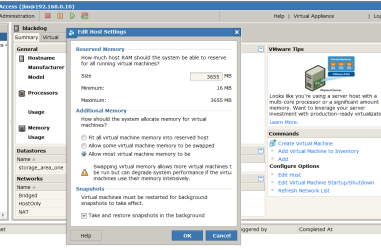
Also when defining your VM config in vmware server specify the option to ALLOW Virtual Machine swapping -- this will stop your HOST from seizing up and specify the maximum RAM you'll allow ALL Virtual machines is 1 GB. Do this in the EDIT HOST on the right hand side as shown.
Enc screenshot.
Change the values to what I've suggested.
Cheers
jimbo
Attachments
vmconfig.png
105.6 KB
· Views: 52
My Computer
Computer type
PC/Desktop
Computer Manufacturer/Model Number
Custom built, several laptops HP/ASUS
OS
Linux CENTOS 7 / various Windows OS'es and servers
However the OP's point wasn't in CREATING VM's but in the amount of resources required to RUN them (quite a different topic).
I wiouldn't worry too much about the CPU overhead -- depends on what the VM is running and the first few times its powered on it might be doing things like indexing etc.
Another point is when you create the VM spit the disk into allocate by 2GB slices rather than allocate the whole storage initially --- unless your VM is running a Data base or web server.
VM's DO EAT RAM for breakfast but running a 640 MB RAM XP vm on a 2GB machine shouldn't cause too many problems.
Cheers
jimbo
My Computer
Computer type
PC/Desktop
Computer Manufacturer/Model Number
Custom built, several laptops HP/ASUS
OS
Linux CENTOS 7 / various Windows OS'es and servers
The only thing that site does is create the config file for you and a virtual harddrive file that will expand. You set it up to boot from your ISO file and install your OS. Its very safe.
I'm not associated with the site in anyway, I've just used it a few times.
My Computer
Computer Manufacturer/Model Number
custom built
OS
Windows 7 RC 64bit
CPU
amd
Motherboard
msi
Memory
2gb
Graphics Card(s)
nvidia
Sound Card
audigy 2 zs
Monitor(s) Displays
21" lcd widescreen
Hard Drives
300gb in 3 partitions (1 for winxp, 1 for win7-64, and 1 for data)
Keyboard
old HP
Mouse
5 button
Internet Speed
cable
Other Info
xpmode installed and working :)
dualbooting with xp pro on same hdd
Something else to think about: It would appear from your specs that you system does not have the "V" chip needed to run Microsoft's new Virtual PC. Thus, you will not be able to run XPM (XP Mode). So working with VM Ware is a good way to go. There is also Virtual Box from Sun MicroSystems if you are looking for something else to play around with.
VM Ware player has a large selection of VM Players, Linux and other OS (not Mac or Windows) pre-made up on their web site. Click here for more information.
Using VMware Server 2.0 - Base OS is W7 and pre VM startup is 45% cpu. VM are 256MB vRAM, 2 vCPU and VHD is 93Hb from USB HDD. At bootup system CPU is 71% cpu.