Best way to make mirror images of your HDD you can continue backups on

MetalMan228

New member
Member
VIP
Local time
5:55 AM
Messages
265
Location
Lancaster PA
Good morning all. I have a brand new HP desktop with Win7. The HD is very noisy and i want to make a mirror image of my HDD that as time goes along i can continue backing up as i add pictures, favorites etc. I would hate to have to make backup DVD's every week or so. My questions are:

1) Do i HAVE to have aftermarket (paid) software to do this?
2) Can i just use a suitable sized external HD, utilizing the built in backup program built into my PC's Windows 7 OS?

I would rather pay for an external HDD rather than for software i may need support from to get back up and running. If my HDD fails, as soon as i install the new HDD i want to be able to very quickly upload the mirror image to the new drive and be off.

Comments, thoughts, opinions wanted!
 

My Computer My Computer

At a glance

Windows 7 professional 64 bitAMD Athlon(tm) II X2 220 Processor3GBNVIDIA GeForce 6150SE nForce 430
Computer type
PC/Desktop
Computer Manufacturer/Model Number
HP 505B B2C02UT Business Desktop
OS
Windows 7 professional 64 bit
CPU
AMD Athlon(tm) II X2 220 Processor
Motherboard
PEGATRON (2A99)
Memory
3GB
Graphics Card(s)
NVIDIA GeForce 6150SE nForce 430
Sound Card
Realtek ALC662 High Definition Audio (OEM)
Monitor(s) Displays
OEM Dell CRT
Screen Resolution
N/A
Hard Drives
(1) NCQ Smart IV 500GB Hard Drive - 7,200RPM - SATA 3.0Gb/s

HP LightScribe CD/DVD burner
PSU
OEM HP 300 watt
Case
OEM
Cooling
OEM
Keyboard
wired Logitech K120
Mouse
wired M100 mouse
Internet Speed
G5 High Speed Internet
Antivirus
ZoneAlarm Extreme Security
Browser
FF36.04 IE11
Other Info
JRivers Media Center v17

AudioQuest dragonfly DAC V1.2

Mackie MR5 Studio Monitors

My Computer My Computer

At a glance

Windows 10 Pro x64 ; Xubuntu x64Intel i7 860 @ 2.80 GHz O/C'ed to 4.0GHz16GB Corsair Vengance DDR3 @ 661 MHz Dual Cha...EVGA NVidia GTX 560 1024MB
Computer type
PC/Desktop
Computer Manufacturer/Model Number
Golden Mk. I.4
OS
Windows 10 Pro x64 ; Xubuntu x64
CPU
Intel i7 860 @ 2.80 GHz O/C'ed to 4.0GHz
Motherboard
Gigabyte P55A-UD3R Rev.1. Award BIOS F13
Memory
16GB Corsair Vengance DDR3 @ 661 MHz Dual Channel (9-9-9-24)
Graphics Card(s)
EVGA NVidia GTX 560 1024MB
Sound Card
Realtek Integrated
Monitor(s) Displays
Dual Samsung SyncMaster 2494HS
Screen Resolution
1920*1080 and 1920*1080
Hard Drives
1*Samsung 840 EVO 120GB SSD;
1*OCZ Vertex 2 60GB SSD;
2*Samsung F3 SpinPoint 1TB in RAID0;
1*Samsung F1 SpinPoint 1TB;
2*Western Digital 1TB External USB 3.0
1*Western Digital 500GB External USB 3.0
1*Seagate 500GB External USB 2.0
PSU
Thermaltake ToughPower QFan 750W
Case
Thermaltake Element S VK60001W2Z
Cooling
Corsair H60 Water Cooling, 2*230mm and 2*80mm case fans
Keyboard
Logitech G110
Mouse
Logitech MX518
Cool, i figured the external HDD was the way to go. I still would prefer to use the OEM Microsoft program though. It seems easy to use, with not a lot of variables an inexperienced user would get confused with. Plus, I could get all the killer support i needed right here on this forum!
 

My Computer My Computer

At a glance

Windows 7 professional 64 bitAMD Athlon(tm) II X2 220 Processor3GBNVIDIA GeForce 6150SE nForce 430
Computer type
PC/Desktop
Computer Manufacturer/Model Number
HP 505B B2C02UT Business Desktop
OS
Windows 7 professional 64 bit
CPU
AMD Athlon(tm) II X2 220 Processor
Motherboard
PEGATRON (2A99)
Memory
3GB
Graphics Card(s)
NVIDIA GeForce 6150SE nForce 430
Sound Card
Realtek ALC662 High Definition Audio (OEM)
Monitor(s) Displays
OEM Dell CRT
Screen Resolution
N/A
Hard Drives
(1) NCQ Smart IV 500GB Hard Drive - 7,200RPM - SATA 3.0Gb/s

HP LightScribe CD/DVD burner
PSU
OEM HP 300 watt
Case
OEM
Cooling
OEM
Keyboard
wired Logitech K120
Mouse
wired M100 mouse
Internet Speed
G5 High Speed Internet
Antivirus
ZoneAlarm Extreme Security
Browser
FF36.04 IE11
Other Info
JRivers Media Center v17

AudioQuest dragonfly DAC V1.2

Mackie MR5 Studio Monitors
If you find that easier, go for it :) The quality of the support is the same, regardless of software :)
 

My Computer My Computer

At a glance

Windows 10 Pro x64 ; Xubuntu x64Intel i7 860 @ 2.80 GHz O/C'ed to 4.0GHz16GB Corsair Vengance DDR3 @ 661 MHz Dual Cha...EVGA NVidia GTX 560 1024MB
Computer type
PC/Desktop
Computer Manufacturer/Model Number
Golden Mk. I.4
OS
Windows 10 Pro x64 ; Xubuntu x64
CPU
Intel i7 860 @ 2.80 GHz O/C'ed to 4.0GHz
Motherboard
Gigabyte P55A-UD3R Rev.1. Award BIOS F13
Memory
16GB Corsair Vengance DDR3 @ 661 MHz Dual Channel (9-9-9-24)
Graphics Card(s)
EVGA NVidia GTX 560 1024MB
Sound Card
Realtek Integrated
Monitor(s) Displays
Dual Samsung SyncMaster 2494HS
Screen Resolution
1920*1080 and 1920*1080
Hard Drives
1*Samsung 840 EVO 120GB SSD;
1*OCZ Vertex 2 60GB SSD;
2*Samsung F3 SpinPoint 1TB in RAID0;
1*Samsung F1 SpinPoint 1TB;
2*Western Digital 1TB External USB 3.0
1*Western Digital 500GB External USB 3.0
1*Seagate 500GB External USB 2.0
PSU
Thermaltake ToughPower QFan 750W
Case
Thermaltake Element S VK60001W2Z
Cooling
Corsair H60 Water Cooling, 2*230mm and 2*80mm case fans
Keyboard
Logitech G110
Mouse
Logitech MX518
The Windows7 built in imaging facility is full of surprises. It is my observation that half of the people that used it could not recover when needed. Some people got stuck so badly, that I was compelled to write a tutorial on how they could recover from that bad scenario with the use of free Macrium.

I therefore really advise that you go with the recommendations that Golden has given you - it is much safer and more reliable. In addition, I would create a seperate data partition for your use data. That would make backups easier and faster and the backup frequency on the system and the user data is usually different.

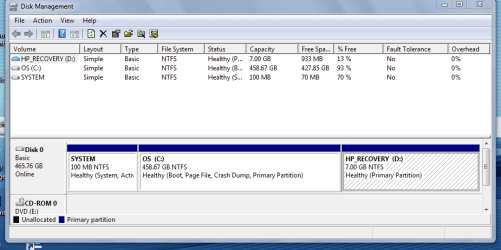
Just make sure that you check in disk management that you have a maximum of 3 primary partitions on your system. If, by chance, you have 4 primary partitions (which is quite frequent on new systems), you cannot create an additional partition before making some accomodations.
 

My Computer My Computer

At a glance

Vista, Windows7, Mint Mate, Zorin, Windows 8from 1.6GHz Duo to i7
Computer Manufacturer/Model Number
HP, Dell, Gateway, Toshiba - 4 laptops and 2 desktops
OS
Vista, Windows7, Mint Mate, Zorin, Windows 8
CPU
from 1.6GHz Duo to i7
Monitor(s) Displays
2x HP w2207
Hard Drives
5x HDD, 7x SSD, 12x Externals
Keyboard
with trackball - no mices
Mouse
Trackball mice
Internet Speed
DSL 6000
OK whs, that's great information!! If the OE program is that touchy, i will use the Macrium. And what is the purpose of the separate data partition? And what do you mean by "data"? I posted a pic with my partitions too. Thanks guys for all the help, i'm almost there!
 

Attachments

  • Capture2.PNG
    Capture2.PNG
    24 KB · Views: 14

My Computer My Computer

At a glance

Windows 7 professional 64 bitAMD Athlon(tm) II X2 220 Processor3GBNVIDIA GeForce 6150SE nForce 430
Computer type
PC/Desktop
Computer Manufacturer/Model Number
HP 505B B2C02UT Business Desktop
OS
Windows 7 professional 64 bit
CPU
AMD Athlon(tm) II X2 220 Processor
Motherboard
PEGATRON (2A99)
Memory
3GB
Graphics Card(s)
NVIDIA GeForce 6150SE nForce 430
Sound Card
Realtek ALC662 High Definition Audio (OEM)
Monitor(s) Displays
OEM Dell CRT
Screen Resolution
N/A
Hard Drives
(1) NCQ Smart IV 500GB Hard Drive - 7,200RPM - SATA 3.0Gb/s

HP LightScribe CD/DVD burner
PSU
OEM HP 300 watt
Case
OEM
Cooling
OEM
Keyboard
wired Logitech K120
Mouse
wired M100 mouse
Internet Speed
G5 High Speed Internet
Antivirus
ZoneAlarm Extreme Security
Browser
FF36.04 IE11
Other Info
JRivers Media Center v17

AudioQuest dragonfly DAC V1.2

Mackie MR5 Studio Monitors
Hi,

Having a separate partition for data (photos, music, documents etc. etc. anything that is not explicitly system information) allows you to have a small C drive (system partition), which means imaging is very fast. For example, my images take about 12 minutes, start to end. Having large partitions takes far longer, with large resultant image files.

Regards,
Golden
 

My Computer My Computer

At a glance

Windows 10 Pro x64 ; Xubuntu x64Intel i7 860 @ 2.80 GHz O/C'ed to 4.0GHz16GB Corsair Vengance DDR3 @ 661 MHz Dual Cha...EVGA NVidia GTX 560 1024MB
Computer type
PC/Desktop
Computer Manufacturer/Model Number
Golden Mk. I.4
OS
Windows 10 Pro x64 ; Xubuntu x64
CPU
Intel i7 860 @ 2.80 GHz O/C'ed to 4.0GHz
Motherboard
Gigabyte P55A-UD3R Rev.1. Award BIOS F13
Memory
16GB Corsair Vengance DDR3 @ 661 MHz Dual Channel (9-9-9-24)
Graphics Card(s)
EVGA NVidia GTX 560 1024MB
Sound Card
Realtek Integrated
Monitor(s) Displays
Dual Samsung SyncMaster 2494HS
Screen Resolution
1920*1080 and 1920*1080
Hard Drives
1*Samsung 840 EVO 120GB SSD;
1*OCZ Vertex 2 60GB SSD;
2*Samsung F3 SpinPoint 1TB in RAID0;
1*Samsung F1 SpinPoint 1TB;
2*Western Digital 1TB External USB 3.0
1*Western Digital 500GB External USB 3.0
1*Seagate 500GB External USB 2.0
PSU
Thermaltake ToughPower QFan 750W
Case
Thermaltake Element S VK60001W2Z
Cooling
Corsair H60 Water Cooling, 2*230mm and 2*80mm case fans
Keyboard
Logitech G110
Mouse
Logitech MX518
1. You could go ahead and create a data partition - you have only 3 primary partitions. Shrink a good chunk from the C partition for that and move the user data folders as explained in the tutorial.

2. As Golden explained, 2 partitions are more efficient. Another advantage is that you do not lose your data should you ever lose your system partition, you do not use your data. The system is always easy to replace (even if you have no images). But your data may be gone for good.

Another advantage is that you can backup system and data independently and depending on need. The updates of the system and the data usually do not occur at the same time. I image the data partition too, but for the data you can also use a sync program which would be faster.
 

My Computer My Computer

At a glance

Vista, Windows7, Mint Mate, Zorin, Windows 8from 1.6GHz Duo to i7
Computer Manufacturer/Model Number
HP, Dell, Gateway, Toshiba - 4 laptops and 2 desktops
OS
Vista, Windows7, Mint Mate, Zorin, Windows 8
CPU
from 1.6GHz Duo to i7
Monitor(s) Displays
2x HP w2207
Hard Drives
5x HDD, 7x SSD, 12x Externals
Keyboard
with trackball - no mices
Mouse
Trackball mice
Internet Speed
DSL 6000
So if i have this right, if i make a data partition, i will have 4 different partitions that will all back up, (but at different times) to create the "mirror image"? And, assuming the worst case scenario, (which is what i am planning for) after the new HDD is installed i can reload all four partitions, and my PC would be as if nothing was ever wrong, correct? Oh, and can i save that video to my HDD? It is very stuttery and hard to watch.
 

My Computer My Computer

At a glance

Windows 7 professional 64 bitAMD Athlon(tm) II X2 220 Processor3GBNVIDIA GeForce 6150SE nForce 430
Computer type
PC/Desktop
Computer Manufacturer/Model Number
HP 505B B2C02UT Business Desktop
OS
Windows 7 professional 64 bit
CPU
AMD Athlon(tm) II X2 220 Processor
Motherboard
PEGATRON (2A99)
Memory
3GB
Graphics Card(s)
NVIDIA GeForce 6150SE nForce 430
Sound Card
Realtek ALC662 High Definition Audio (OEM)
Monitor(s) Displays
OEM Dell CRT
Screen Resolution
N/A
Hard Drives
(1) NCQ Smart IV 500GB Hard Drive - 7,200RPM - SATA 3.0Gb/s

HP LightScribe CD/DVD burner
PSU
OEM HP 300 watt
Case
OEM
Cooling
OEM
Keyboard
wired Logitech K120
Mouse
wired M100 mouse
Internet Speed
G5 High Speed Internet
Antivirus
ZoneAlarm Extreme Security
Browser
FF36.04 IE11
Other Info
JRivers Media Center v17

AudioQuest dragonfly DAC V1.2

Mackie MR5 Studio Monitors
The system partition (the small 100MB partition), you image only once because it never changes. Keep it in a seperate folder.

The recovery partition you can also backup once but because you will have the system images, you will probably never need it.

On a regular basis you backup the C partition with the OS and your data.

On your backup drive, create a seperate folder for each partition so that you know which is which.
 

My Computer My Computer

At a glance

Vista, Windows7, Mint Mate, Zorin, Windows 8from 1.6GHz Duo to i7
Computer Manufacturer/Model Number
HP, Dell, Gateway, Toshiba - 4 laptops and 2 desktops
OS
Vista, Windows7, Mint Mate, Zorin, Windows 8
CPU
from 1.6GHz Duo to i7
Monitor(s) Displays
2x HP w2207
Hard Drives
5x HDD, 7x SSD, 12x Externals
Keyboard
with trackball - no mices
Mouse
Trackball mice
Internet Speed
DSL 6000
Alrighty, thats what i needed to find out. I guess i use Macrium with the External HDD to do the backups, so i will download that now. Thanks for all the help i got!!!
 

My Computer My Computer

At a glance

Windows 7 professional 64 bitAMD Athlon(tm) II X2 220 Processor3GBNVIDIA GeForce 6150SE nForce 430
Computer type
PC/Desktop
Computer Manufacturer/Model Number
HP 505B B2C02UT Business Desktop
OS
Windows 7 professional 64 bit
CPU
AMD Athlon(tm) II X2 220 Processor
Motherboard
PEGATRON (2A99)
Memory
3GB
Graphics Card(s)
NVIDIA GeForce 6150SE nForce 430
Sound Card
Realtek ALC662 High Definition Audio (OEM)
Monitor(s) Displays
OEM Dell CRT
Screen Resolution
N/A
Hard Drives
(1) NCQ Smart IV 500GB Hard Drive - 7,200RPM - SATA 3.0Gb/s

HP LightScribe CD/DVD burner
PSU
OEM HP 300 watt
Case
OEM
Cooling
OEM
Keyboard
wired Logitech K120
Mouse
wired M100 mouse
Internet Speed
G5 High Speed Internet
Antivirus
ZoneAlarm Extreme Security
Browser
FF36.04 IE11
Other Info
JRivers Media Center v17

AudioQuest dragonfly DAC V1.2

Mackie MR5 Studio Monitors
Back
Top