Beware KB3139929

Seffrid

New member
Power User
VIP
Local time
6:02 AM
Messages
336
Those not intending to upgrade to Windows 10 should note that this week's Cumulative Security Update for Internet Explorer is understood (from MS's own documentation) to have an integral non-security patch embedded in it which provides "Updated Internet Explorer 11 capabilities to upgrade Windows 8.1 and Windows 7". That integral patch (KB3146449) is not separately listed when installed and cannot therefore be removed.

IE patch KB 3139929: When a security update is not a security update @ AskWoody

Security Update MS16-023 installs new "Get Windows 10" functionality - gHacks Tech News
 

My Computer

Computer type
PC/Desktop
Computer Manufacturer/Model Number
Custom build by PC Specialist
OS
Windows 7 Home Premium 64
CPU
AMD Phenom II X4 955
Motherboard
Asus M4A78T-E
Memory
8GB Corsair XMS3 DDR3
Graphics Card(s)
Gigabyte Geforce GTX 960 2GB
Sound Card
SB Audigy
Monitor(s) Displays
BenQ 24"
Screen Resolution
1920 x 1080
Hard Drives
500GB Serial ATA
PSU
1010W Quiet Quad Rail
Case
Antec 900
Cooling
Fenrir
Keyboard
Corsair
Mouse
Logitech
Internet Speed
20mbps
Antivirus
MSE plus MBAM 2.x Free
Browser
Chrome
Other Info
Second desktop different spec but similar level.
I stopped running any MS updates. They seem to really try to trick us with their updates. My system works, so why do I need updates.
 

My Computer

Computer Manufacturer/Model Number
HP, Dell, Gateway, Toshiba - 4 laptops and 2 desktops
OS
Vista, Windows7, Mint Mate, Zorin, Windows 8
CPU
from 1.6GHz Duo to i7
Monitor(s) Displays
2x HP w2207
Hard Drives
5x HDD, 7x SSD, 12x Externals
Keyboard
with trackball - no mices
Mouse
Trackball mice
Internet Speed
DSL 6000
I stopped running any MS updates. They seem to really try to trick us with their updates. My system works, so why do I need updates.

While I haven't yet joined you in giving up on MS updates, I certainly think we are fast heading into a situation in which the perceived threat from malware is going to be less than the perceived threat from Microsoft, and at that stage a lot of people will be joining you!
 

My Computer

Computer type
PC/Desktop
Computer Manufacturer/Model Number
Custom build by PC Specialist
OS
Windows 7 Home Premium 64
CPU
AMD Phenom II X4 955
Motherboard
Asus M4A78T-E
Memory
8GB Corsair XMS3 DDR3
Graphics Card(s)
Gigabyte Geforce GTX 960 2GB
Sound Card
SB Audigy
Monitor(s) Displays
BenQ 24"
Screen Resolution
1920 x 1080
Hard Drives
500GB Serial ATA
PSU
1010W Quiet Quad Rail
Case
Antec 900
Cooling
Fenrir
Keyboard
Corsair
Mouse
Logitech
Internet Speed
20mbps
Antivirus
MSE plus MBAM 2.x Free
Browser
Chrome
Other Info
Second desktop different spec but similar level.
Well, that is a new low for Microsoft What a bunch of miserable, misbegotten, "jerks" (I have much better terms but Mama told me not to use those words and forum rules forbid them)
 
Last edited by a moderator:

My Computer

Computer type
PC/Desktop
Computer Manufacturer/Model Number
Custom Build
OS
Win 7 Ultimate 64 bit
CPU
Intel i7-3930K
Motherboard
ASUS P9X79 WS
Memory
Kingston HyperX Genesis 32GB Kit (8x4GB Modules) 1600MHz DDR
Graphics Card(s)
MSI R7850 Twin Frozr 2GD5/OC Radeon HD 7850 2GB 256-bit GDDR
Sound Card
Asus Xonar Essence STX
Monitor(s) Displays
3x Asus VG248QE 24", Vizio 32" TV
Screen Resolution
1920 x 1080, ?
Hard Drives
Samsung 128GB 840 Pro SSD (1),
Samsung 4TB 850 EVO SSDs (4)
Samsung 4TB 850 EVO SSDs (16) external backup drives used in 2.5" hot swap bays in the computer.
PSU
Corsair HX750w
Case
Antec Two Hundred v2 (modified)
Cooling
Cooler Master GeminII S524 120mm (fan replaced with a 140mm)
Keyboard
Logitech G510s
Mouse
Logitech M525 (two in use)
Internet Speed
=< 32Mbps down, 8Mbps up
Antivirus
AVAST!, MBAM, SAS, Spybot S&D (all but MBAM free) Glary Util
Browser
IE11
Other Info
LSI 9211-8i HBA card (8 SATA III ports), 2.5" & 3.5" Hot Swap Bays, HooToo HT-CR001 PCI-E to USB 3.0 Internal Hub + 6 Slot Card Reader, and LG Model CH12LS28 BD-ROM Optical Drive. Also, ScanSnap S1500 ADF duplexing scanner, Canon 9000F flat bed scanner, Corsair SP2500 2.1 speakers, Samsung CLP 415nw laser color printer, Cyberpower PP2200SW UPS
Well, that is a new low for Microsoft What a bunch of miserable, misbegotten, "jerks" (I have much better terms but Mama told me not to use those words and forum rules forbid them)!
Good language. :thumbsup:
 

My Computer

Computer Manufacturer/Model Number
HP, Dell, Gateway, Toshiba - 4 laptops and 2 desktops
OS
Vista, Windows7, Mint Mate, Zorin, Windows 8
CPU
from 1.6GHz Duo to i7
Monitor(s) Displays
2x HP w2207
Hard Drives
5x HDD, 7x SSD, 12x Externals
Keyboard
with trackball - no mices
Mouse
Trackball mice
Internet Speed
DSL 6000
Can't wait to see what they hide in the Malicious Software Removal Tool next patch Tuesday; maybe the entire W10 upgrade.
 

My Computer

Computer type
PC/Desktop
Computer Manufacturer/Model Number
Custom build
OS
W7Pro/64
I'm not sure how Microsoft did it but but after the updates I had GWX reservation in the registry. It wasn't there before the updates.
I check often for such things.
I have removed it again.
 

My Computer

Computer type
PC/Desktop
Computer Manufacturer/Model Number
Home made Desktop
OS
Windows 10 Pro. 64/ version 1709 Windows 7 Pro/64
CPU
Intel i7-6800K @ 4.3
Motherboard
ASUS X-99 Deluxe II
Memory
Corsair Platinum 16 gig @2400
Graphics Card(s)
EVGA GTX 1070 OC
Monitor(s) Displays
Asus 27" LED LCD/VE278Q
Screen Resolution
1920-1080 or 1280-720 HDMI
Hard Drives
INTEL SSD 730-240 Gb Sata 3.0/
PSU
EVGA Platium 1200W
Case
Phanteks Luxe Tempered Glass 8 fans/ one radiator
Cooling
XSPC/ Water Cooled CPU
Keyboard
Das 4 Professional
Mouse
Logitech M705/MX Anywhere 2-S
Internet Speed
100 mbits
Antivirus
Microsoft Security Essentials/ Malwarebytes Premium 3.0/ SAS
Browser
I.E. 11 default/Firefox/ ISP Time Warner Cable/Spectrum
Other Info
LG BluRay Burner/
Sound system-KLipsch-THX/
Icy Dock ssd Hot Swap bays.
Thanks for the heads up. So... now we have to start carefully checking security updates every month too I guess?

Is this just an advertisement for Windows 10 where you can just say "no thanks" or is it a non stop nag (which will probably download W10 in the background then try and trick you into installing it?)

I don't use IE but I did open it once a month or so back and the first thing that popped up was an almost full screen ad for W10 which you can just close and it doesn't bother you again. I also don't have any of the W10 update nag, telemetry, Windows Update Client, etc. updates installed.

Oh, and if anyone's around that uses Windows 8.1 - if you do a clean install these days make sure you do it offline (and make sure you turn off automatic updates before you go online).

I did a clean install of 8.1 a week back (on a separate SSD) and just before the end of the install it said "Getting Critical Updates". After the install finished and Windows booted up, 5 seconds after the desktop appeared a huge "Microsoft recommends updating to Windows 10" ad popped up.

You can just click "no thanks" but one has to wonder whether it might have been doing 'something else' in the background. I've since wiped 8.1 from that drive.

It's really becoming a battle to avoid W10, isn't it?
 

My Computer

Computer type
PC/Desktop
Computer Manufacturer/Model Number
Custom Build
OS
Win 7 Professional 64 (Main PC)/Win 7 Home Premium 32 (Laptop)
CPU
Intel Core i3 4160 @ 3.60GHz
Motherboard
ASUSTeK COMPUTER INC. H81M-PLUS (SOCKET 1150)
Memory
8.00GB Dual-Channel DDR3 @ 799MHz
Graphics Card(s)
2047MB NVIDIA GeForce GT 610 (Gigabyte)
Monitor(s) Displays
BenQ GL2460
Screen Resolution
1920x1080
Hard Drives
232GB Samsung SSD 840 EVO 250GB ATA Device (SSD) x3
2 external spinners - 4TB and 2TB
Antivirus
MSE
Browser
Pale Moon
I imagine it's just an addition to the home page if you use msn.com which has always popped up with win-10 stuff lately.
It's simple don't use ie11 or change your home page.
I opened ie11 with the update installed
It opens to https://google.com/ with nothing about win-10 although google always has download Chrome :p
 

My Computer

Computer type
PC/Desktop
Computer Manufacturer/Model Number
Custom assembled by me :}
OS
Win-7-Pro64bit 7-H-Prem-64bit
CPU
i7-5930K 2nd i9-9940x both water blocked VRM's too
Motherboard
ASUS SABERTOOTH X99 2nd ASUS x299 Apex
Memory
Trident-z 3200C14 2nd Trident-z 3600C16
Graphics Card(s)
EVGA 1080ti ftw3 2nd Titan Xp both water blocked
Sound Card
Built-in Realtek
Monitor(s) Displays
1-AOC G2460PG 24"G-Sync 144Hz/ 2nd 1-ASUS VG248QE 24" 144Hz
Screen Resolution
1920 x 1080 144Hz
Hard Drives
2-Samsung M.2 Evo & Evo Plus
2-Samsung 850 EVO 500GB SSD's/ 3-2.5 W.D. Black 1tb-&3-1tb/3-3.5 WD Black 1tb hdd's
PSU
EVGA SuperNOVA 1000-P2 2nd 1200-P2
Case
2-Corsair Obsidian Series 450D Black ATX Mid Tower
Cooling
Custom water loops
Keyboard
Logitech G710+/ 2nd Logitech G910
Mouse
2-RedDragon M901 Perdition 16400 dpi Gaming mouse = wired
Internet Speed
Comcast Ping 19ms 89.31mbps download speed 6.12mbps upload
Antivirus
Malwarebytes Pro/ Superantispyware Pro
Browser
FireFox & Pale moon
Other Info
2nd ASUS X299 Apex/Intel i9-9940x with Custom water loop/7H-Prem-x64/Corsair 450D case/Ram Trident-z 3600C16 4x8gb / Samsung970Evo plus 500gb SSD/Dual ssd EZ swap evo/PSU EVGA SuperNova 1200w-P2 80+Platinum/GPU Titan Xp /8-ML-140 on push-pull on 2-280GTX rads
Well, that is a new low for Microsoft What a bunch of miserable, misbegotten, "jerks" (I have much better terms but Mama told me not to use those words and forum rules forbid them)

Looks like the Thought Police has struck. Nothing was misspelled; Nigel just doesn't like my spelling of Microsoft.
 

My Computer

Computer type
PC/Desktop
Computer Manufacturer/Model Number
Custom Build
OS
Win 7 Ultimate 64 bit
CPU
Intel i7-3930K
Motherboard
ASUS P9X79 WS
Memory
Kingston HyperX Genesis 32GB Kit (8x4GB Modules) 1600MHz DDR
Graphics Card(s)
MSI R7850 Twin Frozr 2GD5/OC Radeon HD 7850 2GB 256-bit GDDR
Sound Card
Asus Xonar Essence STX
Monitor(s) Displays
3x Asus VG248QE 24", Vizio 32" TV
Screen Resolution
1920 x 1080, ?
Hard Drives
Samsung 128GB 840 Pro SSD (1),
Samsung 4TB 850 EVO SSDs (4)
Samsung 4TB 850 EVO SSDs (16) external backup drives used in 2.5" hot swap bays in the computer.
PSU
Corsair HX750w
Case
Antec Two Hundred v2 (modified)
Cooling
Cooler Master GeminII S524 120mm (fan replaced with a 140mm)
Keyboard
Logitech G510s
Mouse
Logitech M525 (two in use)
Internet Speed
=< 32Mbps down, 8Mbps up
Antivirus
AVAST!, MBAM, SAS, Spybot S&D (all but MBAM free) Glary Util
Browser
IE11
Other Info
LSI 9211-8i HBA card (8 SATA III ports), 2.5" & 3.5" Hot Swap Bays, HooToo HT-CR001 PCI-E to USB 3.0 Internal Hub + 6 Slot Card Reader, and LG Model CH12LS28 BD-ROM Optical Drive. Also, ScanSnap S1500 ADF duplexing scanner, Canon 9000F flat bed scanner, Corsair SP2500 2.1 speakers, Samsung CLP 415nw laser color printer, Cyberpower PP2200SW UPS
I stopped running any MS updates. They seem to really try to trick us with their updates. My system works, so why do I need updates.

I've been wondering for quite some time now if these constant updates are just a ploy so that MS has never ending control over your Windows installations.

I mean... come on... they've been pushing out Windows for over 30 years. Surely there can't be THAT many security issues left that require numerous patches every month. And, we all know that every 'new' version of Windows isn't really new. Most of it is the old code from previous versions with slight modifications and additions.

Reminds me of one of the James Bond movies (can't remember which one, was in the late 90's I think) where a fictional software company had just produced a new version of their operating system and one of the workers commented to the boss that it includes enough bugs to ensure people keep updating for years to come.

I'm sure we don't need more than one guess to figure out who they were having a go at.
 

My Computer

Computer type
PC/Desktop
Computer Manufacturer/Model Number
Custom Build
OS
Win 7 Professional 64 (Main PC)/Win 7 Home Premium 32 (Laptop)
CPU
Intel Core i3 4160 @ 3.60GHz
Motherboard
ASUSTeK COMPUTER INC. H81M-PLUS (SOCKET 1150)
Memory
8.00GB Dual-Channel DDR3 @ 799MHz
Graphics Card(s)
2047MB NVIDIA GeForce GT 610 (Gigabyte)
Monitor(s) Displays
BenQ GL2460
Screen Resolution
1920x1080
Hard Drives
232GB Samsung SSD 840 EVO 250GB ATA Device (SSD) x3
2 external spinners - 4TB and 2TB
Antivirus
MSE
Browser
Pale Moon
"I spent most of the night trying to replicate this behavior -- a blue banner on new tabs in IE11 with "Microsoft recommends upgrading to Windows 10" -- and couldn't get it to trigger. If you can, I'd appreciate your shooting an email with a screenshot"

- Woody Leonhard


Reading the article made me laugh initially. Here you have Microsoft injecting nagware masked in their important updates as a strategy in pushing W10, yet they can't even get it working properly; at least that was the case for Woody (and me).

Anyway, I think you need KB3123862 installed in addition to KB3146449 via the IE11 security update to get the banner to pop up when opening a new tab. I'm guessing Woody's problem in replicating the behavior is not having W10-related KB3123862 installed, which appeared sometime last week, and what I assume was consequently hidden.

So, even if you downloaded the IE11 cumulative update it won't trigger the banner when opening a new tab.
 
Last edited by a moderator:

My Computer

Computer type
PC/Desktop
OS
Windows 7 Home 64-bit
Well, that is a new low for Microsoft What a bunch of miserable, misbegotten, "jerks" (I have much better terms but Mama told me not to use those words and forum rules forbid them)

Looks like the Thought Police has struck. Nothing was misspelled; Nigel just doesn't like my spelling of Microsoft.
Stop bleating Debbie.
 

My Computer

Computer type
PC/Desktop
Computer Manufacturer/Model Number
Golden Mk. I.4
OS
Windows 10 Pro x64 ; Xubuntu x64
CPU
Intel i7 860 @ 2.80 GHz O/C'ed to 4.0GHz
Motherboard
Gigabyte P55A-UD3R Rev.1. Award BIOS F13
Memory
16GB Corsair Vengance DDR3 @ 661 MHz Dual Channel (9-9-9-24)
Graphics Card(s)
EVGA NVidia GTX 560 1024MB
Sound Card
Realtek Integrated
Monitor(s) Displays
Dual Samsung SyncMaster 2494HS
Screen Resolution
1920*1080 and 1920*1080
Hard Drives
1*Samsung 840 EVO 120GB SSD;
1*OCZ Vertex 2 60GB SSD;
2*Samsung F3 SpinPoint 1TB in RAID0;
1*Samsung F1 SpinPoint 1TB;
2*Western Digital 1TB External USB 3.0
1*Western Digital 500GB External USB 3.0
1*Seagate 500GB External USB 2.0
PSU
Thermaltake ToughPower QFan 750W
Case
Thermaltake Element S VK60001W2Z
Cooling
Corsair H60 Water Cooling, 2*230mm and 2*80mm case fans
Keyboard
Logitech G110
Mouse
Logitech MX518
About a month ago, Windows 7 started getting very unstable, crashing a lot. It would crash mostly in the morning, in the first 30 mins of use. It was not dependent upon my shutting it down overnight. I had not changed my configuration at all; so, I started suspecting something was being installed automatically.

I had already (for the umpteenth time) uninstalled and hidden KB2952664, KB2990214, KB3021917, KB3035583. Of course, like a bad penny, they always came back!

So, I disabled Automatic Updates a week ago and my system stabilized and stayed stable until...

I manually performed Windows Update last night!!

That is what led me to this forum. Based on what I read here today, I did a system restore to before the updates and I will follow the guidance here closely to see what, if any, of the updates I will install on my machine. I completely agree that Windows 10 is being crammed down our throats and I am not in agreement with that. That is horrible practice of Microsoft and I have considered going to Linux because of it. Because, if history is any indicator, the pressure will persist and likely increase over time.

I am concerned that unwanted updates have already been installed in the past months. If anyone can tell me what the most problematic ones are and if they can be uninstalled, I would be most grateful.

Thanks for being here!
 

My Computer

Computer type
PC/Desktop
Computer Manufacturer/Model Number
Dell XPS Studio 8000
OS
Windows 7 Home Premium 64-bit
CPU
Intel Core i5 [email protected]
Memory
8GB
Hard Drives
Hitachi HDT721064SLA360 ATA
Antivirus
AVG
Browser
Mozilla Firefox
Yes well i just posted in another thread I only install update for Office and >NET stuff and now I think I shall not install anything after reading this thread.

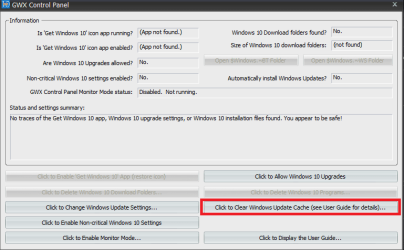
What I am doing besides using the settings for updates - let me choose etc is running the GWX Control Panel and I was able to delete GWX from the registry but it has finally been blocked.

The panel if anyone has not heard of it is this Ultimate Outsider - Software Downloads < make sure to use only the control panel the other stuff is naggy and I keep the icon on my desktop and I regularly use the button in my pic. Plus I have the registry set to disable via Option 1 in this Upgrade to Windows 10 Update - Enable or Disable in Windows 7 or 8.1 - Windows 10 Forums

For what it is worth it is all about money pure and simple and yes I am also using Linux Mint to on my secondary laptop and will have it on one of my deskies soon too at least it avoids this bullying by M$.
 

Attachments

  • GWX CONTROL.PNG
    GWX CONTROL.PNG
    14.8 KB · Views: 4

My Computer

Computer type
PC/Desktop
Computer Manufacturer/Model Number
Own build (new) Desk1 / Asus ROG Win 7 / Desk2 1st build
OS
Desk1 7 Home Prem / Desk2 10 Pro / Main lap Asus ROG 10 Pro 2 laptop Toshiba 7 Pro Asus P2520 7 & 10
CPU
Desk1 i5 3750K / Laptop i7 GTX 860M / Desk2 i5 2500
Motherboard
Desk1 Asus P877-V / Desk2 Gigabyte H67 UD3H / Laptop ?
Memory
Desk1 8GB (1866) / Desk2 16GB (1333) / Laptop 8Gb DDR3
Graphics Card(s)
Desk 1& 2NVidia GTX 650 & Laptops on board Intel
Sound Card
Desk 1 & 2 -XONAR DG Realtek High Def audio Laptop
Monitor(s) Displays
Desk 1 Benq HD 2450 / Desk2 Philips 24" / Laptop 17.5"
Screen Resolution
1920x1080 D1 & D2 & Laptop 1
Hard Drives
Desk1 Samsung 120GB 830 SSD
Asus ROG 256GB 850 Pro SSD
Desk2 Samsung 840 256 SSD
Toshiba 120GB EVO
PSU
Desk 1 Corsair HX 1050/ Laptop ? / Desk 2 Corsair HX 650
Case
Desk 1 Cooler HAF XM ? Toshiba laptop / Desk2 Coolermaster
Cooling
Fans on all Desk1 -2 Desk2 - all Coolermasters 5 Laptop ?
Keyboard
Desk 1 MS Sidewinder X6 Desk 2 MS Sidewinder X 4
Mouse
Desk 1&2 - Gigabyte MS 900 gamer - laptop - Logitec wireless
Internet Speed
ADSL2+
Other Info
One other Desktop (tester) and spare Toshba laptop both with SSD's
Running Kaspersky 2016 ISS on all machines config'd identically
Logitec audio stereo systems on each machine (x3)
Canon MG5250MFC
Router/modem TP-Link running WPA2SK
I'm beginning to think the culprit of this is KB3123862. The files it replaces are things like explorerframe.dll and shell32.dll. There has been no clear explanation on what it actually does and nobody seems to know.
I've installed all the latest updates including the IE11 updates and used IE (for the first time in years) and I don't see any Windows 10 banner. But I have skipped KB3123862.
Anyone else have that update installed? MS can inject as many W10 adverts as they want provided it stays in IE which I don't use anyway. I don't want it affecting other parts of the OS though. That will be extremely annoying! :mad:
 

My Computer

Computer type
PC/Desktop
Computer Manufacturer/Model Number
Custom Build
OS
Win 7 Ultimate, Win 8.1 Pro, Linux Mint 19 Cinnamon (All 64-Bit)
CPU
Intel i5 4690K
Motherboard
Gigabyte Z97X-UD3H
Memory
Corsair Vengeance LP 32GB DDR3
Graphics Card(s)
MSI GTX 1060 GAMING X 6GB
Sound Card
Onboard
Hard Drives
Samsung 850 EVO 250GB SSD (x2)
Samsung 860 EVO 1TB SSD (x2)
Crucial MX300 525GB SSD
WD Blue 2TB 5400rpm Intellipark Disabled (x2)
PSU
Corsair HX750i
Case
Phanteks Enthoo Pro
Cooling
CM Hyper 212 EVO on CPU, Noctua Redux NF-P14S 1500rpm (x6)
Keyboard
Corsair K70 RGB LUX
Mouse
Corsair Sabre RGB
Antivirus
Avast Free, MalwareBytes, SAS & CryptoPrevent
Browser
Chrome
Other Info
StarTech PEXESAT322I 2 Port PCI-E SATA Card
ASUS PCE-AC56 Dual-band AC1300 Wireless Card
Akasa FC.Six Manual Fan Controller
And a Partridge in a Pear Tree!
Brds mate there is an awful lot of references through many threads in here that list updates that have been put out and now it seems changed either by number or embedding in updates for seemingly "innocuous" updates that are aimed at getting 10 onto our machines come hell or high water.

I know some members who have kept track of each and almost every one of them and personally I have just decided to not update at all unless someone can prove to me that by not installing a said update I am at risk of whatever disaster overtaking me.

Microsoft has in my mind gone a little too far in what they are doing to get people to use 10 when it is plainly clear to me that there are a lot of folks who just do not like it and you can see in the number of posts for help to get from 10 to 7 just how many there are.

Why they just could not leave 7 to live out it's days in peace I shall never know except that they just want to make even more money and take ownership of us by not giving us that freedom of choice. I for one do not think that would be an unreasonable ask.
 

My Computer

Computer type
PC/Desktop
Computer Manufacturer/Model Number
Own build (new) Desk1 / Asus ROG Win 7 / Desk2 1st build
OS
Desk1 7 Home Prem / Desk2 10 Pro / Main lap Asus ROG 10 Pro 2 laptop Toshiba 7 Pro Asus P2520 7 & 10
CPU
Desk1 i5 3750K / Laptop i7 GTX 860M / Desk2 i5 2500
Motherboard
Desk1 Asus P877-V / Desk2 Gigabyte H67 UD3H / Laptop ?
Memory
Desk1 8GB (1866) / Desk2 16GB (1333) / Laptop 8Gb DDR3
Graphics Card(s)
Desk 1& 2NVidia GTX 650 & Laptops on board Intel
Sound Card
Desk 1 & 2 -XONAR DG Realtek High Def audio Laptop
Monitor(s) Displays
Desk 1 Benq HD 2450 / Desk2 Philips 24" / Laptop 17.5"
Screen Resolution
1920x1080 D1 & D2 & Laptop 1
Hard Drives
Desk1 Samsung 120GB 830 SSD
Asus ROG 256GB 850 Pro SSD
Desk2 Samsung 840 256 SSD
Toshiba 120GB EVO
PSU
Desk 1 Corsair HX 1050/ Laptop ? / Desk 2 Corsair HX 650
Case
Desk 1 Cooler HAF XM ? Toshiba laptop / Desk2 Coolermaster
Cooling
Fans on all Desk1 -2 Desk2 - all Coolermasters 5 Laptop ?
Keyboard
Desk 1 MS Sidewinder X6 Desk 2 MS Sidewinder X 4
Mouse
Desk 1&2 - Gigabyte MS 900 gamer - laptop - Logitec wireless
Internet Speed
ADSL2+
Other Info
One other Desktop (tester) and spare Toshba laptop both with SSD's
Running Kaspersky 2016 ISS on all machines config'd identically
Logitec audio stereo systems on each machine (x3)
Canon MG5250MFC
Router/modem TP-Link running WPA2SK
I hear ya I have already had to reinstall my laptop because of a corrupted store
Resetting did nothing neither did 3 system images all resulted in the same outcome corrupt.
I believe it happened and I pretty much knew it would by hiding kb3112343 so called "Important"
https://support.microsoft.com/en-us/kb/3112343
 

My Computer

Computer type
PC/Desktop
Computer Manufacturer/Model Number
Custom assembled by me :}
OS
Win-7-Pro64bit 7-H-Prem-64bit
CPU
i7-5930K 2nd i9-9940x both water blocked VRM's too
Motherboard
ASUS SABERTOOTH X99 2nd ASUS x299 Apex
Memory
Trident-z 3200C14 2nd Trident-z 3600C16
Graphics Card(s)
EVGA 1080ti ftw3 2nd Titan Xp both water blocked
Sound Card
Built-in Realtek
Monitor(s) Displays
1-AOC G2460PG 24"G-Sync 144Hz/ 2nd 1-ASUS VG248QE 24" 144Hz
Screen Resolution
1920 x 1080 144Hz
Hard Drives
2-Samsung M.2 Evo & Evo Plus
2-Samsung 850 EVO 500GB SSD's/ 3-2.5 W.D. Black 1tb-&3-1tb/3-3.5 WD Black 1tb hdd's
PSU
EVGA SuperNOVA 1000-P2 2nd 1200-P2
Case
2-Corsair Obsidian Series 450D Black ATX Mid Tower
Cooling
Custom water loops
Keyboard
Logitech G710+/ 2nd Logitech G910
Mouse
2-RedDragon M901 Perdition 16400 dpi Gaming mouse = wired
Internet Speed
Comcast Ping 19ms 89.31mbps download speed 6.12mbps upload
Antivirus
Malwarebytes Pro/ Superantispyware Pro
Browser
FireFox & Pale moon
Other Info
2nd ASUS X299 Apex/Intel i9-9940x with Custom water loop/7H-Prem-x64/Corsair 450D case/Ram Trident-z 3600C16 4x8gb / Samsung970Evo plus 500gb SSD/Dual ssd EZ swap evo/PSU EVGA SuperNova 1200w-P2 80+Platinum/GPU Titan Xp /8-ML-140 on push-pull on 2-280GTX rads
I think you need KB3123862 installed in addition to KB3146449 via the IE11 security update to get the banner to pop up when opening a new tab. I'm guessing Woody's problem in replicating the behavior is not having W10-related KB3123862 installed, which appeared sometime last week, and what I assume was consequently hidden.

So, even if you downloaded the IE11 cumulative update it won't trigger the banner when opening a new tab.

Thanks for the suggestion! I've been looking high and low for a screenshot of this phenomenon. Lots of people have sent me pictures of msn.com throwing up (I use the term intentionally) a "Microsoft recommends upgrading to Windows 10" ad. But msn.com has been running those forever.

I tried installing KB 3123862, as you recommend, and haven't seen an ad on a new tab yet. :cry:

I asked Microsoft about it and got the usual "we have nothing further to say" response. Not unexpected.

I'm still looking! Please, if any of you see a "Get Windows 10" ad on a new tab, shoot a picture.
 
Last edited by a moderator:

My Computer

Computer type
PC/Desktop
OS
Many OSs on multiple platforms
I'm beginning to think the culprit of this is KB3123862. (...)
I've installed all the latest updates including the IE11 updates and used IE (for the first time in years) and I don't see any Windows 10 banner. But I have skipped KB3123862.

Same here, KB3123862 skipped and hidden, and latest cumulative IE update installed.
Nothing suspicious like win10 banners or ads when launching IE.
 

My Computer

Computer type
PC/Desktop
Computer Manufacturer/Model Number
built by myself
OS
Windows 7 Ultimate x64 SP1
CPU
Intel Core i5-3570K @ 4GHz
Motherboard
Asus P8Z77-V Deluxe
Memory
Corsair Vengeance DDR3 8 GB Dual Channel
Graphics Card(s)
Asus Radeon RX 570 Strix OC 4GB
Monitor(s) Displays
LG 24BK550Y-B IPS
Screen Resolution
1920x1080
Hard Drives
SSD SAMSUNG 860 EVO SATA III 2.5'' 500GB
SSD CRUCIAL MX500 SATA III 2.5'' 250GB
Seagate ST1000DM003 SATA III
TOSHIBA HDWD110 SATA III
PSU
Corsair HX750i
Case
Corsair Carbide 400R
Cooling
CPU Cooler Master Hyper 412 Slim
Keyboard
Logitech K200
Mouse
Logitech G400
Antivirus
Norton Security
Browser
Firefox
Back
Top