BF2 and PunkBuster

Kinematic

New member
Local time
1:10 AM
Messages
13
Location
Some where between earth and space.
I have recently installed the 64bit version of Win7 which I received through "House Party." Here's my issue, when I used the 32 bit version and after updating PB, the game was working great. Now after updating PB on the 64 bit version I'm getting kicked out before I even select my spawn point. I did a clean install, I have updated all of my drivers or at least those that are Win7/Vista compatible. I'm at a loss, and I really don't want to go back to the 32 bit version.
 
Last edited:

My Computer

Computer Manufacturer/Model Number
HP G60
OS
Windows 7 Ultimate 64-bit (6.1, Build 7600) (7600.win7_rtm.090713-1255)
CPU
AMD Turion Dual-Core RM-75 (2 CPUs), ~2.2GHz
Memory
4096MB RAM
Graphics Card(s)
NVIDIA GeForce 8200M G
Sound Card
Conexant High Definition SmartAudio 221
Monitor(s) Displays
Generic PnP Monitor
Screen Resolution
1366 x 768 (32 bit) (60Hz)
Hard Drives
Hitachi HTS545032B9A300 ATA 300 GB
I take it by this,

Last edited by Kinematic; 8 Hours Ago at 11:45 PM.. Reason: Apparently I never installed PB.....
that it is working now? And if it isn't working what is the exact kick message?
 

My Computer

Computer type
PC/Desktop
Computer Manufacturer/Model Number
Me
OS
Win 7 Ultimate x64
CPU
FX-8350 @ 4.6 GHz so far
Motherboard
Asus M5A97 EVO
Memory
ADATA XPG V1 Series Black 8GB DDR3 1600
Graphics Card(s)
Sapphire R9 270x Dual-X
Sound Card
Xonar DGX w/ Corsair Vengence 1300
Monitor(s) Displays
Acer S232HL Abid
Screen Resolution
1920x1080
Hard Drives
120 GB OCZ Vertex 3
500 GB Seagate 7200.12
PSU
Antec Earthwatts 650W Green
Case
Antec Three Hundred
Cooling
Cooler Master 212 EVO
Keyboard
Logitech G510
Mouse
Logitech G500s
Internet Speed
35000/3000
for anyone else with pb problems, you need to manually download and install (as admin) the punkbuster services, using pbsvc

then you have to update for your specific game using pbsetup

happy gaming! :)
 

My Computer

Computer Manufacturer/Model Number
mickey megabyte 1234
OS
ultimate 64 sp1
CPU
i5 2500K [email protected]
Motherboard
MSI P67A-GD53
Memory
8 gigs GSkill Ripjaws 1600
Graphics Card(s)
amd hd6950
Sound Card
creative x-fi gamer
Monitor(s) Displays
samsung 24"
Screen Resolution
1920x1080
Hard Drives
ocz vertex 2e 60 gig, samsung f3 1tb, buffalo 2tb ext
PSU
antec 550
Case
antec three hundred
Cooling
i'm a cooling fan
Keyboard
saitek eclipse ii
Mouse
logitech g3
Internet Speed
about 4 Mbps
Other Info
i love win7
Except in the case of BF:H
WHICH if I recall recent events is STILL unsupportive of Win7 (the losers)
 

My Computer

OS
Win7 7100 / WinXP SP2
Except in the case of BF:H
WHICH if I recall recent events is STILL unsupportive of Win7 (the losers)

Um its an EA product, just think of it this way we finally got a patch for BF2 which says it now supports Vista after how many years??
 

My Computer

Computer Manufacturer/Model Number
Custom Build
OS
Windows 7 Ultimate x64 SP1
CPU
AMD Phenom II 1090 3.2 six core
Motherboard
MSI 890FXA-GD65
Memory
16 gig DDR3
Graphics Card(s)
MSI R6950 2gig
Sound Card
on board
Monitor(s) Displays
Acer 23inch led
Screen Resolution
1900x1080 widescreen
Hard Drives
Seagate 1tb SATA6
2x 1tb HITACHI Deskstar
PSU
CORSAIR Enthusiast Series TX750 V2 750W
Case
CoolMaster HAF 922
Cooling
Box AMD Heatsink/Fan
Internet Speed
Cable 12Mbps/3Mbps
I take it by this,

Last edited by Kinematic; 8 Hours Ago at 11:45 PM.. Reason: Apparently I never installed PB.....
that it is working now? And if it isn't working what is the exact kick message?

It was working, for a minute. The kick message was RunPB.exe fail. Which I took as PB never getting installed. So I uninstalled, ran ccleaner, rebooted and tried installing again. In which I got several failed attempts at installing and two BSOD's!!
At this time I now have BF2 installed, but when trying to patch to 1.41 I get "patching failed" error.
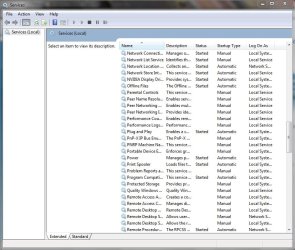
When looking at the services.msc Punk Buster doesn't even show up....
 

Attachments

  • Capture.jpg
    Capture.jpg
    89.1 KB · Views: 260

My Computer

Computer Manufacturer/Model Number
HP G60
OS
Windows 7 Ultimate 64-bit (6.1, Build 7600) (7600.win7_rtm.090713-1255)
CPU
AMD Turion Dual-Core RM-75 (2 CPUs), ~2.2GHz
Memory
4096MB RAM
Graphics Card(s)
NVIDIA GeForce 8200M G
Sound Card
Conexant High Definition SmartAudio 221
Monitor(s) Displays
Generic PnP Monitor
Screen Resolution
1366 x 768 (32 bit) (60Hz)
Hard Drives
Hitachi HTS545032B9A300 ATA 300 GB
I wouldn't even bother with the 1.41 patch use the 1.5. I would head to evenbalances website and run the installer from there with admin rights. That way its the newest version.
 

My Computer

Computer Manufacturer/Model Number
Custom Build
OS
Windows 7 Ultimate x64 SP1
CPU
AMD Phenom II 1090 3.2 six core
Motherboard
MSI 890FXA-GD65
Memory
16 gig DDR3
Graphics Card(s)
MSI R6950 2gig
Sound Card
on board
Monitor(s) Displays
Acer 23inch led
Screen Resolution
1900x1080 widescreen
Hard Drives
Seagate 1tb SATA6
2x 1tb HITACHI Deskstar
PSU
CORSAIR Enthusiast Series TX750 V2 750W
Case
CoolMaster HAF 922
Cooling
Box AMD Heatsink/Fan
Internet Speed
Cable 12Mbps/3Mbps
I wouldn't even bother with the 1.41 patch use the 1.5. I would head to evenbalances website and run the installer from there with admin rights. That way its the newest version.

Thanks, will try patching to 1.5. Although I thought you had to patch to 1.41 first? Guess I'll find out! Thanks for the tip.:D
 

My Computer

Computer Manufacturer/Model Number
HP G60
OS
Windows 7 Ultimate 64-bit (6.1, Build 7600) (7600.win7_rtm.090713-1255)
CPU
AMD Turion Dual-Core RM-75 (2 CPUs), ~2.2GHz
Memory
4096MB RAM
Graphics Card(s)
NVIDIA GeForce 8200M G
Sound Card
Conexant High Definition SmartAudio 221
Monitor(s) Displays
Generic PnP Monitor
Screen Resolution
1366 x 768 (32 bit) (60Hz)
Hard Drives
Hitachi HTS545032B9A300 ATA 300 GB

My Computer

Computer type
PC/Desktop
Computer Manufacturer/Model Number
Me
OS
Win 7 Ultimate x64
CPU
FX-8350 @ 4.6 GHz so far
Motherboard
Asus M5A97 EVO
Memory
ADATA XPG V1 Series Black 8GB DDR3 1600
Graphics Card(s)
Sapphire R9 270x Dual-X
Sound Card
Xonar DGX w/ Corsair Vengence 1300
Monitor(s) Displays
Acer S232HL Abid
Screen Resolution
1920x1080
Hard Drives
120 GB OCZ Vertex 3
500 GB Seagate 7200.12
PSU
Antec Earthwatts 650W Green
Case
Antec Three Hundred
Cooling
Cooler Master 212 EVO
Keyboard
Logitech G510
Mouse
Logitech G500s
Internet Speed
35000/3000
Uninstalling and reinstalling, will post results. Is the 64bit version really worth all this trouble to get my arse pwned!?
 

My Computer

Computer Manufacturer/Model Number
HP G60
OS
Windows 7 Ultimate 64-bit (6.1, Build 7600) (7600.win7_rtm.090713-1255)
CPU
AMD Turion Dual-Core RM-75 (2 CPUs), ~2.2GHz
Memory
4096MB RAM
Graphics Card(s)
NVIDIA GeForce 8200M G
Sound Card
Conexant High Definition SmartAudio 221
Monitor(s) Displays
Generic PnP Monitor
Screen Resolution
1366 x 768 (32 bit) (60Hz)
Hard Drives
Hitachi HTS545032B9A300 ATA 300 GB
Not sure exactly what is going on on your end but other than the warning when the installer first starts about the game not being tested on the OS, I never had any problems installing BF2 on either x64 Vista or x64 Windows 7.
 

My Computer

Computer type
PC/Desktop
Computer Manufacturer/Model Number
Me
OS
Win 7 Ultimate x64
CPU
FX-8350 @ 4.6 GHz so far
Motherboard
Asus M5A97 EVO
Memory
ADATA XPG V1 Series Black 8GB DDR3 1600
Graphics Card(s)
Sapphire R9 270x Dual-X
Sound Card
Xonar DGX w/ Corsair Vengence 1300
Monitor(s) Displays
Acer S232HL Abid
Screen Resolution
1920x1080
Hard Drives
120 GB OCZ Vertex 3
500 GB Seagate 7200.12
PSU
Antec Earthwatts 650W Green
Case
Antec Three Hundred
Cooling
Cooler Master 212 EVO
Keyboard
Logitech G510
Mouse
Logitech G500s
Internet Speed
35000/3000

My Computer

Computer Manufacturer/Model Number
HP G60
OS
Windows 7 Ultimate 64-bit (6.1, Build 7600) (7600.win7_rtm.090713-1255)
CPU
AMD Turion Dual-Core RM-75 (2 CPUs), ~2.2GHz
Memory
4096MB RAM
Graphics Card(s)
NVIDIA GeForce 8200M G
Sound Card
Conexant High Definition SmartAudio 221
Monitor(s) Displays
Generic PnP Monitor
Screen Resolution
1366 x 768 (32 bit) (60Hz)
Hard Drives
Hitachi HTS545032B9A300 ATA 300 GB
My fault, forgot you're on x64. You'll find the BF2 entries in the Wow6432Node.
 

My Computer

Computer type
PC/Desktop
Computer Manufacturer/Model Number
Me
OS
Win 7 Ultimate x64
CPU
FX-8350 @ 4.6 GHz so far
Motherboard
Asus M5A97 EVO
Memory
ADATA XPG V1 Series Black 8GB DDR3 1600
Graphics Card(s)
Sapphire R9 270x Dual-X
Sound Card
Xonar DGX w/ Corsair Vengence 1300
Monitor(s) Displays
Acer S232HL Abid
Screen Resolution
1920x1080
Hard Drives
120 GB OCZ Vertex 3
500 GB Seagate 7200.12
PSU
Antec Earthwatts 650W Green
Case
Antec Three Hundred
Cooling
Cooler Master 212 EVO
Keyboard
Logitech G510
Mouse
Logitech G500s
Internet Speed
35000/3000
So I reinstalled BF2, cleared out the registry. Installed sucessfully, but I'm still getting a patching error when patching 1.41 @ Swiffplayer.dll.
94315025.jpg

Here is the patching history:
----- Processing Patch File -----

Applying HISTORY File Patch for 'AIDLL.dll'

New Version of File 'AIDLL.dll' already exists.


Applying HISTORY File Patch for 'admin\standard_admin\autobalance.py'

New Version of File 'admin\standard_admin\autobalance.py' already exists.


Applying HISTORY File Patch for 'BF2.exe'

New Version of File 'BF2.exe' already exists.


Applying HISTORY File Patch for 'bf2_w32ded.exe'

warning wpt0015: Old File does not exist

Applying HISTORY File Patch for 'BF2Audio.dll'

New Version of File 'BF2Audio.dll' already exists.


Applying HISTORY File Patch for 'BF2VoipServer.dll'

New Version of File 'BF2VoipServer.dll' already exists.


Applying HISTORY File Patch for 'BF2VoipServer.exe'

New Version of File 'BF2VoipServer.exe' already exists.


Applying HISTORY File Patch for 'BF2VoipServer_w32ded.dll'

New Version of File 'BF2VoipServer_w32ded.dll' already exists.


Applying HISTORY File Patch for 'BF2VoipServer_w32ded.exe'

New Version of File 'BF2VoipServer_w32ded.exe' already exists.


Applying HISTORY File Patch for 'mods\bf2\Localization\chinese\chinese.utxt'

New Version of File 'mods\bf2\Localization\chinese\chinese.utxt' already exists.


Applying HISTORY File Patch for 'mods\bf2\Common_client.zip'

Updating ...
Updating to next version ...
File successfully Updated!
Deleting Old File

Applying HISTORY File Patch for 'mods\bf2\Common_server.zip'

Updating ...
Updating to next version ...
File successfully Updated!
Deleting Old File

Applying HISTORY File Patch for 'python\bf2\stats\constants.py'

Updating ...
Updating to next version ...
File successfully Updated!
Deleting Old File

Applying MODIFY File Patch for 'mods\bf2\Settings\Controls.con'

Applying HISTORY File Patch for 'CoreDLL.dll'

Updating ...
Updating to next version ...
File successfully Updated!
Deleting Old File

Applying MODIFY File Patch for 'dice_py.dll'

Applying HISTORY File Patch for 'mods\bf2\Localization\dutch\dutch.utxt'

Updating ...
Updating to next version ...
File successfully Updated!
Deleting Old File

Applying MODIFY File Patch for 'python\bf2\stats\endofround.py'

Applying HISTORY File Patch for 'mods\bf2\Localization\english\English.utxt'

Updating ...
Updating to next version ...
File successfully Updated!
Deleting Old File

Applying HISTORY File Patch for 'mods\bf2\Localization\french\french.utxt'

Updating ...
Updating to next version ...
File successfully Updated!
Deleting Old File

Applying HISTORY File Patch for 'mods\bf2\Localization\german\german.utxt'

New Version of File 'mods\bf2\Localization\german\german.utxt' already exists.


Applying DELETE File Patch for 'gp.info'

Old Version of File 'gp.info' does not exist.

Applying HISTORY File Patch for 'mods\bf2\python\game\gamemodes\gpm_cq.py'

Updating ...
Updating to next version ...
File successfully Updated!
Deleting Old File

Applying DELETE File Patch for 'mods\bf2\python\game\gamemodes\gpm_sl.py'

Old Version of File 'mods\bf2\python\game\gamemodes\gpm_sl.py' does not exist.

Applying HISTORY File Patch for 'mods\bf2\Localization\italian\italian.utxt'

New Version of File 'mods\bf2\Localization\italian\italian.utxt' already exists.


Applying HISTORY File Patch for 'mods\bf2\Localization\japanese\japanese.utxt'

Updating ...
File successfully Updated!
Deleting Old File

Applying HISTORY File Patch for 'mods\bf2\Localization\korean\korean.utxt'

New Version of File 'mods\bf2\Localization\korean\korean.utxt' already exists.


Applying HISTORY File Patch for 'Memory.dll'

Updating ...
Updating to next version ...
File successfully Updated!
Deleting Old File

Applying HISTORY File Patch for 'Memory_w32ded.dll'

warning wpt0015: Old File does not exist

Applying HISTORY File Patch for 'mods\bf2\Menu_client.zip'

Updating ...
Updating to next version ...
File successfully Updated!
Deleting Old File

Applying HISTORY File Patch for 'mods\bf2\Menu_server.zip'

Updating ...
Updating to next version ...
File successfully Updated!
Deleting Old File

Applying HISTORY File Patch for 'mods\bf2\Objects_client.zip'

Updating ...
Updating to next version ...
File successfully Updated!
Deleting Old File

Applying HISTORY File Patch for 'mods\bf2\Objects_server.zip'

Updating ...
Updating to next version ...
File successfully Updated!
Deleting Old File

Applying DELETE File Patch for 'pb\pbcl.db'

Old Version of File 'pb\pbcl.db' does not exist.

Applying MODIFY File Patch for 'pb\pbcl.dll'

warning wpt0036: Old File not found. However, a file of the same name was
found. No update done since file contents do not match.

Applying DELETE File Patch for 'pb\pbclold.dll'

Old Version of File 'pb\pbclold.dll' does not exist.

Applying DELETE File Patch for 'pb\pbsslog.htm'

Old Version of File 'pb\pbsslog.htm' does not exist.

Applying HISTORY File Patch for 'PCRegExp.dll'

Updating ...
Updating to next version ...
File successfully Updated!
Deleting Old File

Applying HISTORY File Patch for 'mods\bf2\Localization\polish\polish.utxt'

Updating ...
File successfully Updated!
Deleting Old File

Applying MODIFY File Patch for 'python\bf2\stats\rank.py'

Applying HISTORY File Patch for 'ReadmeServer.txt'

Updating ...
Updating to next version ...
File successfully Updated!
Deleting Old File

Applying HISTORY File Patch for 'mods\bf2\python\game\scoringCommon.py'

Updating ...
File successfully Updated!
Deleting Old File

Applying HISTORY File Patch for 'mods\bf2\Shaders_client.zip'

Updating ...
Updating to next version ...
File successfully Updated!
Deleting Old File

Applying HISTORY File Patch for 'mods\bf2\Localization\spanish\spanish.utxt'

New Version of File 'mods\bf2\Localization\spanish\spanish.utxt' already exists.


Applying HISTORY File Patch for 'python\bf2\stats\stats.py'

Updating ...
Updating to next version ...
File successfully Updated!
Deleting Old File

Applying HISTORY File Patch for 'mods\bf2\std_archive.md5'

Updating ...
Updating to next version ...
File successfully Updated!
Deleting Old File

Applying HISTORY File Patch for 'mods\bf2\Localization\swedish\swedish.utxt'

Updating ...
File successfully Updated!
Deleting Old File

Applying HISTORY File Patch for 'SwiffPlayer.dll'

Updating ...
Updating to next version ...
error ept0038: Failure Renaming/Deleting File C:\PROGRA~1\EAGAME~1\BATTLE~1\RTA27930

 
Last edited:

My Computer

Computer Manufacturer/Model Number
HP G60
OS
Windows 7 Ultimate 64-bit (6.1, Build 7600) (7600.win7_rtm.090713-1255)
CPU
AMD Turion Dual-Core RM-75 (2 CPUs), ~2.2GHz
Memory
4096MB RAM
Graphics Card(s)
NVIDIA GeForce 8200M G
Sound Card
Conexant High Definition SmartAudio 221
Monitor(s) Displays
Generic PnP Monitor
Screen Resolution
1366 x 768 (32 bit) (60Hz)
Hard Drives
Hitachi HTS545032B9A300 ATA 300 GB
Well it's finally working. After uninstalling it once more, clearing out the registry and then installing it. I went into safe mode and patched it successfully. All is working well along with PB. Thanks for the help. :)
 

My Computer

Computer Manufacturer/Model Number
HP G60
OS
Windows 7 Ultimate 64-bit (6.1, Build 7600) (7600.win7_rtm.090713-1255)
CPU
AMD Turion Dual-Core RM-75 (2 CPUs), ~2.2GHz
Memory
4096MB RAM
Graphics Card(s)
NVIDIA GeForce 8200M G
Sound Card
Conexant High Definition SmartAudio 221
Monitor(s) Displays
Generic PnP Monitor
Screen Resolution
1366 x 768 (32 bit) (60Hz)
Hard Drives
Hitachi HTS545032B9A300 ATA 300 GB
Uninstalling and reinstalling, will post results. Is the 64bit version really worth all this trouble to get my arse pwned!?
yes, not just bf2 but other software, I played a round & a half and then got kicked saying I need to manually update my punkbuster files.
 

My Computer

Computer Manufacturer/Model Number
Custom Build
OS
Windows 7 x64 Ultimate
CPU
AMD Phenom II X4 955 @ 3.72GHz
Motherboard
Gigabyte GA-MA770T-UD3P
Memory
Patriot 8GB DDR3 1333MHz
Graphics Card(s)
NVIDIA GTX560
Sound Card
-
Monitor(s) Displays
LG 23" W2343T
Screen Resolution
1920 x 1080
Hard Drives
256GB Crucial M4 SSD - OS/program files
250GB - Internal HDD - User files
500GB - Internal HDD - Storage #1
1.5TB - Internal HDD - Storage #2
500GB - External HDD - Portable Storage #1
2TB - External HDD - Portable Storage #2
PSU
TT450W
Case
Thermaltake V3
Cooling
Blue Orb II
Keyboard
Compaq.
Mouse
Logitech MX518
Internet Speed
7Mbps.
Other Info
Cooling (couldn't fit it above).
2 x 120mm LED Blue Fan
1 x Blue Orb II [CPU Cooler]
Uninstalling and reinstalling, will post results. Is the 64bit version really worth all this trouble to get my arse pwned!?
yes, not just bf2 but other software, I played a round & a half and then got kicked saying I need to manually update my punkbuster files.

Have you tried to run the updater from evenbalances website?
I would run the update then reboot and run it again just to see if its all there.
 

My Computer

Computer Manufacturer/Model Number
Custom Build
OS
Windows 7 Ultimate x64 SP1
CPU
AMD Phenom II 1090 3.2 six core
Motherboard
MSI 890FXA-GD65
Memory
16 gig DDR3
Graphics Card(s)
MSI R6950 2gig
Sound Card
on board
Monitor(s) Displays
Acer 23inch led
Screen Resolution
1900x1080 widescreen
Hard Drives
Seagate 1tb SATA6
2x 1tb HITACHI Deskstar
PSU
CORSAIR Enthusiast Series TX750 V2 750W
Case
CoolMaster HAF 922
Cooling
Box AMD Heatsink/Fan
Internet Speed
Cable 12Mbps/3Mbps
I got mine fixed aswell, you have to manually replace the .htm files in the /pb/ folder in Bf2, then run the setup.exe.
 

My Computer

Computer Manufacturer/Model Number
Custom Build
OS
Windows 7 x64 Ultimate
CPU
AMD Phenom II X4 955 @ 3.72GHz
Motherboard
Gigabyte GA-MA770T-UD3P
Memory
Patriot 8GB DDR3 1333MHz
Graphics Card(s)
NVIDIA GTX560
Sound Card
-
Monitor(s) Displays
LG 23" W2343T
Screen Resolution
1920 x 1080
Hard Drives
256GB Crucial M4 SSD - OS/program files
250GB - Internal HDD - User files
500GB - Internal HDD - Storage #1
1.5TB - Internal HDD - Storage #2
500GB - External HDD - Portable Storage #1
2TB - External HDD - Portable Storage #2
PSU
TT450W
Case
Thermaltake V3
Cooling
Blue Orb II
Keyboard
Compaq.
Mouse
Logitech MX518
Internet Speed
7Mbps.
Other Info
Cooling (couldn't fit it above).
2 x 120mm LED Blue Fan
1 x Blue Orb II [CPU Cooler]
Back
Top