Solved Big problem after trying to Install themes

silvercats

New member
Local time
3:55 PM
Messages
17
I patched DLLs using universal theme patcher and installed the latest version of Vista glass.Then downloaded a theme and choose it.After than I got a classic like theme and Can't change the theme.Theme selecting area is empty.Help!!!!!!

here is the screen shot

http://oi54.tinypic.com/2lvz1co.jpg
 

My Computer

OS
Windows 7 Ultimate x64
I patched DLLs using universal theme patcher and installed the latest version of Vista glass.Then downloaded a theme and choose it.After than I got a classic like theme and Can't change the theme.Theme selecting area is empty.Help!!!!!!

here is the screen shot

http://oi54.tinypic.com/2lvz1co.jpg
Welcome to the Seven Forums
You should not be using both universal theme patcher and Vista glass I would recommend uninstalling Vista glass and see if that helps.
If that does not help try option two in this tutorial http://www.sevenforums.com/tutorials/1538-sfc-scannow-command-system-file-checker.html it will try to repair the system files It will remove what you have done with universal theme patcher and any .dll you may have changed then you will have to patch the files again.
I would recommend using one of these two tutorials to enable custom themes the first link is a program that works without changing system files.
http://www.sevenforums.com/tutorials/34579-enabling-custom-themes-windows-7-a.html
Or
http://www.sevenforums.com/tutorials/28377-theme-how-apply-custom-themes.html?filter

Let us know if it helped.
Jerry
 

My Computer

Computer type
Laptop
Computer Manufacturer/Model Number
Sager NP9170
OS
Win 7 Pro x64 / Win 10 Pro
CPU
Intel(R) Core(TM) i7-3630QM CPU @ 2.40GHz
Motherboard
CLEVO P170EM
Memory
12 GB
Graphics Card(s)
(1) Intel(R) HD Graphics 4000 (2) NVIDIA GeForce GTX 675M
Sound Card
(1) Realtek High Definition Audio (2) Intel(R) Display Aud
Monitor(s) Displays
17.3
Screen Resolution
1920x1080
Hard Drives
(1) Samsung 860 EVO 500GB(OS) (1) Samsung 860 EVO 500GB(Data)
Keyboard
Backlite
Antivirus
MSE, Malwarebytes Pro
Browser
Firefox
Other Info
DESKTOP: Custom-built.
OS: Win 10 Pro x64.
CASE: Rosewill R5.
CPU: Intel I5 4670K CPU @ 3.40GHz.
CPU COOLER: Cool Master Hyper 212 EVO.
MOTHERBOARD: Asus Z87-A.
MEMORY: Kingston HyperX 2x4 GB.
GPU: Nvidia Geforce 650 TI.
PSU: Corsair TX750.
DRIVES: (1) Samsung 840 120 GB SSD (2) Western Digital blue 500 GB 7200 RPM.
Thanks.
I already had vista glass.After patching the DLLs ,I installed the theme but those themes looked very basic(without any 3D look,just flat)after applying.So I updated Vista glass.And i did mess with the uxstyle theme patcher too.After all I realized that this had happened.

oh and ,I tried uxstyle first but it didn't give me that new process.That is why i messed with vista glass and the other one.

I will do a system restore.Restoring DLLs and uninstalling glass didn't work

Can anyone tell me Why didn't I get the expected look from the theme?After onstalling the theme ,All became black as it supposed but as a classical black on as you can see in above pic.Any idea why my themes didn't work like they supposed to? :shock:
 

My Computer

OS
Windows 7 Ultimate x64

My Computer

Computer type
Laptop
Computer Manufacturer/Model Number
Sager NP9170
OS
Win 7 Pro x64 / Win 10 Pro
CPU
Intel(R) Core(TM) i7-3630QM CPU @ 2.40GHz
Motherboard
CLEVO P170EM
Memory
12 GB
Graphics Card(s)
(1) Intel(R) HD Graphics 4000 (2) NVIDIA GeForce GTX 675M
Sound Card
(1) Realtek High Definition Audio (2) Intel(R) Display Aud
Monitor(s) Displays
17.3
Screen Resolution
1920x1080
Hard Drives
(1) Samsung 860 EVO 500GB(OS) (1) Samsung 860 EVO 500GB(Data)
Keyboard
Backlite
Antivirus
MSE, Malwarebytes Pro
Browser
Firefox
Other Info
DESKTOP: Custom-built.
OS: Win 10 Pro x64.
CASE: Rosewill R5.
CPU: Intel I5 4670K CPU @ 3.40GHz.
CPU COOLER: Cool Master Hyper 212 EVO.
MOTHERBOARD: Asus Z87-A.
MEMORY: Kingston HyperX 2x4 GB.
GPU: Nvidia Geforce 650 TI.
PSU: Corsair TX750.
DRIVES: (1) Samsung 840 120 GB SSD (2) Western Digital blue 500 GB 7200 RPM.
yea I did that before.It stopped at 6%.Didn't work.

these are the instructions I followed.I did them both at once.1st uxstyler,it didn't work.Then patched it using universal theme patcher.But that only gave me that flat classical look after installing few themes even though patcher worked.So I messed with vista glass update too.Finally I got into this 'even unable to change the theme crisis'.I couldn't go to 'window color'par too.Had no option but to restore.I want these themes to work well :/

these are the links to those themes.
Concave 7 by *MrGRiM01 on deviantART

and this
http://lefty-1981.deviantart.com/art/Life-Theme-194225187

Those are suppose to give that looks to the task bar ,start menu and others.But what I got was that just black flat thing.
 

My Computer

OS
Windows 7 Ultimate x64
That error is "Windows Resource Protection could not perform the requested operation." .I still get that
 

My Computer

OS
Windows 7 Ultimate x64
If the scan did not complete you have more problems than just your theme working. I downloaded the Mr. Grimm theme and it works fine The second link did not go anywhere. With all the different ways you try to enable custom themes is probably part of the problem with the theme.
After you do a system restore see if you can run the scan.
Jerry
 

My Computer

Computer type
Laptop
Computer Manufacturer/Model Number
Sager NP9170
OS
Win 7 Pro x64 / Win 10 Pro
CPU
Intel(R) Core(TM) i7-3630QM CPU @ 2.40GHz
Motherboard
CLEVO P170EM
Memory
12 GB
Graphics Card(s)
(1) Intel(R) HD Graphics 4000 (2) NVIDIA GeForce GTX 675M
Sound Card
(1) Realtek High Definition Audio (2) Intel(R) Display Aud
Monitor(s) Displays
17.3
Screen Resolution
1920x1080
Hard Drives
(1) Samsung 860 EVO 500GB(OS) (1) Samsung 860 EVO 500GB(Data)
Keyboard
Backlite
Antivirus
MSE, Malwarebytes Pro
Browser
Firefox
Other Info
DESKTOP: Custom-built.
OS: Win 10 Pro x64.
CASE: Rosewill R5.
CPU: Intel I5 4670K CPU @ 3.40GHz.
CPU COOLER: Cool Master Hyper 212 EVO.
MOTHERBOARD: Asus Z87-A.
MEMORY: Kingston HyperX 2x4 GB.
GPU: Nvidia Geforce 650 TI.
PSU: Corsair TX750.
DRIVES: (1) Samsung 840 120 GB SSD (2) Western Digital blue 500 GB 7200 RPM.
Because I had no option ,I did a system restore.Still it stops at 6%.I couldn't install some more themes like that.(can install but not the 3D look it supposed to give).
 

My Computer

OS
Windows 7 Ultimate x64
Does the default Aero theme work? Go to C:\Windows\Resources\Themes and double-click on aero.theme file is see if you can get the default aero to work.
Themes.png

Also try
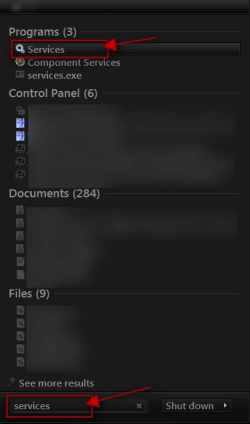
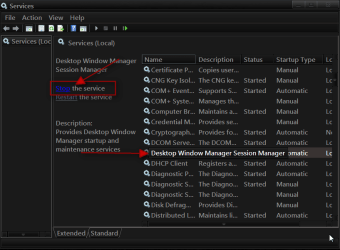
Click on the :orb: Start Button type in Services In the search box and then click on Services
1.png


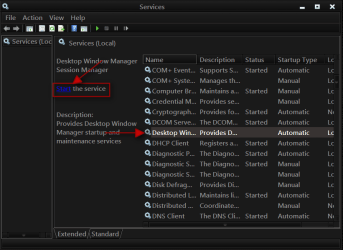
Scroll down until you see Desktop Windows Manager Sessions Manager select it and click on the Stop text and let it stop after that click on Start text and see if that works. Your screen may blink when you do this.
2.png3.png


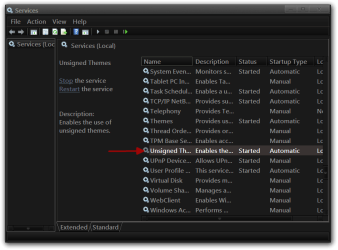
If you have Unsigned Theme there do the same thing to it.
4.png

Jerry
 

My Computer

Computer type
Laptop
Computer Manufacturer/Model Number
Sager NP9170
OS
Win 7 Pro x64 / Win 10 Pro
CPU
Intel(R) Core(TM) i7-3630QM CPU @ 2.40GHz
Motherboard
CLEVO P170EM
Memory
12 GB
Graphics Card(s)
(1) Intel(R) HD Graphics 4000 (2) NVIDIA GeForce GTX 675M
Sound Card
(1) Realtek High Definition Audio (2) Intel(R) Display Aud
Monitor(s) Displays
17.3
Screen Resolution
1920x1080
Hard Drives
(1) Samsung 860 EVO 500GB(OS) (1) Samsung 860 EVO 500GB(Data)
Keyboard
Backlite
Antivirus
MSE, Malwarebytes Pro
Browser
Firefox
Other Info
DESKTOP: Custom-built.
OS: Win 10 Pro x64.
CASE: Rosewill R5.
CPU: Intel I5 4670K CPU @ 3.40GHz.
CPU COOLER: Cool Master Hyper 212 EVO.
MOTHERBOARD: Asus Z87-A.
MEMORY: Kingston HyperX 2x4 GB.
GPU: Nvidia Geforce 650 TI.
PSU: Corsair TX750.
DRIVES: (1) Samsung 840 120 GB SSD (2) Western Digital blue 500 GB 7200 RPM.
yes aero theme works.And session manager service start stop didn't work.
normal theme looks ok


What is wrong with my pc? :cry:
 

Attachments

  • Untitled.jpg
    Untitled.jpg
    57.4 KB · Views: 11

My Computer

OS
Windows 7 Ultimate x64
Do you still have UxStyle, universal theme patcher, Vista glass installed?
Jerry
 

My Computer

Computer type
Laptop
Computer Manufacturer/Model Number
Sager NP9170
OS
Win 7 Pro x64 / Win 10 Pro
CPU
Intel(R) Core(TM) i7-3630QM CPU @ 2.40GHz
Motherboard
CLEVO P170EM
Memory
12 GB
Graphics Card(s)
(1) Intel(R) HD Graphics 4000 (2) NVIDIA GeForce GTX 675M
Sound Card
(1) Realtek High Definition Audio (2) Intel(R) Display Aud
Monitor(s) Displays
17.3
Screen Resolution
1920x1080
Hard Drives
(1) Samsung 860 EVO 500GB(OS) (1) Samsung 860 EVO 500GB(Data)
Keyboard
Backlite
Antivirus
MSE, Malwarebytes Pro
Browser
Firefox
Other Info
DESKTOP: Custom-built.
OS: Win 10 Pro x64.
CASE: Rosewill R5.
CPU: Intel I5 4670K CPU @ 3.40GHz.
CPU COOLER: Cool Master Hyper 212 EVO.
MOTHERBOARD: Asus Z87-A.
MEMORY: Kingston HyperX 2x4 GB.
GPU: Nvidia Geforce 650 TI.
PSU: Corsair TX750.
DRIVES: (1) Samsung 840 120 GB SSD (2) Western Digital blue 500 GB 7200 RPM.
I still have 3 of them installed...........
 

My Computer

OS
Windows 7 Ultimate x64
I still have 3 of them installed...........
You need to try to restore the patched files with universal theme patcher and then uninstall all three of them and then use just one either UxStyle Or universal theme patcher do not use Vista glass.
Jerry
 

My Computer

Computer type
Laptop
Computer Manufacturer/Model Number
Sager NP9170
OS
Win 7 Pro x64 / Win 10 Pro
CPU
Intel(R) Core(TM) i7-3630QM CPU @ 2.40GHz
Motherboard
CLEVO P170EM
Memory
12 GB
Graphics Card(s)
(1) Intel(R) HD Graphics 4000 (2) NVIDIA GeForce GTX 675M
Sound Card
(1) Realtek High Definition Audio (2) Intel(R) Display Aud
Monitor(s) Displays
17.3
Screen Resolution
1920x1080
Hard Drives
(1) Samsung 860 EVO 500GB(OS) (1) Samsung 860 EVO 500GB(Data)
Keyboard
Backlite
Antivirus
MSE, Malwarebytes Pro
Browser
Firefox
Other Info
DESKTOP: Custom-built.
OS: Win 10 Pro x64.
CASE: Rosewill R5.
CPU: Intel I5 4670K CPU @ 3.40GHz.
CPU COOLER: Cool Master Hyper 212 EVO.
MOTHERBOARD: Asus Z87-A.
MEMORY: Kingston HyperX 2x4 GB.
GPU: Nvidia Geforce 650 TI.
PSU: Corsair TX750.
DRIVES: (1) Samsung 840 120 GB SSD (2) Western Digital blue 500 GB 7200 RPM.
I unpatched the system files(DLLs) and then unintalled glass and ux.Universal patcher is portable so i didn't do anything.
Restarted the pc and patched again and restarted but still the same!!!!!
help
 

My Computer

OS
Windows 7 Ultimate x64
Sometimes you need to refresh your WEI http://www.sevenforums.com/tutorials/263-windows-experience-index-update-refresh-score.html
if that does not help the only other thing I can recommend is a Repair Install http://www.sevenforums.com/tutorials/3413-repair-install.html it will not harm any programs or your data.
If that don't help a clean install would probably be my next option but backup all your data (documents, music, picture, video) and make a list of your programs so you can find them again and install.
Jerry
 

My Computer

Computer type
Laptop
Computer Manufacturer/Model Number
Sager NP9170
OS
Win 7 Pro x64 / Win 10 Pro
CPU
Intel(R) Core(TM) i7-3630QM CPU @ 2.40GHz
Motherboard
CLEVO P170EM
Memory
12 GB
Graphics Card(s)
(1) Intel(R) HD Graphics 4000 (2) NVIDIA GeForce GTX 675M
Sound Card
(1) Realtek High Definition Audio (2) Intel(R) Display Aud
Monitor(s) Displays
17.3
Screen Resolution
1920x1080
Hard Drives
(1) Samsung 860 EVO 500GB(OS) (1) Samsung 860 EVO 500GB(Data)
Keyboard
Backlite
Antivirus
MSE, Malwarebytes Pro
Browser
Firefox
Other Info
DESKTOP: Custom-built.
OS: Win 10 Pro x64.
CASE: Rosewill R5.
CPU: Intel I5 4670K CPU @ 3.40GHz.
CPU COOLER: Cool Master Hyper 212 EVO.
MOTHERBOARD: Asus Z87-A.
MEMORY: Kingston HyperX 2x4 GB.
GPU: Nvidia Geforce 650 TI.
PSU: Corsair TX750.
DRIVES: (1) Samsung 840 120 GB SSD (2) Western Digital blue 500 GB 7200 RPM.
I upgraded from win vista to win 7.Didn't uninstall vista and then install 7.that might be the problem probably.I will try a system repair.yea it should work.Thanks for the help Bongo!!!:)
 

My Computer

OS
Windows 7 Ultimate x64
I upgraded from win vista to win 7.Didn't uninstall vista and then install 7.that might be the problem probably.I will try a system repair.yea it should work.Thanks for the help Bongo!!!:)
That may be it.
Let us know how it turns out.
Jerry
 

My Computer

Computer type
Laptop
Computer Manufacturer/Model Number
Sager NP9170
OS
Win 7 Pro x64 / Win 10 Pro
CPU
Intel(R) Core(TM) i7-3630QM CPU @ 2.40GHz
Motherboard
CLEVO P170EM
Memory
12 GB
Graphics Card(s)
(1) Intel(R) HD Graphics 4000 (2) NVIDIA GeForce GTX 675M
Sound Card
(1) Realtek High Definition Audio (2) Intel(R) Display Aud
Monitor(s) Displays
17.3
Screen Resolution
1920x1080
Hard Drives
(1) Samsung 860 EVO 500GB(OS) (1) Samsung 860 EVO 500GB(Data)
Keyboard
Backlite
Antivirus
MSE, Malwarebytes Pro
Browser
Firefox
Other Info
DESKTOP: Custom-built.
OS: Win 10 Pro x64.
CASE: Rosewill R5.
CPU: Intel I5 4670K CPU @ 3.40GHz.
CPU COOLER: Cool Master Hyper 212 EVO.
MOTHERBOARD: Asus Z87-A.
MEMORY: Kingston HyperX 2x4 GB.
GPU: Nvidia Geforce 650 TI.
PSU: Corsair TX750.
DRIVES: (1) Samsung 840 120 GB SSD (2) Western Digital blue 500 GB 7200 RPM.
Back
Top